1. Safety Information
Please read all instructions carefully before assembly and use. Keep this manual for future reference.
- Maximum Weight Capacity: This chair is designed to support a maximum weight of 300 pounds (136 kg). Do not exceed this limit.
- Assembly: Ensure all components are securely fastened before use. Do not use the chair if any parts are missing or damaged.
- Stability: Avoid standing on the chair or using it as a step stool. Do not lean excessively to one side or the back to prevent tipping.
- Children: Keep children away from moving parts during assembly. Supervise children when they are near or using the chair.
- Maintenance: Regularly check all screws and bolts to ensure they are tight. Wipe clean with a damp cloth; avoid harsh chemicals.
- Movement: Use caution when moving the chair, especially on uneven surfaces.
2. Parts List
Verify all parts are present before beginning assembly. If any parts are missing or damaged, please contact customer support.
| Item | Description | Quantity |
|---|---|---|
| Backrest | Ergonomic backrest with headrest and lumbar support attachment points. | 1 |
| Seat | Padded seat with integrated footrest mechanism. | 1 |
| Armrests | Linkage padded armrests. | 2 |
| Base | Reinforced nylon 5-star base. | 1 |
| Casters | Smooth and silent rolling casters. | 5 |
| Gas Lift | SGS-verified class 3 gas lift for height adjustment. | 1 |
| Mechanism | Multifunctional tilt mechanism for recline and height. | 1 |
| Headrest Pillow | Detachable headrest pillow for cervical support. | 1 |
| Lumbar Pillow | Detachable lumbar support pillow. | 1 |
| Hardware Kit | Screws, washers, and assembly tools. | 1 set |
3. Setup Instructions
Follow these steps to assemble your Bigzzia Gaming Chair. It is recommended to assemble on a soft, clean surface to prevent damage.
3.1 Assemble the Base
- Insert the five casters into the holes at the end of each leg of the 5-star base until they click into place.
- Insert the gas lift into the center hole of the 5-star base. Place the gas lift cover over the gas lift.

3.2 Attach the Mechanism to the Seat
- Align the multifunctional tilt mechanism with the screw holes on the underside of the seat. Ensure the "FRONT" arrow on the mechanism points towards the front of the seat.
- Secure the mechanism using the provided screws and the Allen wrench. Tighten all screws firmly.

3.3 Attach Armrests to the Seat
- Attach the armrests to the sides of the seat using the designated screws. Ensure they are aligned correctly.
- Tighten the screws securely with the Allen wrench.
3.4 Connect Seat to Backrest
- Align the backrest with the seat's connection points.
- Insert and tighten the screws to secure the backrest to the seat.
3.5 Attach the Assembled Seat to the Base
- Carefully place the assembled seat onto the gas lift, ensuring the center hole of the mechanism aligns with the top of the gas lift.
- Press down firmly on the seat to secure it onto the gas lift.
3.6 Attach Headrest and Lumbar Pillows
- Attach the headrest pillow to the top of the backrest using its elastic straps.
- Attach the lumbar support pillow to the lower backrest using its elastic straps.

For a visual guide, please refer to the assembly video below:
4. Operating Instructions
4.1 Height Adjustment
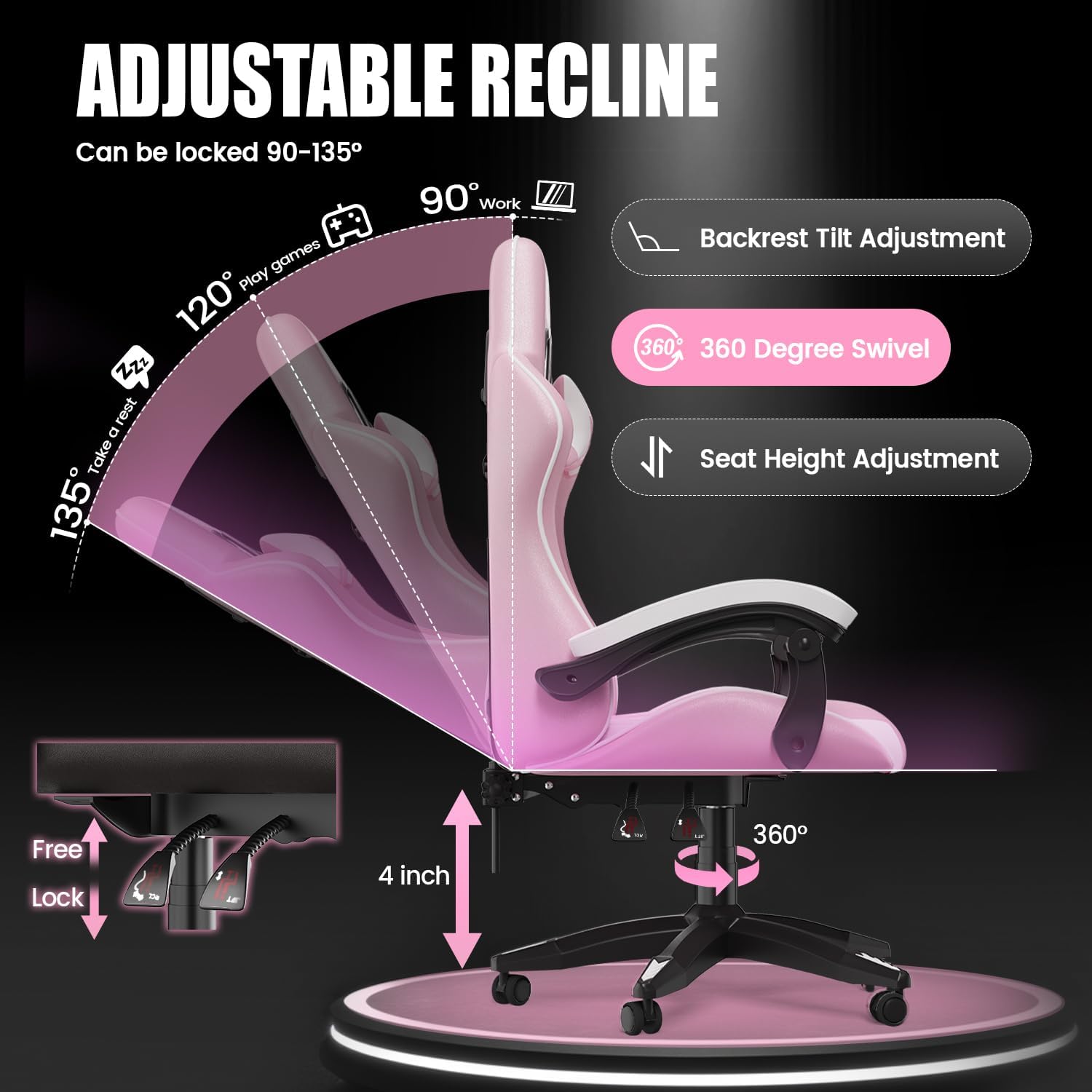
To adjust the seat height, pull the lever located on the right side of the seat upwards. While holding the lever, either lift your weight off the seat to raise it or apply pressure to the seat to lower it. Release the lever to lock the height.
4.2 Backrest Recline (90° to 135°)
To recline the backrest, pull the lever on the left side of the seat upwards. Lean back to your desired angle (between 90° and 135°) and release the lever to lock the position. To return to an upright position, pull the lever again and lean forward.

4.3 Footrest Operation
To extend the footrest, pull it out from underneath the seat. To retract, push it back in until it is fully stored.

4.4 360° Swivel Function
The chair features a 360° swivel seat, allowing for easy rotation without moving the base. Simply rotate the seat to your desired direction.

5. Maintenance
Proper maintenance ensures the longevity and performance of your Bigzzia Gaming Chair.
- Cleaning: Wipe the chair's premium PU leather surfaces with a soft, damp cloth. Avoid using abrasive cleaners, solvents, or harsh chemicals, as these can damage the material.
- Hardware Check: Periodically inspect all screws, bolts, and connections to ensure they are tight. Re-tighten any loose hardware to maintain stability and safety.
- Caster Care: Keep the casters free from hair, dust, and debris to ensure smooth rolling.
- Avoid Direct Sunlight: Prolonged exposure to direct sunlight can cause the PU leather to fade or crack. Position the chair away from direct sunlight when possible.
- Weight Limit: Adhere strictly to the maximum weight capacity of 300 lbs to prevent structural damage.
6. Troubleshooting
If you encounter any issues with your Bigzzia Gaming Chair, refer to the following common problems and solutions:
| Problem | Possible Cause | Solution |
|---|---|---|
| Chair is wobbly or unstable. | Loose screws or improper assembly. | Check and tighten all screws and bolts. Ensure all parts are correctly assembled according to the instructions. |
| Seat height adjustment not working. | Gas lift issue or lever mechanism jammed. | Ensure the lever is fully engaged. If the issue persists, the gas lift may need replacement. Contact customer support. |
| Backrest does not recline or lock. | Recline mechanism jammed or damaged. | Check for any obstructions around the recline mechanism. Ensure the lever is pulled completely. If damaged, contact customer support. |
| Casters are not rolling smoothly. | Debris caught in casters or damaged casters. | Clean any hair, dust, or debris from the caster wheels. If casters are damaged, they may need replacement. |
7. Specifications
- Brand: Bigzzia
- Model Number: d286f999-a8f9-41de-80f9-44200446d281
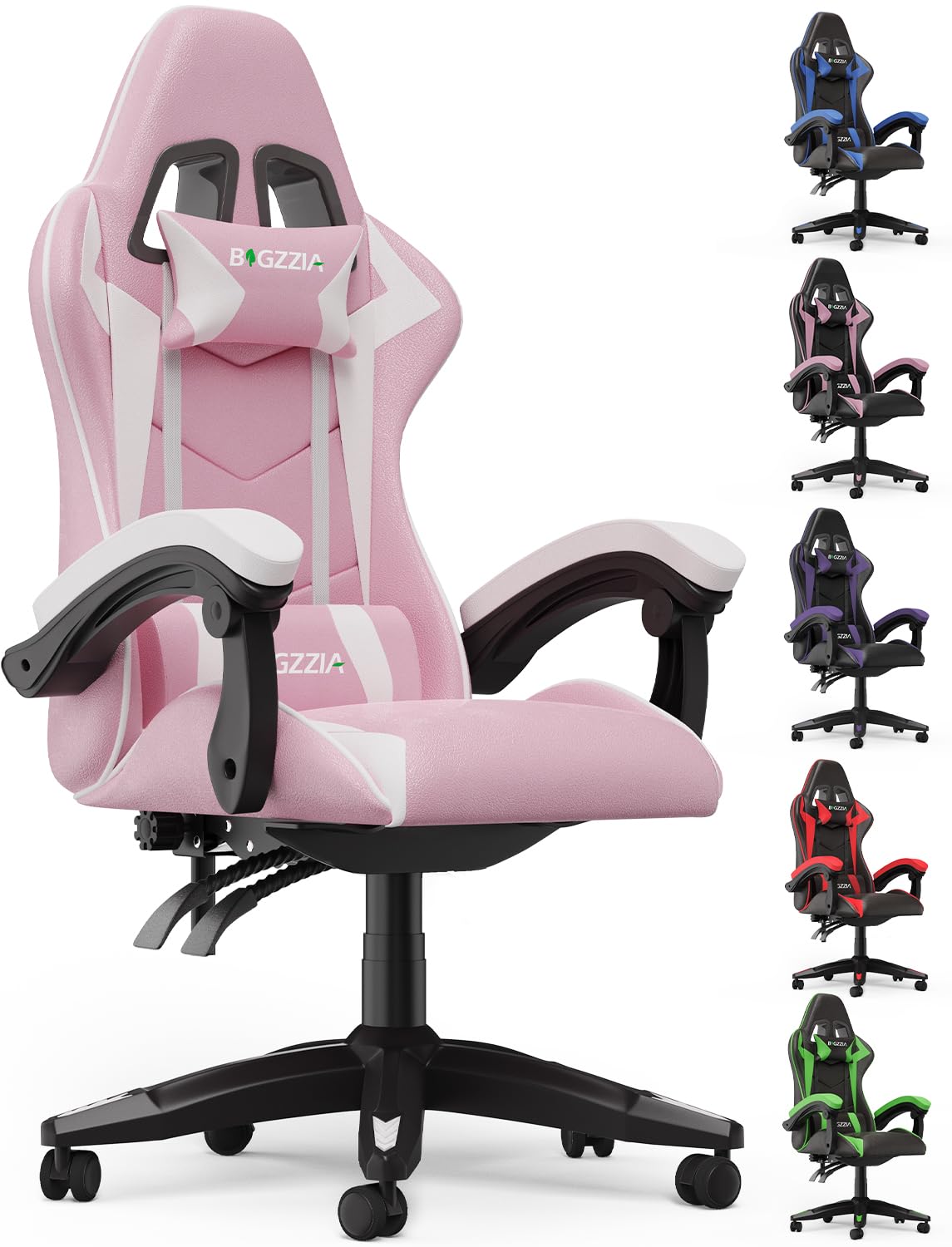
- Color: Pink
- Product Dimensions: 23.23"D x 11.42"W x 31.1"H
- Material: Premium PU Leather, Memory Foam, Metal Frame
- Maximum Weight Recommendation: 300 Pounds
- Special Features: 360° Swivel, Adjustable Height, Arm Rest, Ergonomic Design, Head/Lumbar Support, Reclining (90°-135°), Retractable Footrest
- Included Components: Adjustable Backrest, Headrest, Lumbar Pillow, Accessories, and Instructions
- Item Weight: 33 Pounds
8. Warranty & Support
Bigzzia provides the following warranty and support for your gaming chair:
- Replacement Service: One month replacement service for any issues during assembly.
- Parts Warranty: 1-year warranty on parts.
- Contact Us: For any questions or support needs, please feel free to contact us.
For additional support or to view more products, visit the Bigzzia Store.


