
EUQQ YYK-525
EUQQ Bluetooth Headset Model YYK-525 User Manual
Comprehensive guide for your wireless Bluetooth earpiece.
1. Introduction
Thank you for choosing the EUQQ Bluetooth Headset Model YYK-525. This wireless earpiece is designed to provide crystal-clear calls and immersive stereo sound with advanced noise reduction technology, extended battery life, and comfortable wear. This manual will guide you through the setup, operation, and maintenance of your new headset.
2. Package Contents
Please verify that all items are present in your package:
- 1 x EUQQ Bluetooth Headset (Model YYK-525)
- 1 x Charging Case
- 1 x USB-C Charging Cable
- 3 x Different Size Eartips (S/M/L)
- 1 x User Manual

Image: Contents of the EUQQ Bluetooth Headset package.
3. Product Overview
Familiarize yourself with the components of your EUQQ Bluetooth Headset and its charging case.
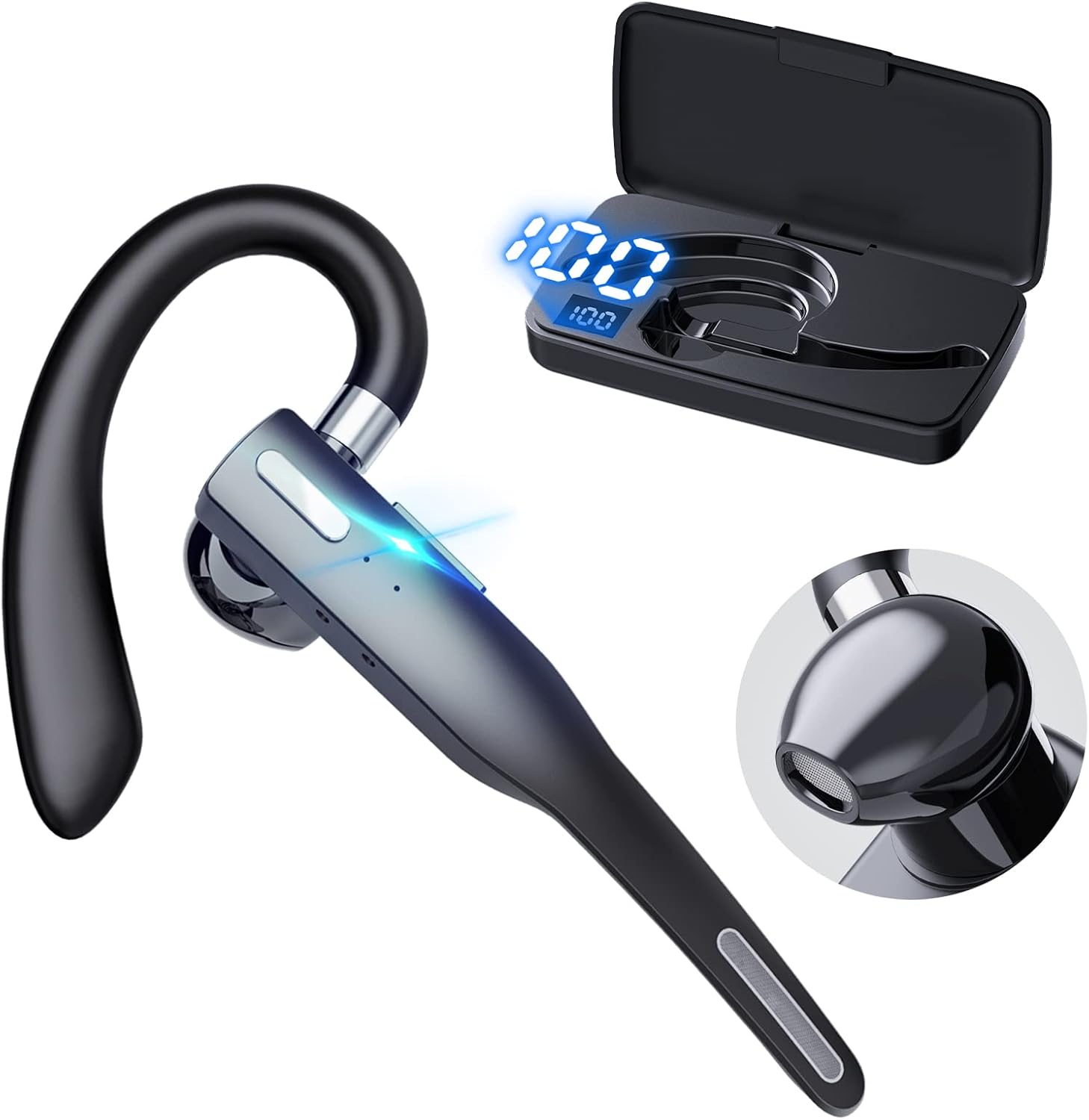
Image: EUQQ Bluetooth Headset and Charging Case.
Headset Features:
- Flexible Ear Hook: For secure and comfortable fit.
- Multi-function Button: Controls calls, music playback, and voice assistant.
- Microphone: Built-in for clear voice pickup with ENC noise reduction.
- LED Indicator: Shows pairing status and battery level.
Charging Case Features:
- Digital Display: Shows battery percentage of the case.
- USB-C Port: For charging the case.
- Headset Charging Slots: Securely holds and charges the headset.
4. Setup
4.1 Charging the Headset and Case
Before first use, fully charge the headset and charging case.
- Place the headset into the charging case. Ensure it is properly seated.
- Connect the USB-C charging cable to the charging port on the case and the other end to a USB power adapter (not included) or a computer's USB port.
- The digital display on the charging case will show the battery percentage. The headset's LED indicator will show charging status.
- A full charge for the charging case takes approximately 1 hour. The headset charges within the case.

Image: Headset and Charging Case connected to power.
Note: The headset can provide up to 24 hours of talk time on a single charge, and with the charging case, it can last for nearly a full workweek (up to 120 hours total playback). A quick 8-minute charge can provide 1 hour of call time.
4.2 Pairing with a Device
The headset features one-step quick pairing for a fast and stable Bluetooth connection.
- Ensure the headset is charged.
- Take the headset out of the charging case. It will automatically enter pairing mode, and the LED indicator will flash.
- On your device (smartphone, tablet, laptop, etc.), enable Bluetooth.
- Search for available Bluetooth devices. Select "YYK-525" from the list.
- Once connected, the headset's LED indicator will stop flashing, and your device will confirm the connection. The headset will auto-connect after the initial pairing.

Image: One-step pairing with a device.
4.3 Dual Device Connection
The EUQQ Bluetooth Headset supports simultaneous connection to two different devices, allowing seamless transition between work and leisure.
- Pair the headset with the first device as described in Section 4.2.
- Disable Bluetooth on the first device. The headset will re-enter pairing mode.
- Pair the headset with the second device.
- Re-enable Bluetooth on the first device. The headset should automatically connect to both devices.
- You can now switch audio sources between the two connected devices.

Image: Headset connected to two devices simultaneously.
5. Operating Instructions
5.1 Wearing the Headset
The headset is designed for all-day comfort with flexible ear hooks and adjustable ear tips. It can be worn on either the left or right ear.
- Choose the ear tip size (S/M/L) that provides the most comfortable and secure fit for your ear canal.
- Adjust the ear hook to fit snugly around your ear. The ear hook can rotate 270 degrees for the right ear and 360 degrees for the left ear to ensure optimal positioning.

Image: Adjusting the headset for left or right ear and ear tip sizes.
5.2 Call Management
Manage your calls effortlessly with the headset's intuitive controls.
- Answer/End Call: Tap the Multi-function Button once.
- Reject Call: Tap the Multi-function Button twice.
- Mute/Unmute: Press and hold the Multi-function Button during a call. This provides fast and easy mute control to keep quiet or protect your privacy.
- Third-party Call Handover: Tap the Multi-function Button once.

Image: Using the one-button mute feature during a call.
The headset features advanced ENC (Environmental Noise Cancellation) technology and strategically placed built-in microphones to ensure crystal-clear conversations, even in noisy environments like a truck cabin.
Video: Demonstration of the Bluetooth headset's microphone and noise cancellation capabilities, suitable for truckers and noisy environments.

Image: Clear calls even in noisy environments with 4 built-in microphones and noise cancellation.
5.3 Music Playback
Control your audio playback directly from the headset.
- Play/Pause: Tap the Multi-function Button once.
- Volume Up: Tap the '+' button once.
- Volume Down: Tap the '-' button once.
- Next Song: Long press the '+' button.
- Previous Song: Long press the '-' button.
5.4 Voice Assistant Activation
Easily activate your device's voice assistant (Siri, Google Assistant, etc.) for hands-free commands.
- Activate Voice Assistant: Press the Multi-function Button for 1 second.

Image: Overview of headset controls.
6. Maintenance
Proper care will extend the life of your EUQQ Bluetooth Headset.
- Cleaning: Wipe the headset and charging case with a soft, dry, lint-free cloth. Do not use harsh chemicals or abrasive materials.
- Storage: When not in use, store the headset in its charging case to protect it and keep it charged. Store in a cool, dry place away from extreme temperatures.
- Water Resistance: The headset is waterproof. However, avoid prolonged submersion in water and do not expose it to saltwater or other corrosive liquids. Ensure the charging port is dry before charging.
7. Troubleshooting
If you encounter issues with your headset, refer to the following common problems and solutions:
| Problem | Possible Solution |
|---|---|
| Headset does not turn on. | Ensure the headset is charged. Place it in the charging case and connect the case to power. |
| Cannot pair with device. |
|
| No sound or low volume. |
|
| Call quality is poor. |
|
8. Specifications
| Feature | Detail |
|---|---|
| Model Name | YYK-525 |
| Connectivity Technology | Wireless (Bluetooth) |
| Bluetooth Version | 5.3 |
| Bluetooth Range | Up to 15 meters (49 feet) |
| Battery Life (Headset) | Up to 24 hours (talk time) |
| Total Playback Time (with Case) | Up to 120 hours |
| Charging Port | USB-C |
| Carrying Case Charging Time | Approx. 1 hour |
| Fast Charging | 8 minutes charge for 1 hour call time |
| Noise Control | ENC (Environmental Noise Cancellation) |
| Audio Driver Size | 16.3 Millimeters |
| Weight (Headset) | Approx. 0.4 ounces (11.3 grams) |
| Water Resistance Level | Waterproof |
| Compatible Devices | Smartphones, Tablets, Desktops, TVs |
| Control Type | Button Control, Touch |
| Earpiece Shape | Hook |
9. Warranty and Support
For warranty information or technical support, please contact EUQQ customer service through the retailer where you purchased the product or visit the official EUQQ website. Please retain your proof of purchase for warranty claims.
Manufacturer: EUQQ
Model Number: YYK-525
Related documentsYYK-525


Ask a question about this manual
Ask about setup, troubleshooting, compatibility, parts, safety, or missing instructions. Manuals+ will review the question and use this page’s manual context to help answer it.