
Introduction
This manual provides instructions for the Effireli CT-8528 replacement remote control. Designed for various Toshiba TV models, this remote requires no programming and offers a straightforward user experience. Please read this manual thoroughly before use to ensure proper operation and longevity of your device.
Product Overview
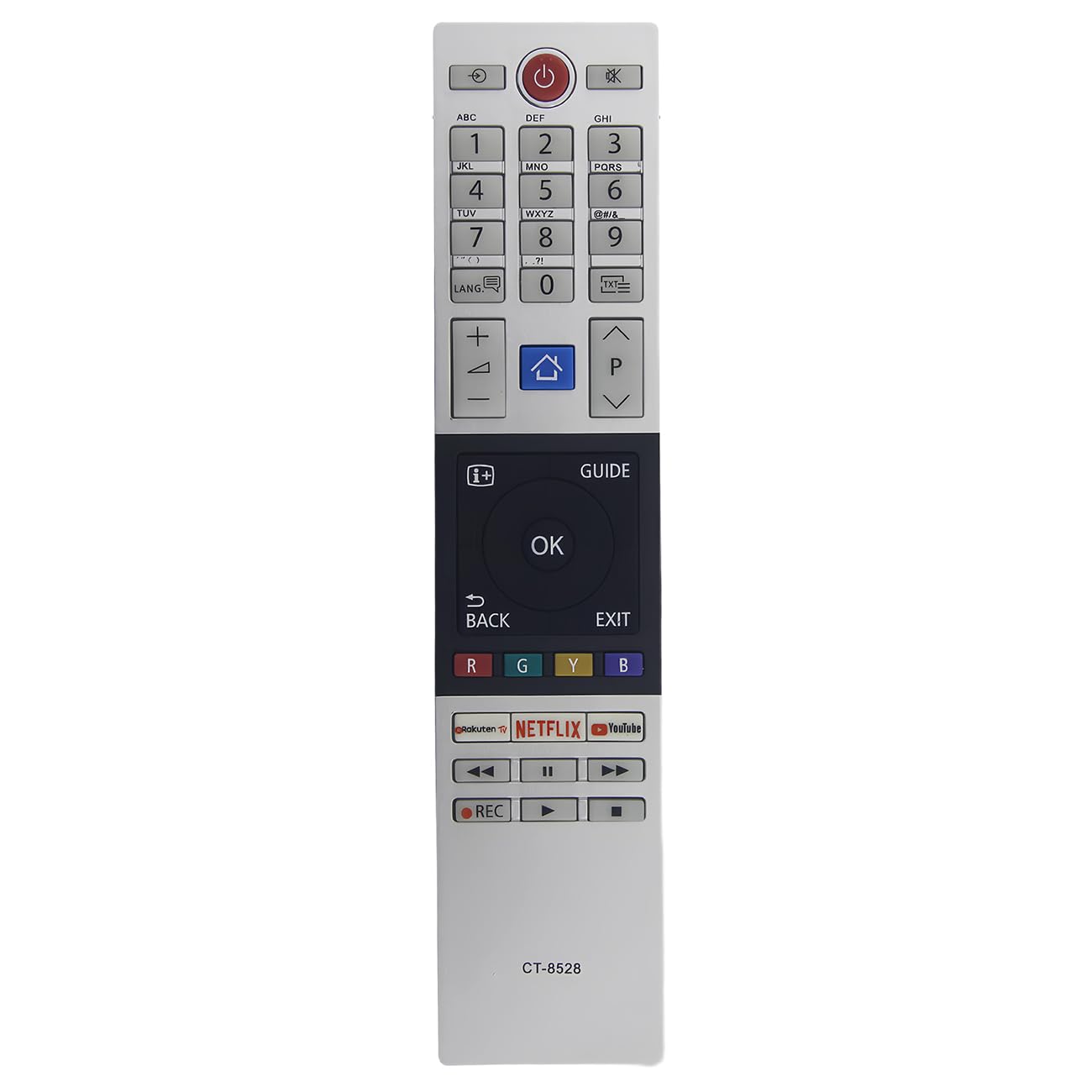
Image: The Effireli CT-8528 replacement remote control, featuring standard television control buttons.
The Effireli CT-8528 is a direct replacement remote control for compatible Toshiba television models. It features standard television control buttons for power, volume, channel selection, and menu navigation, providing full functionality without the need for complex setup procedures.
Setup
Battery Installation
The remote control requires two AAA batteries (not included) for operation. Follow these steps to install the batteries:
- Locate the battery compartment on the back of the remote control.
- Slide the battery cover downwards to open it.
- Insert two AAA batteries, ensuring the positive (+) and negative (-) terminals align correctly with the indicators inside the compartment.
- Slide the battery cover back into place until it clicks securely.
Once batteries are installed, the remote is ready for use with compatible Toshiba TVs. No programming is required.
Operating Instructions
Basic Functions
This remote control operates identically to your original Toshiba TV remote. Simply insert batteries and point the remote towards your television's infrared receiver. Below are the common functions of the buttons:
- Power Button: Turns the television on or off.
- Volume Up/Down: Adjusts the sound level.
- Channel Up/Down: Changes the television channel.
- Number Buttons (0-9): Directly select channels.
- Input/Source: Selects the input source (e.g., HDMI, AV, Component).
- Menu/Home: Accesses the television's main menu or smart TV interface.
- Navigation Buttons (Up, Down, Left, Right, OK): Navigate through menus and confirm selections.
- Back/Exit: Returns to the previous screen or exits a menu.
- Mute: Silences the television audio.
Compatible Models
This Effireli CT-8528 replacement remote control is compatible with a wide range of Toshiba TV models, including but not limited to:
- 49U5863DB
- 49U7863DB
- 49U7863DBC
- 49V5863DB
- 49V6863DB
- 50U5863DB
- 24D3863DB
- 24L2863DB
- 24W2863DB
- 24W3863DB
- 28W2863DB
- 28W3863DB
- 32D2863DB
- 32D3862DB
- 32D38632DB
- 32W323864DB
- 40L2863DB
- 24D2863DB
- 49T6863DB
- 43L2863DB
- 43L3863DB
- 43T6863DB
- 43U5863DB
- 43U6863DB
- 43V5863DB
- 43V6863DB
- 48L2863DB
- 49U6863DB
- 49L2863DB
Note: If your specific Toshiba TV model is not listed above, or if your original remote control appears significantly different, please contact customer support for compatibility verification.
Maintenance
Cleaning
To clean the remote control, use a soft, dry cloth. Do not use liquid cleaners, solvents, or abrasive materials, as these can damage the remote's surface, buttons, or internal components.
Battery Replacement
Replace batteries when the remote's response becomes sluggish or stops working. Always replace both batteries simultaneously with new AAA batteries. Do not mix old and new batteries, or different types of batteries, as this can lead to improper function or battery leakage.
Troubleshooting
Remote Not Responding
- Check Batteries: Ensure batteries are inserted correctly with the correct polarity (+/-) and are not depleted. Replace with fresh AAA batteries if necessary.
- Line of Sight: Ensure there is a clear, unobstructed line of sight between the remote control and the television's infrared receiver. Obstructions can block the signal.
- Distance: Operate the remote within a reasonable distance from the television (typically up to 20 feet or 6 meters).
- Interference: Bright lights, direct sunlight, or other electronic devices can sometimes interfere with the infrared signal. Try operating the remote in a different environment or adjusting lighting.
Specific Buttons Not Working
- Clean Contacts: If only certain buttons are unresponsive, there might be dirt or debris under the buttons. Gently clean around the buttons with a dry cotton swab.
- Battery Check: Even if some buttons work, low battery power can affect the functionality of others. Replace batteries as a first troubleshooting step.
Specifications
- Model: YK-CT-8528
- Brand: Effireli
- Connectivity Technology: Infrared
- Max Number of Supported Devices: 1
- Compatible Devices: Television
- Product Dimensions: 7.09 x 1.5 x 0.63 inches (18 x 3.8 x 1.6 cm)
- Item Weight: 2.89 ounces (82 grams)
- Power Source: 2 x AAA Batteries (not included)
Warranty and Support
This Effireli remote control comes with a 12-month warranty covering manufacturing defects. A 30-day money-back guarantee is also offered. Returns and exchanges are accepted within the warranty period, provided the product is returned in its original condition.
For technical support, warranty claims, or compatibility inquiries, please contact Effireli customer service through the retailer's platform or the contact information provided with your purchase. Please have your model number (YK-CT-8528) and purchase details ready when contacting support.