
1. Introduction
Thank you for choosing the Yaufey Model YDY-32A Dehumidifier. This unit is designed to efficiently remove excess moisture from your home, basement, or other large rooms, covering areas up to 2,000 square feet. It is an Energy Star certified appliance, ensuring energy-efficient operation. This manual provides essential information for safe operation, installation, maintenance, and troubleshooting.
The YDY-32A dehumidifier can remove up to 31.6 pints (at 95℉, 90% RH) of moisture per day. It features adjustable humidity control from 30% to 80% RH, with two operating modes: Continuous mode (defaults to 30% RH) and Auto mode (user-set target humidity between 30% and 80% RH).
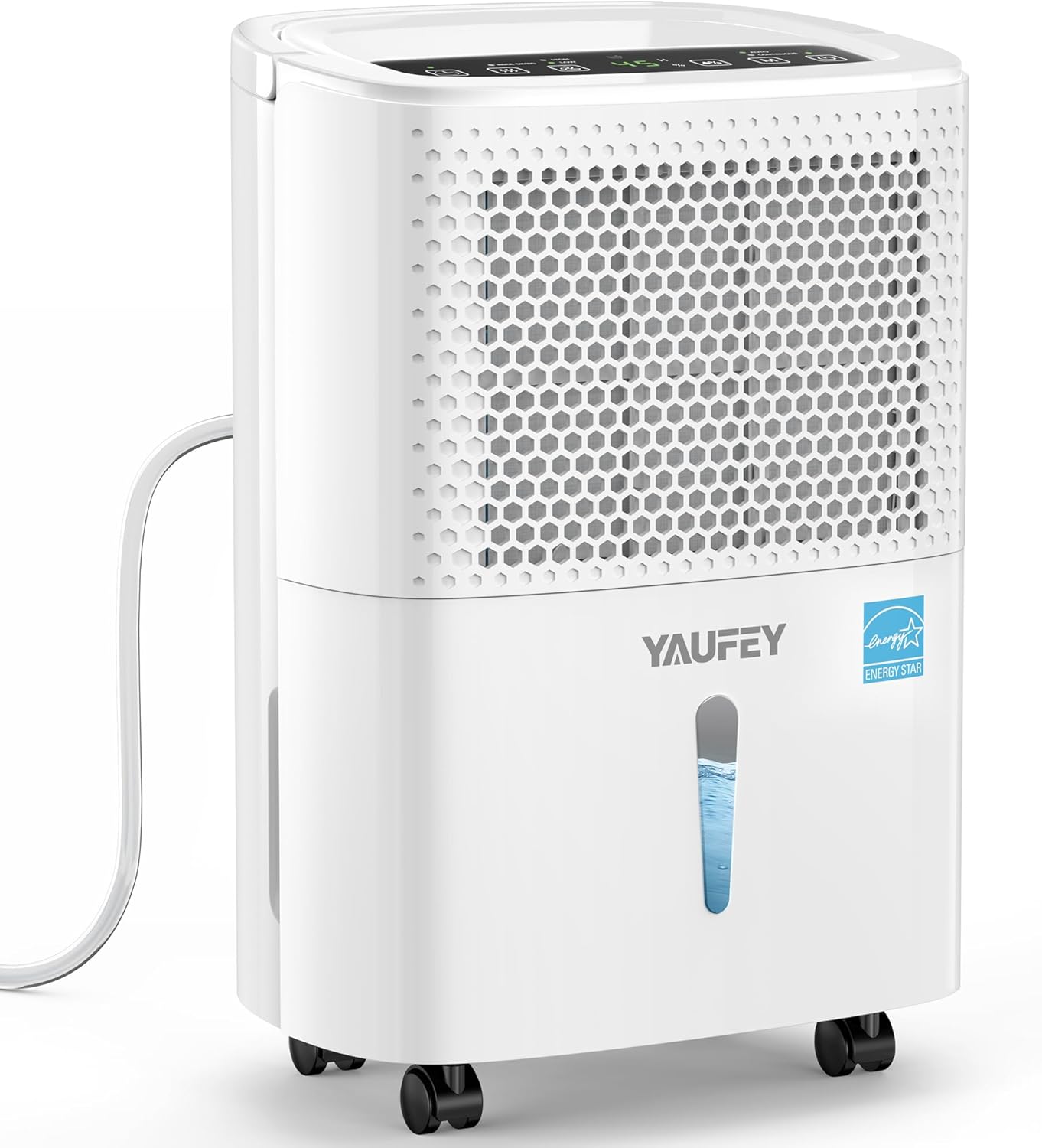
Image 1.1: Front view of the Yaufey Dehumidifier Model YDY-32A.
2. Safety Information
Please read all safety instructions carefully before using the appliance to prevent injury or damage. Keep this manual for future reference.
- Ensure the dehumidifier is placed on a level, stable surface.
- Do not operate the unit with a damaged power cord or plug.
- Keep the air inlet and outlet clear of obstructions.
- Do not insert objects into the unit's openings.
- Unplug the unit before cleaning or performing any maintenance.
- This appliance is not intended for use by persons with reduced physical, sensory, or mental capabilities unless supervised or instructed.
3. Package Contents
Verify that all items are present in the package:
- Yaufey 31.6 Pints Dehumidifier (x1)
- Visible Water Tank (x1)
- Drain Hose (3.3 ft) (x1)
- Power Cord (x1)
- Detachable & Washable Filter (x1)
- User Manual (x1)
4. Product Features
The Yaufey YDY-32A Dehumidifier incorporates several features for enhanced performance and user convenience:
- Energy Star Certified: Recognized for high energy efficiency, reducing electricity consumption by up to 45% compared to standard dehumidifiers.
- High Capacity Moisture Removal: Extracts up to 31.6 pints of moisture per day.
- Wide Coverage Area: Effective in spaces up to 2,000 square feet.
- Adjustable Humidity Control: Set target humidity levels between 30% and 80% RH.
- Two Operating Modes: Continuous and Auto modes for flexible operation.
- Two Drainage Options: Utilizes a 0.48-gallon water tank or continuous drainage via the included hose.
- Full Tank Alarm & Auto Shut-off: Prevents overflow by alerting the user and automatically turning off when the tank is full.
- Automatic Defrost: Prevents ice buildup on coils, ensuring efficient operation in cooler environments.
- Power-Off Memory: Restores previous settings (except timer) after a power interruption.
- 24-Hour Timer: Program the unit to turn on or off automatically.
- Self-Drying Function: Activates automatic drying of internal components to prevent mold and odors.
- Child Lock: Prevents unintended changes to settings.
- Overload Protection: Safeguards the unit from electrical overloads.
- Quiet Operation: Operates at a low noise level of 38 dB.
- Washable Filter: High-density filter captures dust and pet hair, reusable after cleaning.
- Universal Wheels: For easy portability.

Image 4.1: Overview of key features including Auto Defrost, Timer, Power-Off Memory, and Overload Protection.
5. Setup
- Unpacking: Carefully remove the dehumidifier and all accessories from the packaging. Retain packaging for future storage or transport.
- Placement: Place the dehumidifier on a firm, level surface in the desired location. Ensure there is at least 8 inches (20 cm) of space around the unit for proper airflow. Avoid placing it near heat sources or in direct sunlight.
- Power Connection: Plug the power cord into a grounded electrical outlet. Ensure the voltage matches the unit's requirements.
- Drainage Setup (Optional): Decide on your preferred drainage method (see Section 7 for details). If using continuous drainage, connect the drain hose now.
6. Operating Instructions
The control panel is located on the top of the unit.

Image 6.1: Control panel layout.
6.1 Power On/Off
- Press the Power button (
 ) to turn the unit on or off.
6.2 Mode Selection
Press the Mode button ( ) to switch between:
- Auto Mode: The unit will operate to maintain the set target humidity (30% - 80% RH).
- Continuous Mode: The unit will continuously dehumidify, defaulting to 30% RH.

Image 6.2: Two operating modes available.
6.3 Humidity Setting
- In Auto Mode, press the Humidity Setting button (
 ) to adjust the desired humidity level between 30% and 80% RH, in 5% increments.
6.4 Fan Speed Selection
Press the Fan Speed Selection button () to toggle between Low and High fan speeds.

Image 6.3: Fan speed options and airflow.
6.5 Timer Setting
- Press the Timer Setting button () to set the desired operating duration (1-24 hours) for automatic shut-off or turn-on.
6.6 Inside Drying Function
- Press the Inside Drying button () to activate the self-drying function, which dries internal components to prevent mold and odors.
6.7 Child Lock
- Hold the Mode button () for 3 seconds until "CL" appears on the display to activate or deactivate the child lock.
7. Drainage Options
The YDY-32A dehumidifier offers two methods for water removal:
7.1 Water Tank Drainage
- The unit is equipped with a 0.48-gallon (1.8-liter) visible water tank.
- When the tank is full, the unit will automatically shut off, and an indicator light will flash red with an audible beep to remind you to empty it.
- Carefully pull out the water tank, empty the collected water, and reinsert it securely until it clicks into place.
7.2 Continuous Drainage (Gravity Drainage)
- For continuous operation without manually emptying the tank, use the included 3.3 ft (1 meter) drain hose.
- Locate the continuous drain outlet on the back of the unit.
- Connect one end of the drain hose to this outlet.
- Direct the other end of the hose to a suitable drain point (e.g., floor drain, large bucket), ensuring the hose is sloped downwards for gravity drainage.
- Ensure the hose is not kinked or blocked to allow for proper water flow.

Image 7.1: Visual representation of the two drainage options.
8. Maintenance
Regular maintenance ensures optimal performance and extends the lifespan of your dehumidifier.
8.1 Cleaning the Air Filter
- The dehumidifier features a detachable and washable high-density filter.
- It is recommended to clean the filter every two weeks or more frequently depending on usage and air quality.
- To clean, gently pull out the filter from its slot.
- Wash the filter with clean water (not hotter than 104℉ / 40℃) and a mild detergent.
- Rinse thoroughly and allow it to air dry completely before reinserting. Do not expose to direct sunlight.
8.2 Cleaning the Water Tank
- Clean the water tank regularly to prevent mold and bacteria growth.
- Remove the tank, wash it with clean water and a mild detergent, then rinse thoroughly.
- Ensure the tank is dry before placing it back into the unit.
8.3 Storing the Dehumidifier
- If storing the unit for an extended period, ensure the water tank is empty and clean.
- Activate the self-drying function to dry internal components.
- Clean the air filter.
- Wrap the power cord and secure it.
- Store the unit upright in a cool, dry place, preferably in its original packaging.
9. Troubleshooting
Refer to this section for common issues and their solutions. If the problem persists, contact customer support.
| Problem | Possible Cause | Solution |
|---|---|---|
| Dehumidifier does not turn on. | No power; Power cord not plugged in; Water tank full or not properly inserted; Child lock activated. | Check power connection; Empty and reinsert water tank; Deactivate child lock. |
| No water collected or low dehumidification. | Humidity level already low; Air filter clogged; Room temperature too low; Air inlet/outlet blocked; Unit too small for the space. | Adjust target humidity; Clean air filter; Ensure room temperature is above 41℉ (5℃); Clear obstructions; Consider unit placement. |
| Unit is noisy. | Unit not on a level surface; Air filter clogged; Fan obstruction. | Place on a level surface; Clean air filter; Check for obstructions. |
| Water leaks from the unit. | Water tank not properly inserted; Drain hose loose or clogged (if using continuous drainage). | Reinsert water tank correctly; Check drain hose connection and clear any blockages. |
| Frost appears on coils. | Room temperature too low. | The unit has an automatic defrost function. If frost persists, increase room temperature. |
10. Specifications
| Specification | Detail |
|---|---|
| Brand | Yaufey |
| Model Name | YDY-32A |
| Dehumidification Capacity | 31.6 Pints per Day (95℉, 90% RH) |
| Coverage Area | Up to 2000 Square Feet |
| Humidity Control Range | 30% - 80% RH |
| Water Tank Volume | 0.48 Gallons (1.8 Liters) |
| Product Dimensions (D x W x H) | 8.54" x 11.65" x 17.2" |
| Item Weight | 22 Pounds |
| Wattage | 130 watts |
| Air Flow Capacity | 58.8 Cubic Feet Per Minute (High Speed) |
| Number of Speeds | 2 (Low, High) |
| Material | Plastic |
| UPC | 711500195928 |
11. Warranty and Support
Yaufey is committed to providing high-quality products and excellent customer service.
- Quality Coverage: 1-year standard quality coverage.
- Extended Quality Coverage: 2-year extended quality coverage available upon product registration.
- Compressor Coverage: 5-year compressor quality coverage.
- Technical Support: Lifetime expert technical support.
For any questions or assistance, please contact Yaufey customer service. We aim to respond within 24 hours on working days.


