1. Introduction
This manual provides comprehensive instructions for the installation, operation, and maintenance of your WREO K10mini Keypad Smart Door Knob Lock. Please read this manual thoroughly before installation and use to ensure proper function and safety. Keep this manual for future reference.
2. Product Overview
2.1 Components
- Exterior Keypad Knob
- Interior Knob
- Latch Mechanism
- Mounting Hardware (screws, spindle)
- Backup Keys (2)
- USB Type-C Charging Cable
2.2 Key Features
- Keyless Entry with Keypad
- Multiple Access Modes: Passcode, Backup Key
- Anti-Peeping Code Functionality
- 5-Second Auto-Lock Feature
- Backlit Keypad for Low Light Conditions
- Rechargeable Battery with Low Battery Alert
- Up to 12 Months Battery Life
- Supports up to 20 User Codes and 3 Admin Codes
- Passage Mode, Privacy Mode, Normal Mode, Silent Mode
- Durable Aluminum Construction
- IP54 Waterproof Rating
- Operating Temperature: 23°F to 131°F (-5°C to 55°C)
- Easy DIY Installation

Figure 2.1: The WREO K10mini Keypad Smart Door Knob Lock, showing both the exterior keypad knob and the interior knob, along with the included backup keys.
3. Installation Guide
3.1 Before Installation
- Charge the Lock: Before installation, fully charge the lock using the provided Type-C cable for at least 3 hours. Use a 5V/2A charger or a power bank.
- Check Door Compatibility: Ensure your door meets the following specifications:
- Door Hole: 2-1/8" (54 mm)
- Backset: 2-3/4" (70 mm) or 2-3/8" (60 mm)
- Latch Hole: 1" (25 mm)
- Door Thickness: 1-3/8" to 2-1/8" (35-54 mm)

Figure 3.1: This diagram illustrates the required door hole, backset, latch hole, and door thickness for proper installation of the WREO K10mini lock. It also shows the product dimensions of the lock components.
3.2 Installation Steps
- Prepare the Door: Ensure the door is properly drilled according to the compatibility specifications.
- Install the Latch: Insert the latch mechanism into the door edge. Ensure the latch is horizontal.
- Install Exterior Knob: Place the exterior keypad knob through the door hole.
- Install Interior Knob: Align both the Exterior and Interior Knobs with the "UP" mark. Position the spindle bar vertically. Align the thumb turn arrow with the center dot and "UP" mark. Apply slight pressure to secure the interior knob.
- Secure the Lock: Use a manual screwdriver to tighten the mounting screws. Do not use an electric screwdriver to avoid overtightening, which can damage the lock.
- Test Functionality: After installation, test the lock with a backup key and the default passcode (if any) to ensure smooth operation.

Figure 3.2: A person using a screwdriver to install the WREO K10mini keypad door knob, demonstrating the DIY installation process.
4. Operating Instructions
4.1 Admin and User Codes
The lock supports up to 3 Admin Codes and 20 User Codes. Admin codes have full control over lock settings, while user codes are for daily access.
4.1.1 Setting Admin Codes
Follow the instructions provided in the separate programming guide (usually included with the product) to set up your Admin Codes. Admin codes are typically 4 to 8 digits long.

Figure 4.1: This image illustrates the sequence for setting an Administrator Password, typically involving pressing a button, entering the Admin Code, and re-entering it for confirmation.
4.1.2 Setting User Codes
Admin users can set up to 20 unique User Codes, each 4 to 8 digits long, for family members, guests, or staff. Refer to the programming guide for detailed steps.

Figure 4.2: This image demonstrates the process for setting a User Password, which involves an Admin Code followed by the new User Code and re-entry for verification.
4.2 Unlocking the Door
4.2.1 Using a Passcode
- Enter your 4-8 digit passcode on the keypad.
- Press the "✓" button.
- The lock will unlock.
4.2.2 Anti-Peeping Code
To prevent others from observing your code, you can enter random digits before or after your actual passcode. For example, if your code is 1234, you can enter 567812349012. The lock will still recognize the correct sequence within the longer entry.

Figure 4.3: This image illustrates the anti-peeping code functionality, where random digits can be entered before or after the correct passcode to obscure it from onlookers.
4.2.3 Using Backup Keys
In case of battery depletion or forgotten codes, use the provided backup keys to manually unlock the door. Insert the key into the keyhole and turn to unlock.

Figure 4.4: This image visually represents the two primary methods of unlocking the WREO K10mini smart door knob: entering a passcode on the keypad or using a physical backup key.
4.3 Lock Modes
The WREO K10mini offers several operating modes for different security and convenience needs:
- Normal Mode: The lock automatically locks after 5 seconds. This is the default secure mode.
- Passage Mode: The door remains unlocked, allowing free entry and exit without a code. Ideal for high-traffic periods.
- Privacy Mode: The lock can only be unlocked by an Admin Code from the outside. This mode enhances privacy for occupants.
- Silent Mode: Disables all sound prompts from the lock. Activate by pressing "3" + "✓" on the keypad.

Figure 4.5: This image displays the WREO K10mini smart lock operating in three distinct modes: Passage Mode (always unlocked), Privacy Mode (admin unlock only), and Normal Mode (5-second auto-lock).
4.4 Auto-Lock Feature
The lock automatically engages after 5 seconds in Normal Mode, ensuring your door is secured even if you forget to lock it. This feature provides an added layer of security.
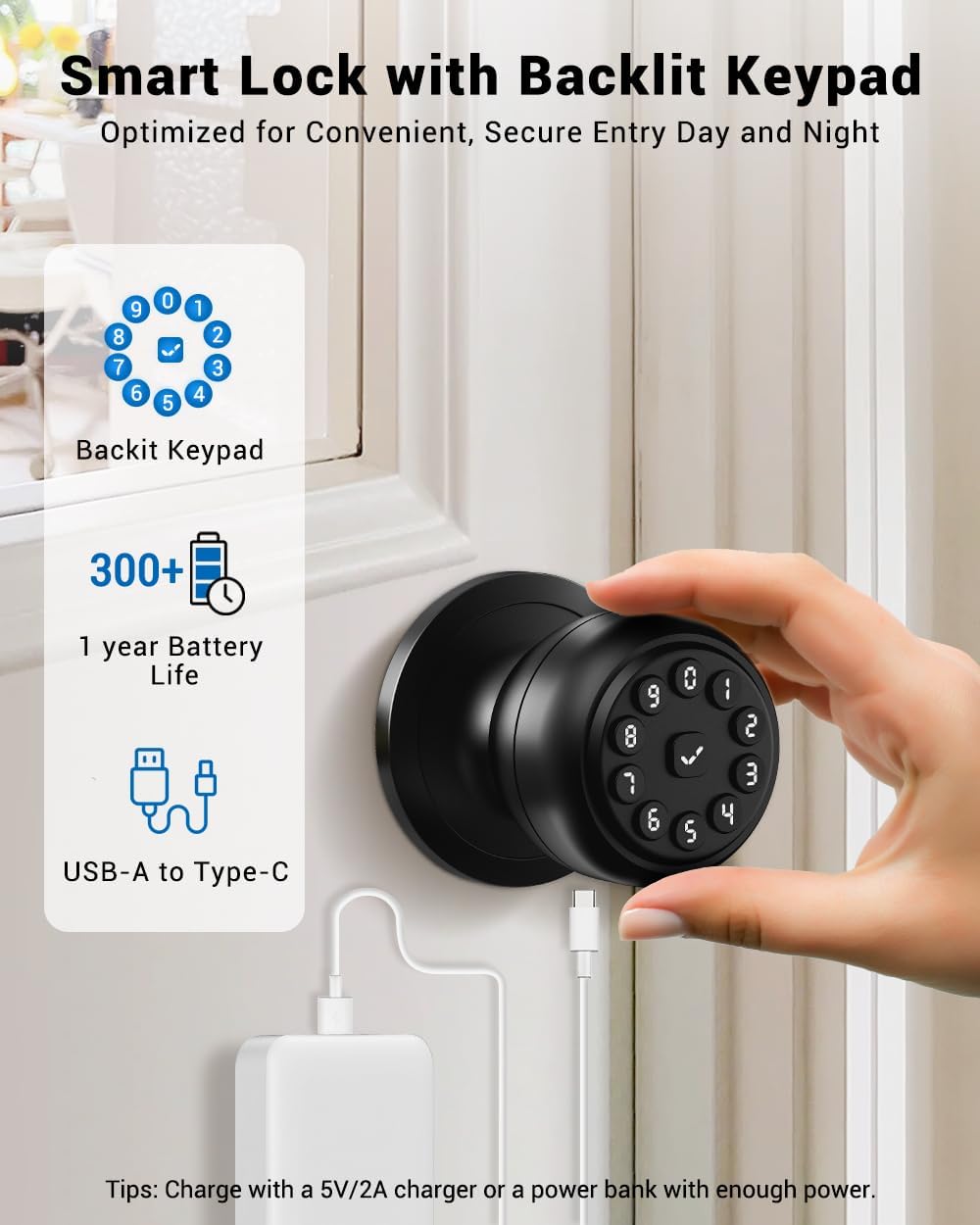
Figure 4.6: This image visually explains the 5-second auto-lock feature, showing the lock engaging automatically after a short delay to secure the door.
5. Maintenance
5.1 Battery Management
The WREO K10mini features a rechargeable battery designed for up to 12 months of life. When the battery is low, the lock will provide a visual alert (blinking green then red lights) on the keypad.
To charge, connect a Type-C cable to the charging port on the exterior knob. Use a 5V/2A charger or a power bank. A full charge takes approximately 3 hours.

Figure 5.1: This image details the long rechargeable battery life, the USB-C charging method, and the visual indicators for low battery alerts (green then red blinking lights).
5.2 Environmental Conditions and Cleaning
The lock is designed for all-weather use with an IP54 waterproof rating, protecting it from dust and splashing water. It operates reliably in temperatures ranging from 23°F to 131°F (-5°C to 55°C).
Regularly wipe the keypad and knob with a soft, dry cloth to remove dust and grime. Avoid using abrasive cleaners, solvents, or harsh chemicals, as these can damage the finish or electronic components.

Figure 5.2: This image highlights the lock's durability, showcasing its ability to function in various temperatures (23°F to 131°F) and its IP54 waterproof rating, ensuring reliable performance in diverse climates.
6. Troubleshooting
6.1 Common Issues and Solutions
- Lock not responding to passcode:
- Ensure the battery is charged.
- Verify the passcode is entered correctly, followed by the "✓" button.
- Try using the backup key to confirm mechanical function.
- Knob turns but does not engage latch:
- This may indicate a mechanical issue. Ensure the spindle bar is correctly aligned during installation.
- If recently installed, re-check the interior knob alignment with the "UP" mark and spindle bar position.
- If the issue persists, contact customer support.
- Difficulty resetting passcode:
- Refer to the detailed programming guide for passcode reset procedures.
- Some reset methods may require specific sequences or twisting the lock knob.
- If issues continue, contact customer support.
- Low battery alert:
- Charge the lock immediately using a Type-C cable and a 5V/2A charger.
7. Specifications
| Feature | Detail |
|---|---|
| Brand | WREO |
| Model Number | K10mini |
| Material | Aluminum |
| Color | Matte Black |
| Product Dimensions | 9"L x 3.86"W |
| Item Weight | 1.65 pounds |
| Lock Type | Combination Lock |
| Hand Orientation | Ambidextrous |
| Indoor/Outdoor Usage | Indoor, Outdoor |
| Waterproof Rating | IP54 |
| Operating Temperature | 23°F to 131°F (-5°C to 55°C) |
| Battery Life | Up to 12 months |
| Charging Port | USB Type-C |
| User Codes Supported | Up to 20 |
| Admin Codes Supported | Up to 3 |
| Door Thickness Compatibility | 1-3/8" to 2-1/8" |
8. Warranty and Support
The WREO K10mini Keypad Smart Door Knob Lock includes a 1-year protection plan from the date of purchase, covering manufacturing defects and malfunctions under normal use.
For technical assistance, troubleshooting, or warranty claims, please contact WREO customer service. Professional customer service is available 24 hours via telephone or email.
Refer to your product packaging or the official WREO website for specific contact details and the most up-to-date support information.