
TOPUMP TPS260
TOPUMP Electric Paddle Board Pump TPS260 User Manual
Model: TPS260
Introduction
This manual provides instructions for the safe and efficient operation of your TOPUMP Electric Paddle Board Pump TPS260. This portable, cordless pump is designed for inflating and deflating various inflatables such as stand-up paddle boards, kayaks, boats, and tents, featuring dual-stage inflation, auto-off functionality, and a maximum pressure of 20 PSI.
What's in the Box
Upon opening the package, verify that all components are present:
- TOPUMP Electric Air Pump (TPS260)
- Air Hose
- 7 Types of Air Nozzles
- Type-C Charging Cable
- User Manual
- O-rings for Air Hose (various sizes)

Setup
1. Charging the Pump
Before first use, fully charge the pump. Connect the provided Type-C charging cable to the pump and a compatible QC3.0 fast charger (not included). A full charge takes approximately 2.5 hours.

2. Attaching the Air Hose and Nozzle
- Connect one end of the air hose to the inflation port (marked "Inflation") on the pump by twisting it clockwise until secure.
- Select the appropriate nozzle for your inflatable item. The pump includes 7 types of nozzles for various valves.
- Attach the selected nozzle to the other end of the air hose. Ensure a tight fit to prevent air leakage.
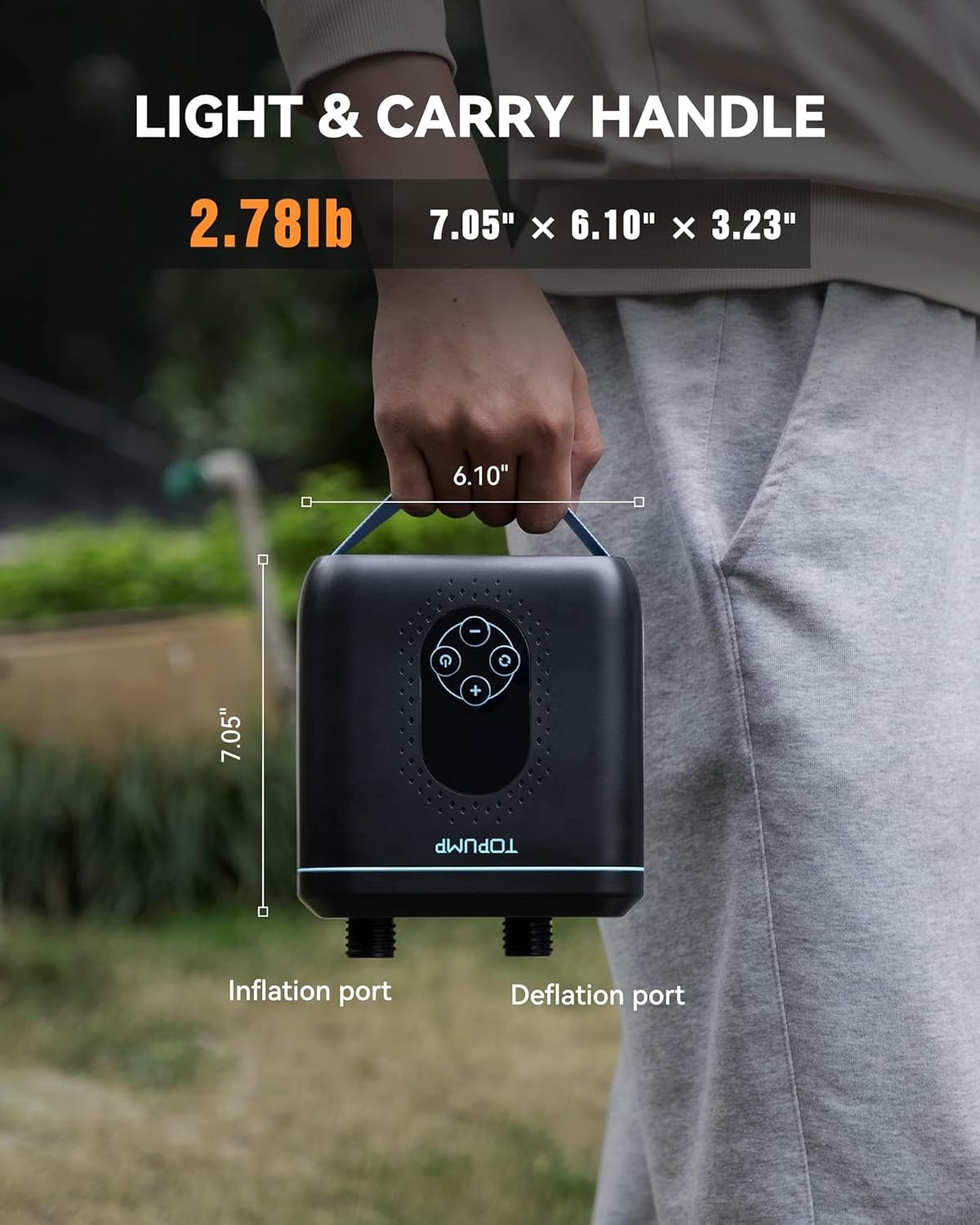
Note: For deflation, connect the hose to the deflation port (marked "Deflation").
Operating Instructions
1. Inflation
- Power On: Press the power button (U) to turn on the pump. The LED display will show the current pressure unit and battery level.
- Select Pressure Unit: Press the unit button (R) to cycle through available pressure units (PSI, BAR, KPA).
- Set Target Pressure: Use the '+' and '-' buttons to adjust the desired pressure. The maximum pressure is 20 PSI.
- Start Inflation: Press the power button (U) again to start the inflation process. The pump will operate in two stages: a high-volume stage for rapid inflation, followed by a high-pressure stage to reach the set PSI.
- Auto-Off: The pump will automatically stop once the target pressure is reached.

2. Deflation
- Connect the air hose to the deflation port on the pump.
- Connect the appropriate nozzle to your inflatable item's valve.
- Press the power button (U) to turn on the pump.
- Press the power button (U) again to start the deflation process. The pump will extract air from the inflatable.
- Manually stop the pump by pressing the power button (U) once deflation is complete.

Video: How to Use the TOPUMP Electric Paddle Board Pump
Video: An official TOPUMP video demonstrating the inflation and deflation process of the electric paddle board pump.
Maintenance
- Cleaning: Wipe the pump exterior with a soft, dry cloth after each use. Do not use harsh chemicals or immerse the pump in water.
- Storage: Store the pump in a cool, dry place away from direct sunlight and extreme temperatures. Ensure the hose and nozzles are clean and dry before storage.
- O-Rings: Periodically check the O-rings on the air hose for wear and tear. Replace them if necessary to maintain an airtight seal. Spare O-rings are included.
- Battery Care: For optimal battery life, charge the pump fully before long-term storage and recharge every 3-6 months if not in use.
Troubleshooting
| Problem | Possible Cause | Solution |
|---|---|---|
| Pump does not turn on. | Low battery or no charge. | Charge the pump fully using the provided Type-C cable. |
| Slow inflation or pump not reaching target PSI. |
|
|
| Pump overheats during continuous operation. | Extended use without cooling. | The pump has an active cooling system, but prolonged use in extreme heat may require a short break. Allow the pump to cool down before resuming. |
| Inaccurate pressure reading. | Sensor calibration or external factors. | Ensure the hose is properly connected. If issues persist, contact customer support. |
Specifications
| Model Number | TPS260 (D11PRO) |
| Brand | TOPUMP |
| Material | Plastic |
| Item Weight | 1.26 kg (2.78 lbs) |
| Product Dimensions (L x W x H) | 6.1" x 3.23" x 7.05" (15.5 cm x 8.2 cm x 18 cm) |
| Power Source | Battery Powered (4000mAh) |
| Air Flow Capacity | 350 liters per minute |
| Maximum Pressure | 20 PSI |
| Operation Mode | Automatic, Dual-Stage Inflation/Deflation |
| Charging Time | Approx. 2.5 hours (with QC3.0 charger) |
Warranty and Support
All TOPUMP products are covered by a two-year manufacturer's warranty from the date of purchase.
If you encounter any issues or have questions regarding your TOPUMP Electric Paddle Board Pump TPS260, please contact our customer service team. Our 24/7 support is available to assist you.
For support, please visit the TOPUMP Store on Amazon or refer to the contact information provided in your product packaging.
Ask a question about this manual
Ask about setup, troubleshooting, compatibility, parts, safety, or missing instructions. Manuals+ will review the question and use this page’s manual context to help answer it.