
1. Introduction
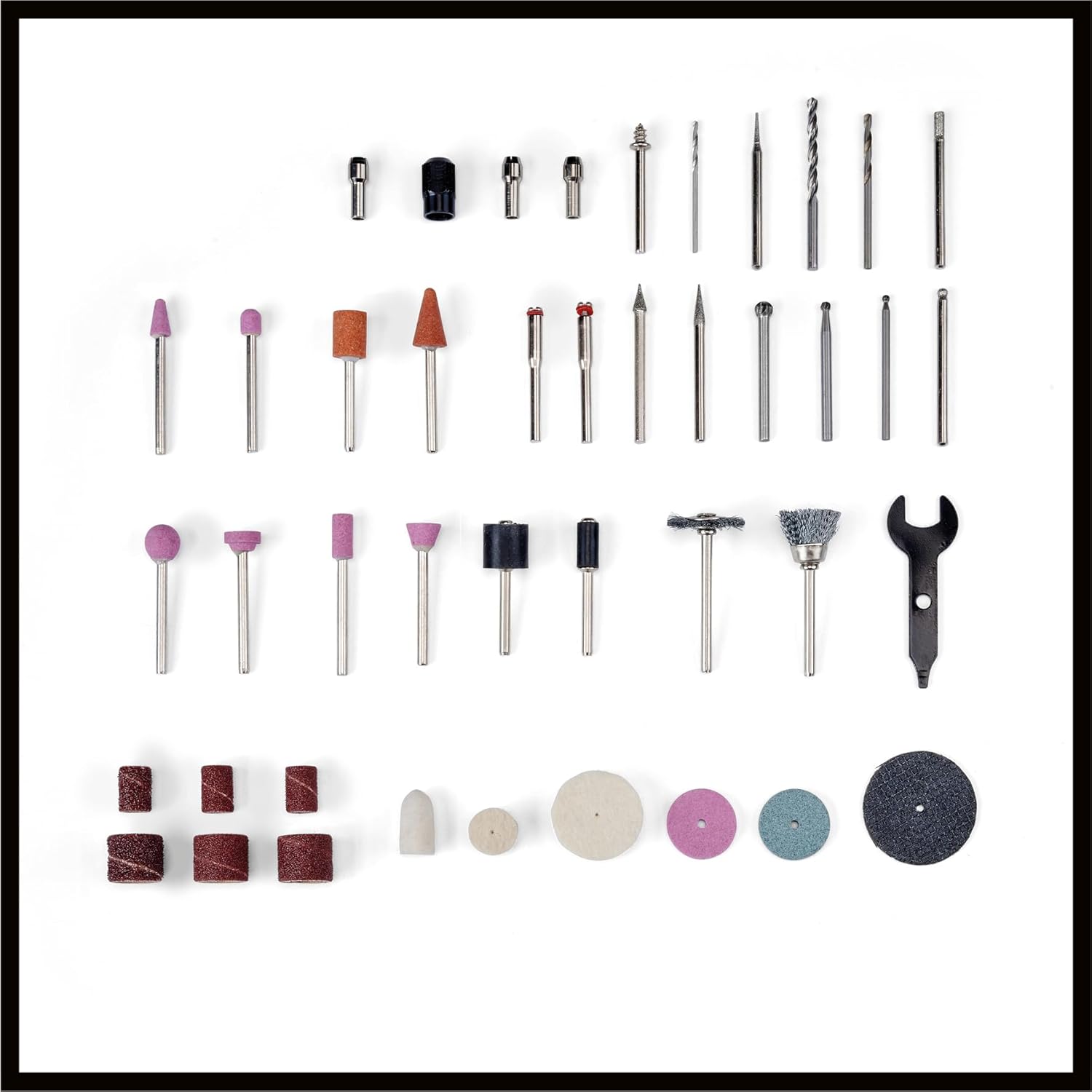
The Einhell TC-MT 150 E is a versatile grinding and engraving tool designed for a wide range of applications, including engraving, polishing, milling, grinding, cutting, and brushing. This tool features a 150 W motor and a 6-level electronic speed control, allowing for flexible adjustment of the rotational speed from 10,000 to 35,000 revolutions per minute (rpm) to suit various materials and tasks. The integrated spindle lock system facilitates quick and easy accessory changes. For detailed and intricate work, a 100 cm flexible shaft is included, equipped with a slim, soft-grip engraving tip for optimal handling and precise results. The device comes with a practical stand that provides storage for the flexible shaft and tip, as well as a tray for frequently used accessories. The stand can be wall-mounted or positioned stably on a workbench using its rubber feet. A cable winding device is integrated into the stand for neat storage. A comprehensive kit of 117 accessories is supplied, offering extensive possibilities for diverse applications.
2. Safety Instructions
Always observe the following safety precautions when operating the Einhell TC-MT 150 E tool:
- Read the entire manual: Before use, thoroughly read and understand all instructions and safety warnings.
- Wear personal protective equipment (PPE): Always wear safety glasses, hearing protection, and a dust mask. Gloves are recommended for handling accessories and workpieces.
- Secure workpiece: Ensure the workpiece is firmly clamped or secured to prevent movement during operation.
- Maintain a clean work area: Keep your workspace tidy and well-lit. Cluttered or dark areas invite accidents.
- Avoid accidental starting: Ensure the switch is in the OFF position before plugging in the tool or changing accessories.
- Use correct accessories: Only use accessories designed for this tool and suitable for the task. Ensure accessories are correctly installed and tightened.
- Do not overreach: Maintain proper footing and balance at all times.
- Disconnect power: Always unplug the tool from the power source before making any adjustments, changing accessories, or performing maintenance.
- Store safely: When not in use, store the tool and accessories in a dry, secure place out of reach of children.
3. Package Contents
Verify that all items are present upon unpacking:
- Einhell TC-MT 150 E Grinding and Engraving Tool
- Flexible Shaft (100 cm)
- Device Stand
- 117-piece Accessory Kit
- Operating Manual
4. Product Overview
Familiarize yourself with the main components of your Einhell TC-MT 150 E tool.


5. Setup
- Unpacking: Carefully remove all components from the packaging. Inspect for any damage. Keep packaging materials for future storage or transport.
- Positioning the Device Stand: Place the device stand on a stable, flat workbench. The rubber feet will help prevent slipping. Alternatively, the stand can be wall-mounted using appropriate fasteners (not included) through the designated holes.
- Attaching the Flexible Shaft:
- Ensure the main tool is unplugged.
- Press and hold the spindle lock button (Figure 4).
- Unscrew the collet nut from the main tool's spindle.
- Insert the inner drive cable of the flexible shaft into the main tool's spindle.
- Screw the flexible shaft's coupling nut onto the main tool's housing until secure. Do not overtighten.
- Release the spindle lock button.
- Inserting Accessories:
- Ensure the tool is unplugged.
- Press and hold the spindle lock button.
- Unscrew the collet nut on the main tool or the flexible shaft's handpiece.
- Insert the desired accessory shank into the collet. Ensure the shank is fully seated.
- Tighten the collet nut firmly. Release the spindle lock button.
- Important: Always use the correct collet size for the accessory shank. The kit includes various collets.

6. Operating Instructions
- Power Connection: Plug the tool into a suitable power outlet (230 V AC).
- Powering On/Off: Use the ON/OFF switch located on the main unit to start or stop the tool.
- Adjusting Speed: Rotate the 6-level electronic speed control dial (Figure 3) to select the desired RPM. Start with a lower speed and gradually increase it as needed for the material and application. Refer to the accessory's recommendations for optimal speed settings.
- Using the Flexible Shaft: When using the flexible shaft, ensure it is not kinked or sharply bent during operation, as this can cause damage. Hold the handpiece firmly and guide the accessory smoothly over the workpiece.
- General Usage Tips:
- Apply light, consistent pressure. Excessive force can damage the tool, accessory, or workpiece.
- Move the tool continuously to prevent overheating the workpiece or accessory.
- For best results, practice on scrap material before working on your final project.
- Allow the tool to reach full speed before contacting the workpiece.
7. Maintenance
Regular maintenance ensures the longevity and optimal performance of your tool.
- Cleaning: After each use, unplug the tool and clean the housing with a soft, damp cloth. Do not use harsh chemicals or abrasive cleaners. Use compressed air to clear dust from ventilation openings.
- Accessory Care: Inspect accessories before and after each use for wear or damage. Replace worn or damaged accessories immediately. Store accessories in their designated compartments in the kit to prevent damage.
- Flexible Shaft: Periodically check the flexible shaft for any signs of wear or damage to the outer casing or inner cable. If damage is found, discontinue use and replace the shaft.
- Cable Inspection: Regularly inspect the power cable for cuts, fraying, or other damage. A damaged cable must be replaced by a qualified electrician.
8. Troubleshooting
If you encounter issues, refer to the following common problems and solutions:
| Problem | Possible Cause | Solution |
|---|---|---|
| Tool does not start | No power supply; ON/OFF switch is off; Faulty power cable | Check power connection; Ensure switch is ON; Inspect power cable for damage. |
| Accessory wobbles or vibrates excessively | Accessory not properly inserted or tightened; Incorrect collet size; Damaged accessory | Re-insert and tighten accessory; Use correct collet; Replace damaged accessory. |
| Tool overheats | Excessive pressure; Blocked ventilation slots; Continuous heavy use | Reduce pressure; Clean ventilation slots; Allow tool to cool down. |
| Reduced performance | Worn accessory; Incorrect speed setting; Motor issue | Replace accessory; Adjust speed; If problem persists, contact customer support. |
If you cannot resolve the issue using this guide, please contact Einhell customer support.
9. Specifications
Technical data for the Einhell TC-MT 150 E Grinding and Engraving Tool:
| Feature | Specification |
|---|---|
| Model Number | 4419380 |
| Power Input | 150 W |
| Voltage | 230 Volts (AC) |
| Max. No-Load Speed | 35,000 rpm |
| Min. No-Load Speed | 10,000 rpm |
| Speed Control | 6-level electronic variator |
| Flexible Shaft Length | 100 cm |
| Dimensions (L x W x H) | 30.1 x 22.7 x 13.4 cm |
| Weight | 560 grams |
| Included Accessories | 117-piece kit |
| Country of Origin | China |
10. Warranty and Support
Einhell products are manufactured to high-quality standards and undergo strict quality controls. This product is covered by a manufacturer's warranty in accordance with country-specific regulations. Please retain your proof of purchase for any warranty claims.
For technical support, spare parts, or warranty inquiries, please contact your local Einhell service center or visit the official Einhell website. Contact information can typically be found in the original packaging or on the Einhell brand website.
EU Spare Parts Availability: 1 Year


