
ForeverPRO 1-458-959-13
User Manual
ForeverPRO 1-458-959-13 Card Wireless Lan
Model: 1-458-959-13
Product Overview
The ForeverPRO 1-458-959-13 Card Wireless Lan is a replacement component designed to provide wireless connectivity for compatible Sony appliances. This card integrates into the appliance's internal system to enable network communication.
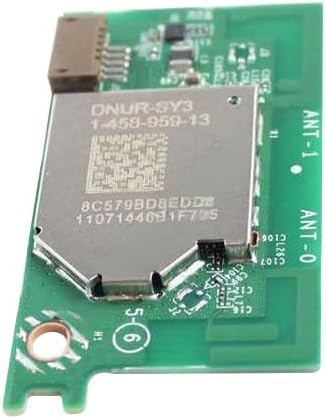
An image of the ForeverPRO 1-458-959-13 Card Wireless Lan, a green circuit board with a silver metallic component labeled 'DNUR-SY3 1-458-959-13' and '8C579BD8EDDE 1107144691F705'. The board also shows 'ANT-1' and 'ANT-0' markings for antenna connections.
Installation (Setup)
Proper installation of the wireless LAN card is crucial for its functionality. Always ensure the appliance is powered off and disconnected from the power source before beginning installation.
- Power Off Appliance: Completely power down and unplug the Sony appliance where the card will be installed.
- Access Internal Components: Refer to your Sony appliance's specific service manual or instructions to safely open its casing and access the internal components, particularly the slot designated for the wireless LAN card.
- Locate Slot: Identify the compatible slot for the 1-458-959-13 wireless LAN card. This may be a PCI-E or similar mini-card slot.
- Insert Card: Carefully align the card with the slot and gently push it in until it is fully seated. Do not force the card.
- Secure Card: Secure the card in place using any provided screws or retention clips within the appliance's chassis.
- Connect Antennas (if applicable): If the appliance has internal antenna cables, connect them to the corresponding antenna ports on the wireless LAN card (e.g., ANT-0, ANT-1).
- Reassemble Appliance: Carefully close and secure the appliance's casing.
- Power On: Reconnect the appliance to the power source and power it on.
Note: Installation should only be performed by individuals familiar with appliance repair and safety procedures. Improper installation can damage the card or the appliance.
Operation
Once correctly installed, the ForeverPRO 1-458-959-13 Card Wireless Lan operates as an integrated component of your Sony appliance. Its primary function is to enable wireless network communication for the appliance.
- Automatic Functionality: The card typically operates automatically once the appliance is powered on and its operating system or firmware recognizes the hardware.
- Network Configuration: Wireless network settings (e.g., connecting to Wi-Fi networks, entering passwords) are managed through the Sony appliance's own user interface or operating system, not directly on the card itself. Refer to your appliance's user manual for instructions on configuring wireless network settings.
Maintenance
The ForeverPRO 1-458-959-13 Card Wireless Lan is a sealed electronic component and requires minimal maintenance. It contains no user-serviceable parts.
- Keep Clean: Ensure the environment where the appliance is located is clean and free of excessive dust, which can accumulate inside the appliance and affect electronic components.
- Ventilation: Ensure the host appliance has adequate ventilation to prevent overheating, which can impact the performance and lifespan of all internal components, including the wireless LAN card.
- No Disassembly: Do not attempt to disassemble the wireless LAN card. Doing so will void any warranty and may damage the component.
Troubleshooting
If you experience issues with wireless connectivity after installing the ForeverPRO 1-458-959-13 Card Wireless Lan, consider the following troubleshooting steps:
- No Wireless Connection:
- Verify the card is correctly seated in its slot. Power off the appliance, open it, and re-seat the card firmly.
- Ensure any internal antenna cables are securely connected to the card's antenna ports.
- Check the appliance's network settings to ensure wireless functionality is enabled and configured correctly.
- Intermittent Connection:
- Check for strong Wi-Fi signal strength in the appliance's location.
- Ensure there are no major obstructions or sources of interference (e.g., microwaves, cordless phones) near the appliance or Wi-Fi router.
- Restart the Sony appliance and your Wi-Fi router.
- Appliance Not Recognizing Card:
- Confirm the card is fully inserted into the correct slot.
- Verify that your specific Sony appliance model is compatible with this wireless LAN card.
- Consult your Sony appliance's manual for hardware detection or driver installation procedures, if applicable.
If issues persist after attempting these steps, it may indicate a more complex problem with the appliance itself or the card. In such cases, contact the appliance manufacturer or a qualified service technician.
Specifications
| Attribute | Detail |
|---|---|
| Manufacturer | ForeverPRO |
| Part Number | FP-1-458-959-13 |
| Item Weight | 8 ounces |
| Product Dimensions | 9 x 6 x 4 inches |
| Country of Origin | China |
| Item Model Number | 1-458-959-13 |
| Included Components | Card Wireless Lan |
| Batteries Required? | No |
| ASIN | B0DHC6TMTV |
| Date First Available | September 18, 2024 |
Warranty Information
The ForeverPRO 1-458-959-13 Card Wireless Lan comes with a 90 Days Manufacturer Warranty. Please retain your proof of purchase for warranty claims. This warranty covers defects in materials and workmanship under normal use.
Note: The warranty does not cover damage caused by improper installation, misuse, accident, unauthorized repair, or modification.
Customer Support
For technical assistance, warranty claims, or further inquiries regarding your ForeverPRO 1-458-959-13 Card Wireless Lan, please contact ForeverPRO customer support. As a USA-based company, ForeverPRO is committed to providing support for their products.
Refer to the packaging or the point of purchase for specific contact details for ForeverPRO customer service.
Ask a question about this manual
Ask about setup, troubleshooting, compatibility, parts, safety, or missing instructions. Manuals+ will review the question and use this page’s manual context to help answer it.