
1. Introduction
This manual provides essential information for the safe and efficient use of your Power Queen 24V 50Ah LiFePO4 Battery. Please read this manual thoroughly before installation, operation, or maintenance. Retain this manual for future reference.
Safety Warnings
- This battery is an energy storage battery, not a start-up battery. Do not use it to start engines or golf carts.
- Ensure correct polarity when connecting the battery. Reverse polarity can damage the battery and connected equipment.
- Use only a LiFePO4 battery charger.
- Avoid short-circuiting the battery terminals.
- Do not disassemble, puncture, or damage the battery.
- Do not expose the battery to fire or extreme temperatures.
- Wear appropriate personal protective equipment (PPE) when working with batteries.
2. Product Overview
The Power Queen 24V 50Ah LiFePO4 battery is designed for deep cycle applications, offering advanced features for reliable and long-lasting power.
Key Features
- Smart Bluetooth Connectivity: Integrated Bluetooth 5.0 for real-time monitoring via smartphone app.
- Superior Performance: 1280Wh energy capacity, 50A max continuous discharge, over 4000 cycle life.
- Low-Temperature Protection (LTCP): Prevents charging below 0°C/32°F and resumes above 5°C/41°F.
- Durable & Compact Design: ABS casing, IP65 water and dust resistance, lightweight (21.7 lbs).
- Enhanced Safety: Robust Battery Management System (BMS) with overcharge, over-discharge, and short-circuit protection.
What's in the Box
- 1 x Power Queen 24V 50Ah LiFePO4 Battery
- 2 x M8 Terminal Bolts
- 2 x Insulating Caps
- 1 x User Manual

Image 1: Power Queen 24V 50Ah LiFePO4 Battery with carrying strap.
3. Setup
Initial Charge
To enable the Bluetooth function and ensure optimal performance, power on the battery by charging it for 3-10 seconds with a compatible LiFePO4 battery charger. The battery may not be fully charged upon arrival due to shipping regulations.
Terminal Connection
- Connect the positive (+) terminal of the battery to the positive (+) terminal of your equipment.
- Connect the negative (-) terminal of the battery to the negative (-) terminal of your equipment.
- If OT terminals are attached directly with screws and their thickness is less than 2mm, add gaskets to ensure secure attachment and prevent loosening or overheating. The same precaution applies when using clamps.
- Ensure all connections are tight and secure to prevent arcing or overheating.
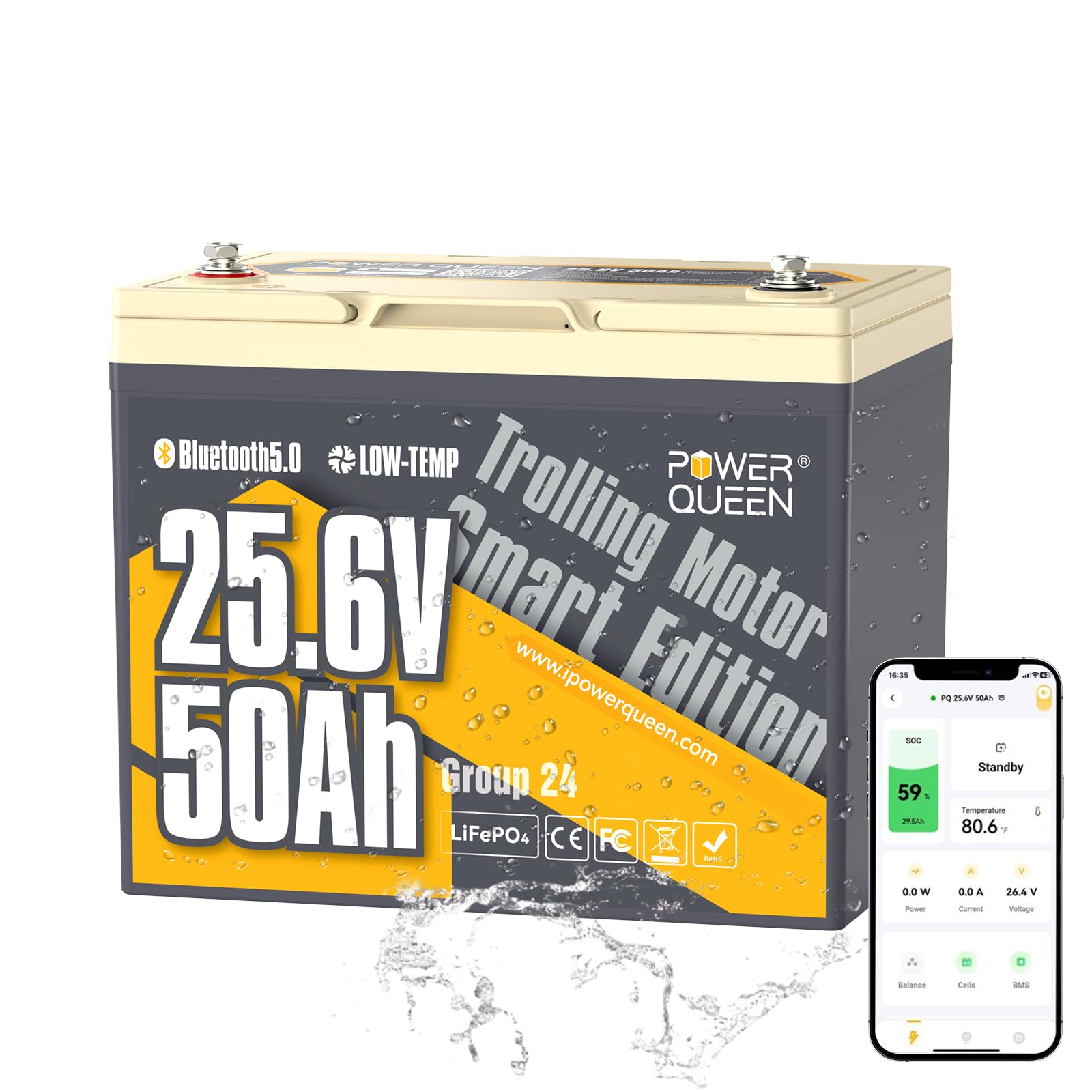
Image 2: Power Queen 24V 50Ah LiFePO4 Battery showing dimensions and a smartphone displaying the Bluetooth app interface.
Bluetooth App Installation
Download the Power Queen app from the App Store (iOS) or Google Play Store (Android). Scan the QR code on the battery label to quickly access the app download page. The effective working distance for Bluetooth is 10 meters without obstacles.
Video 1: Unboxing and initial setup of the Power Queen 24V 50Ah LiFePO4 Battery, including a demonstration of connecting to the Bluetooth app.
4. Operating Instructions
The Power Queen app allows for real-time monitoring and management of your battery's status. Once connected via Bluetooth, you can view critical information directly on your smartphone.
Bluetooth App Functionality
- State of Charge (SOC): Displays the remaining battery capacity as a percentage.
- Voltage (V): Shows the current battery voltage.
- Current (A): Indicates the current flowing into or out of the battery.
- Power (W): Displays the real-time power consumption or generation.
- Temperature: Monitors the internal temperature of the battery.
- Cycle Times: Tracks the number of charge/discharge cycles the battery has undergone.
- BMS Status: Provides information on the Battery Management System's operational status.
Video 2: Demonstration of the Power Queen Bluetooth app, showing real-time battery status, including state of charge, temperature, power, current, and voltage.
5. Maintenance
Charging
- Always use a compatible LiFePO4 battery charger.
- The Low-Temperature Charging Protection (LTCP) function will prevent charging when the battery temperature drops below 0°C/32°F. Charging will resume automatically when the temperature rises above 5°C/41°F.
- Ensure adequate ventilation during charging.
Storage
- Store the battery in a cool, dry place away from direct sunlight and heat sources.
- For long-term storage, ensure the battery is charged to 50-70% capacity.
- Recharge the battery every 3 months during long-term storage to maintain its health.
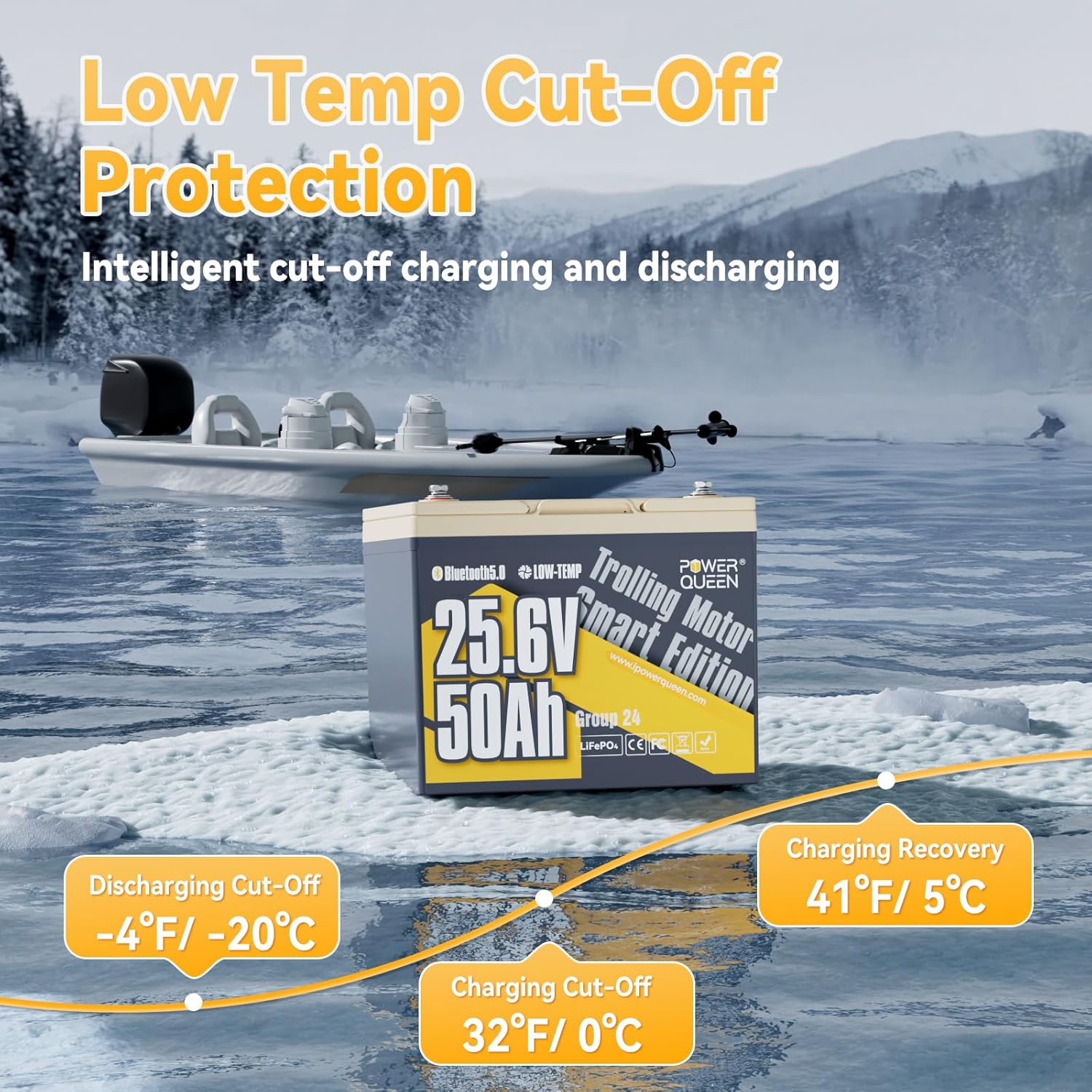
Image 3: Diagram illustrating the Low-Temperature Cut-Off Protection (LTCP) features of the Power Queen LiFePO4 battery, showing cut-off and recovery temperatures for charging and discharging.
6. Troubleshooting
Common Issues & Solutions
- Battery not charging: Check if the battery temperature is below 0°C/32°F (LTCP active). Ensure the charger is compatible and properly connected.
- Bluetooth not connecting: Ensure the battery has been initially charged for 3-10 seconds. Verify the effective working distance (10 meters without obstacles). Restart the app or your phone.
- Reduced performance: Check the battery's State of Charge (SOC) via the app. Ensure all connections are secure and free from corrosion.
- Overheating: Disconnect the battery from all loads and charging sources. Allow it to cool down. Check for proper ventilation around the battery.

Image 4: Illustration detailing the Intelligent BMS Multiple Protection features of the Power Queen LiFePO4 battery, including safeguards against over-charge, over-discharge, over-current, short-circuit, over-temperature, and low-temperature.
7. Specifications
| Parameter | Value |
|---|---|
| Brand | Power Queen |
| Model | PQ24V50AH |
| Voltage | 25.6 Volts |
| Capacity | 50Ah |
| Energy | 1280Wh |
| Max Continuous Discharge Current | 50A |
| Cycle Life | Over 4000 cycles |
| Low-Temperature Charging Protection (LTCP) | Prevents charging below 0°C/32°F, resumes above 5°C/41°F |
| Water & Dust Resistance | IP65 |
| Item Weight | 21.7 pounds |
| Dimensions (L x W x H) | 10.24 x 6.61 x 8.27 inches |
| Terminal Type | M8 |
8. Warranty & Support
Warranty Information
Power Queen offers protection plans for their products. Please refer to your purchase documentation for specific warranty terms and conditions.
- 3-Year Protection Plan (available for purchase)
Customer Support
For any questions, technical assistance, or warranty claims, please contact Power Queen customer service. Visit the official Power Queen website or refer to the contact information provided in your product packaging.
Seller: Power Queen-US
Website: Power Queen Store