
Product Overview
The Millennium ChessGenius Electronic Chess Board M810 is designed for chess enthusiasts of all skill levels. It features a built-in AI opponent, adjustable difficulty settings, and interactive learning features to enhance your game. The portable design with magnetic pieces makes it suitable for play at home or on the go.
- Built-in AI Chess Opponent: Play against an intelligent computer opponent anytime. The integrated ChessGenius engine responds to your moves for engaging solo chess play without another player.
- Adjustable Difficulty Levels: Multiple levels support beginners learning the game and experienced players practicing strategy and decision-making skills.
- Interactive Learning Features: Optional hints and mistake alerts provide guidance during play, helping players understand moves and develop stronger chess fundamentals.
- Interactive LCD Display: The built-in backlit screen shows real-time move validation, tutorials, and game feedback. Play, learn, and improve all from one compact device.
- Magnetic Portable Chess Board: Compact electronic board with magnetic pieces helps keep the game stable during play at home, school, or while traveling.
- Standalone & Easy to Use: No app, Wi-Fi, or subscription required. Simple controls make setup and play accessible for kids and adults.

Image: The Millennium ChessGenius Electronic Chess Board M810, showcasing its compact design and chess pieces.
What's in the Box
- Chess Board
- Chess Pieces (magnetic)
- Storage Bag
- Instruction Manual

Image: Contents of the box, including the electronic chess board, magnetic pieces, and a storage bag.
Setup Instructions
- Unpack the Contents: Carefully remove the chess board, pieces, storage bag, and manual from the packaging.
- Install Batteries: The ChessGenius M810 requires 3 AA batteries (included). Locate the battery compartment on the underside of the board, open it, insert the batteries according to the polarity markings, and close the compartment. The board will beep to confirm battery installation.
- Power On: Press the power button (usually marked with a power symbol) to turn on the device. The LCD display will light up.
- Select Language: If prompted, use the navigation buttons to select your preferred language (e.g., English) and press the Enter button.
- Set Up Pieces: Place the magnetic chess pieces on their starting positions on the board. The board's sensors will detect the pieces.
Video: An unboxing and initial setup guide for the Millennium ChessGenius M810, demonstrating how to unpack and prepare the board for first use.
Operating Instructions
Playing a Game
- Start a New Game: Press the "NEW" button to begin a new game. The board will reset to the standard starting position.
- Make Your Move: Select a piece by pressing down on its square, then press down on the destination square. The LCD display will show your move. The board will register the move and the AI will respond.
- Interactive LCD Display: The LCD screen provides real-time feedback, displaying current moves, game status, and other information.
- Using Hints: If you need assistance, press the "HINT" button. The LCD display will suggest a move.
- Undo/Redo Moves: Use the arrow buttons to navigate through previous moves or to correct an error.
- Adjust Difficulty: Access the menu (usually via a "MENU" button) to adjust the AI's difficulty level to match your skill.
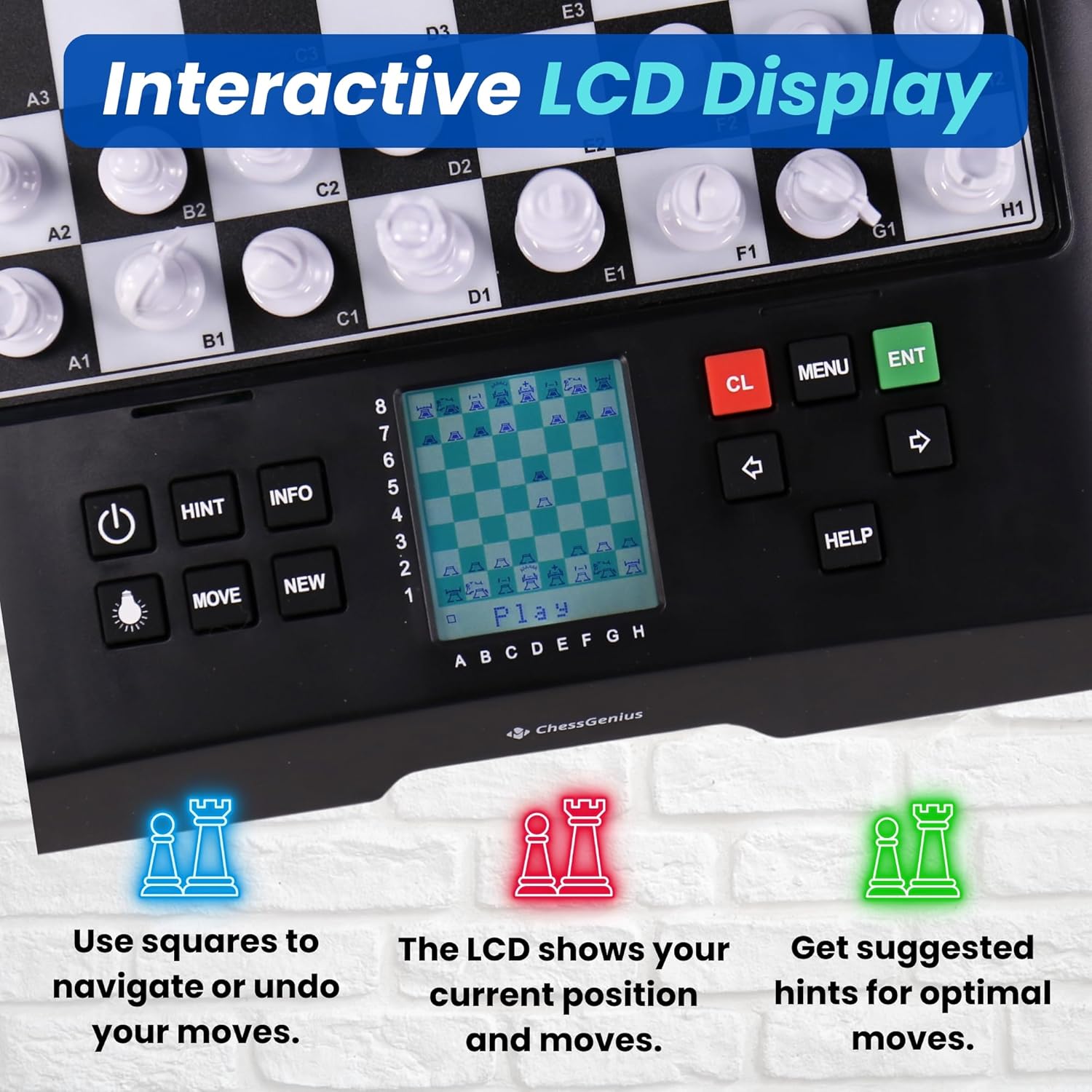
Image: A close-up of the interactive LCD display and control buttons, highlighting how to navigate and receive hints.
Video: An overview of the Millennium Electronic Chess Boards, demonstrating various play modes and interactive features.
Maintenance
- Cleaning: Use a soft, dry cloth to clean the surface of the chess board and pieces. Avoid using abrasive cleaners or solvents.
- Storage: When not in use, store the chess board and pieces in the provided storage bag to protect them from dust and damage. The board also has a storage compartment for pieces on the underside.
- Battery Care: Remove batteries if the device will not be used for an extended period to prevent leakage.
Troubleshooting
- Board Not Turning On:
- Ensure batteries are correctly installed with proper polarity.
- Replace old batteries with new AA batteries.
- Pieces Not Registering:
- Ensure pieces are placed firmly on the center of the squares.
- Check for any debris on the board surface or under the pieces.
- Incorrect Moves Displayed:
- Verify that the pieces are correctly identified by the board (e.g., white vs. black).
- Consult the manual for specific game rules or settings that might affect move validation.
Specifications
| Brand Name | MILLENNIUM |
| Model Number | M810 |
| Set Name | Millennium ChessGenius |
| Edition | 2024 Edition |
| Number of Players | 1 |
| Power Source | Battery Powered |
| Number of Batteries | 3 AA batteries required (included) |
| Item Dimensions L x W | 11.81"L x 10.83"W |
| Item Weight | 1.7 Pounds |
| Material Type | Plastic |
| Educational Objective | Enhance cognitive skills, strategic thinking, and problem-solving abilities through the game of chess |
Warranty and Support
For warranty information and customer support, please refer to the official MILLENNIUM website or contact their customer service directly. Keep your purchase receipt as proof of purchase for any warranty claims.
For additional assistance, you may also refer to the QR code provided on the product packaging for quick start guides or video tutorials.


