
1. Product Overview
The Vu 55MASTERPIECE is a 55-inch 4K QLED TV from the Masterpiece Frame Series, featuring a 144Hz refresh rate and Google TV operating system. This television is designed to deliver a high-quality visual and audio experience with advanced features for entertainment and gaming.

Image: Vu Masterpiece Frame QLED TV highlighting Quantum Dot IPS Panel, 144Hz Refresh Rate, 800 nits Peak Brightness, HDR10 Plus HLG, Dolby Vision, Dolby Atmos, 2.1.2 CH Sound with 6 Speakers + 1 Subwoofer, Advanced CPU + GPU, and Game Mode VRR, ALLM, MEMC.
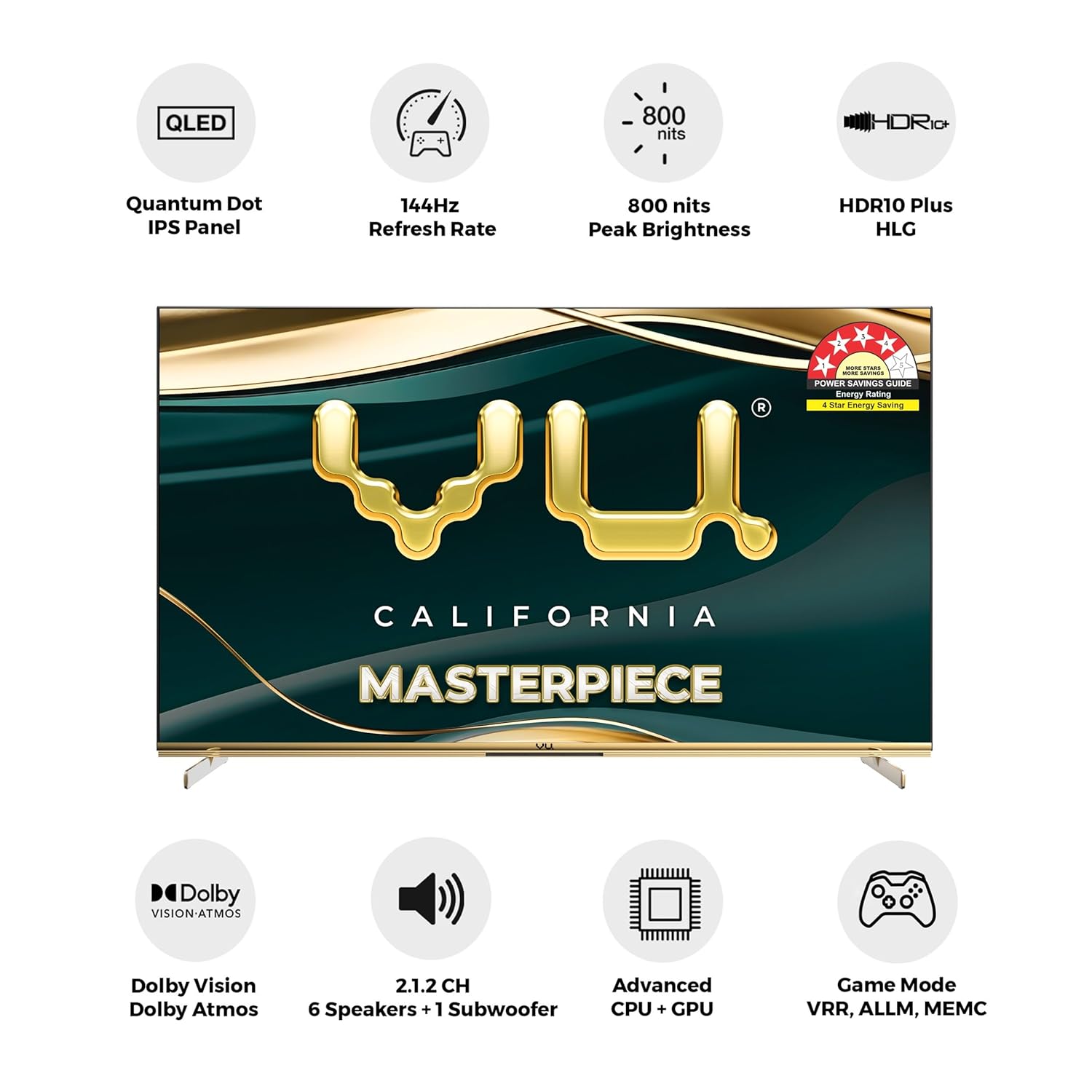
Image: Front view of the Vu 55-inch Masterpiece Frame QLED TV, showcasing its sleek design and Armani Gold accents.
2. What's in the Box
Verify that all the following items are included in your product packaging:

Image: Diagram illustrating the contents of the product box, including the TV unit, remote control, batteries, power cord, AV converting cable, wall mount bracket, stand screws, base stand, and user manual.
- 1 x Vu 55MASTERPIECE TV Unit
- 1 x Remote Control
- 2 x AAA Batteries (for remote control)
- 1 x Power Cord
- 1 x User Manual
- 1 x Table Mount Stand
- 1 x VESA Wall Mount Bracket
- 4 x Stand Screws
3. Physical Specifications & Design
The Vu 55MASTERPIECE TV features a sleek, bezel-less design with Armani Gold aesthetics, providing a premium look. Its slim profile is designed for modern living spaces.

Image: Technical drawing showing the dimensions of the 55-inch Vu Masterpiece Frame QLED TV. The screen measures 139 cm (55 inches) diagonally, with a width of 123.3 cm (48.54 inches) and a height of 75.8 cm (31.15 inches) including the stand. The depth is 21.2 cm (8.34 inches) with the stand. Weight including base is 15.2 kg, and without base is 14.9 kg.

Image: A close-up view of the TV's metallic ice-blade base and the Armani Gold metallic strip, highlighting the premium design and craftsmanship.

Image: A comparison showing the slimness of the Masterpiece Frame TV (88mm) compared to conventional TVs (108mm and 98mm), illustrating its perfect fusion of innovation and style.
4. Setup Instructions
4.1 Unpacking
Carefully remove the TV and all accessories from the packaging. Retain the packaging for future transport or service needs.
4.2 Stand Installation (Table Mount)
- Place the TV screen-down on a soft, flat surface to prevent damage.
- Align the table mount stand with the screw holes on the bottom of the TV.
- Secure the stand using the provided screws. Ensure the stand is firmly attached.
4.3 Wall Mount Installation
If using the VESA wall mount bracket, follow the instructions provided with the bracket and ensure it is installed by a qualified professional. Refer to the VESA mounting standards for proper installation.
4.4 Power Connection
Connect the power cord to the TV's power input and then to a suitable electrical outlet. Ensure the voltage matches the TV's requirements (230 Volts).
4.5 Initial Setup
Upon first power-on, the TV will guide you through the initial setup process, including language selection, network connection, and Google TV account setup.
5. Connectivity
The TV offers a variety of connectivity options for external devices and network access.

Image: Close-up view of the TV's rear connectivity panel, showing ports for AV Input, Headphone Jack, USB 1 & 2, HDMI 1 (eARC/ARC), HDMI 2, HDMI 3, Optical Out, and LAN.
- HDMI Ports: 3 HDMI ports (including HDMI 2.1 for gaming consoles up to 144Hz VRR, HDMI CEC & eARC/ARC) for connecting set-top boxes, Blu-ray players, and gaming consoles.
- USB Ports: 2 USB ports for connecting hard drives and other USB devices.
- Wireless: 2.4/5GHz Wi-Fi and Bluetooth 5.0 for wireless connectivity.
- Ethernet (LAN): For wired network connection.
- Audio Output: Optical Out for external audio systems.
- AV Input: For older devices.
- Headphone Jack: For private listening.

Image: An illustration comparing HDMI 2.1 (48 Gbps) with older HDMI versions (HDMI 2.0 at 18 Gbps and HDMI 1.4), highlighting HDMI 2.1 features such as 4K eARC, Dynamic HDR, VRR, and support for 4K/2K resolutions.
6. Operating Instructions
6.1 Remote Control
The ActiVoice Remote Control provides quick access to various functions and apps.

Image: The Vu TV remote control, featuring dedicated hotkeys for Wi-Fi, Bluetooth, Netflix, YouTube, Cricket, Cinema, Picture, Sound, HDMI, and USB, along with ActiVoice for voice search.
- ActiVoice Remote: Use voice commands for search and control.
- Hotkeys: Dedicated buttons for Netflix, YouTube, Prime Video, Jio Cinema, Picture, Sound, Cricket, Cinema, WiFi, HDMI, USB, and Bluetooth for quick access.
6.2 Google TV Interface
Navigate the Google TV interface to access apps, streaming services, and personalized content.

Image: The Google TV home screen displayed on the Vu TV, showing recommended content and various streaming applications like Netflix, YouTube, Prime Video, Disney+ Hotstar, Spotify, JioCinema, Sun NXT, and SonyLIV.
6.3 Special Modes
- Art Mode: Transform your TV into a digital art display. Select preloaded art, explore vibe images, use it as a clock, or upload personal photos.
- Family Photo Mode: Upload family photos from your phone or a USB drive to display them in Art Mode.
- Cricket Mode: Optimized picture and sound settings for watching cricket, enhancing the viewing experience.
- Cinema Mode: Adjusts picture and sound for an immersive cinematic experience.

Image: The Art Mode interface on the Vu Masterpiece Frame TV, showing options for Art Gallery, Vibe Space, and Family Corner to display various visual content.

Image: The Family Photo Mode interface, demonstrating how to upload and manage personal photos for display on the TV's art mode, with options for mobile image transmission via QR code or USB flash drive.

Image: A visual representation of the Cricket and Cinema modes, emphasizing how these modes enhance the viewing experience with precise ball impact visualization and powerful 124-watt sound.
7. Display Features
Experience superior visual quality with advanced display technologies.
- 4K Quantum Dot Technology: Delivers vibrant colors and high contrast.
- 144Hz (VRR) Refresh Rate, 240Hz Motion Rate: Ensures smooth motion, especially for fast-paced content and gaming.
- 800 Nits Peaking Brightness: Provides bright and clear images.
- 100% Color Volume: Delivers accurate and rich color reproduction.
- Dolby Vision, HDR10+ & HLG: Support for multiple HDR formats for enhanced contrast and color.
- AI Picture Engine: Automatically optimizes clarity, color, texture, and contrast for an improved viewing experience.
- FILMMAKER Mode: Preserves the original aspect ratio, colors, and frame rates as intended by the filmmaker.

Image: An illustration explaining the evolution of Quantum Dot technology from Gen 3 to Gen 4, highlighting wide color gamut backlight, new generation QD structure, and environmental protection & health benefits for an authentic QLED experience.

Image: A visual demonstrating the difference between 60Hz and 144Hz refresh rates, showing sharper visuals and enhanced resolution during fast-moving scenes, such as a motorcycle race.

Image: A scenic image demonstrating the visual excellence of Full Range HDR, supporting Dolby Vision, HDR10+, HDR10, and HLG, with seamless SDR to HDR conversion for lifelike imagery.

Image: An illustration of the AI-powered Iconium 4K Processor PQ engine, detailing its functions: AI Super Resolution for clarity, AI Super Color for vibrancy, AI Super Clarity for restoring textures, and AI Super Contrast for dynamic depth enhancement.
8. Audio Features
The TV integrates a powerful sound system for an immersive audio experience.
- 2.1.2 CH Sound System: Features 7 speakers, including 2 master speakers, 4 tweeters, and 1 built-in subwoofer.
- 124 Watt Sound Output: Delivers clear and powerful audio.
- Built-in Subwoofer: Provides deep, rich bass with low frequencies down to 45Hz.
- Dolby Atmos Sound Enhancement: Creates a three-dimensional audio experience.
- eARC Support: Enhanced Audio Return Channel for high-quality audio transmission to compatible sound systems.

Image: A diagram illustrating the 2.1.2ch sound system, showing the placement of 7 total speakers, including a built-in subwoofer, providing 180-degree left & right sound field and 124W output power.

Image: A detailed cutaway view of the TV's speaker system, showing the arrangement of full-frequency speakers and four tweeters, emphasizing the 124W speaker power for rich sound details.

Image: A diagram illustrating the integrated concealed subwoofer, highlighting its 50W subwoofer power and ability to produce low frequencies down to 45Hz for super clean bass.

Image: A depiction of a home theater setup with Dolby Atmos, showing sound directionality and enhanced realism for a natural audio experience, with sound waves emanating from the TV and surrounding the viewers.
9. Gaming Features
The Vu 55MASTERPIECE TV is equipped with features to enhance your gaming experience.
- 4K@144Hz (VRR): Supports high refresh rates at 4K resolution with Variable Refresh Rate for smooth, tear-free gaming.
- HDMI 2.1: Provides the necessary bandwidth for 4K 144Hz gaming and other advanced features.
- ALLM (Auto Low Latency Mode): Automatically switches to a low-latency mode when a gaming console is detected, reducing input lag.
- HDR Gaming: Supports HDR for more vibrant and detailed game visuals.
- Game Mode Pro: Optimized settings for gaming performance.
- Game Console Features: Includes shooting assistant (crosshair), frame rate display, real-time HDR switching, and sound effect switching for an enhanced gaming experience.

Image: A split-screen comparison showing the benefit of Auto Low Latency Mode (ALLM) in gaming. The 'No ALLM' side shows a slight delay, while the 'ALLM' side shows immediate response, illustrating how ALLM automatically optimizes for low latency during gaming.

Image: A visual showcasing the Game Console features, including a shooting assistant with crosshair, frame rate display, real-time HDR switching, and sound effect switching, designed for large-screen gaming.
10. Performance
The TV is powered by an advanced processor for smooth operation.
- 144Hz Iconium™ 4K Processor: Enhances visual experience with 144Hz refresh rate, upscales content to 4K resolution, and boosts streaming speeds for high-speed, powerful graphics, and smooth motion handling.
- 3GB RAM & 16GB Storage: Ensures smooth multitasking and ample space for apps.

Image: A stylized depiction of the 144Hz Iconium™ 4K Processor, highlighting its role in enhancing visual experience, upscaling content to 4K, boosting streaming speeds, and managing overall smart interface operations for gaming and general use.
11. Maintenance
Proper maintenance ensures the longevity and optimal performance of your TV.
11.1 Cleaning the Screen
- Always turn off the TV and unplug the power cord before cleaning.
- Use a soft, lint-free cloth (e.g., microfiber cloth) to gently wipe the screen.
- For stubborn marks, lightly dampen the cloth with water or a specialized screen cleaner. Never spray liquid directly onto the screen.
- Avoid using abrasive cleaners, alcohol, benzene, or thinners, as these can damage the screen surface.
11.2 Cleaning the TV Body
- Wipe the TV body and stand with a soft, dry cloth.
- Do not use any liquid cleaners on the TV body to prevent electrical hazards.
11.3 Ventilation
- Ensure adequate ventilation around the TV to prevent overheating. Do not block ventilation openings.
- Avoid placing the TV in direct sunlight or near heat sources.
12. Troubleshooting
Refer to this section for solutions to common issues you might encounter.
12.1 No Power
- Check if the power cord is securely connected to both the TV and the electrical outlet.
- Ensure the power outlet is functioning by plugging in another device.
- Press the power button on the TV or remote control.
12.2 No Picture or Poor Picture Quality
- Verify that the correct input source is selected (e.g., HDMI 1, AV).
- Check all cable connections (HDMI, AV) between the TV and external devices. Ensure they are secure.
- Adjust picture settings (brightness, contrast, color) in the TV menu.
- If using an antenna, check the antenna connection and signal strength.
12.3 No Sound or Poor Sound Quality
- Ensure the TV is not muted and the volume is turned up.
- Check audio cable connections to external sound systems or ensure internal speakers are enabled.
- Adjust sound settings in the TV menu (e.g., sound mode, equalizer).
- If using an external sound system, ensure it is powered on and correctly configured.
12.4 Remote Control Not Working
- Replace the batteries in the remote control (2 x AAA).
- Ensure there are no obstructions between the remote and the TV's IR sensor.
- If using Bluetooth remote, ensure it is paired correctly. Refer to the TV's on-screen instructions for pairing.
12.5 Network Connection Issues
- For Wi-Fi, ensure the router is on and within range. Re-enter the Wi-Fi password if necessary.
- For wired connection, ensure the Ethernet cable is securely connected to both the TV and the router.
- Restart your router and modem.
13. Technical Specifications
| Feature | Specification |
|---|---|
| Brand | Vu |
| Model | 55MASTERPIECE |
| Screen Size | 55 Inches (139 cm) |
| Display Technology | QLED, LED, IPS |
| Resolution | 4K (3840x2160 Pixels) |
| Refresh Rate | 144 hertz (VRR) |
| Motion Rate | 240Hz |
| Peak Brightness | 800 Nits |
| Color Volume | 100% |
| HDR Support | Dolby Vision, HDR10+, HLG |
| Viewing Angle | 178 Degrees |
| Operating System | Google TV |
| RAM Memory | 3 GB |
| Storage Capacity | 16 GB |
| Graphics Coprocessor | Advanced GPU |
| HDMI Ports | 3 (HDMI 2.1 compatible) |
| USB Ports | 2 |
| Wireless Connectivity | 2.4/5GHz Wi-Fi, Bluetooth 5.0 |
| Audio Output Mode | Surround |
| Audio Encoding | Dolby Atmos |
| Speakers Maximum Output Power | 124 Watts |
| Power Source | AC |
| Voltage | 230 Volts |
| Wattage | 150 Watts |
| Product Dimensions (LxWxH) | 21.2 x 123.3 x 75.8 cm |
| Item Weight | 14.9 kg |
14. Warranty and Support
14.1 Warranty Information
The Vu 55MASTERPIECE TV comes with a 1-year manufacturer warranty from the date of purchase on the television set and a 6-month warranty on the remote control. Warranty claims can be processed using the Amazon e-invoice.
14.2 Customer Support
For any queries, technical assistance, or warranty claims, please contact Vu Technologies Pvt. Ltd. customer support:
- Contact Number: 022 45417000
- WhatsApp: +91 9867740000
- Email: support@vutvs.com
- Address: Vu Technologies Pvt. Ltd. 29, MIDC Central Road, Andheri East, Mumbai, 400093
The user guide and manual are also available on the brand’s official website under the repair & customer support section.
