
1MORE S31
1MORE S31 Open Ear Bluetooth Headphones User Manual
Model: S31 | Brand: 1MORE
1. Product Overview & Key Features
The 1MORE S31 Open Ear Bluetooth Headphones are designed for comfort and situational awareness, providing a high-quality audio experience without blocking ambient sounds. They feature a lightweight design, secure fit, and advanced audio technologies for clear sound and calls.

Image: The 1MORE S31 Open Ear Bluetooth Headphones with their charging case, showcasing their sleek black design.
Key Features:
- Featherweight Comfort: Designed 50% slimmer for an open-ear listening experience that eliminates discomfort during prolonged use, allowing sound to flow freely.
- Locked-In Stability: Equipped with innovative, gravity-balanced ear hooks that adapt to your ear shape, ensuring the headphones remain secure during any activity.

Image: A person wearing the 1MORE S31 headphones securely while cycling, demonstrating their stable fit during movement.
- Rich Soundscapes: Features a large 14.2 mm dynamic driver, directional sound technology, and an advanced DBB bass enhancement algorithm for enhanced audio quality.
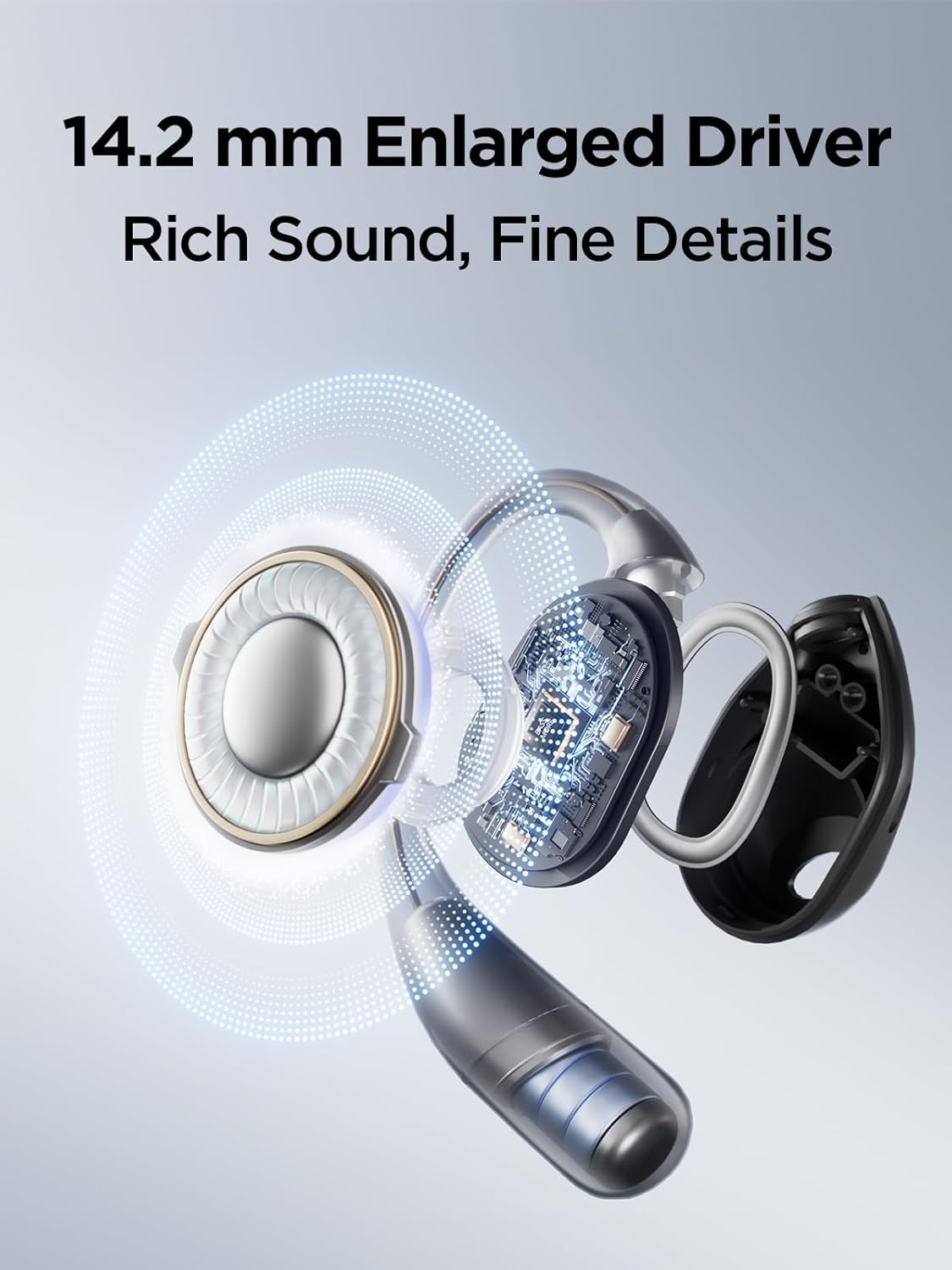
Image: An exploded view diagram highlighting the 14.2mm dynamic driver and internal components of the 1MORE S31 headphone, illustrating its sound technology.
- Precision Audio Control: Offers four studio-grade EQ settings accessible via the 1MORE app, allowing users to tailor audio for various music genres.
- All-Weather Audio: Boasts an IPX5 waterproof rating and durable construction, making them suitable for training, climbing, biking, and other activities regardless of weather conditions.

Image: A 1MORE S31 headphone being splashed with water, visually representing its IPX5 water resistance for outdoor and active use.
2. Package Contents
Ensure all items are present in the package:
- 1MORE S31 Open Ear Bluetooth Headphones (Left and Right earbuds)
- Charging Case
- User Manual
Note: The package includes the headphones, charging case, and this user manual. Other accessories like a charging cable are typically included but not explicitly detailed in the provided "whats_in_the_box" data.

Image: The 1MORE S31 headphones resting inside their open charging case, ready for use or charging.
3. Setup Guide
3.1 Initial Charging
Before first use, fully charge the headphones and the charging case. Place the earbuds into the charging case. Connect the charging case to a power source using a USB-C cable (not included in the provided "whats_in_the_box" but typically required). The indicator light on the case will show charging status.

Image: The 1MORE S31 headphones in their charging case, illustrating the extended battery life of up to 30 hours with the case and 8 hours on a single charge.
3.2 Bluetooth Pairing
- Ensure the headphones are charged.
- Open the charging case. The earbuds will automatically enter pairing mode (indicator lights will flash).
- On your device (smartphone, tablet, computer), enable Bluetooth.
- Search for "1MORE S31" in the list of available Bluetooth devices.
- Select "1MORE S31" to connect. Once connected, a voice prompt will confirm, and the indicator lights will turn off or show a steady light.
If pairing fails, place the earbuds back into the case, close it, and then reopen to re-enter pairing mode. Refer to your device's Bluetooth settings for specific instructions.
4. Operating Instructions
4.1 Basic Controls
The 1MORE S31 headphones feature intuitive touch controls. Specific functions may vary slightly based on firmware updates or app settings.
- Play/Pause: Single tap on either earbud.
- Next Track: Double tap on the right earbud.
- Previous Track: Double tap on the left earbud.
- Answer/End Call: Single tap on either earbud.
- Reject Call: Press and hold either earbud for 2 seconds.
- Voice Assistant: Triple tap on either earbud.
4.2 1MORE MUSIC App
For advanced features and customization, download the 1MORE MUSIC app from your device's app store. The app allows you to:
- Adjust EQ settings (4 studio-grade presets available).
- Customize touch controls.
- Update firmware.
- View battery status.
5. Maintenance
Proper care ensures the longevity and performance of your 1MORE S31 headphones.
- Cleaning: Use a soft, dry, lint-free cloth to clean the earbuds and charging case. Do not use abrasive cleaners or solvents.
- Water Resistance: The headphones have an IPX5 water-resistant rating, meaning they can withstand splashes and sweat. They are not designed for submersion in water. Dry them thoroughly before placing them back in the charging case.
- Storage: When not in use, store the headphones in their charging case to protect them from dust and damage. Store in a cool, dry place away from extreme temperatures.
- Battery Care: To preserve battery life, avoid fully discharging the headphones frequently. Charge them regularly, even if not in constant use.
6. Troubleshooting
If you encounter issues with your 1MORE S31 headphones, refer to the following common solutions:
6.1 No Sound or Intermittent Connection
- Ensure both earbuds are charged.
- Check that Bluetooth is enabled on your device and the headphones are connected.
- Move closer to your device to avoid interference.
- Try unpairing and re-pairing the headphones with your device.
- Restart your device.
6.2 Charging Issues
- Ensure the charging cable is securely connected to both the case and the power source.
- Verify the power source is active.
- Clean the charging contacts on the earbuds and inside the case with a dry cotton swab.
6.3 Poor Call Quality
- Ensure the microphones are not obstructed.
- Move to a quieter environment if possible.
Video: This video demonstrates the 1MORE S31 Open Ear Headphones, highlighting features such as open-ear design, 14.2mm dynamic driver, gravity balance technology, IPX5 water resistance, UFT 3.0 directional audio, four-microphone AI ENC smart call noise cancellation, and 30 hours of extended battery life. It shows the product in use during exercise and work, emphasizing comfort, sound quality, and clear communication in various environments.
- Check the microphone settings on your connected device.
7. Specifications
| Feature | Detail |
|---|---|
| Brand | 1MORE |
| Model Name | S31 |
| Connectivity Technology | Wireless (Bluetooth) |
| Bluetooth Version | 5.0 |
| Audio Driver Type | Dynamic Driver |
| Water Resistance Level | IPX5 (Water Resistant) |
| Control Method | App |
| Item Weight | 0.14 Kilograms (4.9 ounces) |
| Compatible Devices | Laptops, Desktops, Tablets, Telephones, Smart Speakers, Televisions, Car Audio Systems, Cellphones |
| Batteries | 3 Lithium Ion batteries required (included) |
8. Warranty and Support
1MORE products are designed and manufactured to the highest quality standards. For detailed warranty information, product registration, or technical support, please visit the official 1MORE website or contact their customer service. Keep your purchase receipt as proof of purchase for warranty claims.
For further assistance, you may also refer to the 1MORE Store on Amazon:
Related documentsS31


Ask a question about this manual
Ask about setup, troubleshooting, compatibility, parts, safety, or missing instructions. Manuals+ will review the question and use this page’s manual context to help answer it.