
Introduction
This manual provides instructions for the safe and effective use of your SIS BF-960 Foldable Electronic Piano. Please read this manual thoroughly before operating the device and keep it for future reference.
The SIS BF-960 is a lightweight and compact 61-key electronic piano designed for portability and ease of use. It features a foldable design, rechargeable battery, and various functions to enhance your playing experience.

Image: The SIS BF-960 Foldable Electronic Piano shown unfolded, alongside its dedicated carrying case and USB charging cable. The piano is also depicted in its folded state.
Package Contents
Please ensure all items are present in the package:
- SIS BF-960 Foldable Electronic Piano (61 keys)
- USB Charging Cable
- Dedicated Soft Case

Image: A visual representation of the product package contents, including the unfolded piano, USB charging cable, and the dedicated soft case.
Setup
Unfolding the Piano
The SIS BF-960 features a simple folding mechanism.
- Place the folded piano on a flat, stable surface.
- Gently hold both ends of the piano.
- Carefully unfold the piano until it lies flat and the two sections are securely connected by the three metal hinges.
Caution:
- Be careful not to pinch your fingers in the folding mechanism.
- Ensure the piano is fully unfolded and stable before use.

Image: A close-up view demonstrating the simple folding mechanism and the headphone jack.
Charging the Battery
The piano has a built-in rechargeable battery.
- Locate the DC 5V charging port on the side of the piano.
- Connect the provided USB charging cable to the charging port.
- Connect the other end of the USB cable to a compatible USB power adapter (not included) or a computer's USB port.
- The charging indicator light will illuminate.
- A full charge takes approximately 4 hours.
Note:
- The piano can be used while charging.
- For optimal battery life, avoid completely draining the battery before recharging.

Image: A visual guide showing the DC 5V charging port on the side of the piano and the included USB charging cable.
Operating Instructions
Power On/Off
- To power on, press the ON/OFF button.
- To power off, press the ON/OFF button again.
Basic Playback
Simply press the keys to play notes. The keyboard is designed for a natural and light touch.
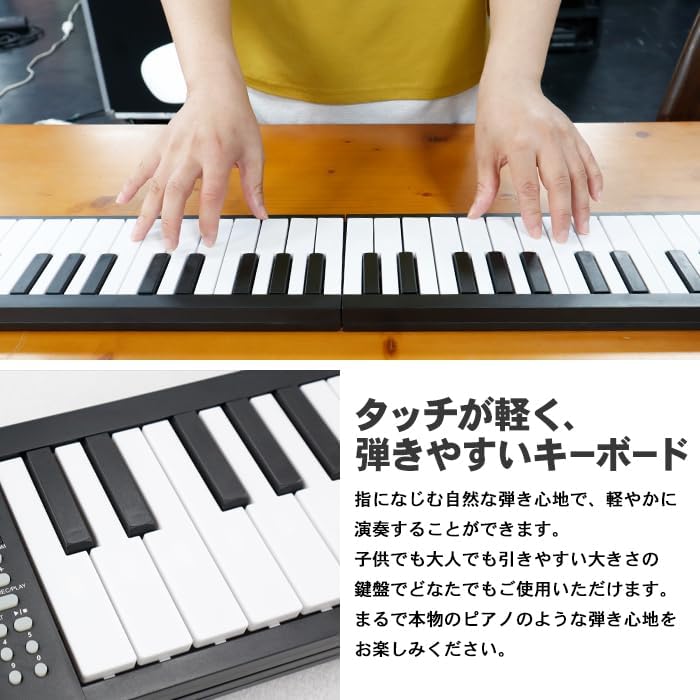
Image: Hands demonstrating playing on the keyboard, highlighting its light touch and ease of play for both children and adults.
Control Panel Functions
The control panel allows you to adjust various settings and access different features.
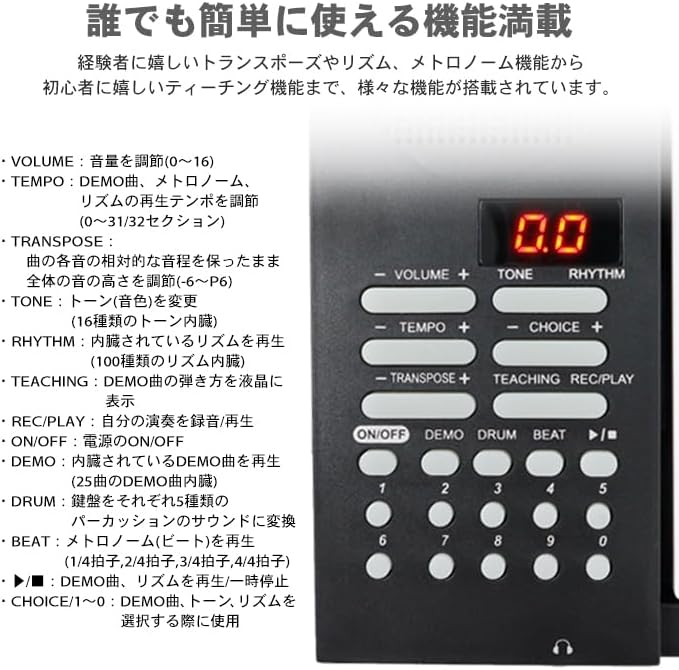
Image: A detailed view of the control panel, showing buttons for Volume, Tempo, Transpose, Tone, Rhythm, Teaching, Recording, Demo, Drum, Beat, ON/OFF, and numerical keys.
- VOLUME: Adjusts the sound volume (0-16 levels).
- TEMPO: Adjusts the playback tempo for demo songs, metronome, and rhythms (0-32 sections).
- TONE: Selects from 16 different instrument tones.
- RHYTHM: Selects from 100 built-in rhythm patterns.
- DEMO: Plays one of the 25 built-in demo songs.
- TRANSPOSE: Adjusts the pitch of the entire keyboard from -6 to +6 semitones.
- TEACHING: Activates the teaching function, displaying the notes of demo songs on the LCD.
- REC/PLAY: Records your own performance or plays back a recorded performance.
- DRUM: Changes the sound of each of the 5 drum keys.
- BEAT: Plays the metronome (beat) in various time signatures (e.g., 1/4, 2/4, 3/4, 4/4).
- CHOICE/1~0: Used to select demo songs, tones, or rhythms.
Using Headphones
To practice without disturbing others, connect headphones to the headphone jack on the side of the piano.
- Locate the headphone jack (3.5mm stereo) on the side of the piano.
- Insert your headphones into the jack.
- The internal speaker will automatically mute when headphones are connected.
Image: A close-up view of the headphone jack on the side of the piano, with an illustration of headphones.
Maintenance
Cleaning
- Always power off the piano before cleaning.
- Use a soft, dry cloth to wipe the surface of the piano.
- For stubborn dirt, slightly dampen the cloth with water and a mild detergent, then wipe dry immediately.
- Do not use abrasive cleaners, solvents, or chemical sprays, as they may damage the finish.
Storage
- When not in use, fold the piano and store it in its dedicated soft case to protect it from dust and scratches.
- Store the piano in a cool, dry place, away from direct sunlight, extreme temperatures, and high humidity.
- Avoid placing heavy objects on top of the piano.

Image: The SIS BF-960 Foldable Electronic Piano being carried in its dedicated soft case, emphasizing its portability and lightweight design (792g).
Troubleshooting
| Problem | Possible Cause | Solution |
|---|---|---|
| No sound | Power is off; Volume is too low; Headphones are connected; Speaker malfunction. | Press ON/OFF button; Increase volume; Disconnect headphones; Contact customer support. |
| Keys not responding | Piano not fully unfolded; Internal issue. | Ensure piano is fully unfolded and locked; Power off and on again; Contact customer support. |
| Battery not charging | USB cable not connected properly; Faulty USB cable/adapter; Battery issue. | Reconnect USB cable; Try a different USB cable/adapter; Contact customer support. |
| Distorted sound | Volume too high; Low battery; External interference. | Decrease volume; Charge battery; Move away from other electronic devices. |
Specifications
| Feature | Specification |
|---|---|
| Model | BF-960 |
| Number of Keys | 61 keys |
| Dimensions (Unfolded) | Approx. 940 x 24 x 135 mm |
| Dimensions (Folded) | Approx. 470 x 45 x 135 mm |
| Weight | Approx. 792 g |
| Charging Time | Approx. 4 hours |
| Volume Levels | 0-16 |
| Tempo Sections | 32 |
| Tones | 16 types |
| Rhythms | 100 types |
| Demo Songs | 25 songs |
| Transpose Range | -6 to +6 semitones |
| Materials | ABS, HIPS, Silicone |
| Accessories | USB Charging Cable, Dedicated Soft Case |
Note: Product size, weight, and contents are based on internal measurements. Slight errors may occur.

Image: A diagram illustrating the unfolded and folded dimensions of the piano, along with key features like 61 keys, recording function, rechargeable battery, weight (792g), number of demo songs (25), rhythms (100), and transpose range.
Image: A comprehensive overview of the product's detailed specifications, including dimensions, weight, key count, charging time, volume, tempo, tones, rhythms, demo songs, transpose, materials, and included accessories (USB charging cable, dedicated soft case).
Warranty and Support
For warranty information and customer support, please refer to the retailer or manufacturer's official website. Keep your purchase receipt as proof of purchase.
For further assistance, please contact SIS customer service.