
Introduction
The Pulsar GD950BN is a highly efficient and versatile inverter generator designed to provide reliable backup power for both residential and camping applications. With an impressive 9,500 peak watt and 7,600 running watt capacity, this generator can safely power appliances, tools, and sensitive electronics. Operating at a rated volume of only 65 dB, it is suitable for use in social environments without causing disturbance. Its Dual-Fuel capability allows operation on either gasoline or propane, offering flexibility in fuel choice. The generator also features low idle control to maximize run times and voltage selection for 120 volts or 240 volts output.
Safety Information
Always read and understand all safety warnings and instructions before operating the generator. Failure to follow these instructions can result in serious injury or death.
- Carbon Monoxide Hazard: Generators produce carbon monoxide, an odorless, colorless gas that can kill you. Operate the generator outdoors in a well-ventilated area, far away from windows, doors, and vents.
- Electrical Shock Hazard: Do not operate the generator in wet conditions. Ensure all electrical connections are secure and dry.
- Fire Hazard: Fuel is highly flammable. Refuel in a well-ventilated area with the engine off and cool. Do not smoke or allow open flames near the generator.
- Hot Surfaces: The generator's engine and muffler become very hot during operation and remain hot for a period after shutdown. Avoid contact with hot surfaces.
- Children and Pets: Keep children and pets away from the generator, especially during operation.
Components Overview
Familiarize yourself with the main components of your Pulsar GD950BN generator.

Figure 1: Overall view of the Pulsar GD950BN Inverter Generator, showcasing its compact design and telescoping handle for portability.

Figure 2: Front view highlighting the control panel, various outlets (15-50R RV Ready, 20A AC 120V, 50A AC 120V/240V), and the electric push start button.
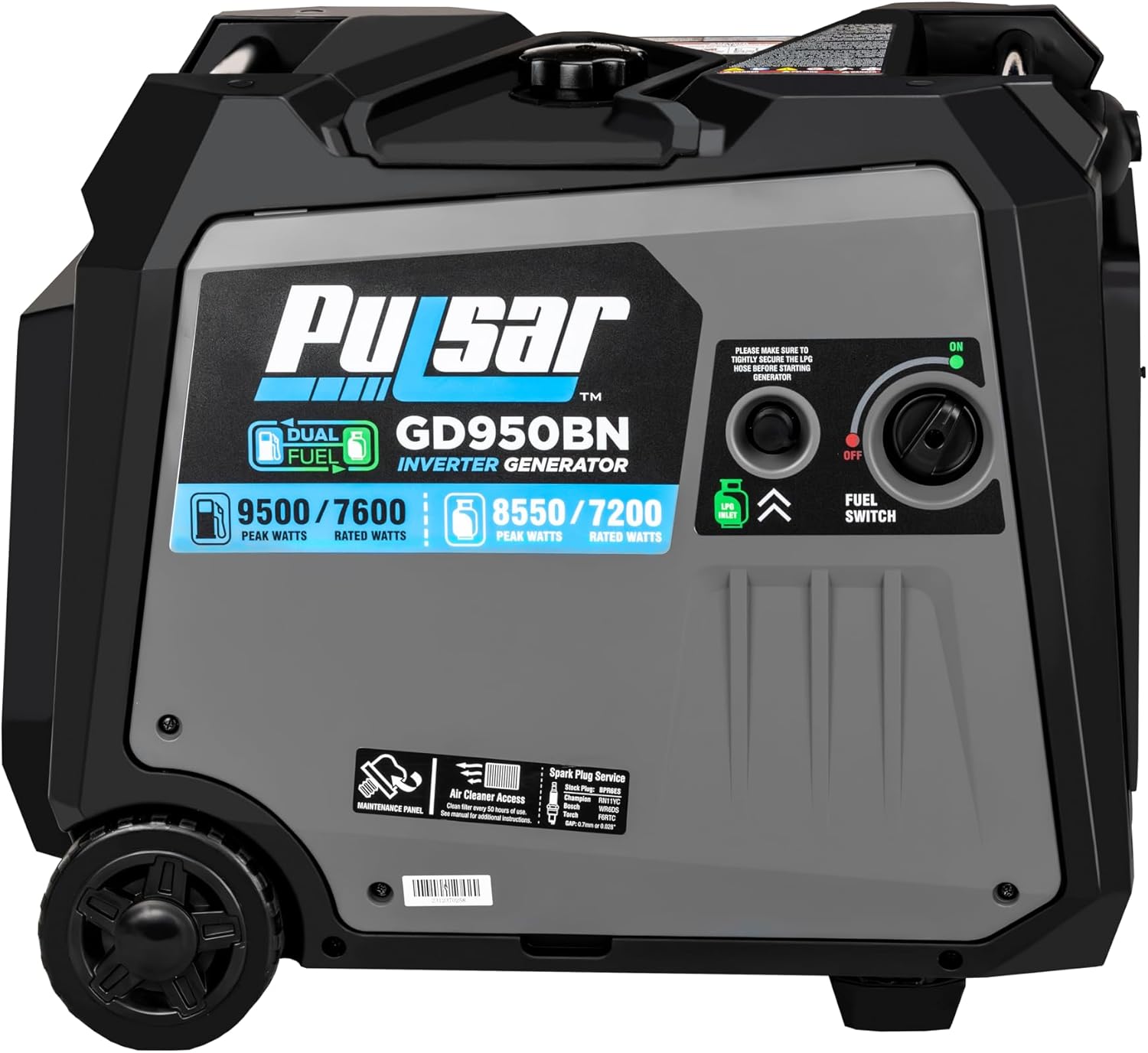
Figure 3: Side view illustrating the fuel switch for selecting gasoline or propane, and access points for air cleaner and spark plug service.

Figure 4: Rear view of the generator, showing the robust casing and wheel design for easy transport.
Setup
1. Unpacking and Initial Assembly
Carefully remove the generator from its packaging. The Pulsar GD950BN comes with never-flat wheels and a telescoping handle for easy portability. Attach any components as instructed in the quick start guide included with your unit.
2. Adding Engine Oil
Before first use, add the recommended engine oil to the generator. Refer to the oil fill cap or the engine specifications for the correct type and amount of oil. Do not overfill.
3. Fueling the Generator
The GD950BN is a dual-fuel generator, capable of running on either gasoline or propane.
- For Gasoline: Ensure the generator is off and cool. Fill the fuel tank with fresh, unleaded gasoline. The tank volume is 8 gallons.
- For Propane: Connect a standard propane tank (not included) to the generator's propane inlet. Ensure all connections are secure and leak-free.
Note: Propane can be stored with peace of mind as residual fuel will not cause problems when the generator is idle.

Figure 5: Dual Fuel capability of the GD950BN, indicating peak and rated watts for both gasoline and propane operation.
Operating Instructions
1. Starting the Generator
The GD950BN features an electric push start for convenient operation.
- Ensure the generator is on a level surface and all connections are secure.
- Select your desired fuel type (gasoline or propane) using the fuel switch.
- Press the electric push start button.
- Allow the engine to warm up for a few moments before connecting electrical loads.

Figure 6: Key operational features: Parallel Ready connections, Electric Start button, and the generator's quiet operation suitable for camping.
2. Connecting Electrical Loads
The generator provides multiple outlets for various applications:
- 15-50R RV Ready Outlet: Ideal for campgrounds, tailgates, and other outdoor festivities.
- AC 120V Outlets: Standard household power.
- AC 120V/240V Outlets: For higher voltage requirements.
Ensure the total wattage of connected devices does not exceed the generator's rated running watts (7600W on gasoline, 7200W on propane).

Figure 7: Overview of available outlets, typical runtime, engine size, and fuel efficiency benefits.
3. ECO Switch
The ECO Switch provides enhanced fuel efficiency by allowing variable engine speeds. This can result in 30% to 50% higher fuel efficiency compared to traditional generators, especially under lighter loads.
4. Parallel Operation
The GD950BN is Parallel Ready, allowing you to connect two compatible Pulsar inverter generators together to double your power output. Refer to the parallel kit instructions for detailed setup.

Figure 8: Two GD950BN generators connected for parallel operation, providing increased power capacity for larger loads like home AC units.

Figure 9: Detailed view of the parallel connection ports, ensuring proper and secure connection for combined power output.
Maintenance
Regular maintenance is crucial for the longevity and optimal performance of your generator.
- Oil Changes: Check engine oil level before each use and change according to the maintenance schedule in the full manual.
- Air Filter: Inspect and clean the air filter regularly, especially in dusty conditions. Replace if damaged.
- Spark Plug: Inspect the spark plug periodically and replace if necessary to ensure reliable starting.
- Storage: For extended storage, drain the fuel system (gasoline) or ensure the propane tank is disconnected. Store in a dry, well-ventilated area.
Troubleshooting
This section addresses common issues you might encounter with your generator.
| Problem | Possible Cause | Solution |
|---|---|---|
| Generator will not start | No fuel, low oil, spark plug issue, battery dead (for electric start) | Add fuel, check oil level, inspect/replace spark plug, charge/replace battery. |
| No power output | Circuit breaker tripped, overload, faulty connection | Reset circuit breaker, reduce load, check connections. The generator has Overload Protection and Short Circuit Protection. |
| Engine runs rough | Stale fuel, dirty air filter, incorrect fuel selection | Use fresh fuel, clean/replace air filter, ensure correct fuel type is selected. |
Specifications
| Feature | Detail |
|---|---|
| Model Name | Pulsar 9500w Dual-Fuel Inverter Generator |
| Peak Wattage (Gasoline) | 9500 watts |
| Running Wattage (Gasoline) | 7600 watts |
| Peak Wattage (Propane) | 8550 watts |
| Running Wattage (Propane) | 7200 watts |
| Fuel Type | Gasoline, Propane |
| Engine Type | 4 Stroke |
| Engine Displacement | 457 Cubic Centimeters |
| Voltage | 120/240 Volts |
| Runtime (Gasoline, Half Load) | 5 hours |
| Fuel Tank Capacity | 8 Gallons |
| Item Weight | 125 Pounds |
| Product Dimensions (L x W x H) | 25.7" x 19.6" x 21.8" |
| Special Features | Automatic Shut Down, Automatic Voltage Regulation, Digital Display, Dual Fuel, Fuel Efficient, Low Oil Shutdown, Portable |
| Warranty | 3 Year Manufacturer |
Reference Wattage for Common Appliances
The following table provides estimated running and starting wattages for common household appliances. Use this as a guide when planning your power needs.

Figure 10: A guide to the power requirements of typical appliances, useful for load management.
Warranty and Support
Your Pulsar GD950BN generator comes with a 3-Year Manufacturer Warranty. For any questions, technical assistance, or warranty claims, please contact Pulsar Customer Support.
You can find customer support information on the seller's page or through the official Pulsar website.
Additional Product Usage Scenarios

Figure 11: The GD950BN is an excellent power source for camping and RV use, providing reliable electricity in remote locations.

Figure 12: Powering tools in a workshop or job site, demonstrating the generator's capability for demanding applications.

Figure 13: Essential for home backup during power outages, keeping critical appliances running smoothly.

Figure 14: Illuminating outdoor spaces at night, showcasing its utility for events or extended outdoor activities.

Figure 15: Visual summary of the generator's versatile applications, from home backup to recreational use.
Important Notes
- The generator's voltage selection enables support for 120 volts or 240 volts.
- Rubber outlet covers are equipped to keep out dust and debris, ensuring a longer lifespan.