
1. Introduction
The XIAHEEO TY22 Solar Tire Pressure Monitoring System (TPMS) is designed to enhance driving safety by providing real-time monitoring of your vehicle's tire pressure and temperature. This system utilizes advanced technology to detect and alert you to potential tire issues, helping to prevent accidents and extend tire life. This manual provides detailed instructions for the proper installation, operation, and maintenance of your TPMS.
2. Package Contents
Before installation, please verify that all components are present in the package:
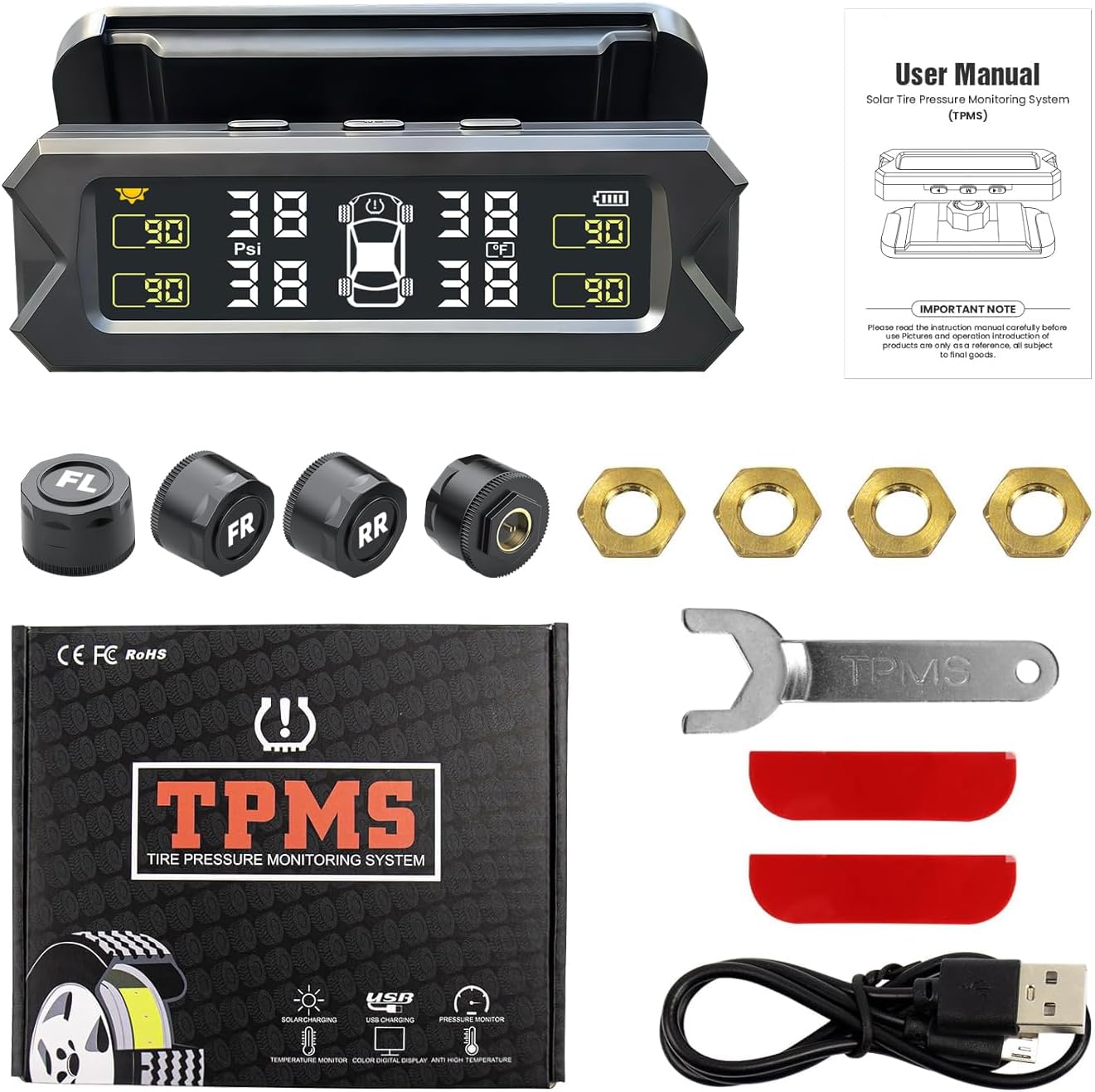
- 1 x TPMS Monitor Display
- 4 x External Tire Pressure Sensors (labeled FL, FR, RL, RR)
- 4 x Anti-theft Nuts
- 1 x Wrench
- 1 x USB Charging Cable
- 1 x User Manual
- Adhesive pads for mounting
3. Setup and Installation
3.1 Monitor Charging
The monitor can be charged via solar power or the included USB cable. For initial use, it is recommended to fully charge the monitor using the USB cable.
- Solar Charging: Place the monitor on your dashboard or windshield where it can receive direct sunlight. The solar panel will automatically charge the internal battery.
- USB Charging: Connect the provided USB cable to the monitor's charging port and a 5V USB power source. The charging indicator will illuminate during charging.

3.2 Monitor Installation
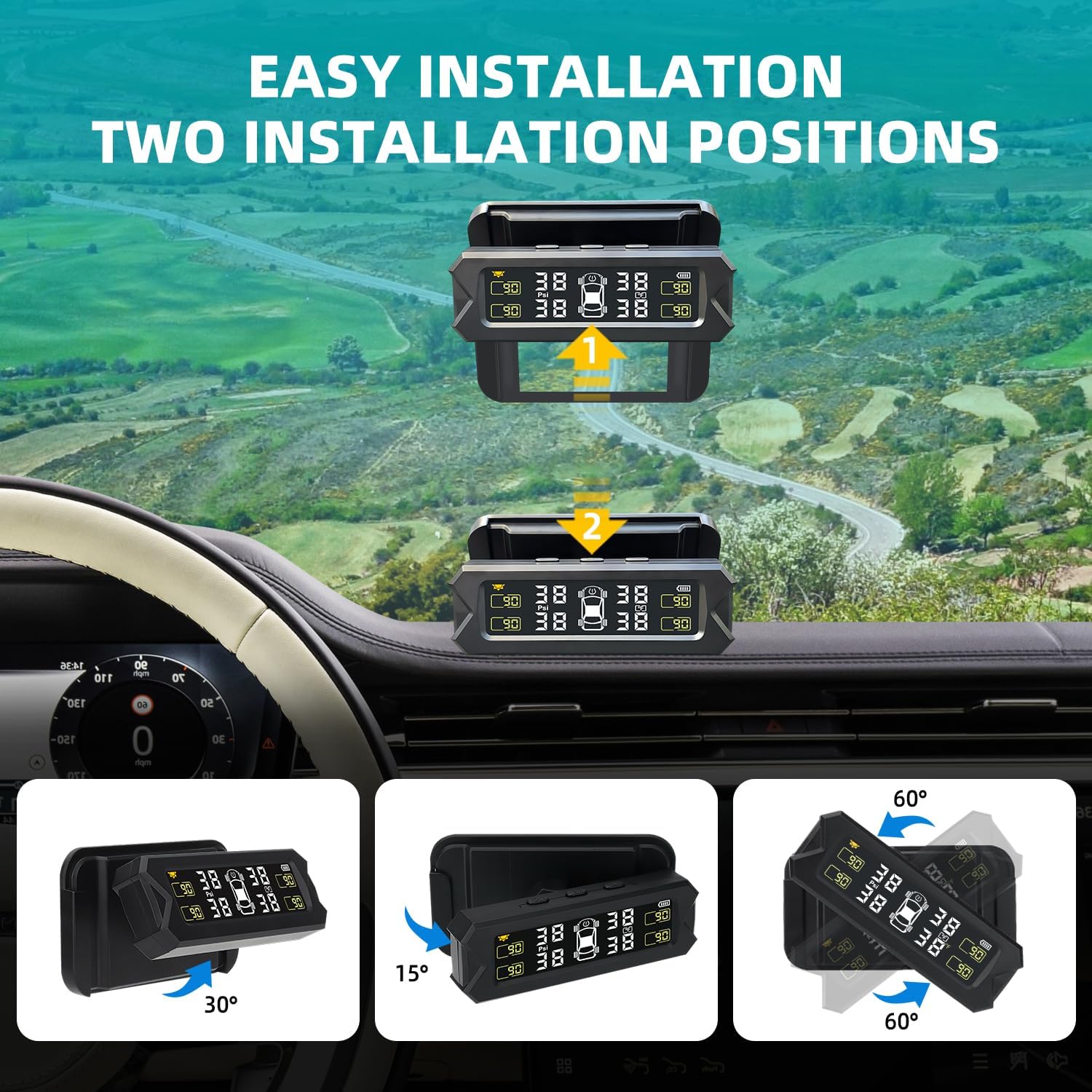
The monitor offers two installation positions for optimal viewing:
- Dashboard Mounting: Use the adhesive pad to secure the monitor directly onto your vehicle's dashboard.
- Windshield Mounting: Attach the monitor to the windshield using the provided bracket and adhesive. Ensure it does not obstruct your view.
The monitor's angle can be adjusted for better visibility.
3.3 Sensor Installation
Install the external sensors on your vehicle's tire valves according to their labels (FL: Front Left, FR: Front Right, RL: Rear Left, RR: Rear Right).
- Unscrew the original valve cap from the tire valve.
- Screw on an anti-theft nut onto the valve stem.
- Screw the corresponding sensor onto the valve stem until it is hand-tight.
- Use the provided wrench to tighten the anti-theft nut against the sensor, securing it in place.
- Repeat for all four tires.
Note: If a sensor does not work immediately after installation, remove it, wait 10 minutes, and then reinstall it. This often resolves initial connection issues.

4. Operating Instructions
4.1 Power On/Off
The monitor features an intelligent power management system:
- When the vehicle is started, the display automatically powers on.
- When the vehicle is turned off, the display automatically shuts down after a period of inactivity to conserve battery.
4.2 Display Overview
The LCD screen displays real-time tire pressure and temperature for all four tires. It also shows the monitor's battery level and solar charging status.

4.3 Unit Settings
The monitor allows you to switch between different units for pressure and temperature:
- Pressure Units: PSI (Pounds per Square Inch) / Bar
- Temperature Units: °F (Fahrenheit) / °C (Celsius)
Refer to the detailed instructions in the included paper manual for how to access and change these settings.
4.4 Alarm Modes
The system provides 6 distinct alarm modes to alert you to potential tire issues:
- Fast Leak Alarm: Alerts to a rapid drop in tire pressure.
- Slow Leak Alarm: Alerts to a gradual loss of tire pressure.
- Low Pressure Alarm: Activates when tire pressure falls below the preset minimum.
- High Pressure Alarm: Activates when tire pressure exceeds the preset maximum.
- High Temperature Alarm: Alerts when tire temperature rises above the preset limit.
- Sensor Fault Alarm: Indicates a malfunction or loss of signal from a sensor.
- Sensor Battery Low Power Alarm: Alerts when a sensor's battery is low.
Press any button on the monitor to silence an active alarm.

4.5 Automatic Brightness Adjustment
The monitor automatically adjusts its display brightness based on ambient light conditions, ensuring clear readability during both day and night driving without distracting the driver.
5. Maintenance
5.1 Sensor Care
The external sensors are designed to be resistant to water, dust, and snow. However, regular inspection for damage or debris is recommended. Ensure they are securely tightened to prevent air leaks.
5.2 Monitor Cleaning
Wipe the monitor display with a soft, dry cloth. Avoid using abrasive cleaners or solvents that could damage the screen or casing.
5.3 Battery Life
The monitor's internal battery is designed for long-term use with solar and USB charging capabilities. The sensors have their own internal batteries. If a sensor battery low power alarm is triggered, the sensor may need replacement.
6. Troubleshooting
- Sensor Not Displaying Data: Ensure the sensor is correctly installed and tightened. If the issue persists, try reinstalling the sensor after 10 minutes. Verify the sensor battery is not low.
- Inaccurate Readings: Ensure tires are properly inflated to the manufacturer's recommended pressure. Recalibrate the system if necessary (refer to the full manual for calibration steps).
- Monitor Not Turning On: Check if the monitor battery is charged. Connect it to a USB power source. Ensure the vehicle is running or the monitor is exposed to sunlight.
- Alarm Sounds Continuously: Identify the specific alarm type displayed on the screen. Address the underlying issue (e.g., inflate tire, check for leaks). Press any button to silence the alarm temporarily.
For further assistance, please contact customer support.
7. Specifications
| Feature | Specification |
|---|---|
| Model Number | TY22 |
| Brand | XIAHEEO |
| Pressure Range | 0-81 Psi (0-5.6 Bar) |
| Charging Method | Solar Power / USB Cable |
| Display Type | Digital LCD |
| Sensor Type | External Cap Sensors |
| Alarm Modes | Fast/Slow Leak, Low/High Pressure, High Temperature, Sensor Fault, Sensor Battery Low |
| Suitable Vehicle Types | Cars, Sedans, SUVs, MPVs, Pickups, RVs, Trailers |
| Item Weight | 6.4 ounces |
| Product Dimensions | 2.6 x 3.7 x 1.2 inches |
| Batteries | 1 Lithium Ion battery (included) |
8. Warranty and Support
XIAHEEO is committed to providing quality products and customer satisfaction. Your TY22 TPMS comes with the following support:
- 2-Year After-Sales Service: Comprehensive support for product issues.
- 6-Month Change for New: Replacement for qualifying defects within the first six months.
- 30-Day No Reason Refund: Return policy for customer satisfaction.
- 24-Hour Amazon Mail Service: Prompt responses to inquiries via Amazon messaging.
For any questions, technical support, or warranty claims, please contact XIAHEEO customer service through your Amazon order page.