
GODOX G-AD600Pro II Kit( with Carrying Case)
Contents
Godox AD600 Pro II Flash User Manual
Model: G-AD600Pro II Kit (with Carrying Case)
Brand: GODOX
1. Introduction
The Godox AD600 Pro II is an advanced portable flash unit designed for professional photographers. It features a powerful 600Ws output, a 40W bi-color modeling light, and an optimized color screen for intuitive control. This upgraded version offers enhanced flash duration, improved battery life, and a wider output range, making it suitable for various shooting environments from studio to outdoor locations.
Key features include one-tap sync capability with the Godox X3 trigger, 16 color-coded groups for easy identification in multi-light setups, and a precise 1/1 to 1/512 output range. Its fast recycling time and high-speed sync mode allow for capturing fast-moving subjects with exceptional clarity.

Figure 1.1: Godox AD600 Pro II Flash unit and included accessories.
2. What's in the Box
Please verify that all the following components are included in your package:
- Flash Body × 1
- Flash Tube × 1
- Reflector Protection Cover × 1
- Charger × 1
- Power Cord × 1
- Battery × 1
- Reflector × 1

Figure 2.1: Included components of the AD600 Pro II kit.
3. Setup
3.1 Battery Installation and Charging
The AD600 Pro II uses a powerful 28.8V/2600mAh lithium battery pack. Ensure the battery is properly charged before use.
- Insert the battery into the designated slot on the flash unit until it clicks into place.
- Connect the charger to the battery and then to a power outlet to charge. The battery indicator will show charging status.
Battery Cautions:
- Do not charge continuously for over 24 hours.
- Store in dry, cool, ventilated places.
- Do not put aside or into fire.
- Charge batteries to about 80% if storing for a while. Test fire them a few dozen times once a month.
Battery Activation Instructions:
Due to battery upgrade, if the battery hasn't been used for more than a month, it will automatically go to sleep. To activate it, short press the battery indicator button.

Figure 3.1: Important battery care and activation guidelines.
3.2 Attaching Accessories
Attach the reflector or other light modifiers to the flash head as needed. Ensure they are securely mounted before operation.
4. Operating Instructions
4.1 Power On/Off and Display Control
The AD600 Pro II features an upgraded TFT color screen for clear visibility. To power on or off, press the dedicated On/Off button on the screen. The modeling light can be toggled with a single click of its button.

Figure 4.1: Operating the AD600 Pro II's color screen and controls.
4.2 One-Tap Sync with X3 Trigger
For seamless wireless synchronization, the AD600 Pro II supports one-tap sync with the Godox X3 trigger. Simply press the wireless sync option on both your X3 and the AD600 Pro II to achieve quick synchronization without complex channel or ID settings. The unit is also compatible with other Godox triggers like XproII and X2T.

Figure 4.2: One-Tap Sync feature with Godox X3 trigger.
4.3 Wireless X System and Group Identification
The AD600 Pro II is part of Godox's 2.4 GHz Wireless X System, offering a range of 100m. It features 16 groups and 32 channels, facilitating multi-light setups. Each of the 16 groups displays a different color locally on the flash head, allowing for easy identification and management in complex lighting scenarios.

Figure 4.3: Multi-light setup with 16 color-coded groups for easy identification.
4.4 Power Output Adjustment
The AD600 Pro II offers an extended 10-step power output, ranging from 1/1 to 1/512 in 0.1 increments. This precise control allows you to tailor the exact output needed for subtle highlights or full power, achieving ideal lighting effects with unparalleled flexibility.
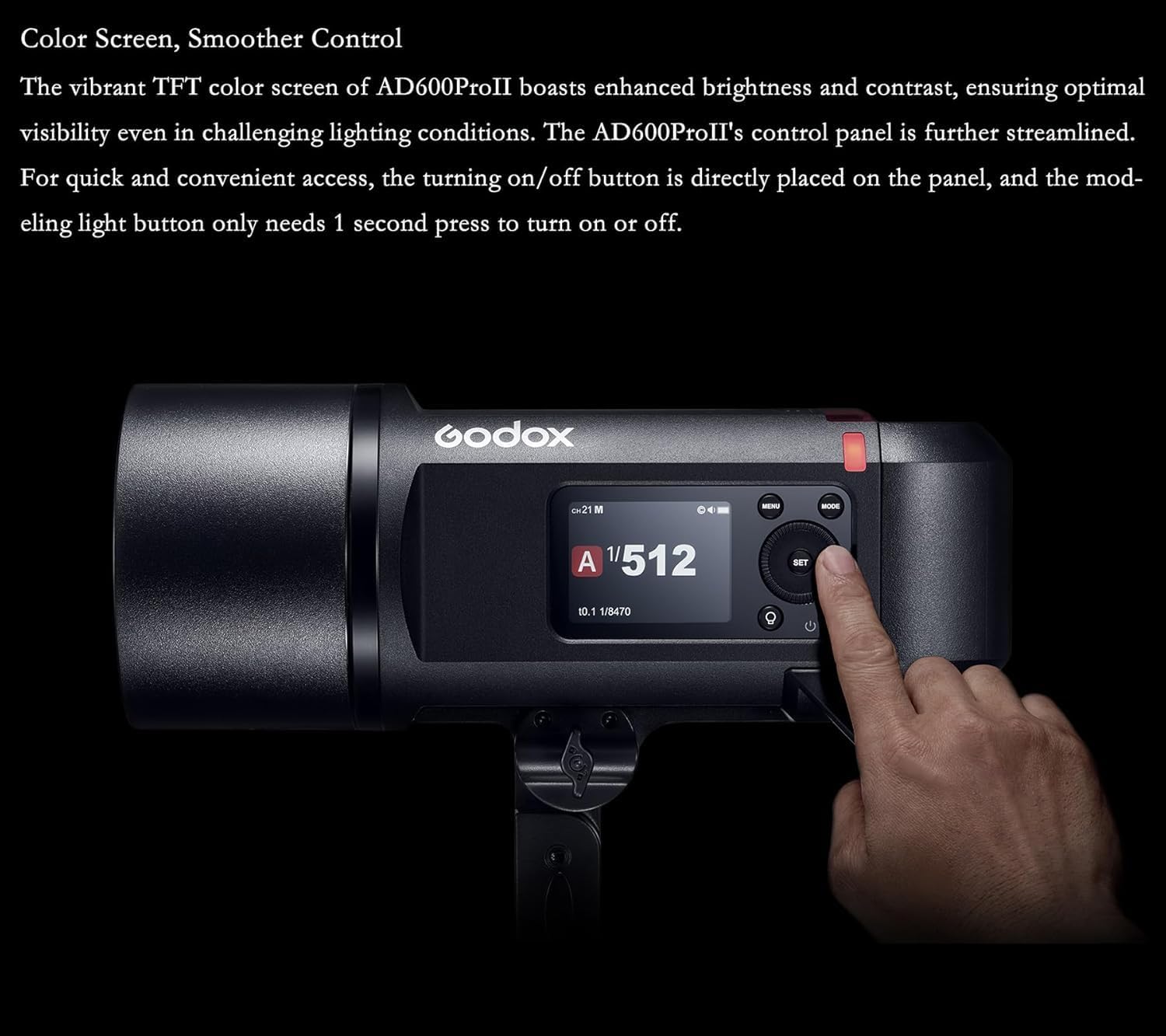
Figure 4.4: Examples of lighting versatility with adjustable power output.
4.5 40W Bi-color LED Modeling Light
The AD600 Pro II is equipped with a powerful 40W LED modeling lamp with bi-color CCT, adjustable from 2800K to 6000K. This versatile light can be used to previsualize lighting or as an alternative fill light for video recording.

Figure 4.5: Demonstrating the bi-color modeling light's capabilities.
4.6 Freeze Mode
The AD600 Pro II boasts an exceptional Freeze Mode that captures action effortlessly. With an ultra-short flash duration reaching 1/20400s and a shortest recycling time of 0.01s, it allows you to freeze fast-moving objects with unrivaled precision. This mode is ideal for capturing rapid sports, dance movements, or water splashes with crisp details.

Figure 4.6: Capturing motion with Freeze Mode.
5. Maintenance
5.1 Battery Care and Storage
Proper battery care is crucial for longevity and performance:
- Do not let lithium-ion batteries sit idle and unused for months.
- If you need to store the batteries for long periods, it is best to store them with a 50-70% charge.
- Try to use and recharge at least every month.
- Do not "top off" the batteries after a shoot unless you will be using them again the next day.
- As stated above, these batteries store best at less than a full charge.

Figure 5.1: Battery care and maintenance tips.
5.2 Cleaning
Use a soft, dry cloth to clean the flash unit. Avoid using harsh chemicals or abrasive materials that could damage the surface or internal components.
6. Troubleshooting
If you encounter issues with your Godox AD600 Pro II, please refer to the following common problems and solutions:
- Flash not firing: Ensure the battery is charged and properly installed. Check the trigger connection and settings. Verify the flash mode is correctly set.
- Wireless sync issues: Confirm that both the flash and trigger are set to the same group and channel. For X3 trigger, use the one-tap sync feature.
- Modeling light not working: Ensure the modeling light button has been pressed. Check power settings.
- Battery not holding charge: Refer to the battery care instructions in Section 5.1. If the battery has been idle, activate it as described in Section 3.1.
For further comparison and understanding of features, refer to the table below outlining differences between the AD600Pro and AD600Pro II:
| Upgraded Point | AD600Pro | AD600Pro II |
|---|---|---|
| Modeling Light (LED) | 38W | 40W, Bi-Color (Color Temperature range: 2800K-6000K) |
| Display Screen | Black & White | Color Screen (Enhanced brightness and contrast) |
| Power Output | 9 Steps (1/256-1/1) | 10 Steps (1/512-1/1 with 0.1 increment each step) |
| Sync Triggering Mode | 2.4G Wireless Sync | Wireless Sync & One-Tap Sync with X3 |
| Controllable Slave Groups | 5 Groups | 16 color groups with identification indicator |
| Flash Mode | Standard & Color | Standard & Color & Freeze Mode |
| Flash Duration | 1/220-1/10100s | Standard: 1/220s~1/11760s Color: 1/220s~1/7400s Freeze: 1/2570s~1/20400s |
Table 6.1: Comparison of Godox AD600Pro and AD600Pro II features.
7. Specifications
| Feature | Detail |
|---|---|
| Model Number | G-AD600Pro II Kit( with Carrying Case) |
| Package Dimensions | 13.66 x 12.24 x 7.68 inches |
| Item Weight | 12.27 pounds |
| Batteries | 1 Lithium Ion batteries required (included) |
| Compatible Mountings | Sony, Canon, Nikon, Fuji, Olympus etc DSLR Cameras |
| Camera Flash | Built-In |
| Flash Sync Speed | up to 1/8000 seconds |
| Included Components | Flash Body |
| Date First Available | September 16, 2024 |
| Manufacturer | GODOX Manufacturer |
8. Warranty and Support
For warranty information and technical support, please refer to the official GODOX website or contact your authorized dealer. Keep your purchase receipt as proof of purchase for any warranty claims.
For additional resources and product updates, visit the GODOX Store on Amazon.
Ask a question about this manual
Ask about setup, troubleshooting, compatibility, parts, safety, or missing instructions. Manuals+ will review the question and use this page’s manual context to help answer it.