
Orient Electric Aerosense BLDC (2134848712300)
Orient Electric Aerosense BLDC Ceiling Fan User Manual
Model: Aerosense BLDC (2134848712300)
Brand: Orient Electric
Introduction
This manual provides comprehensive instructions for the installation, operation, and maintenance of your Orient Electric Aerosense BLDC Ceiling Fan. Designed for energy efficiency and quiet operation, this fan features a Brushless Direct Current (BLDC) motor, remote control, and smart connectivity options. Please read this manual thoroughly before installation and use to ensure safe and optimal performance of your appliance.
Important Safety Instructions
To reduce the risk of fire, electric shock, or injury to persons, observe the following:
- Read all instructions before installing and operating the fan.
- Installation must be performed by a qualified electrician and in accordance with all local electrical codes.
- Ensure the mounting structure is strong enough to support the fan's weight (approximately 4.9 kg).
- Always disconnect power at the main circuit breaker before working on the fan.
- Do not operate the fan with a damaged cord or plug.
- Keep hands, feet, and other objects away from the rotating blades.
- This appliance is not intended for use by persons (including children) with reduced physical, sensory or mental capabilities, or lack of experience and knowledge, unless they have been given supervision or instruction concerning use of the appliance by a person responsible for their safety.
- Children should be supervised to ensure that they do not play with the appliance.
Package Contents
Carefully unpack your fan and check that you have received all the following items:
- Motor Unit
- A set of 3 Blades
- Down Rod
- Shackle Kit & A pair of canopies
- Remote with Pair of Batteries

Image: The main components of the Orient Electric Aerosense BLDC Ceiling Fan, including the motor, blades, down rod, and remote control.
Setup and Installation
Installation of the Orient Electric Aerosense BLDC Ceiling Fan should only be carried out by a certified electrician to ensure safety and compliance with electrical standards.
- Power Disconnection: Before beginning any installation, ensure the main power supply to the installation area is turned off at the circuit breaker.
- Mounting Bracket Installation: Securely attach the mounting bracket to a ceiling joist or a suitable support structure capable of holding the fan's weight. Use appropriate hardware for your ceiling type.
- Down Rod Assembly: Insert the down rod through the canopy and coupling, then secure it to the motor unit. Ensure all screws are tightened.
- Wiring Connection: Carefully connect the fan's electrical wires to the household wiring according to the wiring diagram provided in the separate installation guide. Ensure all connections are secure and insulated.
- Fan Hanging: Lift the fan assembly and hang it onto the mounting bracket.
- Blade Attachment: Attach the three fan blades to the motor hub using the provided screws. Ensure they are firmly secured.
- Canopy Adjustment: Slide the canopy up to cover the mounting bracket and wiring connections, then secure it in place.
- Final Check: Double-check all connections and ensure no wires are pinched. Restore power and test the fan's operation.

Image: An installed Orient Electric Aerosense BLDC Ceiling Fan, showcasing its sleek design and ash wood finish.
Operating Instructions
Your Orient Electric Aerosense BLDC Ceiling Fan offers multiple control options for convenience.
Remote Control Operation
The fan comes with a dedicated remote control for easy operation. Insert the provided batteries into the remote before use.
- Power On/Off: Press the Power button to turn the fan on or off.
- Speed Control: Use the Speed Up and Speed Down buttons to adjust the fan speed. The fan has multiple speed settings.
- Light Control (if applicable): If your model includes an underlight, use the Light button to turn the light on/off or adjust its brightness.
- Mode Selection: The Mode button may cycle through different operational modes (e.g., Sleep mode, Breeze mode).

Image: A visual representation of the fan's remote control and the smartphone application interface, highlighting voice control capabilities.
Smart Control (App & Voice)
The Aerosense BLDC fan is IoT enabled, allowing control via a smartphone app and voice commands through compatible smart home assistants (e.g., Alexa, Google Assistant).
- App Control: Download the "Orient Smart" application from your device's app store. Follow the in-app instructions to pair your fan. The app allows for comprehensive control, including speed adjustment, light control, scheduling, and mode selection.
- Voice Control: Once paired with the app, you can link your fan to Amazon Alexa or Google Assistant. Use voice commands such as "Alexa, turn on the fan" or "Hey Google, set fan speed to 3."
Two-Way Rotation Feature
This fan features a unique two-way rotation capability, optimizing comfort for different seasons:
- Counter-clockwise Rotation (Summer Mode): In this standard mode, the fan pushes air downwards, creating a cooling effect by generating a breeze.
- Clockwise Rotation (Winter Mode): In this mode, the fan draws air upwards, circulating warm air that collects near the ceiling. This helps to distribute heat more evenly throughout the room, providing a sensation of warmth without creating a direct draft. Refer to your remote or app for switching rotation direction.

Image: Diagram illustrating the two-way rotation feature of the fan, showing how clockwise rotation helps in winter by circulating warm air upwards, and counter-clockwise rotation creates a cooling effect in summer by pushing air downwards.
Maintenance
Regular maintenance ensures the longevity and efficient operation of your fan.
- Cleaning: Always disconnect power before cleaning. Use a soft, damp cloth to wipe down the fan blades and motor housing. Do not use abrasive cleaners or solvents, as they may damage the finish. The ABS blades with PU finish are designed for easy cleaning.
- Blade Inspection: Periodically check the blades for any signs of damage or warping. Ensure they are securely attached.
- Tighten Screws: Over time, screws may loosen. Periodically check and tighten all screws on the fan assembly, including those on the down rod and mounting bracket.
- No Lubrication Required: The BLDC motor and double ball bearings are designed for maintenance-free operation and do not require lubrication.

Image: Close-up view of the fan's aerodynamically designed blades, emphasizing their smooth finish and ease of cleaning.
Troubleshooting
If you encounter issues with your fan, refer to the following common problems and solutions:
| Problem | Possible Cause | Solution |
|---|---|---|
| Fan does not start | No power supply; Loose wiring; Remote batteries dead. | Check circuit breaker; Ensure all wiring connections are secure (consult electrician); Replace remote batteries. |
| Fan makes excessive noise | Loose screws; Unbalanced blades; Motor issue. | Tighten all screws; Check blades for warping or damage and ensure they are balanced; If noise persists, contact customer support. |
| Remote control not working | Dead batteries; Remote not paired; Obstruction between remote and fan receiver. | Replace batteries; Refer to pairing instructions in the full manual (if applicable); Ensure clear line of sight. |
| Fan wobbles | Loose mounting; Unbalanced blades; Bent down rod. | Ensure mounting bracket is securely fastened; Check blade balance; Inspect down rod for damage. |
If the problem persists after attempting these solutions, please contact Orient Electric customer support.
Specifications
| Feature | Detail |
|---|---|
| Brand | Orient Electric |
| Model Name | Aerosense BLDC |
| Item Model Number | 2134848712300 |
| Colour | Ash Wood |
| Electric Fan Design | Ceiling Fan |
| Power Source | Corded Electric |
| Product Dimensions | 60.2D x 34.5W x 23.8H Centimeters |
| Special Features | App Operable, BLDC Motor, IoT Enabled, Inverter Compatible, Remote Controlled |
| Recommended Uses | Air Circulation, Cooling, Drying |
| Wattage | 40 Watts |
| Number of Blades | 3 |
| Air Flow Capacity | 245 Cubic Metres per Minute |
| Blade Length | 1200 Millimetres |
| Speed | 280 RPM |
| Item Weight | 4.9 kg (4900 Grams) |
| Indoor/Outdoor Usage | Indoor |
| Control Method | Voice, Remote, App |
| Country of Origin | India |
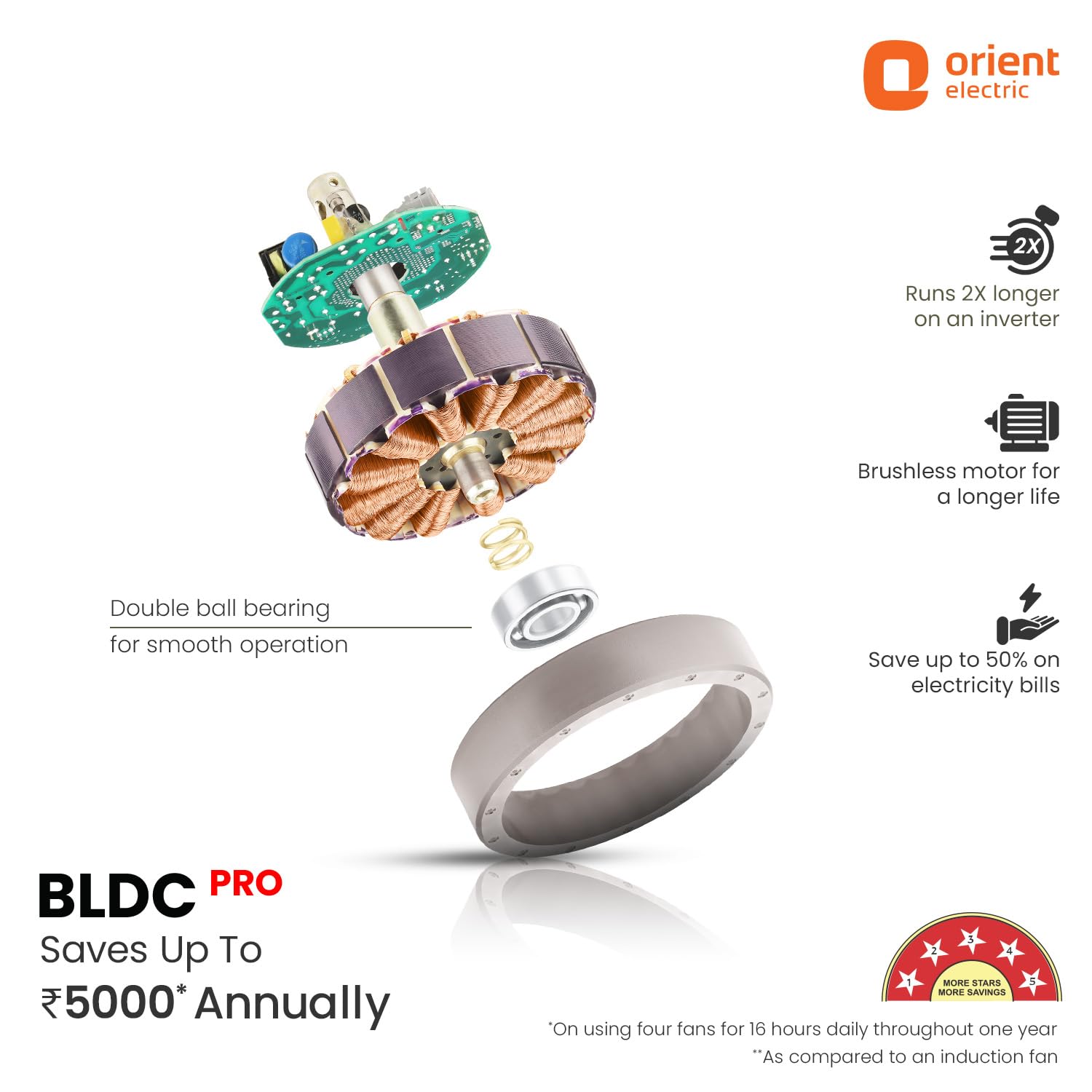
Image: An exploded view of the BLDC motor, highlighting its brushless design and double ball bearings for smooth, energy-efficient operation.
Warranty and Support
Your Orient Electric Aerosense BLDC Ceiling Fan comes with a comprehensive warranty to ensure peace of mind.
- Warranty Period: This product is covered by a 5-year warranty provided by Orient Electric. Please refer to your purchase documentation for specific terms and conditions.
- Warranty Claims: In case of any manufacturing defects or issues covered under warranty, please contact Orient Electric customer service.
- Customer Support: For technical assistance, troubleshooting, or service requests, please reach out to Orient Electric customer support. Contact details can typically be found on the official Orient Electric website or on your product packaging.
For the most up-to-date contact information and service center locations, please visit the official Orient Electric website: www.orientelectric.com
Ask a question about this manual
Ask about setup, troubleshooting, compatibility, parts, safety, or missing instructions. Manuals+ will review the question and use this page’s manual context to help answer it.