
Intex Roar 4701
Intex 4.1 Channel Roar 4701 Bluetooth Home Theater System
User Manual

The Intex 4.1 Channel Roar 4701 Home Theater System, featuring a central subwoofer unit, four satellite speakers, and a remote control.
Introduction
This manual provides essential information for the safe and efficient operation of your Intex 4.1 Channel Roar 4701 Bluetooth Home Theater System. Please read this manual thoroughly before using the product and retain it for future reference.
Safety Information
- Ensure the power supply matches the requirements specified on the product label.
- Do not expose the unit to rain, moisture, or extreme temperatures.
- Avoid placing the unit near heat sources or in direct sunlight.
- Do not block ventilation openings.
- Keep the unit away from strong magnetic fields.
- Disconnect the power cord during lightning storms or when unused for long periods.
- Refer all servicing to qualified personnel.
Package Contents
Verify that all items listed below are included in your package:
- 1N Woofer (Subwoofer Unit)
- 4N Satellite Speakers
- 1N Audio Cable
- 1N Remote Control
- 1N QR Code Manual Card (for digital manual access)
Product Overview
The Intex 4.1 Channel Roar 4701 system consists of a main subwoofer unit and four satellite speakers, designed to deliver immersive audio. The main unit houses the controls and various input ports.

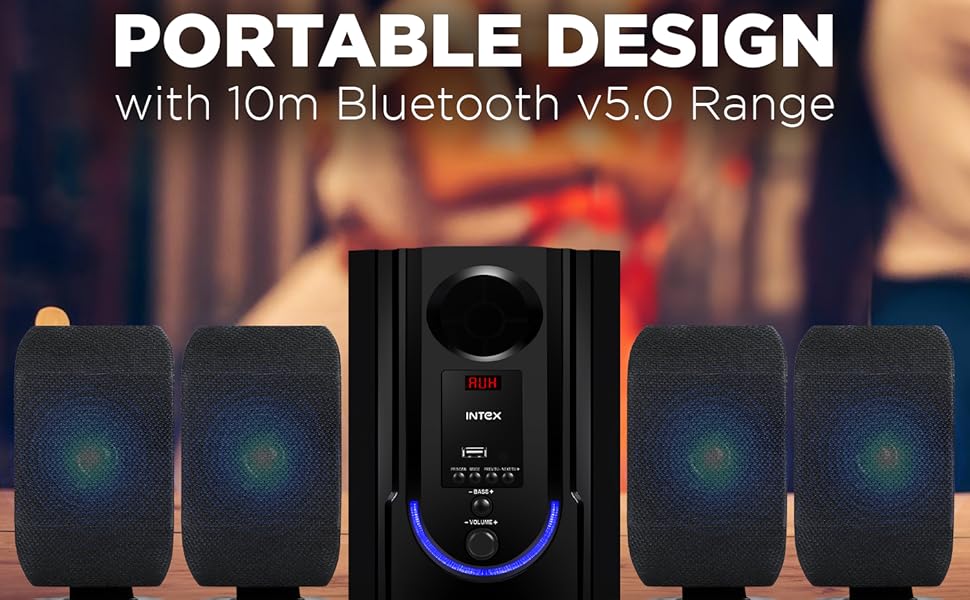
Front view of the Intex 4.1 Channel Roar 4701 system, showcasing the subwoofer and four satellite speakers.

Rear view of the subwoofer unit, illustrating the various audio input and speaker output ports.
Setup
1. Unpacking
Carefully remove all components from the packaging. Retain the packaging materials for future transport or storage.
2. Placement
- Place the subwoofer on a stable, flat surface, preferably on the floor for optimal bass response.
- Position the four satellite speakers around your listening area for a surround sound experience. Ensure they are equidistant from the listener for balanced audio.
- Avoid placing speakers directly against walls or in corners, which can distort sound.
3. Connections
Before making any connections, ensure the system is powered off and unplugged from the main power outlet.
- Satellite Speaker Connection: Connect the four satellite speakers to the corresponding output ports on the rear of the subwoofer unit. Ensure correct polarity (positive to positive, negative to negative) if applicable.
- Audio Input Connection:
- AUX: Use the provided audio cable to connect your device (e.g., smartphone, PC) to the AUX input port on the subwoofer.
- USB: Insert a USB drive into the USB port for media playback.
- HDMI: Connect an HDMI cable from your TV or compatible device to the HDMI input port on the subwoofer.
- FM Antenna: Connect the FM antenna (if included) to the FM antenna port for radio reception.
- Power Connection: Once all audio connections are made, plug the power cord into a suitable AC power outlet.

Detailed view of the main unit's control panel, highlighting the multiple connectivity options including Bluetooth, USB, AUX, and FM radio.
Operating Instructions
1. Power On/Off
Press the Power button on the front panel of the subwoofer or on the remote control to turn the system on or off.
2. Mode Selection
Press the 'MODE' button on the front panel or remote control to cycle through available input modes: Bluetooth (BT), USB, AUX, HDMI, and FM.
3. Bluetooth Pairing
- Switch the system to Bluetooth mode. The LED display will show 'BT' and an audible prompt may indicate pairing mode.
- On your mobile device, enable Bluetooth and search for available devices.
- Select 'Intex Roar 4701' (or similar name) from the list.
- Once paired, the system will indicate a successful connection, and you can begin playing audio from your device.
4. USB Playback
Insert a USB flash drive containing MP3/WMA audio files into the USB port. The system will automatically switch to USB mode and begin playback. Use the remote or front panel controls to navigate tracks.
5. AUX/HDMI Input
Connect your audio source via the AUX or HDMI port. Switch the system to the corresponding input mode. Audio from your connected device will now play through the speakers.
6. FM Radio
- Switch the system to FM mode.
- Press the 'SCAN' button on the remote or front panel to automatically scan and save available FM stations.
- Use the 'PREV' and 'NEXT' buttons to navigate between saved stations.
7. Remote Control Functions
The included remote control provides convenient access to all system functions.

The remote control for the Intex 4.1 Channel Roar 4701 system, showing various buttons for power, mode, volume, track control, and bass/treble adjustments.
- Power: Turns the system on/off.
- Mode: Switches between input sources (BT, USB, AUX, HDMI, FM).
- Volume +/-: Adjusts the master volume.
- Bass +/-: Adjusts the bass level.
- Treble +/-: Adjusts the treble level.
- Play/Pause: Controls media playback.
- Previous/Next: Skips tracks or navigates FM stations.
- Mute: Mutes/unmutes audio.
Maintenance
Cleaning
Wipe the unit with a soft, dry cloth. Do not use abrasive cleaners, waxes, or solvents. Ensure the unit is unplugged before cleaning.
Storage
If storing the system for an extended period, unplug it from the power outlet and store it in a cool, dry place, away from direct sunlight and extreme temperatures.
Troubleshooting
| Problem | Possible Cause | Solution |
|---|---|---|
| No power | Power cord not connected; Power outlet faulty; System off. | Check power cord connection; Test outlet with another device; Press power button. |
| No sound | Volume too low; Mute activated; Incorrect input mode; Loose audio cables. | Increase volume; Deactivate mute; Select correct input mode; Reconnect audio cables securely. |
| Bluetooth not connecting | System not in BT mode; Device too far; Device already connected to another speaker. | Switch to BT mode; Move device closer; Disconnect from other devices and try again. |
| Remote control not working | Batteries depleted; Obstruction between remote and unit; Remote not pointed correctly. | Replace batteries; Remove obstructions; Point remote directly at the main unit's sensor. |
| Distorted sound | Volume too high; Poor audio source quality; Loose speaker connections. | Reduce volume; Use a higher quality audio source; Check all speaker connections. |
Specifications
Visual representation of key technical specifications for the Intex 4.1 Channel Roar 4701 system.
| Feature | Detail |
|---|---|
| Model Name | 4.1 ROAR 4701 (301 PRO) |
| Surround Sound Channel Configuration | 4.1 |
| Speaker Type | Multimedia |
| Speaker Maximum Output Power | 70 Watts |
| Subwoofer Diameter | 4.5 Inches |
| Satellite Speaker Size | 3 Inches (x4) |
| Connectivity Technology | Auxiliary, Bluetooth, HDMI, USB |
| Wireless Communication Technology | Bluetooth |
| Bluetooth Range | 10 Metres |
| Control Method | Touch, Remote Control |
| Product Dimensions | 44.2D x 18.2W x 27H Centimeters |
| Item Weight | 3.2 kg |
| Power Supply | AC 110V - 265V / 50Hz |
| Manufacturer | Intex Technologies India Limited |
| Country of Origin | India |
Warranty and Support
For warranty information and customer support, please refer to the documentation provided with your purchase or visit the official Intex website. Keep your purchase receipt as proof of purchase for warranty claims.
Related documentsRoar 4701


Ask a question about this manual
Ask about setup, troubleshooting, compatibility, parts, safety, or missing instructions. Manuals+ will review the question and use this page’s manual context to help answer it.