1. Product Overview
This manual provides instructions for the PZL RC-PWS III Universal Replacement Remote Control. This remote is designed to replace your original remote for various Bose Cinemate and Solo TV Sound Systems, offering universal control capabilities for other devices as well.

Image 1.1: Front and back view of the PZL RC-PWS III Universal Replacement Remote Control. The remote features a sleek, ergonomic design with clearly labeled buttons for various functions.

Image 1.2: Key features of the remote control, including its ABS material construction, soft plastic buttons for comfortable use, and the 'no setup required' functionality for certain Bose systems.
2. Compatibility
The PZL RC-PWS III remote control is compatible with a range of Bose audio systems, including:
- Bose Cinemate I IIGS 1SR
- Bose Solo5, Solo 10, & Solo 15
- Bose Solo TV Sound Systems
- Bose CineMate Home Theater Speaker Systems
Please ensure your original remote model matches the compatible design to guarantee full functionality.

Image 2.1: A visual comparison of different remote control models, with the PZL RC-PWS III highlighted to assist in identifying the correct replacement.

Image 2.2: The remote control shown in context with a television, illustrating its intended use with compatible TV sound systems.
3. Initial Setup
3.1 Battery Installation
The remote control requires two 1.5V AAA batteries (not included). To install:
- Open the battery compartment cover on the back of the remote.
- Insert two AAA batteries, ensuring correct polarity (+ and -).
- Close the battery compartment cover securely.
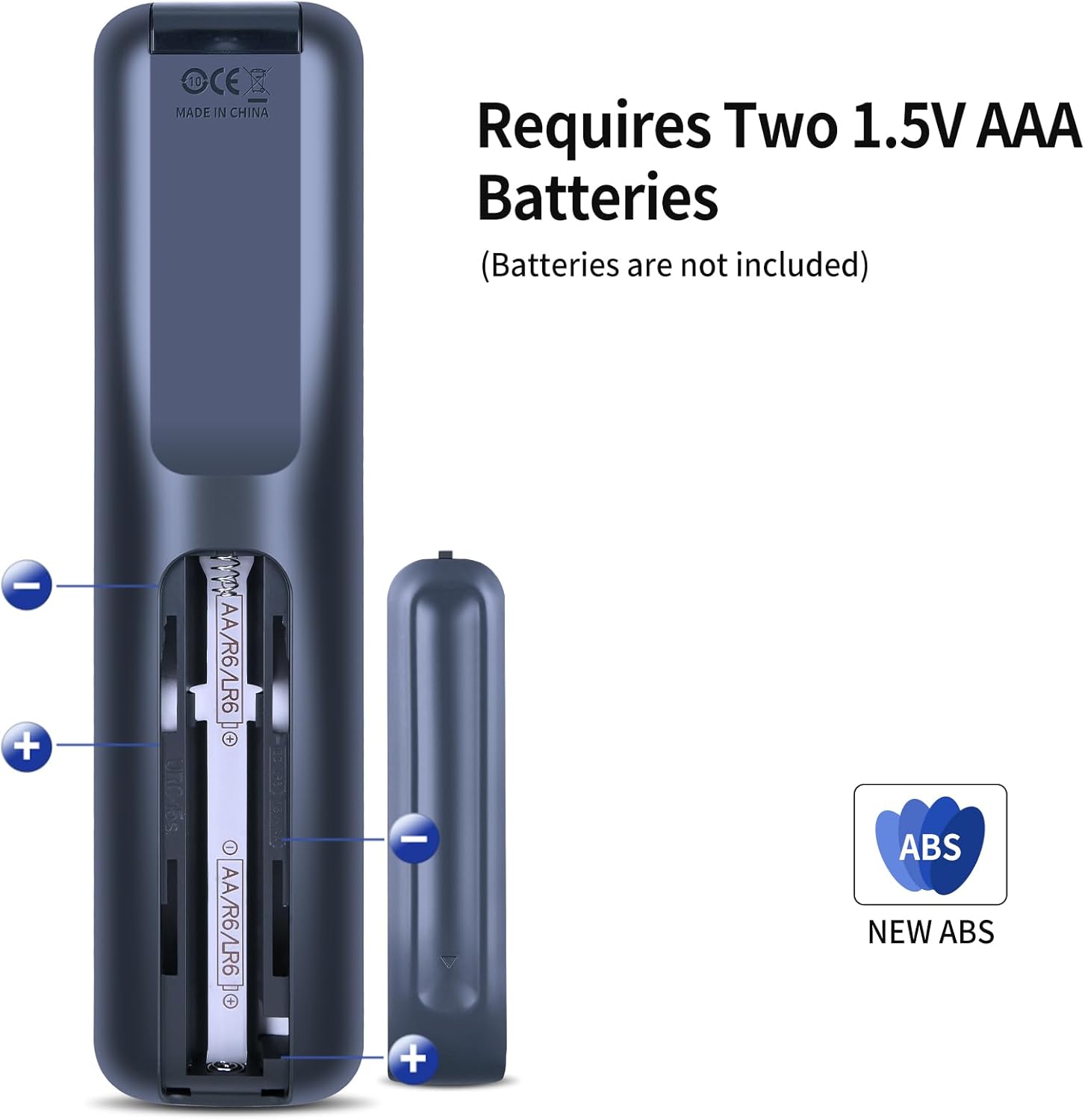
Image 3.1: View of the remote's battery compartment, illustrating the correct placement for two AAA batteries.
3.2 Pairing with Bose Systems
For many compatible Bose systems, this replacement remote control may function directly without any additional programming. Simply install the batteries and test the basic functions with your Bose device.
3.3 Programming for Other Devices (Universal Functionality)
To control non-Bose devices (e.g., TV, Cable/Satellite box, DVD/Blu-ray player, Game system), follow these steps to program the remote:
- Power on your source device (e.g., TV, DVD player).
- Identify the appropriate source button on the remote (e.g., TV, CBL-SAT, BD-DVD, GAME, AUX).
- Press and hold the corresponding source button until all six source buttons illuminate, then release it.
- Input the 4-digit code for your source device's brand. Refer to the Universal Device Codes section below. If all six buttons flash three times, the code is invalid; repeat steps 3 and 4 with a different code.
- Press the Volume Up (+) button.
- Test basic functions:
- For TV: Press the channel button, then the menu button.
- For Cable/Satellite box, DVD or Blu-ray Disc player: Press the Guide button.
- For Game system: Press left or right to navigate the menu.
- If your source device responds to the basic functions, press the EXIT button to save the settings.
3.4 Universal Device Codes
Use the following codes for programming non-Bose devices. Due to image resolution, please refer to the physical instruction sheet included with your remote for the clearest view of these codes, or contact customer support if needed.

Image 3.2: Universal device codes for Television and Cable/Satellite boxes. Find the brand of your device and use the corresponding 4-digit code for programming.

Image 3.3: Universal device codes for DVD players, AUX devices, and Game systems. Locate your device's brand and use the associated 4-digit code for programming.
4. Operating the Remote Control
4.1 Button Functions
The remote control features a standard layout for intuitive operation:
- Source Buttons (CBL-SAT, BD-DVD, GAME, TV, AUX): Select the device you wish to control.
- Power Button: Turns the selected device on or off.
- Navigation Pad (MENU, OK, GUIDE, INFO, EXIT): Used for menu navigation and selection.
- Volume Control (+/-): Adjusts the volume of the active audio device.
- Channel Control (CH +/-): Changes channels on TV or cable/satellite boxes.
- Playback Controls (Play, Pause, Stop, Rewind, Fast Forward, Skip): For controlling media playback on DVD/Blu-ray players or other media devices.
- Numeric Keypad (0-9, ENTER): For direct channel input or other numeric functions.
4.2 Basic Operation
To operate a device, first press the corresponding source button (e.g., TV for your television). Once the source is selected, the remote's buttons will control that specific device. For example, pressing the Volume Up button will adjust the TV's volume if 'TV' is selected.
5. Care and Maintenance
To ensure the longevity and optimal performance of your remote control:
- Keep the remote clean by wiping it with a soft, dry cloth. Avoid using liquid cleaners.
- Do not expose the remote to extreme temperatures, humidity, or direct sunlight.
- Avoid dropping the remote or subjecting it to strong impacts.
5.1 Battery Replacement
Replace batteries when the remote's response becomes sluggish or stops working. Always replace both batteries at the same time with new AAA batteries. Dispose of used batteries responsibly according to local regulations.
6. Troubleshooting Guide
If you encounter issues with your remote control, refer to the following common solutions:
- Remote not responding:
- Check if the batteries are correctly installed and have sufficient charge. Replace if necessary.
- Ensure there are no obstructions between the remote and the device's sensor.
- Verify that the correct source button (e.g., TV, BD-DVD) is selected for the device you are trying to control.
- Device not responding after programming:
- Re-attempt the programming steps (Section 3.3) using a different code from the Universal Device Codes list for your device's brand.
- If all six source buttons flash three times during programming, the entered code is invalid.
- Some functions not working:
- While the remote is universal, some advanced or unique functions of your original device may not be supported.
- Ensure the remote is pointed directly at the device.
7. Product Specifications
| Model Number | RC-PWS |
| Brand | PZL |
| Power Source | 2 x 1.5V AAA Batteries (not included) |
| Item Weight | 5.3 ounces |
| Color | Black |
| Max Number of Supported Devices | 1 (per programmed source button) |
| Compatible Devices | Bose Stereo Systems, various TVs, DVD/Blu-ray players, Cable/Satellite boxes, Game systems |

Image 7.1: Detailed dimensions of the remote control for reference.
8. Customer Support
For any questions regarding your PZL RC-PWS III Universal Replacement Remote Control, including compatibility or programming assistance, please contact our customer service team. We are committed to providing professional after-sales support and will respond to inquiries within 12 hours on weekdays.
Please refer to your purchase documentation or the seller's contact information for specific support channels.


