1. Introduction
This manual provides essential instructions for the proper use and maintenance of your realme P2 Pro 5G smartphone. Please read this manual thoroughly before using your device to ensure optimal performance and safety.
1.1 Product Overview
The realme P2 Pro 5G is a high-performance smartphone designed for advanced mobile communication and entertainment. It features a 6.7-inch 120Hz curved AMOLED display, powered by a Snapdragon 7s Gen 2 processor. The device includes a 50MP main camera with Optical Image Stabilization (OIS), an 8MP ultrawide lens, and a 32MP front camera. A 5200mAh battery supports 80W fast charging, complemented by a Stainless Steel Vapor Cooling system for efficient thermal management.
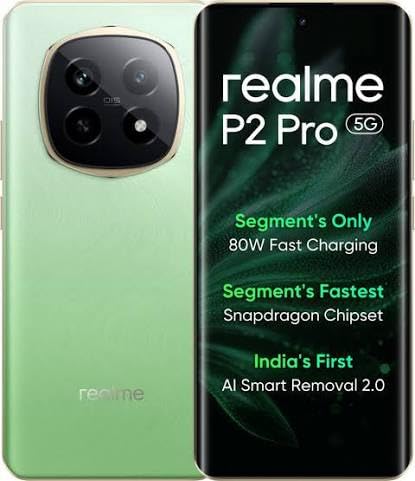
Figure 1.1: realme P2 Pro 5G Smartphone. This image displays the front and back of the realme P2 Pro 5G in Parrot Green. The front shows the curved display with a punch-hole camera, while the back highlights the large, circular camera module containing multiple lenses and the realme branding.
1.2 Package Contents
Verify that all items are present in your product package. If any item is missing or damaged, contact your retailer.
- realme P2 Pro 5G Smartphone
- 80W SuperVOOC Charger
- USB Type-C Cable
- SIM Ejector Tool
- Protective Case
- Quick Start Guide
- Safety Information and Warranty Card
2. Setup
2.1 SIM Card Installation
- Locate the SIM card tray on the side of your device.
- Insert the SIM ejector tool into the small hole next to the tray and press gently until the tray pops out.
- Place your Nano-SIM card(s) into the tray with the gold contacts facing down. Ensure proper orientation.
- Carefully reinsert the SIM card tray into the phone.
2.2 Initial Charging and Power On
- Connect the USB Type-C cable to the phone's charging port and the 80W SuperVOOC charger.
- Plug the charger into a power outlet. The phone will begin charging.
- To power on, press and hold the Power button (located on the right side) until the realme logo appears.
- Follow the on-screen instructions to complete the initial setup, including language selection, Wi-Fi connection, and Google account setup.
3. Operating Your Device
3.1 Basic Navigation
- Touch Gestures: Tap to select, swipe to scroll, pinch to zoom.
- Home Screen: Access apps, widgets, and notifications.
- Status Bar: Displays notifications, time, battery status, and signal strength. Swipe down to access Quick Settings.
- In-Display Fingerprint Sensor: Unlock your device securely by placing your registered finger on the designated area of the screen.
3.2 Calls and Messaging
- Making Calls: Open the Phone app, enter the number, and tap the call icon.
- Sending Messages: Open the Messages app, tap the new message icon, enter recipient and message, then send.
3.3 Camera Functions
Your realme P2 Pro 5G features a versatile camera system.
- Main Camera: 50MP with OIS for stable, high-resolution photos.
- Ultrawide Camera: 8MP for capturing broader scenes.
- Front Camera: 32MP for clear selfies and video calls.
- Modes: Explore various modes like Portrait, Night, Pro, and Panorama within the Camera app.
3.4 Connectivity
- Wi-Fi: Connect to wireless networks for internet access. Go to Settings > Wi-Fi.
- Bluetooth: Pair with wireless headphones, speakers, and other devices. Go to Settings > Bluetooth.
- 5G Network: Utilize high-speed 5G connectivity where available. Ensure your SIM card and plan support 5G.
- USB Type-C: For charging, data transfer, and connecting accessories.
4. Maintenance
4.1 Battery Care
- Use only the official 80W SuperVOOC charger and cable provided with your device.
- Avoid exposing the phone to extreme temperatures, as this can degrade battery life.
- For optimal battery longevity, avoid fully discharging the battery frequently.
4.2 Cleaning Your Device
- Gently wipe the screen and body with a soft, lint-free cloth.
- Avoid using harsh chemicals, abrasive cleaners, or aerosol sprays.
- Ensure no liquid enters openings such as the charging port or speaker grilles.
4.3 Software Updates
Regularly check for and install software updates to enhance performance, security, and introduce new features. Go to Settings > About device > Up to date (or similar path depending on OS version).
5. Troubleshooting
If you encounter issues with your realme P2 Pro 5G, refer to the common solutions below.
| Problem | Possible Solution |
|---|---|
| Device not powering on | Ensure the battery is charged. Connect to the charger for at least 10 minutes, then try powering on again. |
| Apps crashing or freezing | Clear the app's cache (Settings > Apps > [App Name] > Storage > Clear cache). If the issue persists, restart the device. |
| Poor battery life | Check background app usage (Settings > Battery). Reduce screen brightness, disable unnecessary features like GPS or Bluetooth when not in use. |
| Network connectivity issues | Toggle Airplane Mode on and off. Restart the device. Check SIM card insertion. Reset network settings (Settings > System > Reset options > Reset Wi-Fi, mobile & Bluetooth). |
| Fingerprint sensor not working | Ensure your finger and the screen are clean and dry. Re-register your fingerprints if necessary (Settings > Security & privacy > Fingerprint unlock). |
For further assistance, please contact realme customer support.
6. Specifications
Detailed technical specifications for the realme P2 Pro 5G (Model: RMX3987).
| Feature | Detail |
|---|---|
| Model Number | RMX3987 |
| Operating System | Android 14 |
| Processor | Snapdragon 7s Gen 2 (CPU Speed: 2.4 GHz) |
| RAM | 12 GB (Up to 24GB Dynamic RAM) |
| Storage | 256GB (as per product title) |
| Display | 6.7-inch Curved AMOLED, 2412 x 1080 Resolution |
| Main Camera | 50 MP (Sony LYT-600 OIS Camera) |
| Front Camera | 32 MP |
| Battery Capacity | 5200 mAh (1 Lithium Ion battery included) |
| Charging | 80W Fast Charging |
| Connectivity | 5G, Bluetooth, USB, Wi-Fi, GPS |
| Special Features | In-display fingerprint sensor, 4500 mm² VC Cooling System |
| Dimensions (LxWxH) | 16.13 x 7.39 x 0.82 cm |
| Weight | 510 g |
| Color | Parrot Green |
| Manufacturer | BBK Electronics |
7. Safety Information
- Do not attempt to disassemble or modify the device.
- Keep the device away from water and excessive moisture.
- Avoid exposing the device to direct sunlight or high temperatures for extended periods.
- Use only realme-approved accessories.
- Dispose of the device and its battery responsibly according to local regulations.
- Do not use the device while driving or operating heavy machinery.
8. Warranty and Support
Your realme P2 Pro 5G is covered by a limited warranty. Please refer to the warranty card included in your package for specific terms and conditions.
For technical support, service, or warranty claims, please visit the official realme support website or contact their customer service.
- realme Official Website: www.realme.com
- Customer Service: Refer to your region-specific realme support contact information.


