Introduction
This document provides essential instructions for the setup, operation, maintenance, and troubleshooting of your new Generic replacement remote control. This remote is designed to be compatible with various portable air conditioner models, including Nedis ACMB1WT7, Fiogohumi BDAJ1000 A019BDJ A030BDJ, and Jymipa JHS-A019-07KR2/J JHS-A030-09KR2/J. Please ensure your original remote control matches the appearance of this replacement remote for full compatibility.

Image 1: Front view of the replacement remote control. It is white with a grey panel containing several white buttons. The buttons include a fan icon, up arrow, clock icon, moon icon, down arrow, another clock icon, and an oval power button.
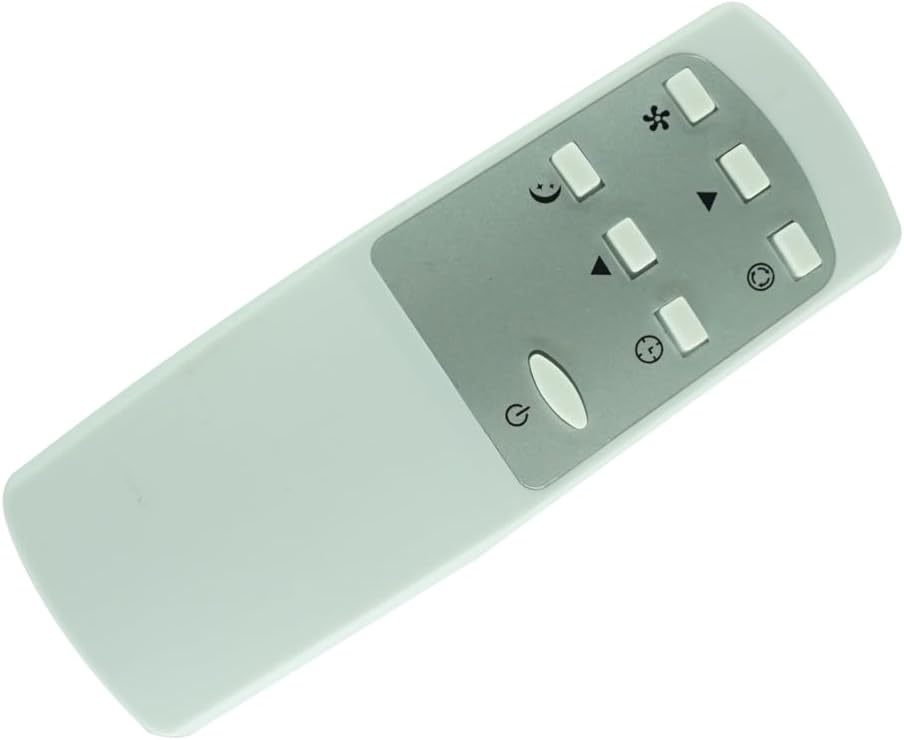
Image 2: Angled view of the replacement remote control, showing its ergonomic design and button layout from a different perspective.
Setup
Battery Installation
- Locate the battery compartment cover on the back of the remote control.
- Slide the cover downwards or in the direction indicated by an arrow to open it.
- Insert two (2) AAA batteries, ensuring the positive (+) and negative (-) terminals align correctly with the markings inside the compartment.
- Slide the battery compartment cover back into place until it clicks securely.
Note: This is an infrared (IR) replacement remote control. No pairing or complex setup procedures are typically required. Ensure there are no obstructions between the remote and the air conditioner's IR receiver.
Operating Instructions
Point the remote control directly at the air conditioner's infrared receiver. Press the desired button to control your unit. Below is a description of common button functions:
- Power Button (⏻)
- Turns the air conditioner ON or OFF.
- Fan Mode Button (⚙)
- Cycles through different fan speeds or fan modes (e.g., Low, Medium, High, Auto).
- Temperature Up Button (▲)
- Increases the set temperature or adjusts other settings upwards.
- Temperature Down Button (▼)
- Decreases the set temperature or adjusts other settings downwards.
- Sleep Mode Button (☽)
- Activates or deactivates the sleep mode, which often adjusts temperature and fan speed for comfortable sleep.
- Timer On/Off Button (⏱)
- Used to activate or cancel the timer function.
- Timer Setting Button (⏲)
- Used to set the desired time for the air conditioner to turn ON or OFF automatically.
For specific functions not detailed here, please refer to your air conditioner's original user manual, as button functionalities can vary slightly between models.
Maintenance
Battery Replacement
Replace batteries when the remote's range decreases or if the air conditioner does not respond to commands. Always replace both batteries simultaneously with new AAA batteries of the same type. Do not mix old and new batteries, or different types of batteries.
Cleaning
Wipe the remote control with a soft, dry cloth. For stubborn dirt, a slightly damp cloth can be used, followed by immediate drying. Do not use abrasive cleaners, solvents, or chemical sprays, as these can damage the remote's surface or internal components.
Troubleshooting
- Remote not responding:
- Check if the batteries are inserted correctly with the correct polarity.
- Replace old batteries with new ones.
- Ensure there is a clear line of sight between the remote's IR emitter and the air conditioner's receiver. Remove any obstructions.
- Confirm that the remote is compatible with your specific air conditioner model. This remote is a direct replacement for the models listed in the title.
- Limited functionality:
- While this remote is a replacement, some advanced or unique functions of your original air conditioner remote might not be fully supported if they are not standard IR commands.
- Verify that your air conditioner model is explicitly listed as compatible. If your original remote differs significantly in appearance, full functionality may not be guaranteed.
Specifications
| Product Type | Replacement Remote Control |
| Compatible Devices | Portable AC Air Conditioners (Specific models: Nedis ACMB1WT7, Fiogohumi BDAJ1000 A019BDJ A030BDJ, Jymipa JHS-A019-07KR2/J JHS-A030-09KR2/J) |
| Power Source | 2 x AAA Batteries (not included) |
| Color | Grey |
| Max Number of Supported Devices | 1 |
| Special Feature | Ergonomic design, Infrared (IR) technology |
Warranty and Support
Specific warranty information for this replacement remote control is not provided in the product details. For any inquiries regarding warranty, returns, or technical support, please contact the seller directly through the platform where the purchase was made. It is recommended to message the seller freely for any doubts or issues encountered with the remote control.


