1. Introduction
Thank you for choosing the ONBRILL 60" Sideboard Buffet Cabinet. This versatile piece of furniture is designed to enhance your living space with its curved design and ample storage. This manual provides detailed instructions for safe assembly, proper use, and effective maintenance to ensure long-lasting enjoyment of your cabinet.
2. Safety Information
- Heavy Item Warning: This cabinet is a heavy item. Always use proper lifting techniques and seek assistance from another person to avoid injury during assembly and relocation.
- Anti-Tipping Device: For enhanced stability and to prevent accidental tipping, especially in households with children, utilize the provided wall connection fixer. Securely attach the cabinet to a wall stud.
- Curved Edges: The cabinet features curved edges designed to minimize the risk of accidental bumps. However, always exercise caution around furniture.
- Assembly: Follow all assembly instructions carefully. Do not skip steps or use incorrect hardware.
- Weight Capacity: Do not overload shelves. Distribute weight evenly.
- Cleaning: Use only recommended cleaning agents to avoid damaging the finish.
3. Package Contents
Before beginning assembly, ensure all parts and hardware are present and undamaged. Refer to the included parts list and hardware list for verification.
Parts List:
- Various engineered wood panels (numbered 1-16)
Hardware List:
- A: Cam Lock (x27)
- B: Cam Bolt (x27)
- C: Dowel Pin (x22)
- D: Screw (x2)
- E: Shelf Pin (x8)
- F: Hinge (x4)
- G: Hinge (x4)
- H: Screw (x8)
- I: Handle (x4)
- J: Screw (x8)
- K: Back Panel Fastener (x18)
- L: Screw (x18)
- M: Foot Pad (x14)
- N: Wall Connection Fixer (x2)
- O: Allen Wrench (x1)
4. Assembly Instructions
Assembly typically requires two people. Please follow the steps below carefully. A detailed installation video is also available for visual guidance.
Official Installation Video:
Video Description: This official ONBRILL installation video provides a step-by-step guide for assembling the 60" Walnut Sideboard Buffet Cabinet. It covers all major assembly stages from attaching cam bolts and dowel pins to installing hinges and back panels.
Step-by-Step Guide:
- Prepare Base Components: Attach cam bolts (B) to the designated holes on the base panels (e.g., parts 10, 14, 15, 16).
- Assemble Side Panels: Connect the side panels (e.g., parts 1, 2, 3, 4, 5, 6) using dowel pins (C) and cam locks (A). Ensure all connections are secure.
- Install Center Support: Secure the center support panel (e.g., part 9) into the main frame using appropriate hardware.
- Attach Back Panels: Slide the back panels (e.g., parts 11, 12, 13) into the grooves and secure them with back panel fasteners (K) and screws (L).
- Insert Adjustable Shelves: Place shelf pins (E) into the desired height holes within the cabinet compartments. Carefully slide the adjustable shelves into place.
- Attach Door Hinges: Secure hinges (F, G) to the cabinet doors using screws (H).
- Mount Doors: Attach the doors to the cabinet frame by aligning the hinges and securing them with screws (H). Adjust hinges as needed for proper door alignment.
- Install Handles: Attach the handles (I) to the cabinet doors using screws (J).
- Apply Foot Pads: Attach foot pads (M) to the bottom of the cabinet for stability and floor protection.
- Secure with Wall Connection Fixer: Attach the wall connection fixer (N) to the back of the cabinet and to a wall stud using screws (D) to prevent tipping.

Image Description: An illustration detailing the dimensions of the ONBRILL 60" Sideboard Buffet Cabinet, showing its length (60"), width (15.7"), and height (31.1"), along with internal measurements and a 300 lbs weight capacity.
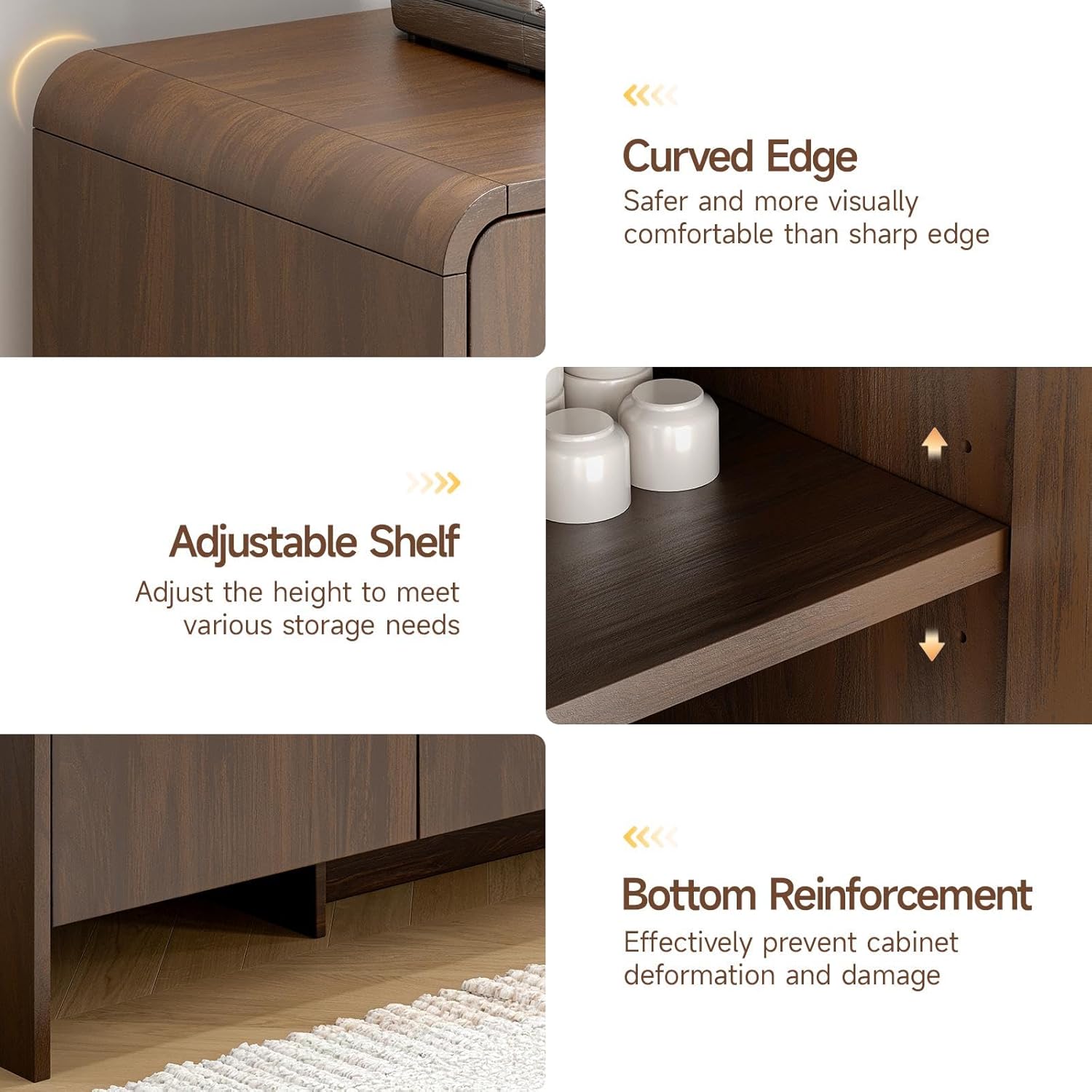
Image Description: A composite image highlighting key features of the cabinet: a close-up of the curved edge for safety and aesthetics, an adjustable shelf mechanism, bottom reinforcement for durability, and a wall connection fixer for stability.
5. Operating Instructions
Adjustable Shelves:
The cabinet features 2 adjustable shelves across its 4 compartments. To adjust a shelf:
- Empty the shelf of all contents.
- Carefully lift the shelf to remove it from its current position.
- Relocate the shelf pins (E) to the desired height holes. There are multiple pre-drilled holes to accommodate various storage needs.
- Insert the shelf back onto the pins, ensuring it is level and secure.
Doors:
The cabinet is equipped with 4 doors. To open, gently pull the handles. To close, push the doors firmly until they are flush with the cabinet frame. If doors appear misaligned, adjust the screws on the hinges (F, G) to achieve proper alignment.

Image Description: The ONBRILL sideboard with all four doors open, revealing the interior storage compartments. The image showcases various kitchen items, dishes, and small appliances stored on the adjustable shelves, demonstrating the cabinet's spacious and customizable storage options.
6. Care and Maintenance
- Cleaning: Wipe surfaces with a soft, damp cloth. Avoid harsh chemicals, abrasive cleaners, or excessive moisture, which can damage the engineered wood finish.
- Spills: Clean spills immediately to prevent staining or water damage.
- Sunlight: Avoid prolonged exposure to direct sunlight to prevent fading or discoloration of the wood finish.
- Heat: Do not place hot items directly on the cabinet surface. Use coasters or protective pads.
- Hardware: Periodically check all screws and fasteners to ensure they are tight. Retighten if necessary.
7. Troubleshooting
- Wobbly Cabinet: Ensure all cam locks and bolts are fully tightened. Verify that the middle support and all legs are making even contact with the floor. If on uneven flooring, consider using furniture levelers.
- Misaligned Doors: Adjust the screws on the hinges (F, G) to align the doors. Small adjustments can significantly improve door fit. Avoid overtightening to prevent stripping screw holes.
- Damaged Parts: If any parts arrived damaged or become damaged during assembly, please contact customer support for assistance. Do not attempt to force damaged parts together.
- Missing Hardware: If any hardware is missing, refer to the package contents list and contact customer support for replacements.
8. Specifications
| Attribute | Detail |
|---|---|
| Brand | ONBRILL |
| Model Name | TC01 |
| Color | Walnut |
| Material | Engineered Wood |
| Product Dimensions | 15.7"D x 60"W x 31.1"H |
| Item Weight | 82 Pounds |
| Number of Doors | 4 |
| Number of Adjustable Shelves | 2 |
| Mounting Type | Freestanding |
| Assembly Required | Yes |
9. Warranty and Support
For any questions regarding assembly, missing parts, or product issues, please contact ONBRILL customer support. Please refer to your purchase documentation for specific warranty details and contact information.