
1. Product Overview
The iMangoo Personal Alarm is a multi-functional safety device designed to help you track items and alert others in emergencies. It features a loud 130dB siren, an LED flashlight, and integrates with Apple's Find My network for item location. This device is rechargeable and includes a keychain for easy attachment to personal belongings.
Product Components
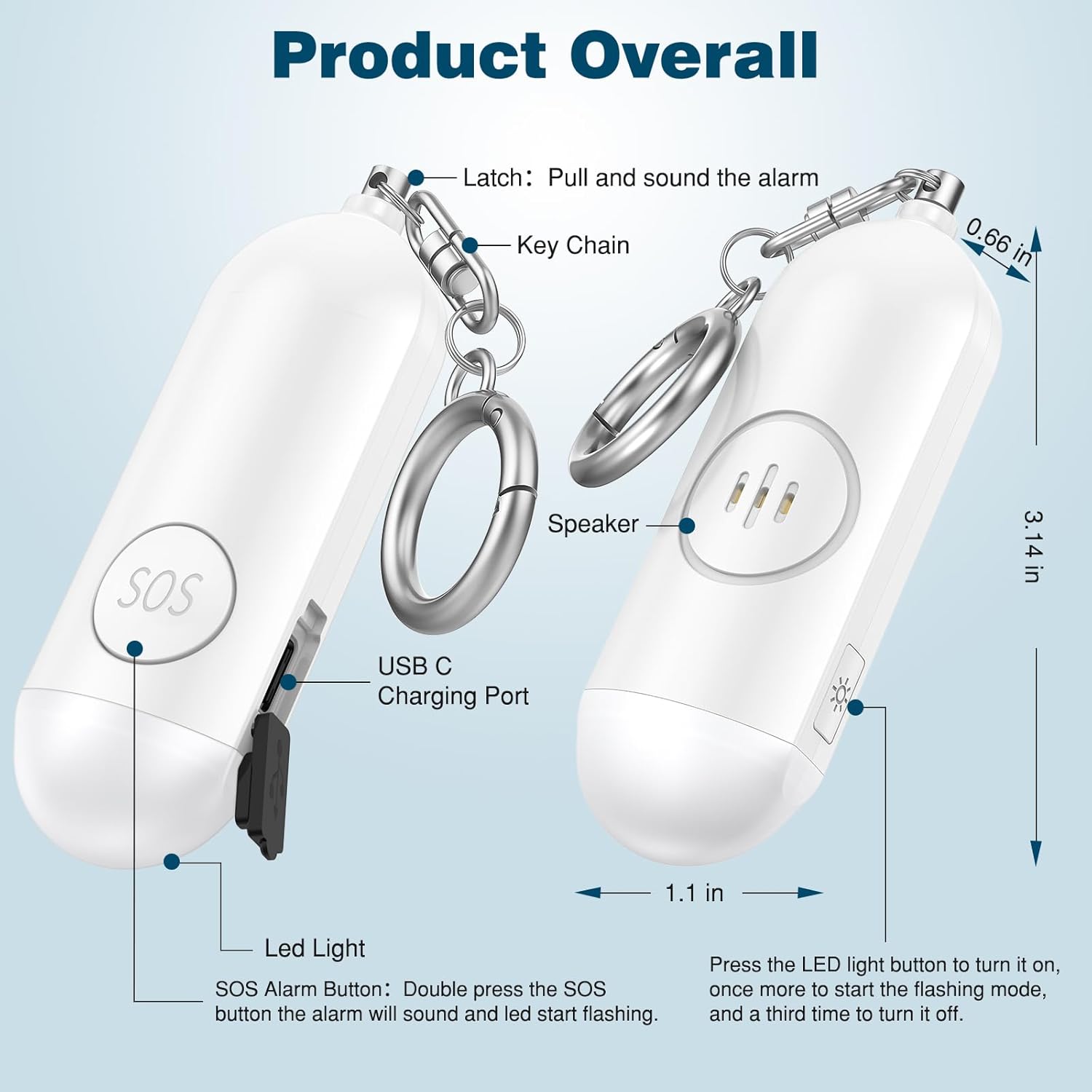
Image: Overview of the iMangoo Personal Alarm, highlighting its SOS button, LED light, USB-C charging port, speaker, latch, and keychain with dimensions.
- SOS Alarm Button: Double-press to activate the alarm and flashing LED.
- LED Light Button: Press to activate the flashlight.
- USB-C Charging Port: For recharging the device.
- Speaker: Emits the 130dB alarm sound.
- Latch: Pull to activate the alarm.
- Keychain: For attaching the device to items.
2. Charging the Device
The personal alarm features a built-in rechargeable battery. Before first use, or when the battery is low, charge the device using the provided USB-A to USB-C charging cable.
- Connect the USB-C end of the charging cable to the USB-C charging port on the iMangoo Personal Alarm.
- Connect the USB-A end of the charging cable to a compatible power source, such as a computer USB port or a USB wall adapter.
- Allow the device to charge until fully powered. A full charge provides up to 6 months of standby time.
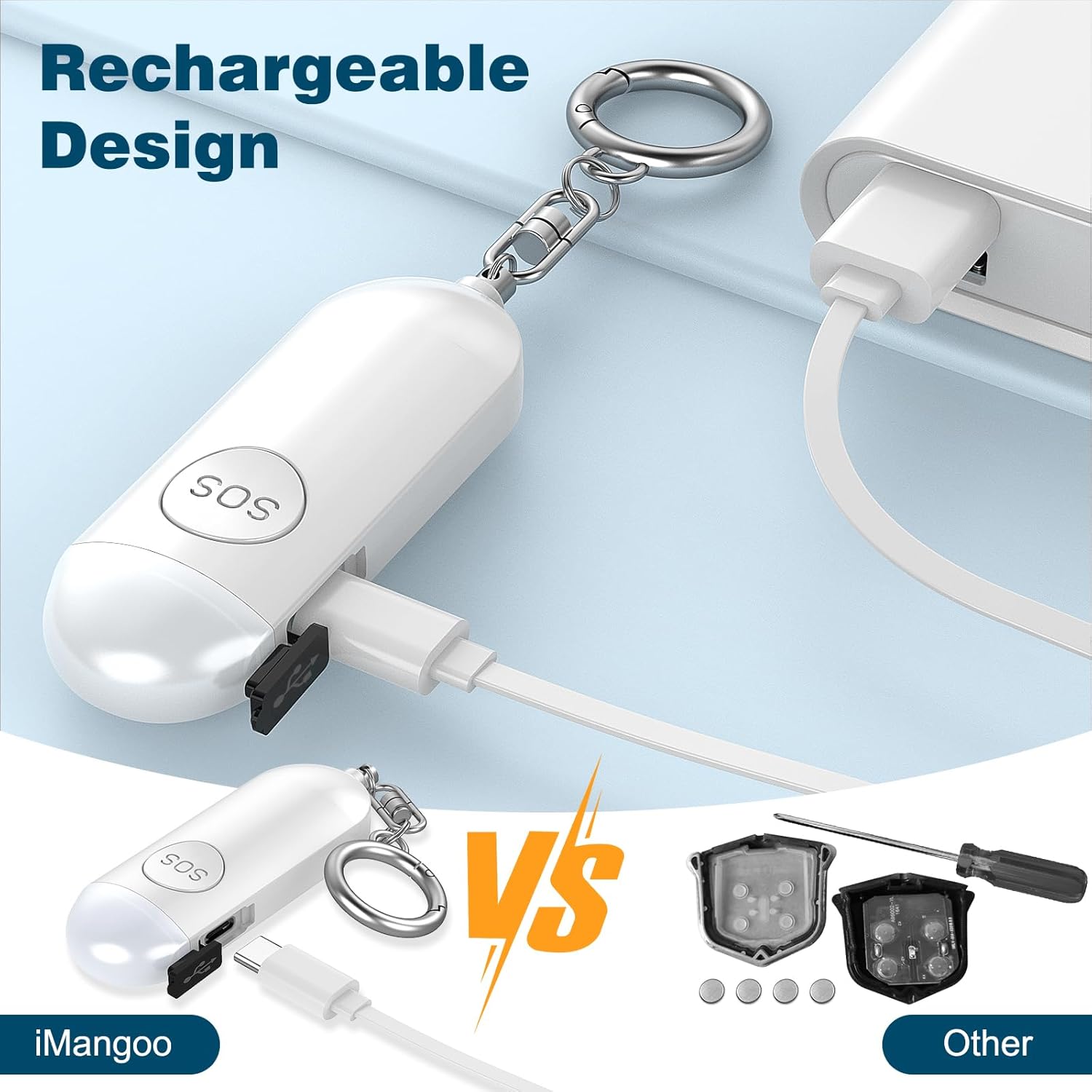
Image: The iMangoo Personal Alarm being charged via its USB-C port, highlighting its rechargeable battery feature.
3. Setup: Pairing with Apple Find My
This device is designed exclusively for Apple iPhone/iOS devices and integrates with the Apple Find My app. Android devices are not supported.
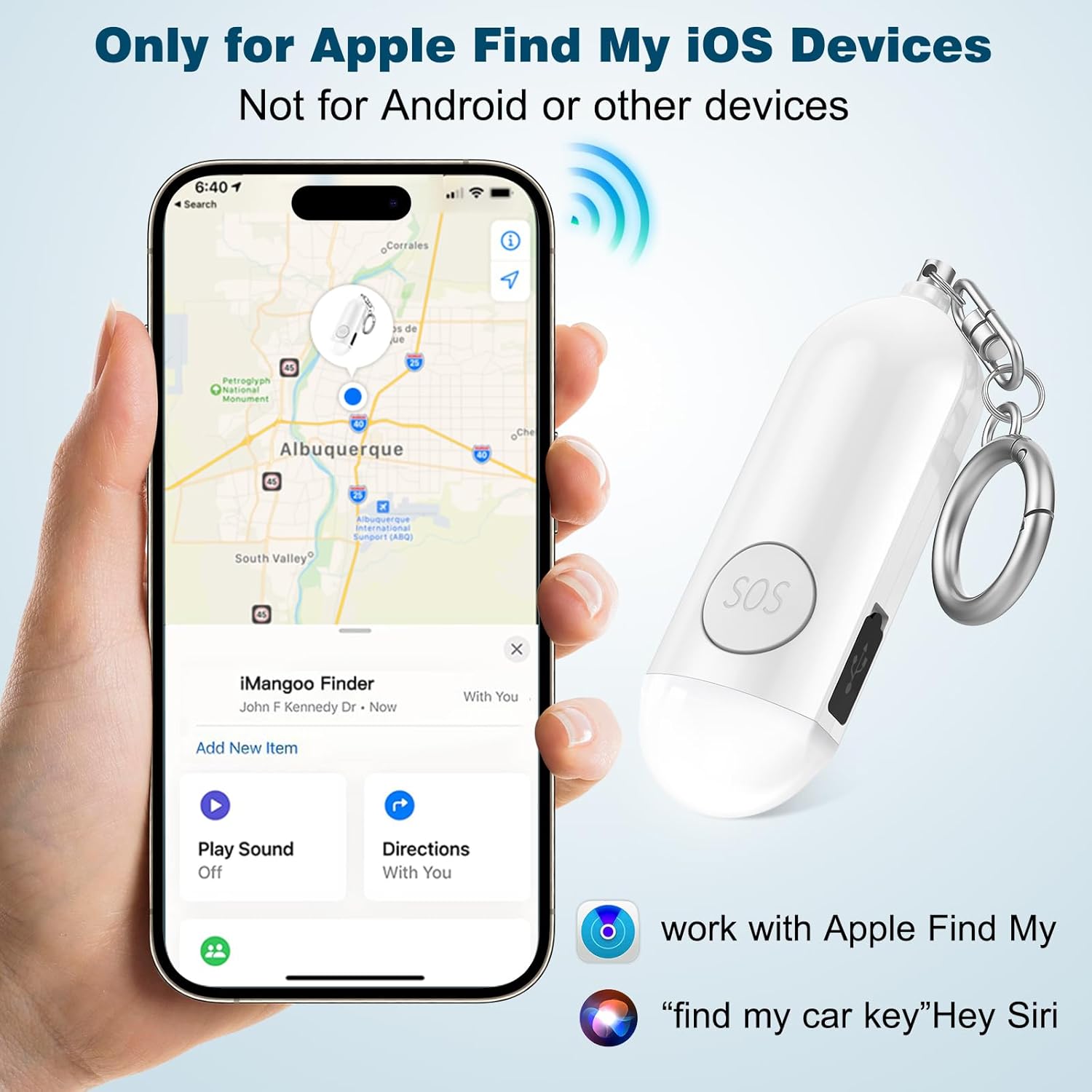
Image: The iMangoo Personal Alarm shown with an iPhone, indicating its compatibility with Apple's Find My network.
Pairing Steps:
- Ensure Bluetooth is enabled on your iPhone/iOS device.
- Open the 'Find My' app on your device.
- Navigate to the 'Items' tab and tap 'Add Item'.
- Select 'Other Supported Item'.
- The app will search for nearby items. Once 'AIYATO-XX' (or a similar identifier) appears, tap it to connect.
- Follow the on-screen prompts to complete the connection, including naming your item and choosing an emoji.
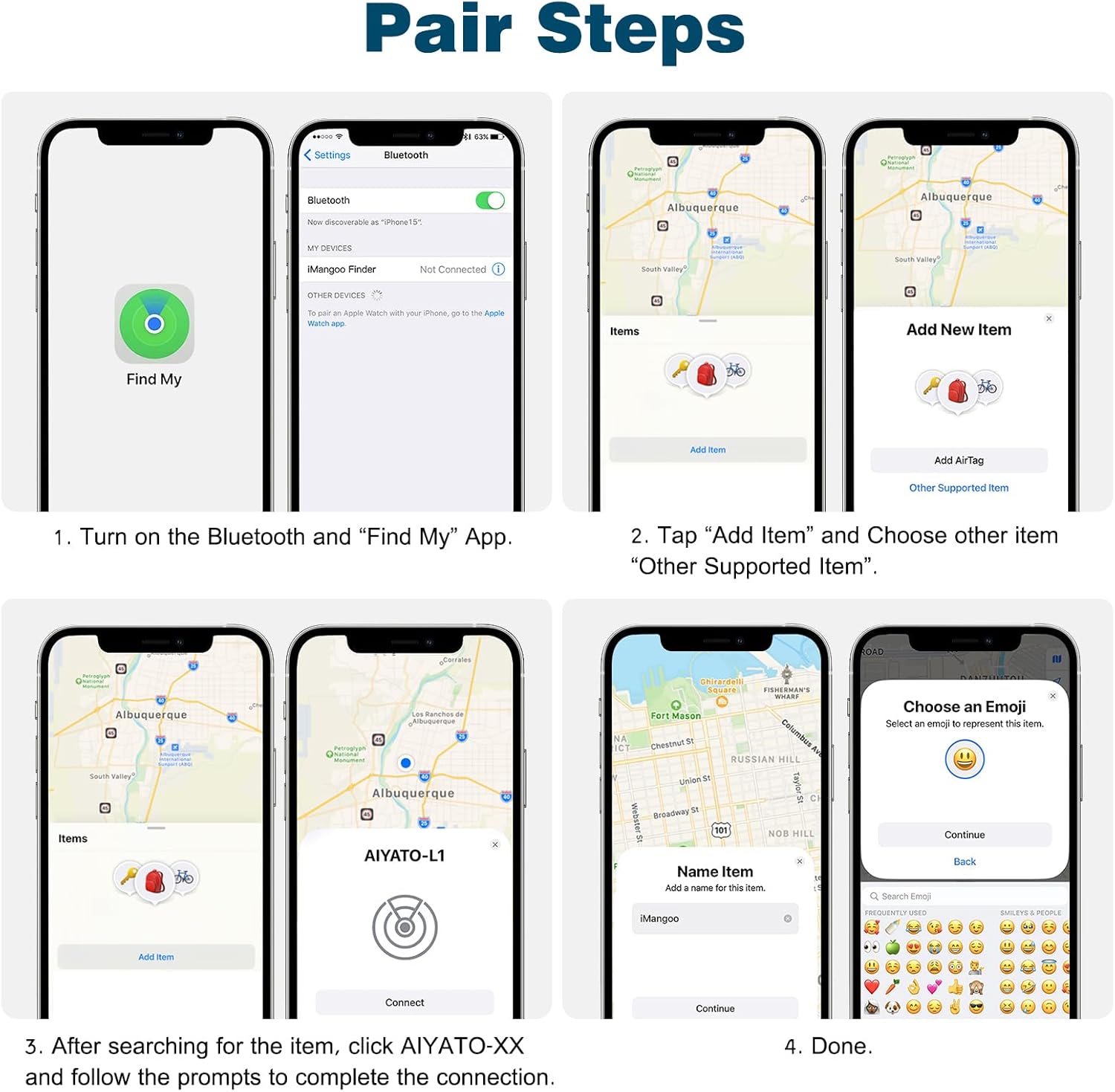
Image: A visual guide demonstrating the steps to pair the iMangoo Personal Alarm with an Apple iOS device using the Find My app.
4. Operating Instructions
Activating the Personal Alarm (Siren):
The iMangoo Personal Alarm features a loud 130dB siren to attract attention in emergency situations. There are two methods to activate it:
- Pull the Latch: Pull the metal latch connected to the keychain away from the device. The alarm will sound immediately. To stop the alarm, reinsert the latch into the device.
- SOS Button: Double-press the SOS button located on the device. The alarm will sound, and the LED light will start flashing. Double-press the SOS button again to deactivate the alarm and light.

Image: Visual instructions for activating the personal alarm using both the SOS button and the pull latch mechanism.
Using the LED Flashlight:
The device includes an LED flashlight for illumination in dark environments.
- First Press: Press the LED light button once to turn on the steady light.
- Second Press: Press the LED light button a second time to activate the flashing mode.
- Third Press: Press the LED light button a third time to turn off the LED light.
Locating Items with Find My:
Once paired, you can use the Apple Find My app to locate your iMangoo Personal Alarm.
- Open the 'Find My' app on your iPhone/iOS device.
- Go to the 'Items' tab.
- Select your iMangoo Personal Alarm from the list.
- Play Sound: Tap 'Play Sound' to make the alarm emit a loud beep, helping you locate it if it's nearby.
- Find Nearby: For precise location, especially with iPhones equipped with a U1 chip, use the 'Find Nearby' feature to get directional guidance.
- View Location on Map: The app will display the last known location of your device on a map.

Image: The Find My app interface demonstrating how to play a sound or find the nearby location of the iMangoo Personal Alarm.
Left-Behind Reminder:
To receive alerts if you leave your personal alarm behind:
- In the 'Find My' app, select your iMangoo Personal Alarm.
- Enable the 'Notify When Left Behind' toggle.
- You will receive a notification on your iPhone/iOS device if the alarm is no longer within range.
5. Maintenance
To ensure optimal performance and longevity of your iMangoo Personal Alarm:
- Charging: Recharge the device regularly, especially after prolonged use of the alarm or flashlight. A full charge provides up to 6 months of standby time.
- Cleaning: Wipe the device with a soft, dry cloth. Avoid using harsh chemicals or abrasive materials.
- Storage: Store the device in a cool, dry place when not in use.
6. Troubleshooting
If you encounter issues with your iMangoo Personal Alarm, refer to the following common solutions:
- Device not turning on or charging:
- Ensure the USB-C cable is securely connected to both the device and the power source. Try a different charging cable or power adapter. Allow the device to charge for at least 30 minutes before attempting to turn it on.
- Alarm not sounding:
- Check if the latch is fully pulled out or if the SOS button is double-pressed correctly. Ensure the device has sufficient battery charge.
- LED flashlight not working:
- Press the LED light button multiple times to cycle through modes (on, flashing, off). Ensure the device has sufficient battery charge.
- Cannot pair with Find My app:
- Verify that Bluetooth is enabled on your iOS device. Ensure the Find My app is updated to the latest version. Make sure the iMangoo Personal Alarm is within Bluetooth range of your iOS device. Restart both your iOS device and the personal alarm (if unresponsive, fully discharge and recharge).
- Device not appearing in Find My app:
- Confirm that the device is powered on and within range. Re-attempt the pairing process as described in the 'Setup' section. Remember, this device is only compatible with Apple iOS devices.
7. Specifications
| Feature | Detail |
|---|---|
| Brand | iMangoo |
| Model Number | iMangoo-0747 |
| Alarm Volume | 130dB |
| Light Source | LED Flashlight |
| Battery Type | 1 Lithium Ion battery (included) |
| Charging Port | USB-C |
| Standby Time | Up to 6 months |
| Compatible Devices | iPhone/iOS devices (via Find My app) |
| Material | Plastic |
| Control Method | Remote (via Find My app), Manual (buttons/latch) |
8. Warranty and Support
Warranty: This iMangoo product comes with a 1-year manufacturer's warranty.
Customer Support: For any issues regarding product functionality, quality, or shipping, please contact iMangoo customer service via Amazon. We are committed to providing support and ensuring customer satisfaction.