
1. Introduction
Welcome to your isinwheel Electric Skateboard manual. This guide provides essential information for the safe and optimal use of your V-series electric skateboard. Please read thoroughly before operation to ensure a safe and enjoyable riding experience.
Safety Note: Always wear appropriate safety gear, including a helmet, knee pads, and elbow pads. Ride responsibly and adhere to local regulations. Be aware of your surroundings and ride within your skill level.
2. Setup
2.1 Initial Charging
Before first use, fully charge your skateboard's battery. Connect the charger to the skateboard's charging port and then to a power outlet. The remote control also requires charging. Refer to the remote's display for battery status.
2.2 Powering On & Pairing
The V4 electric skateboard offers two innovative start options:
- Kick-to-Start: Give the skateboard an initial push to activate it. This is designed for effortless operation.
- Bottom Switch: Alternatively, press the power button located on the bottom of the skateboard.
Ensure your remote control is paired with the skateboard. Typically, this involves turning on both devices and following the pairing instructions in the remote's dedicated manual (if provided separately).

Figure 2.1: Smart and Effortless Power-On Options. The skateboard can be powered on by pressing the bottom switch or by giving it an initial kick-to-start.
3. Operating Instructions
3.1 Remote Control Functions
Your isinwheel electric skateboard is controlled via a wireless remote. The remote typically features:
- Throttle: Controls acceleration.
- Brake: Controls deceleration and stopping.
- Speed Modes: Allows selection of different speed settings (e.g., 1, 2, 3, 4) to match your skill level and desired performance.
- Direction Control: Some models allow switching between forward and reverse drive.
3.2 Speed and Performance
The isinwheel V-series offers various models with different motor powers and top speeds:
- V4-250W: Top speed up to 9 Mph.
- V6-450W: Top speed up to 12 Mph.
- V6pro-500W: Peak power.
- V8-600W: Top speed up to 30 Mph.
- V10-3000W: Top speed up to 32 Mph.
3.3 Cruise Control
The V4 model is equipped with a safe and innovative cruise control feature. To activate, press the power button on the remote simultaneously while accelerating. This will maintain a steady speed. To exit cruise control, toggle the accelerator button or any other button on the remote.

Figure 3.1: Activating Cruise Control for a Smooth Ride. Simply press the Power button while accelerating to engage cruise control.
3.4 Battery Indicators
The remote control features dual battery indicators, displaying both the skateboard's and the remote's battery levels. This helps you monitor charge levels and avoid unexpected power loss during your ride.
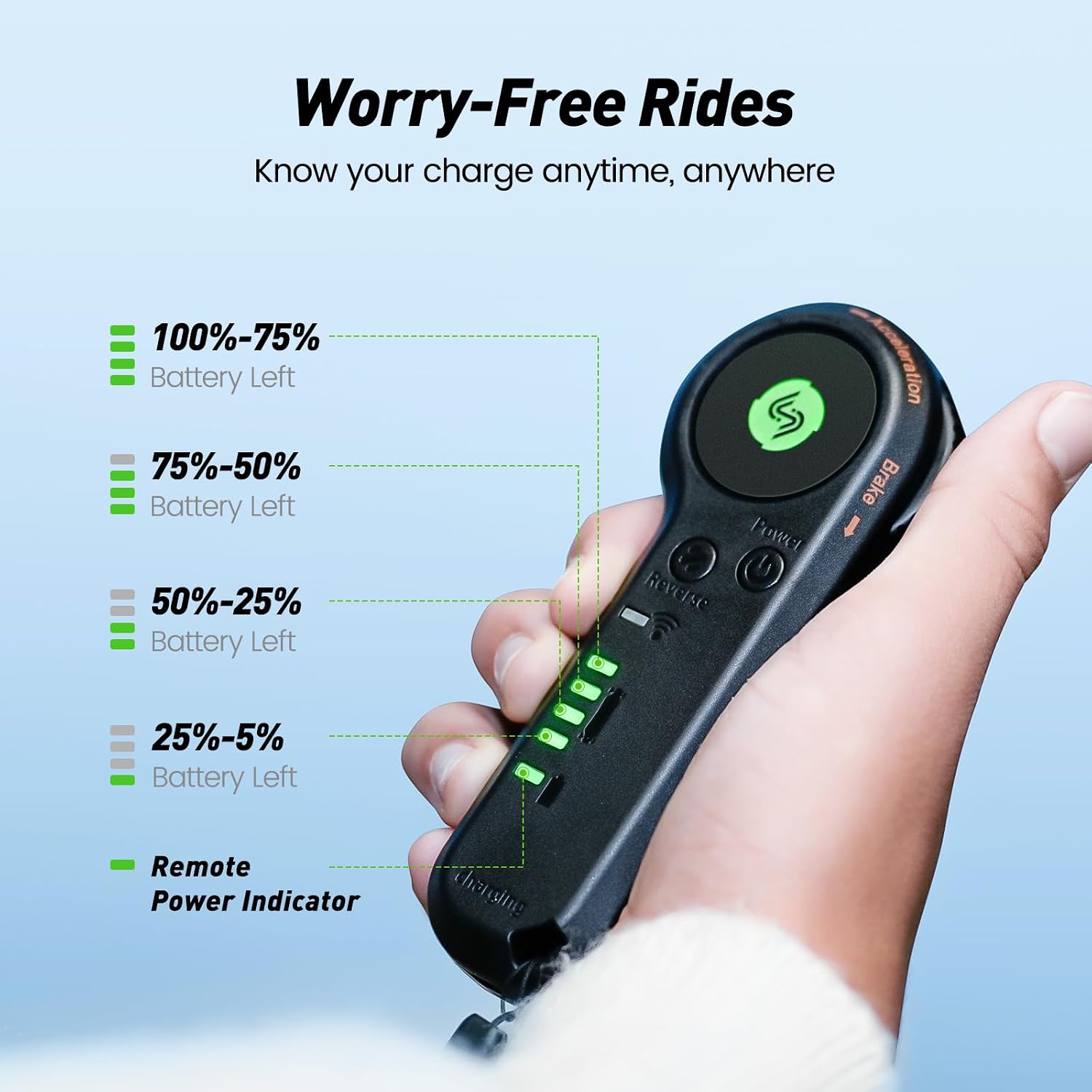
Figure 3.2: Dual Battery Indicators on the Remote Control. Know your charge anytime, anywhere for worry-free rides.
3.5 Tail Lights
The V4 model is equipped with vibrant seven-color flowing LED tail lights, enhancing visibility and adding style to your rides, day or night.

Figure 3.3: Vibrant and Colorful Tail Lights. Light up the night with stunning lights for increased visibility and style.
4. Maintenance
4.1 Battery Care
To prolong battery life, avoid completely draining the battery. Charge it regularly, especially after each ride. Store the skateboard in a cool, dry place when not in use. If storing for extended periods, ensure the battery is charged to about 50-60%.
4.2 Cleaning and Storage
Clean the skateboard regularly with a damp cloth. Avoid using harsh chemicals or excessive water. The deck is made of durable PP board material. Store the skateboard in a dry environment, away from direct sunlight and extreme temperatures.
4.3 Wheel and Motor Inspection
Periodically inspect the 3-inch Polyurethane wheels for wear and tear. Ensure they spin freely and are free from debris. Check the brushless motor for any unusual noises or signs of damage. Keep the motor area clean and clear of obstructions.
5. Troubleshooting
If you encounter issues with your isinwheel electric skateboard, consider the following common troubleshooting steps:
- Skateboard Not Turning On: Ensure the battery is fully charged and the power button is pressed correctly. Check the remote's battery.
- Loss of Power/Motor Issues: This could indicate a low battery or a motor issue. Fully charge the battery. If the problem persists, contact customer service.
- Remote Not Responding: Check remote battery, ensure it's paired correctly, and that there are no obstructions between the remote and the skateboard.
- Speed Wobbles at High Speeds: This can be common with skateboards. Ensure trucks are tightened appropriately for your riding style and speed. Practice at lower speeds before attempting higher ones.
For persistent issues or complex problems, please refer to the Warranty & Support section for assistance.
6. Specifications (V4-250W Model)
| Feature | Specification |
|---|---|
| Brand | isinwheel |
| Model Name | V4 |
| Motor Power | 250W Brushless Motor |
| Top Speed | 9 Mph |
| Deck Length | 20 Inches |
| Deck Width | 8.5 Inches |
| Deck Material | PP board |
| Wheel Size | 3 Inches |
| Wheel Material | Polyurethane |
| Skill Level | Beginner |
| Age Range | 6-12 Years |
| Included Components | Skateboard, Remote |
7. Warranty & Support
7.1 Quality Assurance
isinwheel provides a 365-day quality assurance for your product. This covers potential issues with the battery or other accessories. In case of a problem, instant reissue is provided, eliminating the need to wait for repairs.
The product is UL 2272 certified, ensuring compliance with electrical safety standards.
7.2 Customer Service
For any questions, concerns, or support needs, isinwheel offers 24/7/365 customer services online. Please reach out to them for prompt assistance.
8. Portability
The V4 is designed to be lightweight and compact, making it highly travel-friendly. It is small enough to fit into a suitcase, making it an ideal companion for trips and family outings. This allows for easy transport and enjoyment wherever you go.

Figure 8.1: Convenience Redefined. The compact design allows for easy storage and transport, fitting into a suitcase.