
Introduction
The Spider Farmer GGS AC5 Power Strip Kits provide advanced control and automation for your indoor grow environment. This system features smart outlets, integrated sensors, and app-based management to optimize conditions for plant growth. This manual will guide you through the setup, operation, and maintenance of your GGS AC5 Power Strip Kits.
Product Overview & What's Included
The Spider Farmer GGS AC5 Power Strip Kits include the following components:
- 1X GGS AC5 Power Strip
- 1X 3-in-1 Soil Sensor
- 1X GGS Temp Humid Light Sensor
- 1X GGS Light & Fan Adapter
- 3X RJ12 Telephone Line Splitter
- 7X 98in 6 Pin RJ12 Cable
- 2X 10in 6 Pin RJ12 Cable
- 6X Hook and Loop Strap
- 1X User Manual

Figure 1: Overview of the Spider Farmer GGS AC5 Power Strip Kit and its included components.
Setup
1. Physical Connection
Connect the GGS AC5 Power Strip to a suitable power outlet. Then, connect the 3-in-1 Soil Sensor and the GGS Temp Humid Light Sensor to the power strip using the provided RJ12 cables and splitters as needed. Ensure all connections are secure.
2. App Installation and Pairing
Download the Spider Farmer app from your device's app store. Follow the in-app instructions to pair your GGS AC5 Power Strip with your smartphone via Bluetooth and Wi-Fi. This will enable remote control and monitoring of your grow environment.
Video 1: A demonstration of the Spider Farmer GGS Power Strip Kits, highlighting app-based smart grow features and setup.
Operating Instructions
Smart Controls Outlets
The GGS AC5 power strip features 5 independent outlets, allowing you to power and control up to 5 devices. Through the Spider Farmer app, you can remotely manage SF Series (excluding SF1000D, SF300, SF600), G Series, and SE Series LED grow lights. RJ12 clip/inline fans support precise scheduling, standby speed, and oscillation settings. Fans without RJ12 ports can still be controlled via on/off timers.
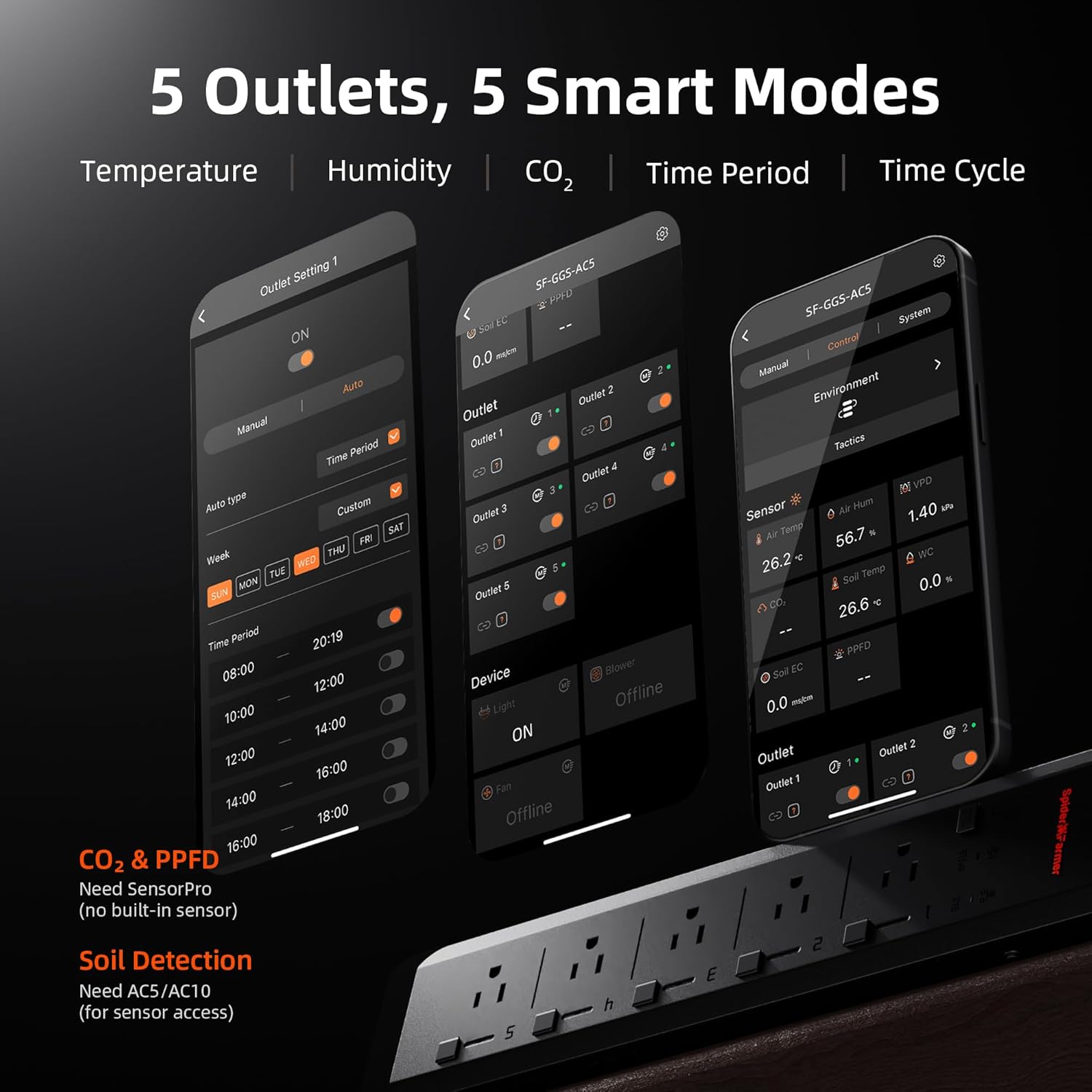
Figure 2: The app interface displaying control options for the 5 independent outlets and various smart modes.
Complete Environmental Automation
With the Spider Farmer App, you can build custom grow schedules to automate lighting, fans, and temperature across each plant stage. The GGS AC5 power strip integrates seamlessly with heaters, humidifiers, dehumidifiers, and supplemental lights. It supports timer, temperature, humidity, and CO₂-triggered modes, automating your grow environment for healthier plants.

Figure 3: Illustration of the compatible growing ecosystems and devices that can be managed by the power strip.

Figure 4: Visual representation of the smart growing ecosystem, showing how the GGS AC5 controls various equipment.

Figure 5: Close-up of the power strip, highlighting the independent program buttons for each of the 5 devices.
3-in-1 Soil Sensor
This sensor monitors soil moisture (VWC), temperature, and electrical conductivity (EC), providing crucial plant growth data. It helps determine watering schedules, ensures healthy root growth, and prevents over-fertilization. Insert the probes horizontally into the soil for accurate readings.

Figure 6: The 3-in-1 Soil Sensor, designed to measure soil temperature, moisture, and EC for optimal plant health.
GGS Temp Humid Light Sensor
This sensor precisely tracks temperature, humidity, and day/night cycles inside the grow tent, optimizing plant conditions. Note: The light sensor is located on the side—ensure it remains unobstructed for accurate measurements. CO₂ and PPFD sensors are not included with the AC5/AC10 Smart Power Outlet; please purchase SensorPro separately if needed.

Figure 7: The GGS Temp Humid Light Sensor, providing data for precise VPD (Vapor Pressure Deficit) sensing.
GGS Light & Fan Adapter
This 2-in-1 adapter allows for total control over 0-10V lights and PWM clip fans, integrating them seamlessly into your smart growing system.

Figure 8: The GGS Light & Fan Adapter, enabling comprehensive control for lighting and fan systems.
Video 2: A demonstration showcasing the synchronization of SF Series products with the GGS system for enhanced control.
Maintenance
To ensure optimal performance and longevity of your Spider Farmer GGS AC5 Power Strip Kits, regular maintenance is recommended:
- Cleaning: Periodically wipe down the power strip and sensors with a dry, soft cloth to remove dust and debris. Avoid using liquid cleaners directly on electronic components.
- Sensor Care: For the 3-in-1 Soil Sensor, gently clean the probes if soil buildup occurs. Ensure the GGS Temp Humid Light Sensor's side is unobstructed for accurate light readings.
- Cable Management: Use the provided hook and loop straps to keep cables tidy and prevent tangling, which can reduce wear and tear.
- Software Updates: Regularly check the Spider Farmer app for software updates to ensure you have the latest features and performance improvements.
Troubleshooting
If you encounter issues with your GGS AC5 Power Strip Kits, consider the following common troubleshooting steps:
- No Power: Ensure the power strip is securely plugged into a working electrical outlet. Check the overcurrent protection button on the power strip; press it if it has popped out.
- App Connectivity Issues: Verify that your Wi-Fi network is active and stable (2.4 GHz network is required). Ensure your smartphone's Bluetooth is enabled and the device is within range during initial pairing. Try restarting the app and the power strip.
- Inaccurate Sensor Readings: Check that sensors are properly connected via RJ12 cables. For the soil sensor, ensure probes are inserted horizontally and are clean. For the Temp Humid Light Sensor, confirm the light sensor on the side is not obstructed.
- Device Not Responding: If a specific outlet or connected device is not responding, try manually toggling the outlet on the power strip. Ensure the device itself is functioning correctly when plugged into a standard outlet.
If problems persist, refer to the support section for further assistance.
Specifications
| Feature | Specification |
|---|---|
| Model Number | SF-GGS-AC5 Kits-EU |
| Brand | Spider Farmer |
| Color | Black |
| Total Power Outlets | 5 |
| Voltage | 120 Volts (AC) |
| Power Plug Type | Type B - 3 pin (North American) |
| Item Weight | 4.86 pounds |
| Package Dimensions | 17.63 x 8.46 x 5.47 inches |
| Manufacturer | Spider Farmer |
| Country of Origin | China |
Warranty and Support
The Spider Farmer GGS AC5 Power Strip Kits come with 2 years of support services. For any technical assistance, warranty claims, or further inquiries, please contact Spider Farmer customer support through their official website or the contact information provided in your product packaging.