
Important Safety Information
To reduce the risk of injury, adult supervision is required. Never use on roadways, near motor vehicles, on or near steep inclines or steps, swimming pools or other bodies of water; always wear shoes, and never allow more than one rider.
This product is designed for children aged 36 months to 6 years, with a maximum weight capacity of 66 pounds.
Product Overview
The Best Choice Products Kids 12V Electric Ride On UTV Car and Trailer is an electric ride-on vehicle designed for children, featuring a detachable trailer, LED lights, and a Bluetooth sound system. It offers both child-controlled driving and parental remote control options.

The 12V Electric Ride On UTV Car and Trailer in black, showcasing its robust design and detachable trailer.

The high-capacity detachable trailer allows children to haul their favorite toys and games, enhancing playtime.

The UTV can be driven by the child or guided by a parent using the included remote control, offering versatile play options. It features a 60-minute run time on a full charge.

A built-in Bluetooth sound system allows children to enjoy their favorite music while driving, connecting easily with a smartphone.
Key Features:
- Detachable Trailer: High-capacity bed for hauling toys and games.
- 60 Minute Run Time: Rechargeable battery provides up to 1 hour of continuous use.
- Parental Remote Control Option: Allows adults to guide the vehicle for younger children.
- Child-Friendly Design: Features an adjustable seat harness, treaded plastic wheels, LED headlights, and two driving speeds.
- Bluetooth Sound System: For playing music during rides.
- Durable Construction: Sturdy wheels with springs for a smoother ride.
Setup and Assembly
The UTV and trailer are designed for straightforward assembly. Please refer to the included Assembly Guide for detailed, step-by-step instructions. Ensure all components are securely fastened before initial use.
- Initial Charging: Before first use, fully charge the 12V battery for the recommended duration as specified in the Assembly Guide.
- Wheel Installation: Attach the treaded plastic wheels securely.
- Trailer Attachment: The trailer attaches easily to the rear of the UTV via a simple connection point. Press the red button to detach or attach the trailer.

The sturdy, treaded wheels are designed for various terrains and include springs for enhanced ride comfort.
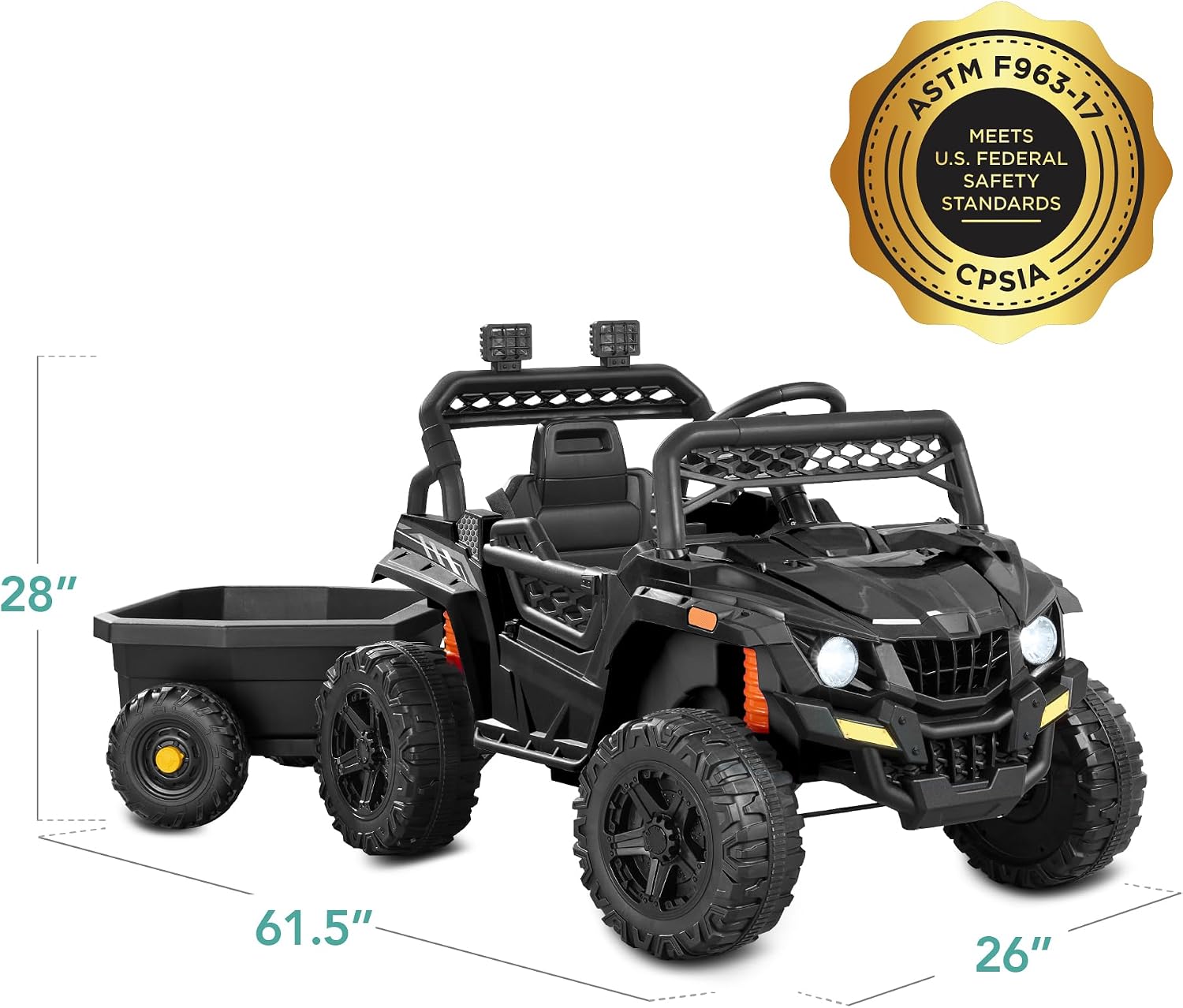
Overall dimensions of the UTV with trailer are 61.5"(L) x 26"(W) x 27"(H), providing a clear understanding of its size.
Operating Instructions
Child Operation:
- Start/Stop: Use the designated button on the dashboard to turn the vehicle on or off.
- Acceleration: Press the foot pedal to accelerate.
- Steering: Use the steering wheel to control direction.
- Forward/Reverse: Select the desired direction using the gear selector.
- Speed Selection: Choose between high and low speeds using the speed control buttons on the dashboard.
- Seat Belt: Always ensure the adjustable seat harness is securely fastened before driving.
- Doors: The vehicle doors can be opened and closed by the child.

The adjustable seat harness ensures the child's safety and security while the vehicle is in motion.

The dashboard features intuitive controls for starting, stopping, and selecting high or low speeds.
Parental Remote Control:
- The included remote control allows parents to override child controls for safety and guidance.
- Use the remote to steer, accelerate, and reverse the vehicle.
- Always ensure the remote control is within range and has fresh batteries.
Bluetooth Connectivity:
- To connect a device via Bluetooth, turn on the UTV and activate Bluetooth on your device.
- Search for the UTV's Bluetooth name (refer to the Assembly Guide for specific name, usually "BCP UTV" or similar).
- Pair your device. Once connected, you can play music through the UTV's speakers.
Maintenance
- Charging: Recharge the battery after each use. Do not overcharge. Store the vehicle with a fully charged battery if not in use for extended periods.
- Cleaning: Wipe down the vehicle with a damp cloth. Avoid using harsh chemicals or abrasive cleaners.
- Storage: Store the UTV in a dry, covered area away from direct sunlight and extreme temperatures.
- Inspection: Regularly check all nuts, bolts, and fasteners to ensure they are tight. Inspect wheels and tires for wear.
Troubleshooting
| Problem | Possible Cause | Solution |
|---|---|---|
| Vehicle does not move. | Battery is low or not connected; power switch is off; loose wiring. | Charge the battery; ensure power switch is on; check all electrical connections. |
| Vehicle moves slowly. | Low battery; overloaded vehicle; rough terrain. | Recharge battery; reduce weight; operate on smoother surfaces. |
| Bluetooth not pairing. | Incorrect pairing procedure; interference; UTV Bluetooth not active. | Ensure UTV is on and in Bluetooth mode; restart both devices; try pairing in a different location. |
| Remote control not working. | Remote batteries are dead; remote not paired with UTV. | Replace remote batteries; refer to manual for remote pairing instructions. |
Specifications
- Product Dimensions (with Trailer): 61.5" (L) x 26" (W) x 27" (H)
- Item Weight: 39.3 pounds
- Model Number: SKY8028
- Manufacturer Recommended Age: 36 months - 6 years
- Weight Capacity: 66 lbs
- Battery: 12V Electric Motor
- Max Speed: 3.1 mph
Warranty and Support
Best Choice Products offers a 30-day easy return policy. For any product inquiries, technical assistance, or warranty claims, please contact Best Choice Products customer support. Refer to the original purchase documentation or visit the official Best Choice Products website for contact details.
Additional protection plans may be available for purchase to extend coverage beyond the standard return period.
Note: This product may contain chemicals known to the State of California to cause cancer and birth defects or other reproductive harm (Proposition 65 warning).


