
HOSTACK Twin LED Bed Frame with Storage Headboard and Charging Station
HOSTACK Twin LED Bed Frame User Manual
Model: Twin LED Bed Frame with Storage Headboard and Charging Station
Brand: HOSTACK
Introduction
This manual provides detailed instructions for the assembly, operation, and maintenance of your HOSTACK Twin LED Bed Frame. Please read this manual thoroughly before assembly and use to ensure safe and proper functionality of your new bed frame.

Figure 1: HOSTACK Twin LED Bed Frame Overview
Included Components
Verify that all components listed below are present before beginning assembly. If any parts are missing or damaged, please contact customer support.
- Headboard with integrated storage and charging station
- Bed frame rails (left and right)
- Wood slats for mattress support
- Two (2) under-bed storage drawers with wheels
- Assembly hardware (screws, bolts, nuts, Allen wrench)
- LED light strip and remote control
- Power adapter for charging station and LED lights
- Instruction manual
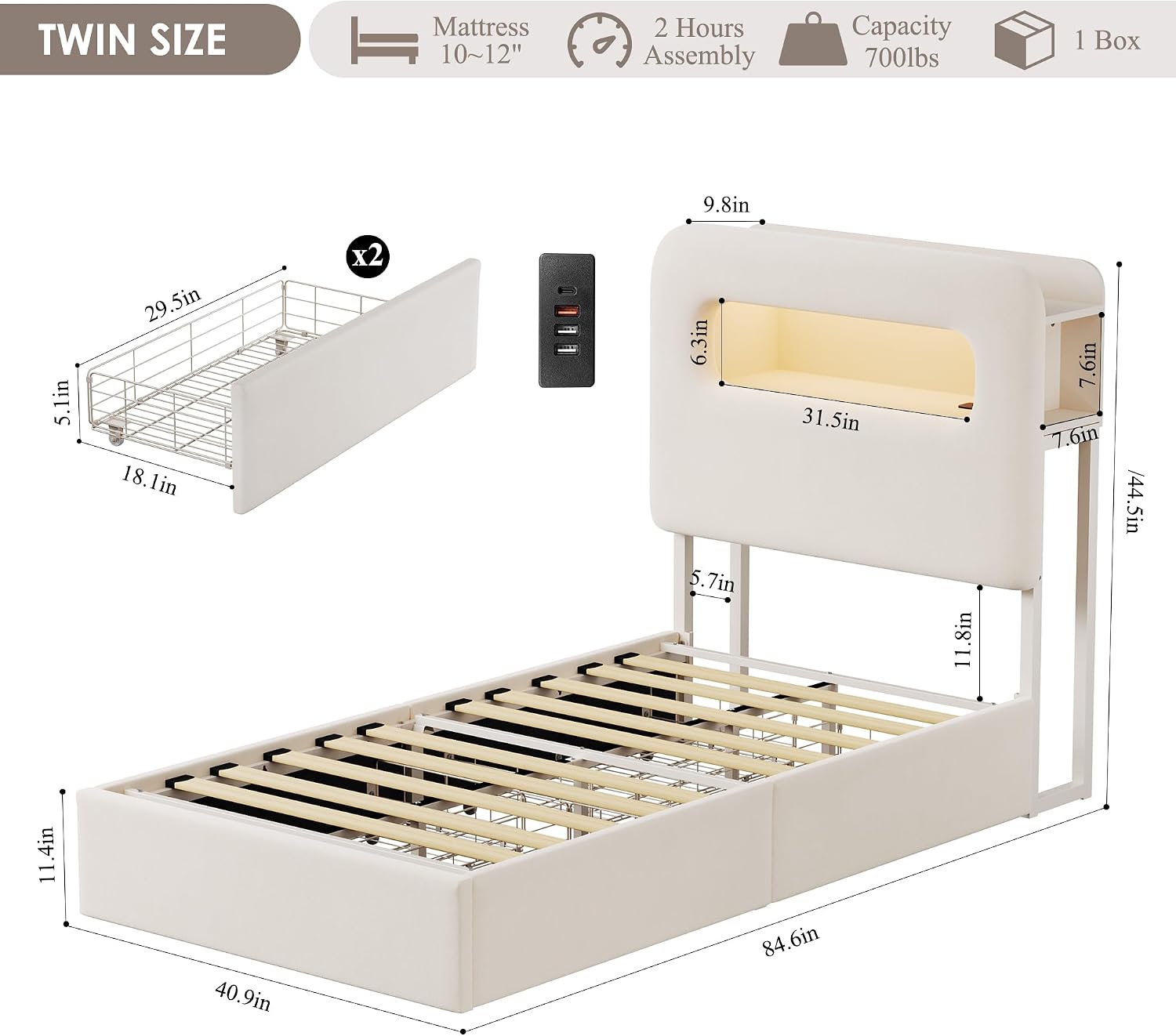
Figure 2: Product Dimensions and Key Features
Setup and Assembly
Assembly of the HOSTACK Twin LED Bed Frame typically takes approximately 40 minutes with two people. Follow the detailed instruction guide included in the package for step-by-step assembly.
Pre-Assembly Checklist:
- Ensure you have adequate space for assembly.
- Lay out all components and hardware.
- Keep children and pets away from the assembly area.
Assembly Steps (General Overview):
- Attach the side rails to the headboard and footboard.
- Install the central support beam and legs.
- Place the wood slats onto the frame, ensuring they are securely fastened. The slats feature a noise-free muter bar for quiet operation.
- Assemble the two under-bed drawers and insert them into the desired positions.
- Install the LED light strip into the headboard compartment and connect the charging station.

Figure 3: Flexible Drawer Placement Options

Figure 4: Under-Bed Storage Drawer Features
Operating Instructions
LED Lighting System:
The integrated LED lights in the headboard can be controlled via the included remote control or a dedicated mobile application. You can customize the light color, brightness, and various modes to create your desired ambiance.
- Power On/Off: Use the power button on the remote or app.
- Color Selection: Choose from over 60,000 colors using the color wheel on the app or preset buttons on the remote.
- Timing Mode: Set timers for the lights to turn on or off.
- Music Mode: Lights can synchronize with music (via app).
- Mic Mode: Lights can react to ambient sounds (via app).

Figure 5: LED Light Features and Control Options
Charging Station:
The headboard features a built-in charging station with USB ports (5V/2A) and a Type-C port (5V/2A) for convenient charging of your electronic devices. Connect the bed frame's power cord to a standard wall outlet.
- Ensure the bed frame is properly plugged into a functioning power outlet.
- Connect your devices to the available USB or Type-C ports.
- The charging station is designed for low-power electronic devices.

Figure 6: Headboard Charging Station
Storage Drawers:
The two under-bed drawers provide ample storage space. They are equipped with easy-gliding wheels for smooth operation and a buckle design to secure them in place under the bed.
- To open, gently pull the drawer outwards.
- To close, push the drawer fully inwards until the buckle engages, securing it.
- Drawers can be positioned on either side of the bed or both on one side, as per your room layout.
Video 1: Demonstration of LED lights, charging station, and drawer functionality.
Maintenance and Care
Cleaning:
- For general cleaning, wipe the bed frame surfaces with a damp cloth.
- Avoid using harsh chemicals or abrasive cleaners, as they may damage the velvet upholstery or metal finish.
- For spills on the velvet, blot immediately with a clean, dry cloth.
Structural Integrity:
- Periodically check all bolts and screws to ensure they remain tight. Tighten if necessary to maintain stability and prevent noise.
- Do not exceed the maximum weight loading capacity of 700 lbs.
- Ensure the mattress size is compatible (8-12 inches recommended).
Troubleshooting
| Problem | Possible Cause | Solution |
|---|---|---|
| LED lights not working. | Power adapter unplugged; remote battery low; loose connection. | Ensure power adapter is securely plugged in. Check remote battery and replace if needed. Verify all LED strip connections are firm. |
| Charging station not providing power. | Bed frame not plugged in; device cable faulty; device requires more power than supplied. | Confirm bed frame is plugged into a live outlet. Try a different charging cable. Ensure your device is compatible with 5V/2A charging. |
| Bed frame is squeaking or unstable. | Loose bolts or screws; uneven floor. | Inspect and tighten all assembly hardware. Ensure the bed is on a level surface; use adjustable legs if available to stabilize. |
| Drawers do not slide smoothly. | Obstruction in the path; wheels dirty or damaged. | Check for any items blocking the drawer path. Clean drawer wheels. Ensure drawers are correctly aligned. |
Specifications
| Feature | Detail |
|---|---|
| Size | Twin |
| Product Dimensions (L x W x H) | 84.6" x 40.9" x 44.5" |
| Color | Cream |
| Finish Type | Velvet Upholstered |
| Special Features | Storage Headboard, 2 Drawers, Charging Station (USB & Type-C), LED Lights |
| Max Loading Capacity | 700 lbs |
| Compatible Mattress Size | 8 - 12 inches |
| Drawer Interior Space | 29.5"L x 18.1"W x 5.1"H |
| Assembly Required | Yes |
| Manufacturer | HOSTACK |
Warranty and Support
For any questions, concerns, or support needs regarding your HOSTACK Twin LED Bed Frame, please contact the seller directly via the "Contact Seller" option on Amazon. The HOSTACK support team offers 24/7 service and is ready to assist you.
Please retain your purchase receipt for any warranty claims.
Ask a question about this manual
Ask about setup, troubleshooting, compatibility, parts, safety, or missing instructions. Manuals+ will review the question and use this page’s manual context to help answer it.