
Introduction
The TiMOVO Remote Control Page Turner provides a convenient way to control your e-reader or tablet without direct screen interaction. This device enhances your reading experience by allowing you to turn pages remotely and can also function as a remote camera shutter for your smartphone or tablet.
This manual provides instructions for setting up, operating, and maintaining your TiMOVO Remote Control Page Turner.
Package Contents
- RF Remote Control × 1
- Screen Sensor Clip × 1
- USB-C Charging Cable × 2
- Wrist Lanyard × 1
- Instruction Manual × 1
Compatibility
The TiMOVO Remote Control Page Turner is designed for use with capacitive touchscreen devices.
Compatible Devices:
- Kindle (all models except 7th/8th Generation)
- Kindle Paperwhite
- Kindle Oasis
- Kindle Kids Edition
- Kindle Voyage
- Kobo eReaders
- iPhone
- iPad
- Android Tablets
- Microsoft Surface
Incompatible Devices:
- Kindle 7th Generation
- Kindle 8th Generation
- Amazon Fire HD 10 (10th/11th Generation)

This image illustrates the range of devices compatible with the TiMOVO Remote Control Page Turner, including various Kindle models, Kobo e-readers, and mobile tablets. It also clearly lists devices that are not compatible.
Setup Instructions
Follow these steps to set up your TiMOVO Remote Control Page Turner for first-time use:
- Activate the Sensor Clip: Press and hold the button on the screen sensor clip for approximately 3 seconds until a red indicator light illuminates and remains steady. This indicates the clip is ready for pairing.
- Pair the Remote Control: Press any button on the RF remote controller. A quick blue flash on the sensor clip confirms a successful connection between the remote and the clip.
- Attach the Sensor Clip: Carefully attach the sensor clip to the screen of your e-reader or tablet. Ensure the clip's contact point touches the screen and does not obstruct any text or content.
Once these steps are completed, you can begin using your page turner.

This image provides a visual guide for the three simple steps required to set up the TiMOVO Remote Control Page Turner, from activating the sensor clip to attaching it to your device.
Important Considerations for Setup:
- Device Thickness: The total thickness of your e-reader or tablet, including any protective case, should not exceed 13.5mm (0.54 inches). If it exceeds this limit, remove the case before use to ensure proper functionality.
- Clip Placement: Ensure the sensor clip is positioned so that its contact point makes proper contact with the screen without covering essential text. Adjust the margins of your reading application if necessary to prevent text obstruction.
Operating Instructions
Turning Pages:
After successful setup, simply press the button on the RF remote control to advance to the next page on your e-reader or tablet. This allows for hands-free reading.
Returning to Previous Page:
To navigate back to the previous page, detach the sensor clip and re-attach it to the left side of your e-reader's screen. This will enable the remote to trigger the 'previous page' function.
Using with Mobile/Tablet Reading Apps:
If using the page turner with reading applications on mobile phones or tablets, it is recommended to disable any scrolling functions within the app. This ensures that the page turner's button press correctly registers as a page turn rather than a scroll action.

This image demonstrates the primary use of the TiMOVO Remote Control Page Turner, allowing for comfortable, hands-free reading by simply pressing a button to turn pages.
Camera Remote Function
Beyond its primary function as a page turner, the TiMOVO Remote Control can also serve as a wireless remote shutter for your smartphone or tablet's camera. This feature is compatible with all capacitive touchscreens.
To use this function, ensure your device's camera app is open and ready to take a photo or start a video. Pressing the button on the remote will trigger the camera shutter, allowing for easier selfies, group photos, or video recording from a distance.

This image illustrates the versatility of the TiMOVO Remote Control, showcasing its use as a wireless camera shutter for both photography and video recording on a smartphone.
Charging and Power Display
The TiMOVO Remote Control Page Turner features USB-C charging and an integrated LCD power display for convenient battery monitoring.
- Charging: Use the provided USB-C charging cable to charge both the RF remote control and the screen sensor clip. A full charge typically takes approximately 2 hours.
- Battery Life: The RF remote control offers up to 60 days of use on a single charge, while the screen sensor clip provides up to 15 days of use.
- LCD Power Display: The remote control features an LCD screen that clearly indicates the current battery level, allowing you to know when charging is needed.
- Auto-Sleep Function: To conserve battery, the device includes a 10-minute auto-sleep function. If the page turner enters sleep mode, simply press any button on the remote to wake it up and resume operation.

This image displays the USB-C charging ports on both the remote control and the sensor clip, along with the remote's LCD power display, indicating battery status and charging progress.
Troubleshooting
If you encounter issues with your TiMOVO Remote Control Page Turner, consider the following:
- Device Not Responding:
- Ensure both the remote control and the sensor clip are sufficiently charged. Check the LCD power display on the remote.
- Verify that the sensor clip is properly attached to the screen and its contact point is making firm contact.
- Confirm that the device is not in auto-sleep mode. Press any button on the remote to wake it up.
- Re-attempt the pairing process as described in the "Setup Instructions" section.
- Page Turning Inconsistent or Not Working:
- Check the thickness of your e-reader/tablet with its case. If it exceeds 13.5mm (0.54 inches), remove the case.
- Adjust the position of the sensor clip to ensure it is not blocking text and is making optimal contact with the screen.
- If using a reading app on a mobile device, ensure any scrolling functions are disabled within the app settings.
- Cannot Turn to Previous Page:
- Ensure the sensor clip is attached to the left side of your e-reader's screen for the previous page function.
Specifications
| Brand | TiMOVO |
| Model Number | 840156967563 |
| Product Dimensions | 8.81 x 3 x 2.95 cm |
| Item Weight | 81.08 g (2.86 ounces) |
| Color | White |
| Connectivity Technology | Radiofrequency (RF) |
| Maximum Range | 15 meters |
| Number of Buttons | 1 |
| Special Features | Rechargeable; Power Display |
| Battery Description | Rechargeable |
| Max Supported Devices | 1 |
Maintenance
To ensure the longevity and optimal performance of your TiMOVO Remote Control Page Turner, follow these maintenance guidelines:
- Cleaning: Use a soft, dry cloth to wipe the surfaces of the remote control and sensor clip. Avoid using harsh chemicals or abrasive materials, which can damage the finish or internal components.
- Storage: Store the device in a cool, dry place away from direct sunlight and extreme temperatures.
- Battery Care: For best battery health, avoid fully discharging the device frequently. Charge it when the power display indicates a low battery level. If storing for an extended period, charge the device to approximately 50% before storage.
- Handle with Care: Avoid dropping the device or subjecting it to strong impacts, as this can damage internal circuitry.
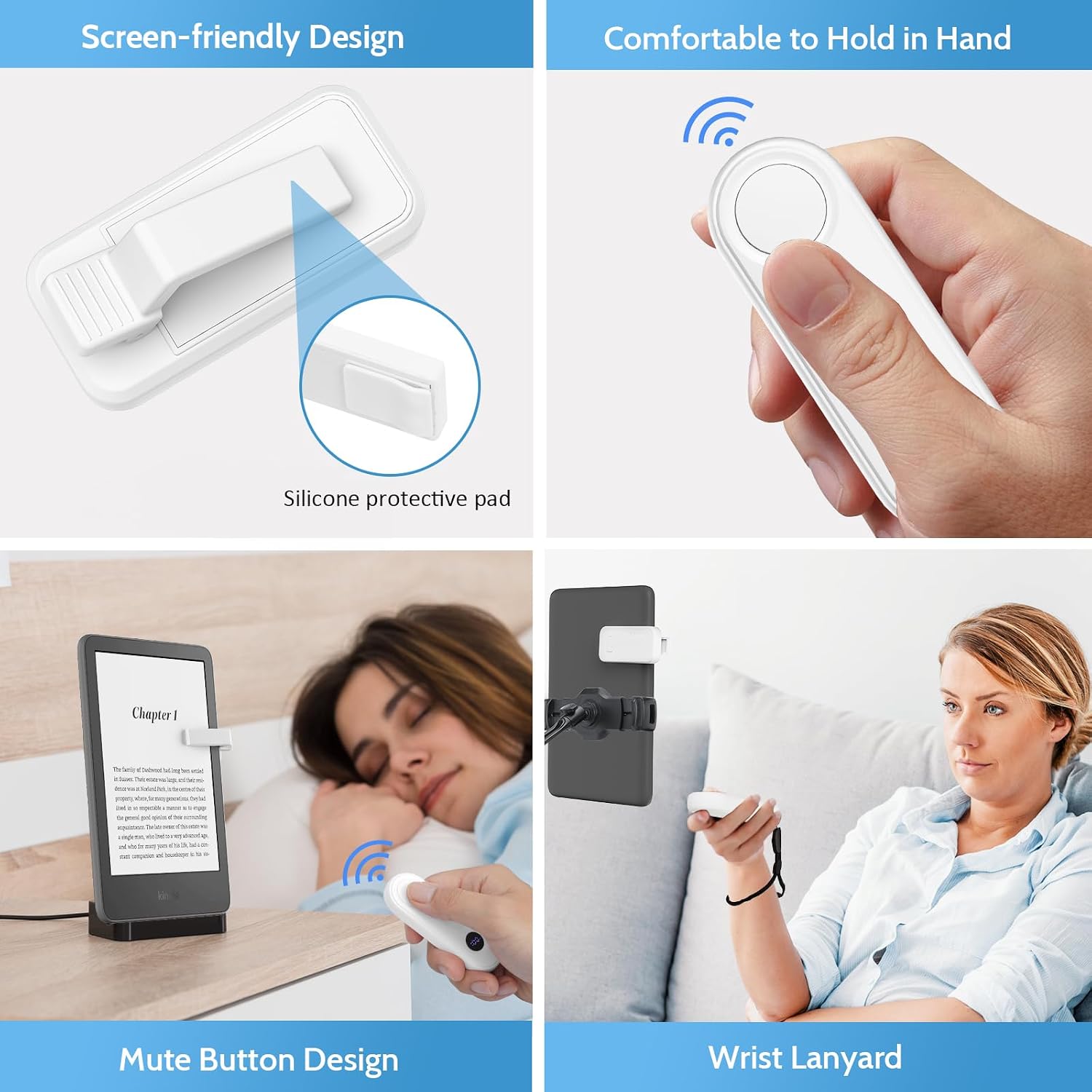
This image showcases the thoughtful design elements of the TiMOVO Page Turner, such as the screen-friendly silicone protective pad on the clip, the ergonomic shape of the remote for comfortable holding, the silent operation of the mute button, and the practical wrist lanyard.
Warranty and Support
For warranty information, technical support, or customer service inquiries regarding your TiMOVO Remote Control Page Turner, please refer to the product packaging or visit the official TiMOVO website. Contact details and specific warranty terms are typically provided with your purchase.