
Aoleaby PNOZ MC7P 773726
Aoleaby Safety Relay PNOZ MC7P 773726 User Manual
Model: PNOZ MC7P 773726
1. Introduction and Product Overview
The Aoleaby Safety Relay PNOZ MC7P 773726 is a critical component designed for industrial safety applications. It is engineered to monitor various parameters within an electrical circuit, such as current and voltage, and to promptly cut off power in the event of dangerous conditions like current overload, short circuits, or ground faults. This ensures the protection of equipment and personnel.
Manufactured with high-quality components, this safety relay offers stable and reliable operation even in demanding industrial environments. Its design prioritizes ease of use, featuring straightforward installation and minimal maintenance requirements.
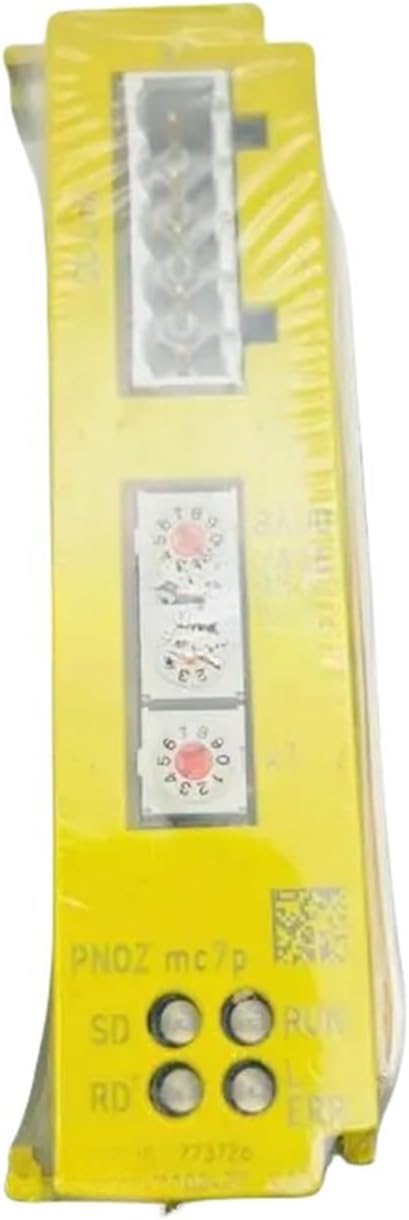
Figure 1.1: Front view of the PNOZ MC7P 773726 Safety Relay, highlighting its robust yellow casing and visible control elements.
2. Key Features
- Circuit Monitoring: Capable of monitoring current, voltage, and other critical electrical parameters.
- Automatic Power Cut-off: Automatically disconnects power upon detection of overload, short circuit, ground fault, or other hazardous conditions.
- High Reliability: Constructed with high-quality components for stable and long-term operation in harsh environments.
- Ease of Use: Designed for simple installation and operation, requiring minimal commissioning and maintenance.
- Customizable Configuration: Adaptable to various circuit types and equipment, allowing for flexible application.
3. Safety Information
Always adhere to local electrical codes and safety regulations when installing, operating, or maintaining the safety relay. Improper installation or use can lead to serious injury or damage to equipment.
- Ensure power is disconnected before any installation or maintenance work.
- Only qualified personnel should perform installation and wiring.
- Verify all connections are secure and correct before applying power.
- Do not operate the device if it appears damaged.
- Regularly inspect the relay for signs of wear or damage.
4. Setup and Installation
The PNOZ MC7P 773726 safety relay is designed for straightforward integration into industrial control systems. Proper installation is crucial for its intended safety function.
- Mounting: Securely mount the relay in a suitable enclosure, ensuring adequate ventilation and protection from environmental factors.
- Wiring: Connect the power supply, input signals (e.g., emergency stop buttons, light curtains), and output contacts (to contactors or other control devices) according to the wiring diagram provided with the product or in the detailed technical documentation. Pay close attention to terminal markings.
- Configuration (if applicable): Some safety relays may require initial configuration of parameters such as reset modes or monitoring functions. Refer to the specific technical data sheet for the PNOZ MC7P 773726 for any required settings.
- Testing: After installation, perform thorough functional tests to verify that the safety relay operates correctly and that all safety functions are active and respond as expected.

Figure 4.1: Rear view of the PNOZ MC7P 773726, illustrating the connection terminals and technical specifications for wiring.
5. Operation
Once properly installed and powered, the PNOZ MC7P 773726 continuously monitors the connected safety circuit. Its operational status is typically indicated by LEDs on the front panel.
- Normal Operation: When all safety conditions are met, the relay's output contacts will be closed, allowing power to flow to the controlled machinery. Status LEDs will indicate a safe operating state (e.g., green).
- Fault Condition: If a safety-related fault occurs (e.g., emergency stop activated, guard opened, overload detected), the relay will immediately open its output contacts, de-energizing the controlled machinery. Status LEDs will change to indicate a fault or unsafe state (e.g., red).
- Reset: After a fault condition has been cleared, the relay typically requires a manual or automatic reset to return to normal operation. Follow the specific reset procedure outlined in the product's detailed technical documentation.
6. Maintenance
The PNOZ MC7P 773726 is designed for low maintenance. However, periodic checks are recommended to ensure continued reliable operation.
- Visual Inspection: Regularly inspect the relay for any signs of physical damage, discoloration, or loose connections.
- Cleaning: Keep the relay free from dust and debris. Use a soft, dry cloth for cleaning. Do not use abrasive cleaners or solvents.
- Functional Testing: Periodically test the safety functions of the system the relay is part of, as per your facility's safety protocols.
7. Troubleshooting
If the safety relay is not functioning as expected, consider the following common issues and solutions:
- Relay Not Energizing:
- Check power supply connections.
- Verify all safety inputs (e.g., emergency stop, guard switches) are closed and functioning correctly.
- Ensure the relay has been properly reset after any previous fault.
- Unexpected Tripping:
- Inspect wiring for loose connections or short circuits.
- Check for intermittent faults in safety input devices.
- Verify that the monitored parameters (current, voltage) are within the relay's specified operating range.
- LED Indicators: Refer to the product's detailed technical documentation for a comprehensive guide to LED status indications and their corresponding fault codes or operational states.
For persistent issues, contact qualified technical support.
8. Specifications
The following table outlines the key technical specifications for the Aoleaby Safety Relay PNOZ MC7P 773726:
| Specification | Value |
|---|---|
| Package Dimensions | 1.18 x 0.79 x 0.39 inches |
| Item Weight | 3.31 pounds |
| Manufacturer | Aoleaby |
| ASIN | B0DGXRP72X |
| Item Model Number | PNOZ MC7P 773726 |
| Assembly Required | No |
| Number of Pieces | 1 |
9. Warranty and Support
For information regarding the product warranty, please refer to the documentation provided with your purchase or contact Aoleaby customer support. Technical assistance and further support can be obtained through the manufacturer's official channels.
Ask a question about this manual
Ask about setup, troubleshooting, compatibility, parts, safety, or missing instructions. Manuals+ will review the question and use this page’s manual context to help answer it.