
1. Introduction
Thank you for choosing the Candy Wave 600 Built-in Microwave. This manual provides essential information for the safe and efficient operation, installation, and maintenance of your appliance. Please read these instructions carefully before using the microwave oven and keep them for future reference.
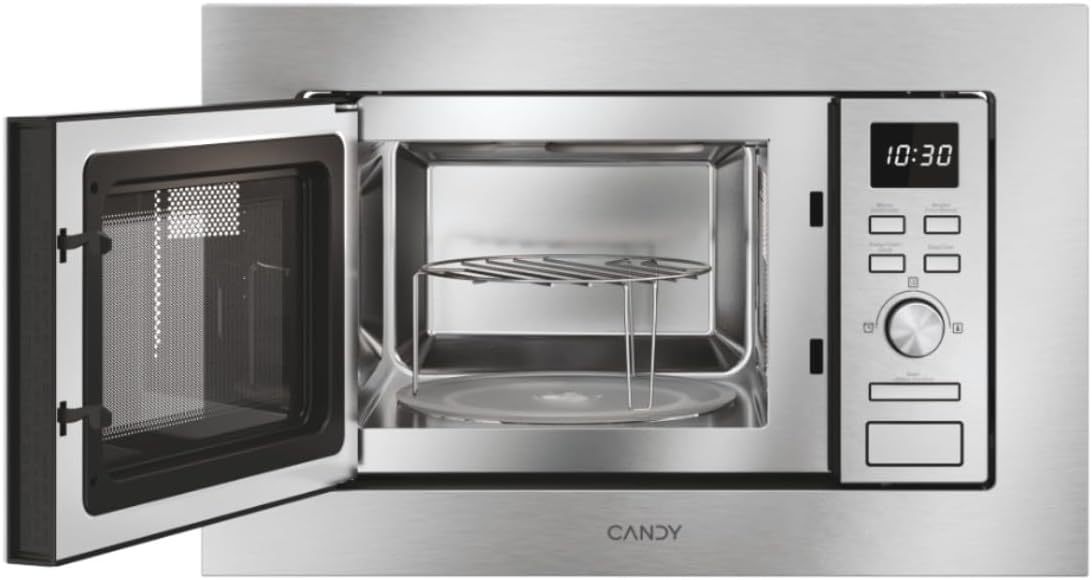
Figure 1: Front view of the Candy Wave 600 Built-in Microwave.
2. Safety Information
Always follow basic safety precautions when using electrical appliances to reduce the risk of fire, electric shock, injury to persons, or exposure to excessive microwave energy.
- Read all instructions before using the appliance.
- Do not attempt to operate this oven with the door open as this can result in harmful exposure to microwave energy.
- Do not heat liquids or other foods in sealed containers as they are liable to explode.
- Only allow children to use the oven without supervision when adequate instructions have been given so that the child is able to use the oven in a safe way and understands the hazards of improper use.
- Do not use corrosive chemicals or vapors in this appliance.
- If the door or door seals are damaged, the oven must not be operated until it has been repaired by a competent person.
- The appliance must be earthed. Connect only to a properly earthed outlet.
3. Setup and Installation
Proper installation is crucial for the performance and safety of your microwave oven. This appliance is designed for built-in installation.
3.1 Unpacking
- Remove all packaging materials from inside the oven cavity and from the door.
- Check the oven for any damage, such as dents or a broken door. Do not install if damaged.
- Ensure all accessories are present: turntable, turntable support, and grill rack.
3.2 Placement and Dimensions
The microwave must be installed in a cabinet opening that meets the specified dimensions. Ensure adequate ventilation around the appliance.

Figure 2: Installation dimensions for the Candy Wave 600 Built-in Microwave.
- The cabinet opening should be 560mm wide and 362mm high.
- The microwave itself measures 59.5 cm (width) x 34.4 cm (depth) x 38.2 cm (height).
- Ensure a minimum depth of 500mm for the cabinet.
3.3 Electrical Connection
- Connect the microwave to a properly earthed 230V AC power outlet.
- Do not use extension cords or multiple sockets.
- The power cord should be easily accessible after installation.
3.4 Initial Cleaning
Before first use, wipe the interior and exterior of the microwave with a damp cloth. Ensure the turntable and support are clean and correctly placed.

Figure 3: Interior view with turntable and grill rack.
4. Operating Instructions
Your Candy Wave 600 microwave offers various functions for convenient cooking. Familiarize yourself with the control panel for optimal use.
4.1 Control Panel Overview
The microwave features an integrated screen and touch controls for easy operation. A rotary knob is used for setting time and selecting options.
4.2 Setting the Clock
- When the oven is plugged in, the display will show '0:00'.
- Press the clock button (usually indicated by a clock icon).
- Use the rotary knob to set the hour, then press the clock button again.
- Use the rotary knob to set the minutes, then press the clock button to confirm.
4.3 Microwave Cooking (Power Levels)
The microwave offers 5 power levels. To cook with microwave power:
- Place food in the oven and close the door.
- Press the 'Microwave' button repeatedly to select the desired power level (e.g., P100 for 100% power).
- Use the rotary knob to set the cooking time.
- Press the 'Start' button to begin cooking.
4.4 Grill Function
The grill function is ideal for browning and crisping food.
- Place food on the grill rack (if provided) directly on the turntable.
- Press the 'Grill' button.
- Use the rotary knob to set the grilling time.
- Press the 'Start' button.
4.5 Automatic Cooking Programs
The microwave features 7 automatic cooking programs for various food types. These programs automatically adjust cooking time and power.
- Press the 'Auto Menu' button.
- Use the rotary knob to select the desired program number.
- Enter the food weight (if prompted) using the rotary knob.
- Press 'Start'.
4.6 Easy Touch Controls
The Easy Touch controls allow you to select the food weight, and the microwave will automatically adjust the cooking time and power.
- Select the desired cooking function (e.g., Microwave).
- Press the 'Easy Touch' button (or similar icon).
- Use the rotary knob to input the food weight.
- Press 'Start'.
4.7 Start Express Function
The Start Express button provides quick cooking at maximum power.
- Press the 'Start Express' button once for 30 seconds of cooking at maximum power.
- Each subsequent press adds another 30 seconds.
4.8 Defrost Program
The defrost program thaws food based on weight.
- Press the 'Defrost' button.
- Use the rotary knob to select the food weight.
- Press 'Start'. The oven will automatically calculate the defrosting time.
4.9 Child Lock Function
The Child Lock prevents accidental operation, especially by children.
- To activate: Press and hold the 'Stop/Cancel' button for approximately 3 seconds until a 'beep' sounds and a lock indicator appears on the display.
- To deactivate: Press and hold the 'Stop/Cancel' button again for approximately 3 seconds until the lock indicator disappears.
5. Maintenance and Cleaning
Regular cleaning and maintenance will ensure the longevity and optimal performance of your microwave oven.
5.1 Interior Cleaning
- Clean the oven cavity after every use with a damp cloth.
- For stubborn stains, use a mild detergent or a microwave-safe cleaner.
- Do not use abrasive cleaners or metal scouring pads.
- Remove and wash the glass turntable and turntable support in warm soapy water.
5.2 Exterior Cleaning
- Wipe the exterior surfaces with a soft, damp cloth.
- Clean the door and door seals regularly to ensure proper closure.
- Avoid excessive moisture near the control panel.
6. Troubleshooting
If you encounter issues with your microwave, refer to the following common problems and solutions before contacting service.
| Problem | Possible Cause | Solution |
|---|---|---|
| Oven will not start | Power cord not plugged in; Door not closed properly; Fuse blown or circuit breaker tripped. | Ensure plug is firmly in outlet; Close door securely; Check household fuse or reset circuit breaker. |
| No microwave power | Incorrect power level selected; Technical malfunction. | Verify power level setting; Contact customer support if issue persists. |
| Food not heating evenly | Food not stirred or rearranged; Turntable not rotating. | Stir or rearrange food during cooking; Check if turntable is correctly placed and rotating. |
| Light not working | Bulb needs replacement. | Contact qualified service personnel for bulb replacement. |
7. Specifications
Technical details for the Candy Wave 600 Built-in Microwave (Model CA20FMW7NG).
| Feature | Specification |
|---|---|
| Model Number | CA20FMW7NG |
| Brand | CANDY |
| Capacity | 20 Liters |
| Microwave Power | 800 Watts |
| Voltage | 230 Volt (AC) |
| Control Type | Touch Control |
| Material | Stainless Steel |
| Dimensions (D x W x H) | 34.4 cm x 59.5 cm x 38.2 cm |
| Weight | 15 Kilograms |
| Heating Method | Radiant and Grill |
| Included Components | Grill Rack |
8. Warranty and Support
Your Candy Wave 600 Built-in Microwave comes with a 2-year product warranty.
For warranty claims, technical assistance, or to purchase spare parts, please contact Candy customer support. Refer to the contact information provided with your purchase documentation or visit the official Candy website.
Please have your model number (CA20FMW7NG) and proof of purchase ready when contacting support.


