1. Introduction
Thank you for choosing the Vieta Pro Easy 2 Portable Bluetooth Speaker. This manual provides essential information for setting up, operating, and maintaining your speaker. Please read it carefully before use to ensure optimal performance and longevity of your device.
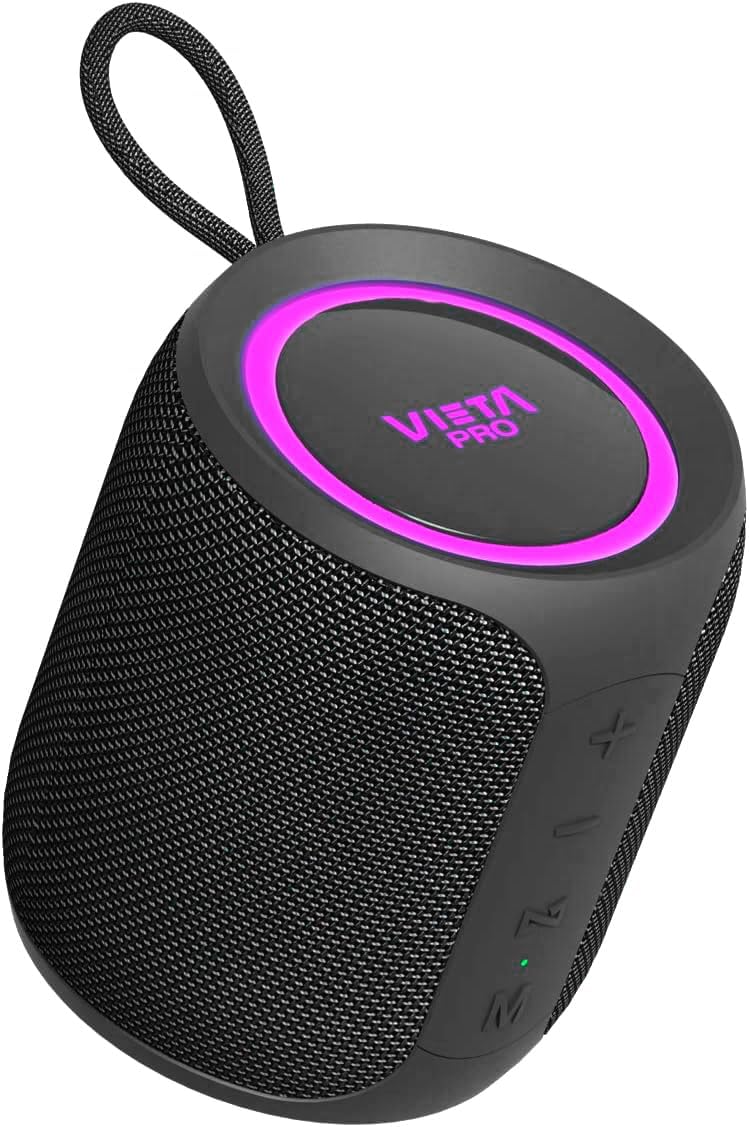
Image 1.1: Vieta Pro Easy 2 Portable Bluetooth Speaker
The Vieta Pro Easy 2 is a versatile portable speaker designed for high-quality audio on the go. It features 20W powerful sound, FM Radio, IPX7 water resistance, a 12-hour battery life, a built-in microphone for hands-free calls, stereo sound capabilities, USB-C charging, and True Wireless Stereo (TWS) functionality.
2. Package Contents
Please check the box for the following items:
- 1x Vieta Pro Easy 2 Portable Bluetooth Speaker
- 1x USB-C Charging Cable
- 1x 3.5mm Jack Audio Cable
- 1x User Manual (this document)
3. Product Overview
3.1. Speaker Components

Image 3.1: Rear view of the speaker with controls
- Power Button: Long press to power on/off. Short press to change playback mode.
- Volume Up (+) / Next Track: Short press for next track. Long press to increase volume.
- Volume Down (-) / Previous Track: Short press for previous track. Long press to decrease volume.
- Play/Pause / Call / Voice Assistant (M): Short press to play/pause music or answer/end calls. Long press to activate voice assistant.
- Mode Button (M): Short press to switch between Bluetooth, FM Radio, USB, and Aux-In modes.
- LED Indicator: Shows charging status, Bluetooth pairing status, and mode.
3.2. Ports
- USB-C Port: For charging the speaker.
- USB Port: For playing music from a USB flash drive.
- Aux-In Port (3.5mm): For connecting external audio devices via cable.
4. Setup
4.1. Charging the Speaker
Before first use, fully charge the speaker. Connect the supplied USB-C cable to the speaker's USB-C port and the other end to a USB power adapter (not included) or a computer's USB port. The LED indicator will show charging status and turn off when fully charged.
4.2. Power On/Off
- To power on: Long press the Power button. The speaker will emit an audible prompt and the LED indicator will light up.
- To power off: Long press the Power button again. The speaker will emit an audible prompt and the LED indicator will turn off.
4.3. Bluetooth Pairing
To connect your speaker to a Bluetooth-enabled device:
- Ensure the speaker is powered on and in Bluetooth mode. If not, short press the Mode button until you hear the "Bluetooth mode" prompt. The LED indicator will flash, indicating it's in pairing mode.
- Enable Bluetooth on your smartphone, tablet, or other device.
- Search for available Bluetooth devices and select "Vieta Pro Easy 2" from the list.
- Once connected, the speaker will confirm with an audible prompt, and the LED indicator will stop flashing and remain solid.
4.4. True Wireless Stereo (TWS) Pairing
TWS allows you to connect two Vieta Pro Easy 2 speakers for a stereo sound experience.
- Ensure both Easy 2 speakers are powered on and not connected to any Bluetooth device.
- On one speaker (this will be the primary speaker), long press the Play/Pause button until you hear a pairing tone.
- The two speakers will automatically connect to each other. Once connected, you will hear a confirmation tone.
- Now, connect your Bluetooth device to the primary speaker as described in section 4.3. Both speakers will play audio in stereo.
5. Operating Instructions
5.1. Music Playback (Bluetooth/USB/Aux-In)
- Play/Pause: Short press the Play/Pause button.
- Next Track: Short press the Volume Up (+) button.
- Previous Track: Short press the Volume Down (-) button.
- Volume Control: Long press the Volume Up (+) button to increase volume. Long press the Volume Down (-) button to decrease volume.
5.2. FM Radio
To use the FM Radio function:
- Short press the Mode button to switch to FM Radio mode.
- Long press the Play/Pause button to automatically scan and save available FM stations.
- Short press the Volume Up (+) or Volume Down (-) buttons to switch between saved stations.
Note: The FM radio functionality is basic and does not display the frequency. Station selection is sequential through saved channels.
5.3. USB Playback
Insert a USB flash drive containing MP3 audio files into the USB port. The speaker will automatically switch to USB mode and begin playback. Use the music playback controls as described in section 5.1.
5.4. Aux-In Mode
Connect an external audio device (e.g., MP3 player, computer) to the speaker's 3.5mm Aux-In port using the provided audio cable. The speaker will automatically switch to Aux-In mode. Control playback from your connected device.
5.5. Hands-Free Calls
When connected via Bluetooth to a smartphone, you can use the speaker for hands-free calls:
- Answer Call: Short press the Play/Pause button.
- End Call: Short press the Play/Pause button during a call.
- Reject Call: Long press the Play/Pause button.
5.6. Voice Assistant
The speaker supports voice assistants like Alexa, Google Assistant, and Siri.
- Activate Voice Assistant: Long press the Play/Pause button. The speaker will activate the voice assistant on your connected smartphone.
6. Maintenance
- Cleaning: Use a soft, dry cloth to clean the speaker. Do not use abrasive cleaners or solvents.
- Water Resistance (IPX7): The speaker is IPX7 water-resistant, meaning it can be submerged in up to 1 meter of water for 30 minutes. Ensure all port covers are securely closed before exposure to water. After exposure to water, dry the speaker thoroughly before charging.

Image 6.1: Speaker demonstrating IPX7 water resistance
7. Troubleshooting
| Problem | Possible Cause | Solution |
|---|---|---|
| Speaker does not power on | Low battery | Charge the speaker fully. |
| No sound | Volume too low or muted | Increase volume on speaker and connected device. Check if device is muted. |
| Bluetooth pairing fails | Speaker not in pairing mode or device too far | Ensure speaker is in Bluetooth pairing mode (flashing LED). Move device closer to speaker. Forget speaker from device's Bluetooth list and re-pair. |
| Poor FM radio reception | Weak signal | Move speaker to a location with better signal. Re-scan for stations. |
| TWS pairing fails | Speakers already connected to other devices | Ensure both speakers are disconnected from other Bluetooth devices before initiating TWS pairing. |
8. Specifications
- Brand: Vieta Pro
- Model Name: Easy 2
- Model Number: FBM-VM-BS36BK
- Speaker Type: Portable Bluetooth Speaker
- Connectivity Technology: Bluetooth 5.0
- Output Power: 20 Watts
- Audio Output Mode: Stereo
- Frequency Response: 80.2 Hz
- Battery Life: Up to 12 Hours
- Charging Port: USB-C
- Water Resistance: IPX7
- Special Features: True Wireless Stereo (TWS), Built-in Microphone, Voice Assistant Button, FM Radio, USB Playback, Aux-In
- Dimensions (L x W x H): 8.4 cm x 9.5 cm x 8.4 cm
- Weight: 550 g
- Material: Silicone or Rubber

Image 8.1: Speaker dimensions
9. Warranty and Support
The Vieta Pro Easy 2 Portable Bluetooth Speaker comes with a limited warranty. For specific warranty terms and conditions, please refer to the warranty card included in your package or contact Vieta Pro customer support.
For technical assistance, troubleshooting, or any other inquiries, please visit the official Vieta Pro website or contact their customer service department.


