
Important Safety Information
Please read all safety instructions carefully before using the BAOFENG UV-K61 Walkie Talkie. Failure to follow these instructions may result in injury or damage to the device.
- Do not operate the radio in explosive atmospheres (e.g., flammable gases, dust particles, metallic powders).
- Do not expose the radio to direct sunlight for extended periods or place it near heating appliances.
- Use only BAOFENG approved batteries and chargers. Unauthorized accessories may cause damage or fire.
- Keep the radio away from medical devices to avoid interference.
- Do not disassemble or modify the radio. Repairs should only be performed by qualified technicians.
- Avoid using the radio at high volume levels for prolonged periods to prevent hearing damage.
Package Contents
Verify that all items are present in your package:
- 1x BAOFENG UV-K61 Radio
- 1x 2600mAh High Capacity Battery
- 1x High Gain Antenna
- 1x USB-C Charger Cable
- 1x Charger Dock
- 1x Belt Clip
- 1x Hand Strap
- 1x User Manual (this document)
- 1x 771 Antenna
- 1x Programming Cable
- 1x Shoulder Speaker Microphone

Image: The BAOFENG UV-K61 radio displayed with its various accessories, including the battery, antennas, charging cable, charger dock, belt clip, hand strap, programming cable, and shoulder speaker microphone.
Product Overview
The BAOFENG UV-K61 is a versatile multi-band two-way radio designed for reliable communication. It features a 1.44-inch LCD screen, 999 channels, VOX hands-free operation, NOAA weather alerts, and multiple charging options.

Image: A detailed diagram of the BAOFENG UV-K61 radio, highlighting key components such as the antenna, flashlight, PTT key, alarm switch, radio/monitor button, sweep key, menu key, volume/power knob, 1.44" LCD screen, 2-pin K port, V/M-VFO/MR button, A/B select key, speaker, exit key, and keypad. Product dimensions are also indicated.
Setup
1. Battery Installation
- Align the 2600mAh battery with the battery compartment on the back of the radio.
- Slide the battery into place until it clicks securely.
2. Antenna Attachment
- Screw the desired antenna (High Gain or 771 Antenna) clockwise onto the antenna connector at the top of the radio until it is finger-tight. Do not overtighten.
3. Charging the Battery
The UV-K61 offers multiple charging methods:
- USB-C Direct Charging: Connect the USB-C cable directly to the radio's USB-C port.
- Charger Dock: Place the radio with the battery installed into the charger dock. Connect the charger dock to a power source using the provided US base charger.
The LED indicator on the battery or charger dock will show red during charging and turn green when fully charged.

Image: The BAOFENG UV-K61 radio with its 2600mAh high-capacity battery and USB-C charging port. LED indicators show red for charging and green for charged status.

Image: Illustrations demonstrating various charging methods for the BAOFENG UV-K61, including direct USB-C connection to a laptop, car charger, power bank, and charging via the included charger dock.
Operating Instructions
1. Power On/Off
Rotate the Volume & Power knob clockwise to turn the radio on. Rotate it counter-clockwise until a click is heard to turn the radio off.
2. Channel Selection (999 Channels)
The UV-K61 supports up to 999 channels. Use the keypad to directly input a channel number or use the Up/Down arrow keys to navigate through channels. Press the V/M button to switch between Frequency (VFO) mode and Channel (MR) mode.
3. Frequency Copying (One Key Match Frequency)
This feature allows you to quickly copy frequencies from another radio.
- Step 1: Turn on your UV-K61 radio. Press and hold the MENU button to enter search mode. The screen will display "SEARCH".
- Step 2: Press and hold the transmit button (PTT) on the other radio you wish to copy from. Your UV-K61 will search for and display the frequency and decode information.
- Step 3: Once the search is complete, press the MENU button again to confirm and save the frequency. Switch to channel mode to select the channel, and the screen will show the frequency of the other radio, allowing for communication.

Image: A visual guide demonstrating the three steps for using the One Key Match Frequency feature on the BAOFENG UV-K61. It shows the radio display during search, frequency detection, and channel selection.
4. VOX Function (Voice Operated Transmit)
The VOX function enables hands-free operation by transmitting automatically when it detects your voice. To activate/deactivate VOX, navigate to the VOX setting in the menu and adjust the sensitivity level.
5. NOAA Weather Channels
The UV-K61 includes a built-in NOAA receiver with 10 channels to provide real-time weather alerts. To access NOAA channels, switch to the NOAA band or use the dedicated NOAA function if available in the menu. This feature helps you stay informed about sudden weather changes.

Image: The BAOFENG UV-K61 radio displaying a NOAA Weather Alert on its screen, set against a background depicting stormy weather, emphasizing its weather alert capability.
6. AM/FM Radio
The radio supports both AM and FM broadcast reception. Use the appropriate menu settings to switch to AM or FM radio mode and scan for stations.
7. Flashlight
The built-in flashlight can be activated via a dedicated button or menu option, providing illumination in low-light conditions.
8. LCD Display
The 1.44-inch LCD screen provides clear visibility of frequencies, channel numbers, battery status, and other operational indicators. It features a dual display mode and an English menu for ease of use.
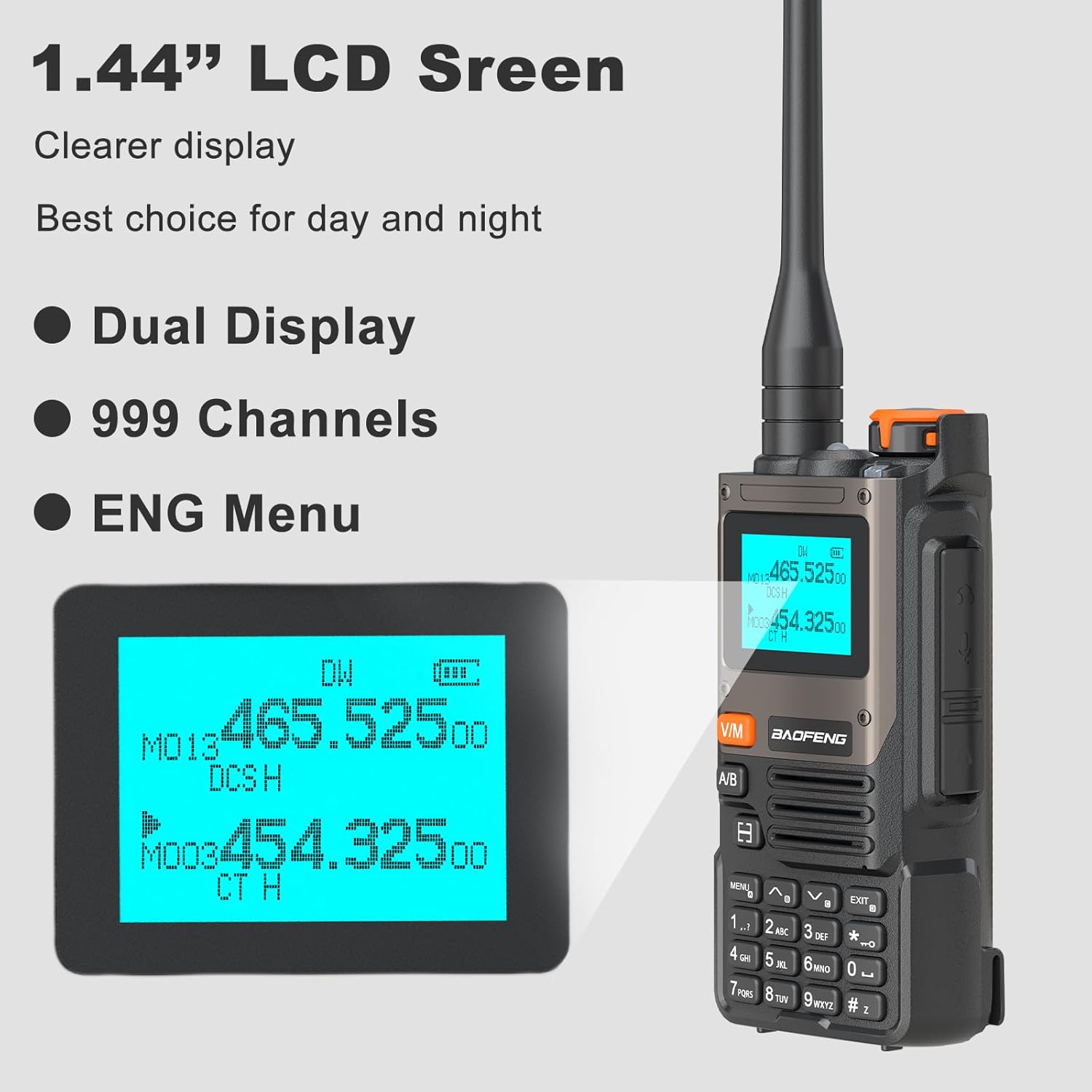
Image: A close-up view of the BAOFENG UV-K61's 1.44-inch LCD screen, showing its clear display of frequencies, channel information, and battery level. The image highlights its dual display capability and English menu.
9. Main Functions Overview

Image: An infographic displaying the main functions of the BAOFENG UV-K61 through icons, including 999 Channels, Frequency Copy, VOX Function, 2600mAh battery, Flashlight, 10 NOAA Channels, FM Radio, and AM Radio.
Maintenance
1. Battery Care
- Charge the battery fully before first use.
- Avoid overcharging or completely draining the battery to prolong its lifespan.
- Store the battery in a cool, dry place when not in use for extended periods.
2. Cleaning the Device
- Wipe the radio with a soft, damp cloth. Do not use harsh chemicals or abrasive cleaners.
- Ensure the USB-C port and other connectors are free from dust and debris.
3. Storage
- Store the radio in a dry, dust-free environment at room temperature.
- Remove the battery if storing the radio for more than a month.
Troubleshooting
| Problem | Possible Cause | Solution |
|---|---|---|
| Radio does not power on | Low or dead battery; improperly installed battery | Charge the battery; ensure battery is correctly installed. |
| Cannot transmit or receive | Incorrect frequency/channel; antenna not attached; low battery | Verify frequency/channel settings; attach antenna securely; charge battery. |
| Poor audio quality | Weak signal; antenna issue; volume too low/high | Move to an area with better signal; check antenna connection; adjust volume. |
| Battery not charging | Charger/cable faulty; improper connection | Check charger and cable for damage; ensure secure connection to radio/dock and power source. |
Specifications
| Feature | Detail |
|---|---|
| Brand | BAOFENG |
| Model Number | UV-K61 |
| Number of Channels | 999 |
| Frequency Range | 535-1705 kHz (AM), 87.5-108 MHz (FM), 162.400-162.550 MHz (NOAA) |
| Talking Range Maximum | 5 Kilometer |
| Battery Capacity | 2600mAh Lithium Ion |
| Voltage | 7.4 Volts (DC) |
| Product Dimensions (D x W x H) | 1.37" x 2.16" x 4.72" |
| Item Weight | 25.39 Ounces |
| Special Features | 10 NOAA Weather Alarm, Multi-Band (AM/FM), One Key Match Frequency, USB-C Charging, VOX |
| Water Resistance Level | Not Water Resistant |
Warranty Information
The BAOFENG UV-K61 Walkie Talkie comes with a 1-year warranty. This warranty is provided exclusively through "Shiqun Electronics Co., Ltd". Please retain your proof of purchase for warranty claims.
Customer Support
For further assistance, technical support, or warranty inquiries, please contact the seller or refer to the official BAOFENG website for updated contact information. When contacting support, please have your product model (UV-K61) and purchase details ready.


