
1. Introduction
The IMIKI FRAME LITE ST2 is a versatile smartwatch designed for daily use, offering a blend of style and functionality. It features a 1.96-inch IPS display, Bluetooth connectivity, and various health monitoring capabilities. This manual provides essential information for operating and maintaining your device.
2. Package Contents
Please verify that all items are present in your package:
- IMIKI FRAME LITE ST2 Smartwatch
- Magnetic Charging Cable
- User Manual
3. Device Overview
Familiarize yourself with the main components of your smartwatch.
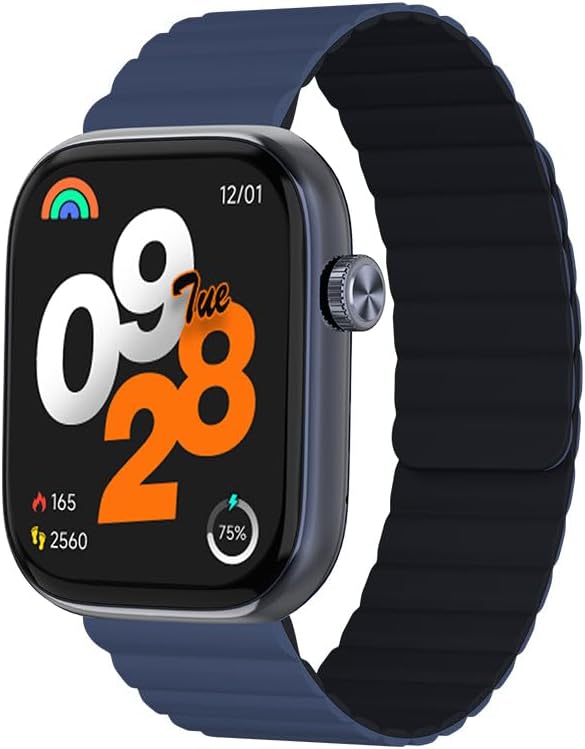
Image 1: Front view of the IMIKI FRAME LITE ST2 Smartwatch, displaying the time, date, and activity metrics on its 1.96-inch IPS screen. The watch features a blue case and a blue magnetic strap.

Image 2: Side view of the IMIKI FRAME LITE ST2 Smartwatch, highlighting its slim profile and the integrated crown button for navigation and control.
4. Setup
4.1 Charging the Smartwatch
Before initial use, fully charge your IMIKI FRAME LITE ST2 Smartwatch.
- Connect the magnetic charging cable to the charging points on the back of the smartwatch.
- Plug the USB end of the cable into a standard USB power adapter (not included) or a computer's USB port.
- The watch display will indicate charging status. A full charge takes approximately 2 hours.
A fully charged 250 mAh battery provides up to 15 days of typical use or 5 days of intensive use.
4.2 Installing the Companion App
To unlock the full features of your smartwatch, download and install the companion application on your smartphone.
- Scan the QR code provided in the quick start guide or search for the official IMIKI app in the Apple App Store (for iOS) or Google Play Store (for Android).
- Install the app on your smartphone.
- Follow the on-screen instructions to create an account and set up your profile.
4.3 Pairing with Your Smartphone
Ensure Bluetooth is enabled on your smartphone and the smartwatch is sufficiently charged.
- Open the IMIKI companion app on your smartphone.
- Navigate to the 'Device' or 'Add Device' section within the app.
- The app will search for available devices. Select 'IMIKI FRAME LITE ST2' from the list.
- Confirm the pairing request on both your smartphone and the smartwatch if prompted.
- Once paired, the smartwatch will synchronize data with your phone.
5. Operating the Smartwatch
5.1 Basic Navigation
- Touch Screen: Swipe left, right, up, or down to navigate through menus and notifications. Tap to select items.
- Side Button/Crown: Press to wake the screen, return to the home screen, or access the app list. Rotate (if applicable) to scroll through lists.
5.2 Call Management
With Bluetooth 5.3 connectivity, you can manage calls directly from your smartwatch when paired with your smartphone.
- Answering Calls: Tap the green icon on the watch screen when an incoming call is displayed.
- Rejecting Calls: Tap the red icon to reject an incoming call.
- Voice Assistant: Access your smartphone's voice assistant directly from the watch for hands-free commands.
5.3 Health and Fitness Monitoring
The IMIKI FRAME LITE ST2 is equipped with sensors to track your health and fitness activities.
- Heart Rate Monitoring: The optical sensor continuously monitors your heart rate. View real-time data on the watch or in the app.
- Blood Oxygen (SpO2) Measurement: Measure your blood oxygen saturation levels. Ensure the watch is worn snugly on your wrist for accurate readings.
- Workout Modes: Choose from 105 supported workout modes to track specific activities. The watch records statistics such as duration, calories burned, and heart rate during exercise.
- Sleep Tracking: Monitor your sleep patterns, including deep sleep, light sleep, and wake times.
5.4 Customization
Personalize your smartwatch experience through the companion app.
- Watch Faces: Select from a variety of watch faces or create custom ones using the app.
- Notification Settings: Manage which app notifications appear on your smartwatch.
6. Maintenance
6.1 Cleaning
Regular cleaning helps maintain the smartwatch's appearance and functionality.
- Wipe the screen and watch body with a soft, lint-free cloth.
- For stubborn dirt, slightly dampen the cloth with water. Avoid using harsh chemicals or abrasive materials.
- Clean the charging contacts periodically to ensure proper charging.
6.2 Water Resistance
The IMIKI FRAME LITE ST2 has an IP68 water resistance rating, meaning it is protected against dust ingress and can withstand immersion in water up to 1.5 meters for 30 minutes. It is suitable for daily use, such as hand washing or light rain. However, it is not recommended for swimming, diving, or exposure to high-pressure water.
6.3 Storage
When not in use for extended periods, store the smartwatch in a cool, dry place. Ensure it has some charge to prevent deep discharge of the battery.
7. Troubleshooting
If you encounter issues with your smartwatch, refer to the following common solutions:
- Watch not turning on: Ensure the watch is fully charged. Connect it to the charger for at least 10 minutes.
- Cannot pair with smartphone:
- Ensure Bluetooth is enabled on your phone.
- Make sure the watch is within range of your phone.
- Restart both the smartwatch and your smartphone.
- Clear the Bluetooth cache on your phone (if applicable).
- Inaccurate health data: Ensure the watch is worn snugly on your wrist, not too tight or too loose. Clean the sensor on the back of the watch.
- Notifications not appearing: Check notification settings in the companion app and on your smartphone. Ensure the app is running in the background.
- Screen unresponsive: Try restarting the smartwatch by pressing and holding the side button for several seconds.
8. Specifications
| Feature | Specification |
|---|---|
| Brand | IMIKI |
| Model Name | IMIKI FRAME LITE ST2 |
| Screen Size | 1.96 Inches |
| Display Type | IPS |
| Connectivity Technology | Bluetooth 5.3 |
| Compatible Devices | Smartphone (Android & iOS) |
| Battery Capacity | 250 mAh |
| Typical Usage Battery Life | Up to 15 days |
| Intensive Usage Battery Life | Up to 5 days |
| Charging Time | Approximately 2 hours |
| Water Resistance Rating | IP68 |
| Health Monitoring | Blood Oxygen, Heart Rate |
| Workout Modes | 105 |
| Strap Type | Magnetic |
9. Warranty and Support
For warranty information and customer support, please refer to the warranty card included in your product packaging or visit the official IMIKI website. Keep your purchase receipt as proof of purchase.
If you require further assistance or have questions not covered in this manual, please contact IMIKI customer service through their official channels.

