Introduction
The M-VAVE Blackbox Bluetooth MIDI Controller is a compact, wireless, and versatile foot switch designed for musicians, guitarists, bassists, and music producers. It aims to streamline performance and recording setups by offering wireless Bluetooth connectivity for easy control over Digital Audio Workstations (DAWs), guitar pedals, and other MIDI-compatible devices.
This all-in-one processor provides unparalleled versatility with its robust features, including a comprehensive effects suite and fully customizable controls, making it an essential tool for both live performances and studio work.
Setup Guide
Package Contents
- M-VAVE Blackbox Bluetooth MIDI Controller
- USB Type-C Cable
- User Manual (this document)
Charging the Device
The M-VAVE Blackbox comes with a built-in rechargeable Lithium Ion battery. Before first use, ensure the device is fully charged.
- Connect the provided USB Type-C cable to the USB-C port on the rear of the Blackbox.
- Connect the other end of the USB cable to a compatible 5V power adapter (not included) or a computer's USB port.
- The device will indicate charging status on its display. A full charge provides up to 10 hours of continuous use.
Initial Power On
To power on the device, locate the power switch on the rear panel and slide it to the 'ON' position.
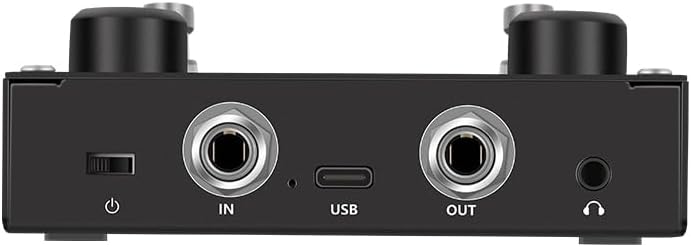
Image: Rear view of the M-VAVE Blackbox, highlighting the power switch, input/output jacks, and USB-C port for charging and data transfer.
Bluetooth Pairing
The M-VAVE Blackbox supports wireless Bluetooth MIDI connectivity.
- Ensure the Blackbox is powered on.
- On your computer (PC/Mac), tablet (iOS/Android), or other compatible device, enable Bluetooth.
- Search for available Bluetooth devices and select 'M-VAVE Blackbox' to pair.
- Once paired, the device is ready for wireless MIDI control.
Wired Connection (USB)
For a wired connection, use the USB Type-C port.
- Connect the USB Type-C cable from the Blackbox to your computer.
- The Blackbox will be recognized as a MIDI device by your operating system and compatible DAWs.
Operating Instructions
Overview of Controls
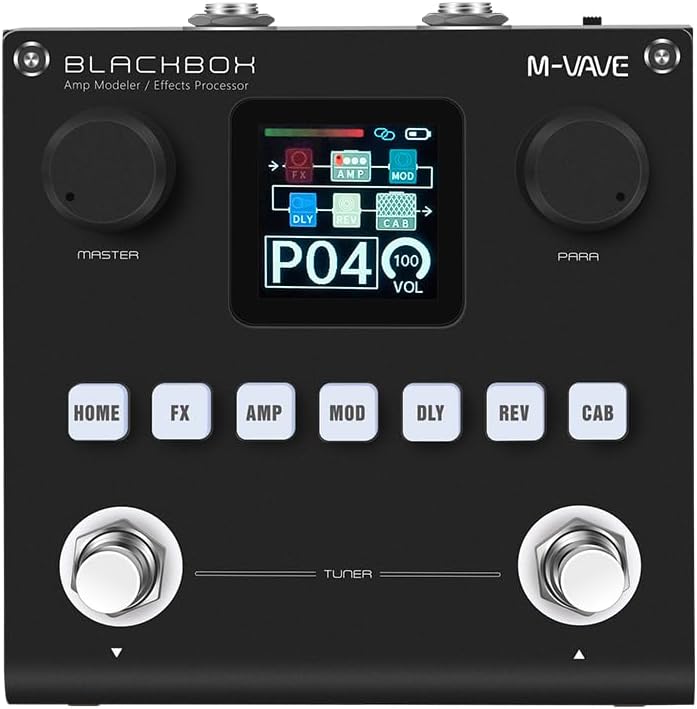
Image: Front view of the M-VAVE Blackbox, displaying its central screen, two large rotary knobs (Master and Para), six effect module buttons (Home, FX, Amp, Mod, Dly, Rev, Cab), and two foot switches with a 'Tuner' label.
- Display Screen: Shows current preset, effect chain, volume, and other parameters.
- Master Knob: Controls overall output volume.
- Para Knob: Adjusts parameters of selected effects or settings.
- Effect Module Buttons (HOME, FX, AMP, MOD, DLY, REV, CAB): Used to navigate between different effect modules and settings.
- Foot Switches: Four programmable foot switches (two visible on the front, two implied by 'Fully Customizable' feature) for changing presets, toggling effects, or sending custom MIDI commands. The front two are labeled for Tuner functionality.
Effect Modules and Presets
The Blackbox features 6 powerful effects modules and 80 fully editable presets.
- FX: Noise Gate, Boost, Compressor.
- AMP: 20 preamp options.
- MOD: 7 modulation effects.
- DLY: 5 delay effects.
- REV: 6 reverb effects.
- CAB: 20 IR cabinet slots.
Use the corresponding effect module buttons to enter their settings. The 'Para' knob can then be used to adjust specific parameters within that module. Presets can be saved and recalled to store your customized effect chains and settings.

Image: The M-VAVE Blackbox display showing 'P21' indicating preset 21, and '093 VOL' indicating the current volume level.
Customizing Foot Switches
The four programmable foot switches allow for flexible control. Refer to the device's companion software (if available) or the on-screen menu for detailed instructions on assigning MIDI commands to each foot switch. This enables control over effects toggling, loop activation, preset changes, and other MIDI-enabled functions.
Maintenance
To ensure the longevity and optimal performance of your M-VAVE Blackbox, follow these maintenance guidelines:
- Cleaning: Use a soft, dry cloth to clean the exterior of the device. Do not use abrasive cleaners, solvents, or waxes.
- Storage: Store the device in a cool, dry place away from direct sunlight, extreme temperatures, and high humidity.
- Handling: The Blackbox features a robust casing, but avoid dropping the device or subjecting it to strong impacts.
- Battery Care: For optimal battery life, avoid fully discharging the battery frequently. If storing for extended periods, charge the battery to approximately 50% every few months.
- Firmware Updates: Check the M-VAVE official website periodically for any available firmware updates. Follow the instructions provided with the update carefully.
Troubleshooting
| Problem | Possible Cause | Solution |
|---|---|---|
| Device does not power on. | Battery is depleted. Power switch is off. | Charge the device using the USB-C cable. Ensure the power switch on the rear is in the 'ON' position. |
| Cannot connect via Bluetooth. | Bluetooth is off on host device. Device is out of range. Interference. | Ensure Bluetooth is enabled on your computer/mobile device. Move the Blackbox closer to the host device. Minimize other wireless devices nearby. Try re-pairing the device. |
| No sound or effect. | Incorrect cabling. Volume is too low. Effect is bypassed or off. | Check all audio cable connections (IN/OUT). Increase the Master volume knob. Ensure the desired effect module is active and not bypassed. |
| Foot switches not responding. | Incorrect MIDI mapping. Device not connected. | Verify MIDI assignments in your DAW or companion software. Ensure the Blackbox is properly connected (Bluetooth or USB). |
| Short battery life. | Battery degradation over time. Frequent full discharges. | Ensure the device is fully charged before use. Avoid leaving the battery completely drained for long periods. If battery life significantly degrades, contact support. |
Specifications
- Model: Blackbox
- Brand: M-VAVE
- Item Weight: 470 g
- Shipping Dimensions: 12.8 x 11.5 x 5 cm
- Color: Black
- Battery: 1 Lithium Ion battery (Included)
- Battery Life: Up to 10 hours (continuous play on full charge)
- Power Input: USB Type-C, 5V ≥ 300mA
- Connector Type: Bluetooth, USB Type-C
- Hardware Interface: USB C
- Compatible Devices: Guitar, Bass, Mixer, DAW
- Hardware Platform: PC/Mac/iOS/Android
- Control Type: Knobs, Programmable Foot Switches
- Supported Software: Various DAWs
- Effects Modules: Noise Gate, Boost, Compressor, Preamp (20 options), Modulation (7 options), Delay (5 options), Reverb (6 options), IR Cabinet (20 slots)
- Presets: 80 fully editable presets
Warranty Information
Specific warranty details are not provided in the product information. Please refer to the manufacturer's official website or contact your retailer for warranty terms and conditions.
Support
For technical support, product inquiries, or further assistance, please visit the official M-VAVE website or contact their customer service department. Contact information may also be available on the product packaging.


