
HITBOX TIG200
HITBOX TIG200 200A TIG/Stick Welder Instruction Manual
Model: TIG200 | Dual Voltage 110V/220V
1. Introduction
This manual provides essential information for the safe and effective operation, setup, and maintenance of your HITBOX TIG200 200A TIG/Stick Welder. Please read this manual thoroughly before using the equipment to ensure proper function and safety.
2. Safety Information
WARNING: Welding can be dangerous. Always follow safety precautions to prevent injury or death.
- Always wear appropriate personal protective equipment (PPE), including a welding helmet with proper shade, flame-resistant clothing, welding gloves, and safety shoes.
- Ensure adequate ventilation to avoid inhaling welding fumes.
- Protect bystanders from arc rays and hot metal.
- Never touch live electrical parts.
- Ensure the welding machine is properly grounded.
- Keep a fire extinguisher nearby.
- Disconnect power before performing any maintenance or service.
3. Product Overview and Features
The HITBOX TIG200 is a versatile 2-in-1 welding machine designed for both High-Frequency (HF) TIG welding and Stick (MMA) welding. It features dual voltage capability (110V/220V) and utilizes advanced IGBT Inverter technology for stable and efficient performance.
Key Features:
- High-Frequency TIG: Non-contact arc initiation minimizes tungsten and material consumption, providing clean, spatter-free welds.
- 2-in-1 Functionality: Offers up to 200 amps for precise TIG welding of stainless and mild steel, and Arc/MMA welding for thicker materials.
- Post Gas Function: Adjustable post gas time (1-10 seconds) maintains protective gas flow after welding, shielding the weld and cooling the torch.
- Safety Features: Built-in protection against overcurrent, overvoltage, overload, and overheating.
- Portability: Lightweight design (approximately 12.1 lbs) with a handle for easy transport.
- Advanced Technology: Utilizes MCU and IGBT Inverter technology for digital control and stable arc performance.
- Arc/MMA Welding Capabilities: Includes Hot Start, Arc-Force, and Anti-Stick functions for improved stick welding performance.

Image: Visual representation of the HITBOX TIG200's multiple advantages, including Dual Voltage, Good Heat Dissipation, Hot Start, Arc Force, Anti-stick, Latest IGBT Technology, Overcurrent Protection, and High Duty Cycle.
4. Components and Accessories
The HITBOX TIG200 welder comes with the following standard accessories:
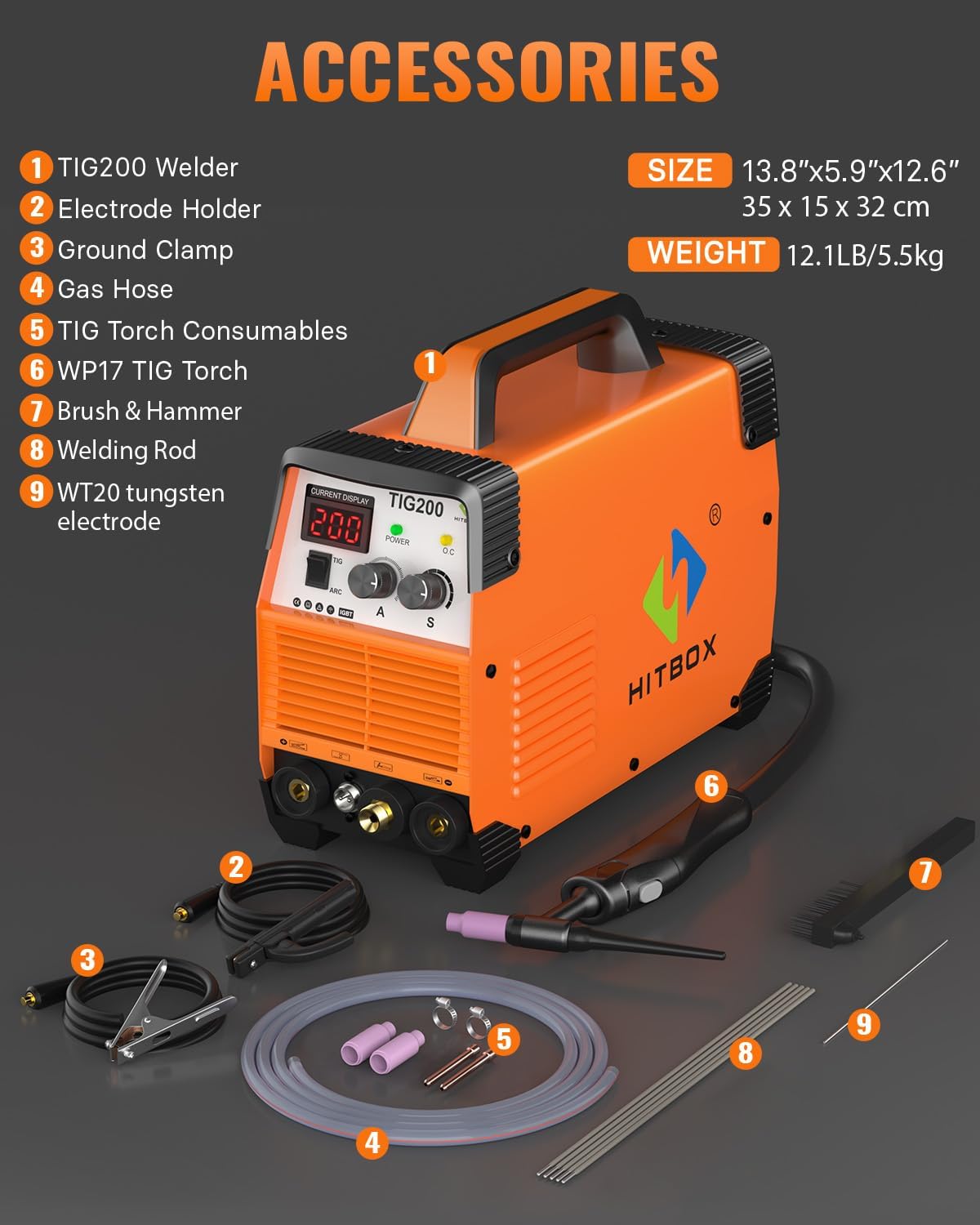
Image: Labeled diagram of the HITBOX TIG200 welder and its accessories, including the welder unit, electrode holder, ground clamp, gas hose, TIG torch consumables, WP17 TIG torch, brush & hammer, welding rod, and WT20 tungsten electrode.
- TIG200 Welder Unit
- Electrode Holder (for Stick/MMA welding)
- Ground Clamp
- Gas Hose (for TIG welding)
- TIG Torch Consumables (e.g., ceramic nozzles, collets)
- WP17 TIG Torch
- Brush & Hammer
- Welding Rods
- WT20 Tungsten Electrode
5. Setup
5.1 Power Connection
- The TIG200 supports dual voltage input (110V/220V). Ensure the power source matches the machine's requirements.
- Connect the power cord to a suitable, grounded electrical outlet.
- Verify the input voltage switch (if present) is set correctly for your power supply.
5.2 Gas Connection (for TIG Welding)
- Connect one end of the gas hose to the gas inlet on the rear of the welder.
- Connect the other end of the gas hose to your argon gas regulator, which should be attached to an argon gas cylinder.
- Ensure all connections are secure and leak-free.
5.3 Connecting Welding Cables
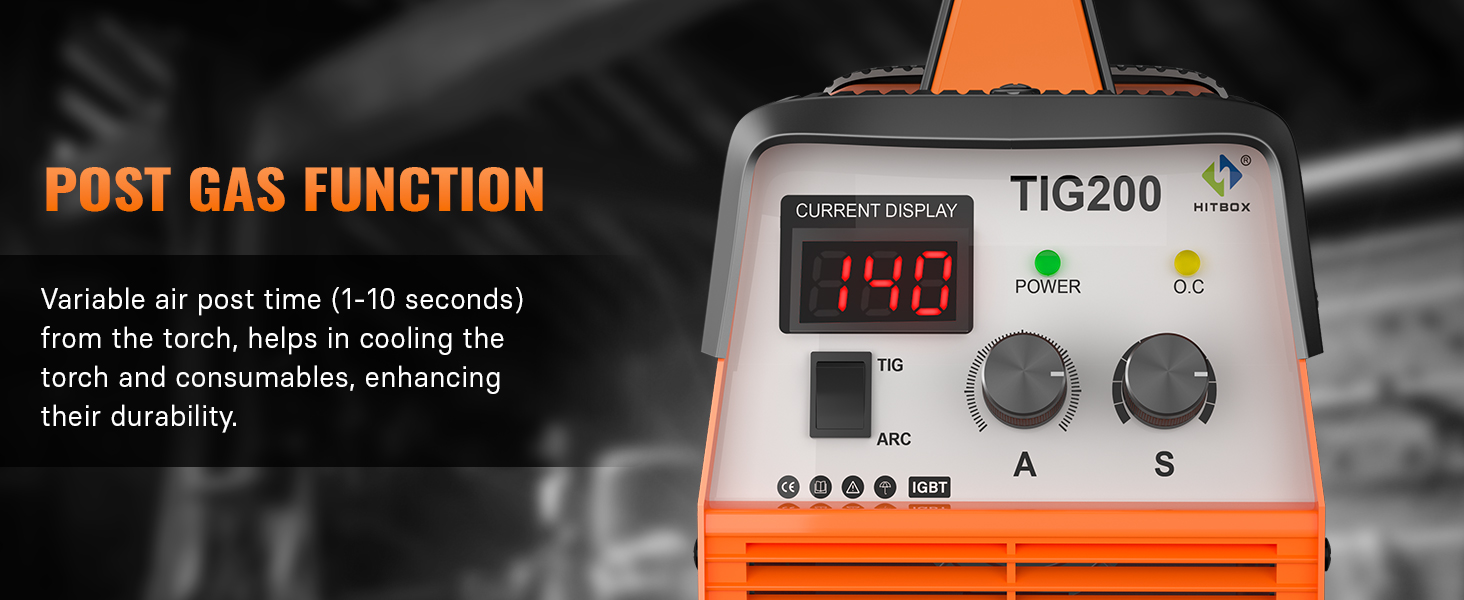
Image: Illustration detailing the connection methods for both MMA (Stick) and HF TIG welding modes on the HITBOX TIG200 welder.
For TIG Welding:
- Connect the TIG torch cable to the appropriate positive (+) terminal on the welder.
- Connect the ground clamp cable to the negative (-) terminal on the welder.
- Attach the ground clamp securely to the workpiece.
- Connect the TIG torch gas line to the gas outlet on the welder.
For Stick (MMA) Welding:
- Connect the electrode holder cable to the positive (+) terminal on the welder.
- Connect the ground clamp cable to the negative (-) terminal on the welder.
- Attach the ground clamp securely to the workpiece.
6. Operating Instructions
6.1 Power On/Off
- Turn on the main power switch located on the rear panel of the welder.
- The digital display will illuminate, showing the current settings.
6.2 Mode Selection
- Use the mode switch on the front panel to select between TIG and ARC (Stick) welding modes.
6.3 Current Adjustment
- Rotate the 'A' (Amperage) knob to adjust the welding current according to the material thickness and type.
6.4 Post Gas Function
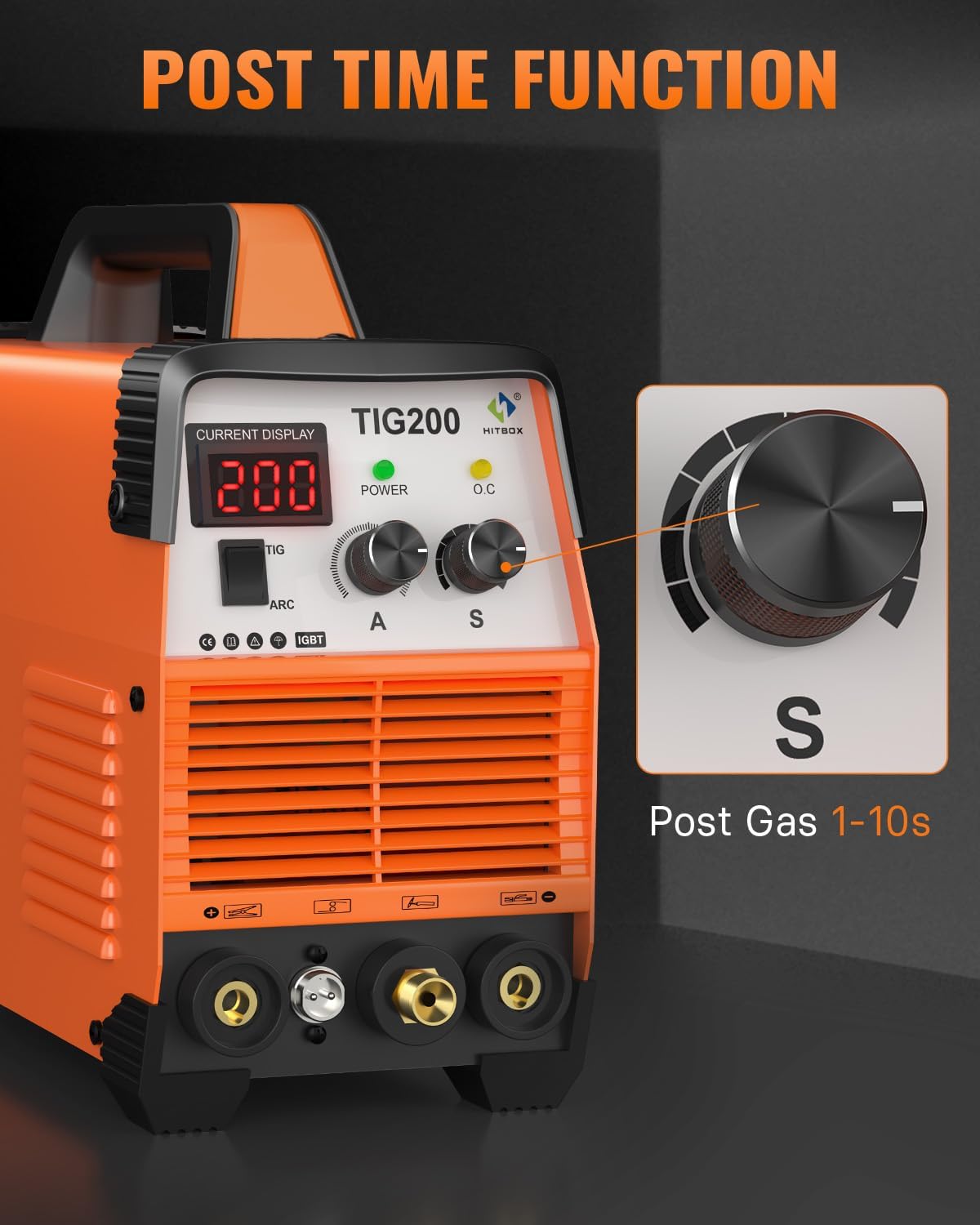
Image: Detailed view of the HITBOX TIG200 control panel, specifically showing the 'S' knob for adjusting the Post Gas time from 1 to 10 seconds.
- The 'S' knob controls the Post Gas time, ranging from 1 to 10 seconds.
- Set the desired duration for the protective gas to flow after the arc is extinguished. This protects the weld puddle from atmospheric contamination and cools the TIG torch.
6.5 TIG Welding Procedure
- Ensure proper gas flow from the regulator.
- Position the TIG torch over the workpiece.
- Initiate the arc using the HF start.
- Maintain a consistent arc length and travel speed.
- Add filler rod as needed to form the weld puddle.
- Allow the post gas to flow for the set duration after extinguishing the arc.
6.6 Stick (MMA) Welding Procedure
- Insert the appropriate electrode into the electrode holder.
- Strike the arc by lightly touching the electrode to the workpiece and quickly lifting it slightly.
- Maintain a consistent arc length and travel speed.
- The Hot Start, Arc-Force, and Anti-Stick functions will assist in arc initiation and stability.

Image: A visual demonstration of the HITBOX TIG200's 2-in-1 capability, showing a welder performing both High-Frequency TIG welding and Stick welding.
6.7 Wide Application
The HITBOX TIG200 is suitable for welding various materials, including:
- Mild Steel
- Stainless Steel
- Steel Plate
- Square Pipe
- Carbon Steel
- Copper

Image: A collage displaying various metal forms and types, such as mild steel, stainless steel, steel plate, square pipe, carbon steel, and copper, indicating the wide application range of the HITBOX TIG200 welder.
7. Maintenance
- Regular Cleaning: Periodically clean the welder's exterior with a dry cloth. Use compressed air to clear dust from internal components, ensuring the machine is unplugged.
- Cable Inspection: Regularly inspect all welding cables, torch, and ground clamp for damage, fraying, or loose connections. Replace damaged components immediately.
- Consumables: Check TIG torch consumables (tungsten, collets, gas nozzles) for wear and replace as necessary to maintain weld quality.
- Ventilation: Ensure the ventilation openings on the welder are clear and unobstructed to prevent overheating.
- Storage: Store the welder in a clean, dry environment when not in use.
8. Troubleshooting
| Problem | Possible Cause | Solution |
|---|---|---|
| No power | Power switch off, loose connection, circuit breaker tripped | Turn on switch, check connections, reset breaker |
| No arc (TIG) | Gas off, tungsten not properly installed, ground clamp loose, wrong mode selected | Check gas supply, install tungsten correctly, secure ground, select TIG mode |
| No arc (Stick) | Electrode not making contact, ground clamp loose, wrong mode selected | Ensure electrode contact, secure ground, select ARC mode |
| Poor weld quality | Incorrect current, improper gas flow, contaminated material, worn consumables | Adjust current, check gas, clean material, replace consumables |
| Overheat indicator (O.C.) | Extended use, blocked ventilation | Allow machine to cool, clear ventilation openings |
If problems persist after attempting these solutions, please contact HITBOX customer support.
9. Specifications
| Feature | Specification |
|---|---|
| Model | TIG200 |
| Input Voltage | 110V/220V Dual Voltage |
| Welding Current (TIG) | Up to 200 Amps |
| Welding Current (ARC/MMA) | Up to 200 Amps |
| Post Gas Time | 1-10 seconds |
| Technology | IGBT Inverter, MCU Digital Control |
| Item Weight | 12.1 pounds (approx. 5.5 kg) |
| Product Dimensions | 13.78 x 5.91 x 12.6 inches (approx. 35 x 15 x 32 cm) |
10. Warranty and Support
The HITBOX TIG200 Welder is backed by a 2-year quality support. This warranty covers manufacturing defects and ensures the product meets industry standards. For warranty claims, technical assistance, or any inquiries, please contact HITBOX customer support through your purchase platform or the official HITBOX website.
Please retain your proof of purchase for warranty validation.
Related documentsTIG200


Ask a question about this manual
Ask about setup, troubleshooting, compatibility, parts, safety, or missing instructions. Manuals+ will review the question and use this page’s manual context to help answer it.