
iENYRID iE-M4 PRO S
iENYRID iE-M4 PRO S Electric Scooter User Manual
Model: iE-M4 PRO S | Brand: iENYRID
1. Safety Information
Before operating the iENYRID iE-M4 PRO S Electric Scooter, please read and understand all safety instructions. Failure to follow these instructions may result in serious injury or damage to the scooter.
- Always wear a helmet and appropriate protective gear (knee pads, elbow pads) when riding.
- Do not ride in wet conditions, heavy rain, or through puddles deeper than 1 inch.
- Ensure all bolts and fasteners are tightened before each ride.
- Do not exceed the maximum weight limit of 330 lbs (150 kg).
- Observe local traffic laws and regulations. Riding on public roads may be restricted in some areas.
- Avoid riding on steep inclines or uneven terrain that exceeds the scooter's capabilities.
- Keep fingers and clothing away from moving parts.
- This scooter is intended for adult use.
2. Package Contents
Verify that all items are present in the package:
- iENYRID iE-M4 PRO S Electric Scooter
- Detachable Seat
- Power Charger
- User Manual (this document)
- Tool Kit (for assembly and maintenance)
3. Product Overview
The iENYRID iE-M4 PRO S is a high-performance electric scooter designed for adults, featuring a robust build and advanced functionalities.
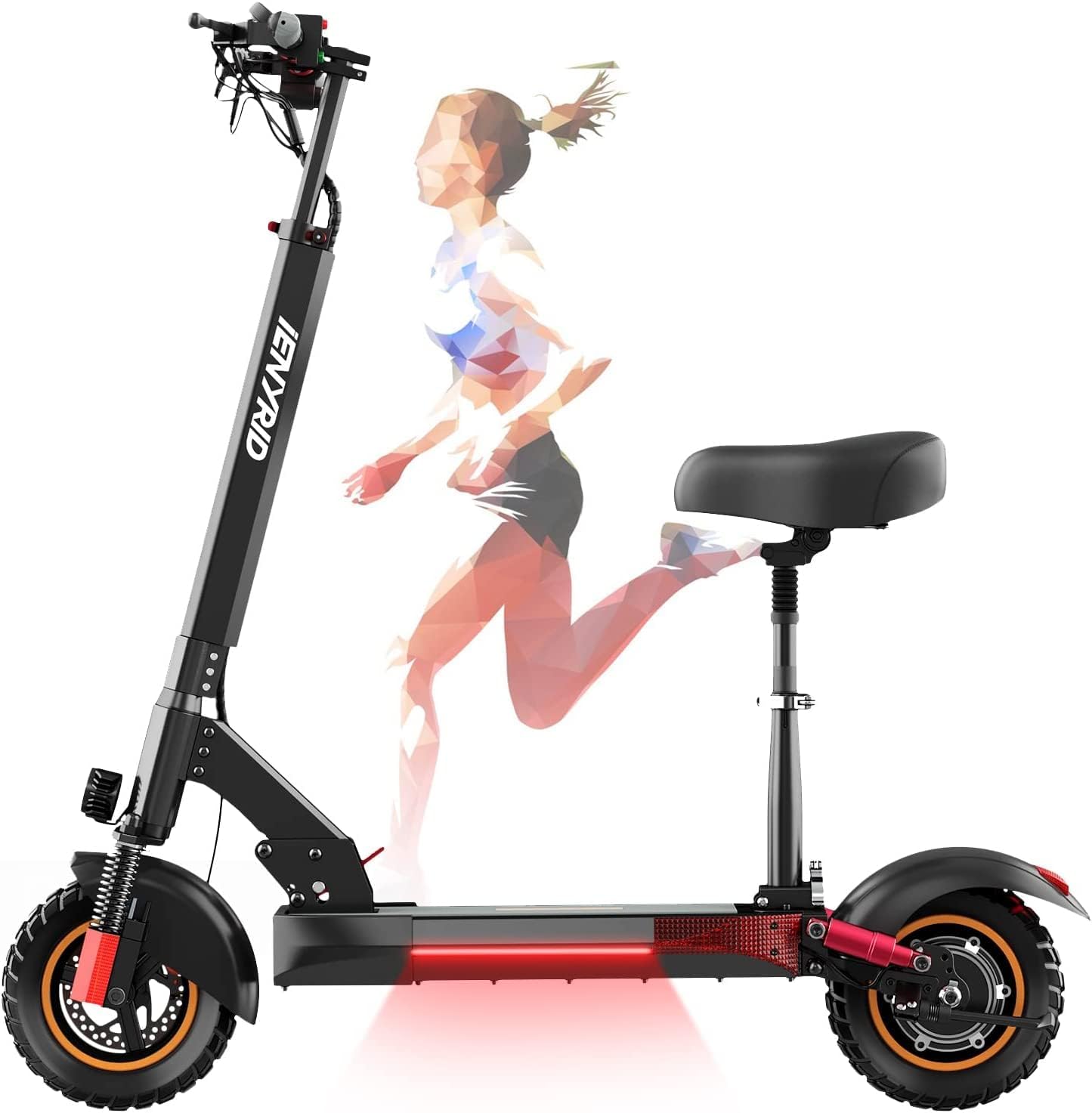
Figure 3.1: Overall view of the iENYRID iE-M4 PRO S Electric Scooter.
Key Components:
- Frame: Durable aluminum alloy construction.
- Motor: 600W powerful brushless motor for efficient performance.
- Battery: 48V 15Ah Lithium battery, providing a range of up to 37 miles.
- Tires: 10-inch off-road pneumatic tires designed for various terrains.
- Braking System: E-ABS porous double disc brakes on both front and rear wheels.
- Suspension: Front and rear suspension system for a smoother ride.
- Lighting: LED headlights, taillights, and turning signal lights for enhanced visibility.
- Display: LCD interface showing gear, driving data, power display, and cruise control status.
- Seat: Foldable and detachable seat for versatile riding options.

Figure 3.2: The iE-M4 PRO S scooter in both folded and unfolded configurations, highlighting the detachable seat.
4. Setup and Assembly
4.1 Unfolding the Scooter
- Place the scooter on a flat surface.
- Locate the folding mechanism latch near the base of the steering column.
- Carefully release the latch and lift the steering column until it locks into the upright position. Ensure it is securely locked before proceeding. Note: The folding mechanism may be stiff initially. Apply firm, steady pressure.
- Adjust the handlebar height to your preference and secure the quick-release clamp.
4.2 Installing the Seat
The iE-M4 PRO S comes with a detachable seat for added comfort.
- Identify the seat post receiver on the scooter's deck.
- Insert the seat post into the receiver.
- Adjust the seat height to a comfortable position and tighten the securing clamp firmly. Note: Some users have reported difficulty with seat installation. Ensure proper alignment and use the provided tools to secure it tightly.

Figure 4.1: Detail of the detachable seat and rear wheel assembly.
4.3 Initial Charging
Before first use, fully charge the scooter's battery.
- Locate the charging port on the scooter.
- Connect the charger to the scooter, then plug the charger into a standard electrical outlet.
- The charging indicator light on the charger will typically turn red during charging and green when fully charged.
- Charging time is approximately 6-8 hours. Do not overcharge.
5. Operating Instructions
5.1 Power On/Off
Press and hold the power button on the LCD display for a few seconds to turn the scooter on or off.
5.2 Riding the Scooter
The iE-M4 PRO S is equipped with 10-inch off-road pneumatic tires and a dual suspension system, making it suitable for various road surfaces including muddy roads, mountain paths, gravel roads, and highways.

Figure 5.1: The 10-inch off-road tires are designed for adaptability across various terrains.
To start riding, kick off gently with one foot while pressing the accelerator. Gradually increase speed. Maintain a balanced posture and keep both hands on the handlebars.
5.3 Speed Modes and Cruise Control
The scooter offers multiple speed gears, selectable via the LCD display. The maximum speed is 28 mph.
Cruise Control: To activate cruise control, maintain a constant speed for approximately 8 seconds. The scooter will then hold this speed, allowing you to focus on the road without continuously pressing the accelerator. To deactivate, simply press the brake lever or accelerator again.

Figure 5.2: The Smart-Do intelligent control LCD display provides real-time driving data and access to features like cruise control.
5.4 Braking System
The iE-M4 PRO S features an E-ABS porous double disc brake system on both the front and rear wheels for efficient and responsive stopping power.
- Gently squeeze the brake levers to slow down.
- Apply both brakes simultaneously for optimal stopping distance and control.
- Avoid sudden, harsh braking, especially at high speeds, to prevent loss of control.
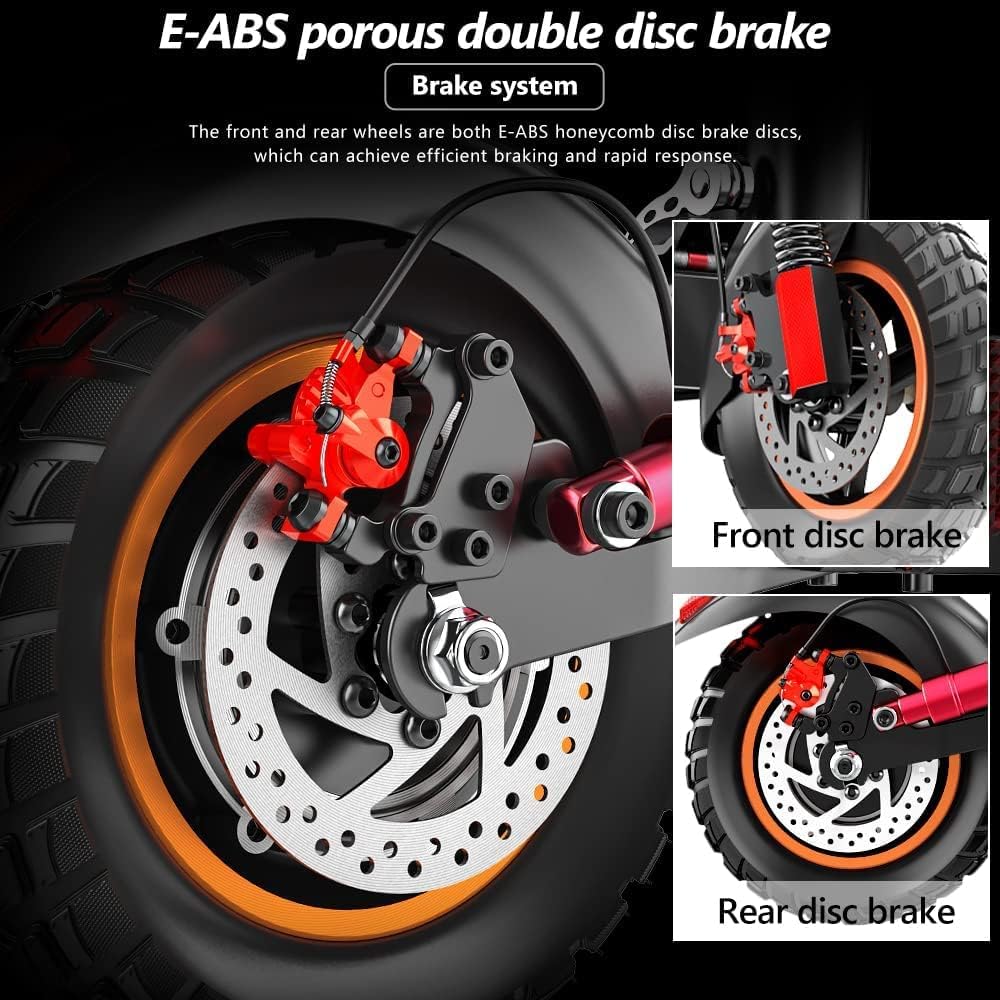
Figure 5.3: Detail of the front and rear E-ABS double disc brakes.
5.5 Lighting System
The scooter is equipped with extensive lighting for night riding and visibility.
- LED Headlights: Provide illumination for night riding.
- Taillights: Enhance rear visibility.
- Turning Signal Lights: Indicate your intended turns to others.

Figure 5.4: The scooter's LED headlights and side lighting for night visibility.
6. Maintenance
6.1 Cleaning
Regularly clean your scooter with a damp cloth. Do not use high-pressure water jets or corrosive cleaning agents. Ensure the charging port cover is securely closed before cleaning.
6.2 Tire Care
The 10-inch pneumatic tires require proper inflation for optimal performance and longevity. Check tire pressure regularly and inflate to the recommended PSI (refer to tire sidewall for details).

Figure 6.1: The robust pneumatic tires are designed for durability and shock absorption.
6.3 Battery Care
- Charge the battery fully before long-term storage.
- If storing for extended periods, charge the battery every 1-2 months to maintain its health.
- Avoid completely draining the battery.
- Use only the original charger provided with the scooter.
6.4 Storage
Store the scooter in a cool, dry place, away from direct sunlight and extreme temperatures. When folded, the scooter is more compact for storage.
7. Troubleshooting
This section addresses common issues you might encounter with your iENYRID iE-M4 PRO S Electric Scooter.
| Problem | Possible Cause | Solution |
|---|---|---|
| Scooter does not power on | Low battery; Loose connections; Faulty power button | Charge the battery; Check all visible connections; Contact customer support if issue persists. |
| Motor not engaging / Scooter not moving | Low battery; Brake engaged; Motor fault; Controller issue | Ensure battery is charged; Release brake levers completely; Power cycle the scooter; Contact customer support. |
| Brakes feel weak or unresponsive | Brake pads worn; Cable tension incorrect; Disc damage | Inspect brake pads and replace if necessary; Adjust brake cable tension; Check discs for damage; Contact customer support. |
| Unusual noises during operation | Loose components; Bearing wear; Motor issue | Check all bolts and fasteners for tightness; Inspect wheels and motor for obstructions; Contact customer support. |
| Difficulty folding/unfolding | Mechanism stiff or obstructed | Apply light lubricant to the folding mechanism; Ensure no debris is blocking the hinge. |
If you encounter a problem not listed here or if the suggested solutions do not resolve the issue, please contact iENYRID customer support.
8. Specifications
Detailed technical specifications for the iENYRID iE-M4 PRO S Electric Scooter:
| Feature | Specification |
|---|---|
| Brand | iENYRID |
| Model Name | iE-M4 PRO S |
| Motor Power | 600W |
| Battery | 48V 15Ah Lithium |
| Maximum Distance Range | Up to 37 Miles (60 km) |
| Maximum Speed | 28 Mph (45 km/h) |
| Charging Time | 6-8 Hours |
| Weight Limit | 330 Pounds (150 kg) |
| Item Weight | 68 Pounds (30.8 kg) |
| Wheel Size | 10 Inches |
| Wheel Type | Pneumatic, Off-road |
| Brake Style | Front and Rear Disc Brakes (E-ABS) |
| Frame Material | Aluminum |
| Special Features | Cruise Control, Dual Braking System, Foldable, Speedometer, Wide Platform, Detachable Seat |
| Age Range (Description) | Adult |
| UPC | 783970312723 |
9. Warranty and Support
9.1 Manufacturer's Warranty
The iENYRID iE-M4 PRO S Electric Scooter comes with a 1-year manufacturer's warranty. This warranty covers defects in materials and workmanship under normal use. Please retain your proof of purchase for warranty claims.
The warranty does not cover:
- Damage caused by misuse, neglect, or accident.
- Normal wear and tear of components such as tires, brake pads, and grips.
- Damage from unauthorized modifications or repairs.
9.2 Customer Support
For technical assistance, warranty claims, or any questions regarding your iENYRID iE-M4 PRO S Electric Scooter, please contact iENYRID customer support through the retailer where you purchased the product or visit the official iENYRID website for contact information.
Related documentsiE-M4 PRO S


Ask a question about this manual
Ask about setup, troubleshooting, compatibility, parts, safety, or missing instructions. Manuals+ will review the question and use this page’s manual context to help answer it.