
Introduction
The ELENKER Electric Stand Up Patient Lift is designed to provide safe, comfortable, and stable assistance for users requiring rehabilitation support or partial weight-bearing capabilities. It facilitates easy transfers between sitting and standing positions, enhancing mobility and daily living for both patients and caregivers.
Safety Information
- Always ensure the patient is securely fastened in the sling before operation.
- Verify all locking mechanisms (casters, knee pad) are engaged before transferring or moving the lift.
- Do not exceed the maximum weight capacity of 400 lbs.
- Use the manual lowering device in case of battery depletion or power failure.
- Ensure clear surroundings to prevent collisions during movement.
- Always have a caregiver present during patient transfers.
Product Features
- Versatility: Ideal for everyday handling of users needing rehabilitation support or partial weight-bearing. Features 4.4" clearance for accessibility to most homecare beds.
- Easy to Use: Foam armrests for better grip and comfort. Handheld remote control for convenient operation. Quick and simple clip-free hook connection for improved safety.
- Manual Lowering Device: Equipped for use when the battery is low.
- Adjustable: Leg support height adjustable (11.2-13.3" L x 18.8-21.6" H). Base width adjustable (26.3-42.3"). Overall height adjustable (35.5-67.1").
- Support Gait Training: Quick-release removable foot platform encourages rehab therapy or mobility maintenance.
Setup and Assembly
Follow these steps to assemble your ELENKER Electric Stand Up Patient Lift. Ensure all components are present before beginning.
Step 1: Attach Upright Frame to Base
Align the holes of the upright frame with the base. Insert the screw into the hole and secure it with the nut. Tighten with a wrench.

Image: A person aligning and securing the upright frame to the base of the patient lift with a screw and wrench.
Step 2: Install Knee Pad Holder
Insert the knee pad holder into its designated slot. Lock it securely with the locking screw.

Image: Close-up of the adjustable knee pads on the patient lift.
Step 3: Attach Knee Pad
Pull open the screw fixed on the upright frame and insert the knee pad. Lock it with the tool provided.

Image: A person attaching the knee pad to the patient lift frame.
Step 4: Install Electric Push Rod
Align the electric push rod with the hole and insert it. Insert the screws and washers into the holes, then screw on the nut and lock it with a tool.

Image: A person installing the electric push rod component onto the patient lift.
Step 5: Attach Hanger Rod
Attach the two plastic round covers to the hanger rod hole. Insert the hanger rod into the upright frame. Insert the screws and washers into the holes, screw on the nut, and tighten with a wrench.

Image: A person attaching the hanger rod to the top of the patient lift frame.
Step 6: Install Electric Push Rod Screw
Install the screw of the electric push rod. Screw on the nut and tighten it with a wrench.
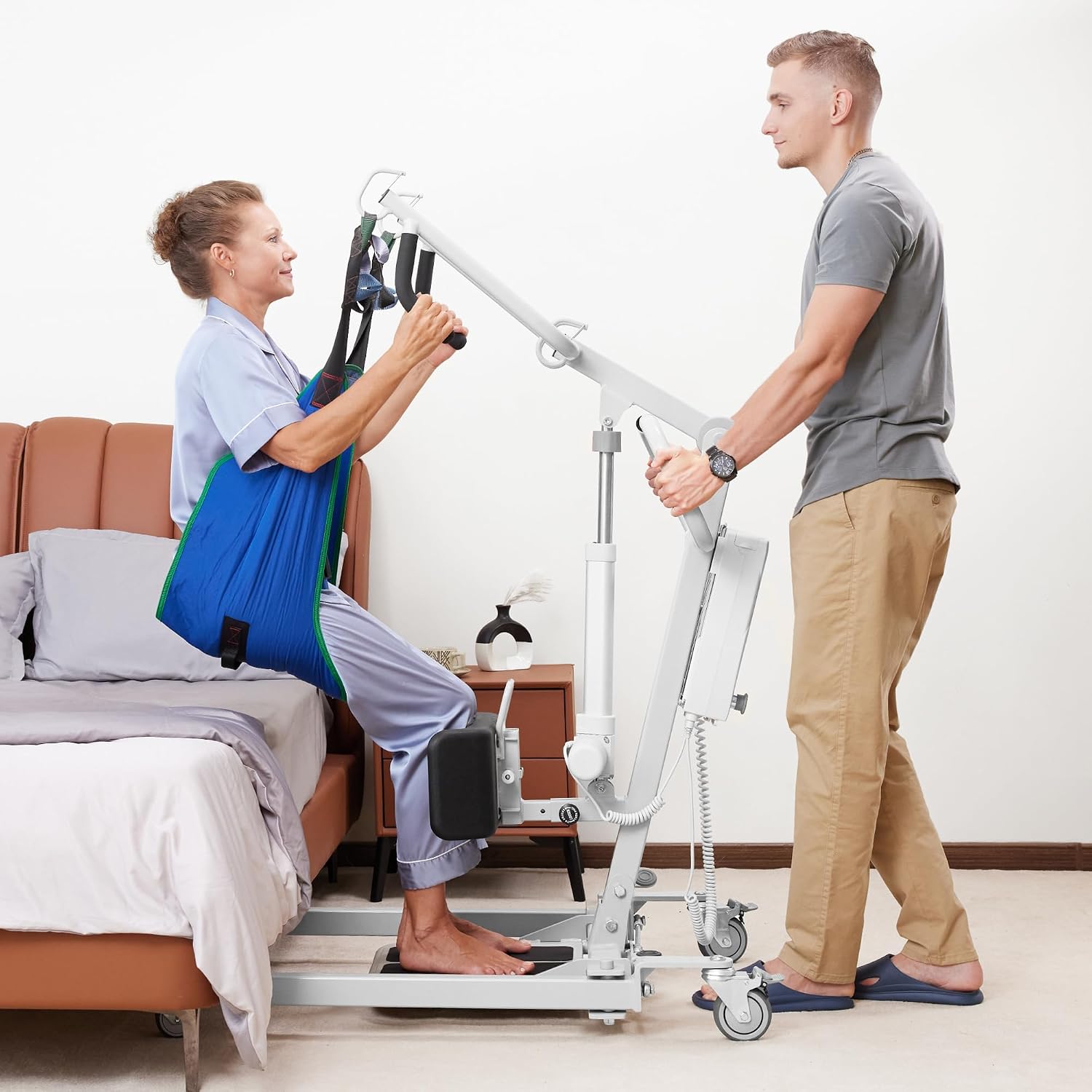
Image: A close-up of a person installing and tightening a screw for the electric push rod.
Step 7: Insert Battery
Open the battery box and insert the battery inside. Push the battery box downwards to the position of the battery box holder.

Image: A rechargeable battery being inserted into its compartment on the patient lift.
Step 8: Connect Remote Control and Motor Plugs
Insert the remote control and motor connecting plugs into ports 1 and 2 on the battery box (based on arrow signs).

Image: A person connecting the remote control and motor plugs to the battery box of the patient lift.
Assembly Video
Video: A step-by-step guide demonstrating the assembly process of the ELENKER Electric Patient Lift.
Operating Instructions
Power On/Off
Rotate the battery switch to the right to turn it on. The battery panel will show the power level. To turn off, press the knob.
Image: Close-up of the control panel with power switch and battery indicator.
Patient Transfer (Sit to Stand)
- Position the patient lift close to the patient. Ensure the base is 4.4 inches off the ground to slide under beds.
- Fasten the patient's straps securely around their waist and under their arms.
- Hang the sling straps onto the hooks of the hanger rod, ensuring they are secure with the pull rings.
- Use the remote control or battery panel buttons to slowly lift the patient to a standing or desired position.
- Unlock the casters to move the patient lift.
- Once in the desired location (e.g., near a wheelchair), lock the casters.
- Use the remote control to slowly lower the patient into the wheelchair.
- Open the straps and remove the sling.

Image: A caregiver assisting a patient from a sitting position to a standing position using the ELENKER Electric Patient Lift.
Operating Video
Video: Demonstration of operating the ELENKER Stand Up Patient Lift for safe patient transfers.
Adjustments
Knee Pad Adjustment
The knee pad can be adjusted vertically from 18.8 to 21.6 inches and horizontally from 11.2 to 12.3 inches to accommodate different patient heights and comfort levels. Loosen the locking screw, adjust, and then tighten.
Image: Close-up of the adjustable knee pads on the patient lift, showing adjustment mechanism.
Base Width Adjustment
The base width is adjustable from 26.3 to 42.3 inches, allowing for easy maneuverability around furniture and accessibility to various chairs or beds. Use the foot pedal to adjust the base width.

Image: The patient lift demonstrating its adjustable base width for improved stability and access.
Height Adjustment
The overall height of the lift is adjustable from 35.5 to 67.1 inches, providing flexibility for various transfer scenarios. Use the remote control to adjust the lifting arm height.

Image: The patient lift showing its adjustable height range.
Maintenance
- Regularly inspect all nuts, bolts, and screws for tightness. Tighten as needed.
- Check the sling for any signs of wear, tears, or damage before each use. Replace if necessary.
- Keep the battery charged. Avoid fully depleting the battery to prolong its lifespan.
- Clean the lift frame with a damp cloth and mild detergent. Do not use abrasive cleaners.
- Ensure casters are clean and free of debris for smooth movement.
Troubleshooting
- Lift not operating: Check if the battery switch is turned on. Ensure the remote control and motor plugs are securely connected. Verify battery charge level.
- Lift moving slowly or weakly: Recharge the battery. Check for any obstructions preventing smooth movement.
- Unusual noises: Stop operation immediately. Inspect for loose parts or damage. Contact customer support if the issue persists.
- Casters not locking/unlocking: Ensure the locking mechanism is fully engaged or disengaged. Clean any debris from the casters.
Specifications
| Feature | Detail |
|---|---|
| Brand | ELENKER |
| Model | B0DGTGPZ1F |
| Weight Capacity | 400 lbs |
| Base Clearance | 4.4 inches |
| Leg Support Height Adjustment | 11.2-13.3 inches (L) x 18.8-21.6 inches (H) |
| Base Width Adjustment | 26.3-42.3 inches |
| Overall Height Adjustment | 35.5-67.1 inches |
| Power Source | Rechargeable Battery |
| Control | Handheld Remote Control, Battery Panel Buttons |
Warranty and Support
For warranty information, technical support, or replacement parts, please contact ELENKER customer service. Refer to your purchase documentation for specific warranty terms and contact details.