
1. Introduction
Thank you for purchasing the Crystal Audio PRT-14 Bluetooth Party Speaker. This portable wireless speaker is designed to deliver powerful audio with versatile connectivity options, including Bluetooth 5.0, TWS (True Wireless Stereo) for connecting two speakers, FM radio, USB, SD card, microphone, and guitar inputs. It features an 80W RMS output, LED lighting, and a built-in rechargeable battery for extended use. Please read this manual carefully before operating the device to ensure proper use and to maximize its performance.
2. Package Contents
Please check the package contents upon unboxing:
- Crystal Audio PRT-14 Party Speaker
- Wireless Microphone
- Remote Control
- Power Adapter (for charging)
- User Manual (this document)

Figure 2.1: Front view of the Crystal Audio PRT-14 speaker, showcasing its dual woofers and vibrant blue LED lighting.
3. Product Overview
3.1. Control Panel Layout
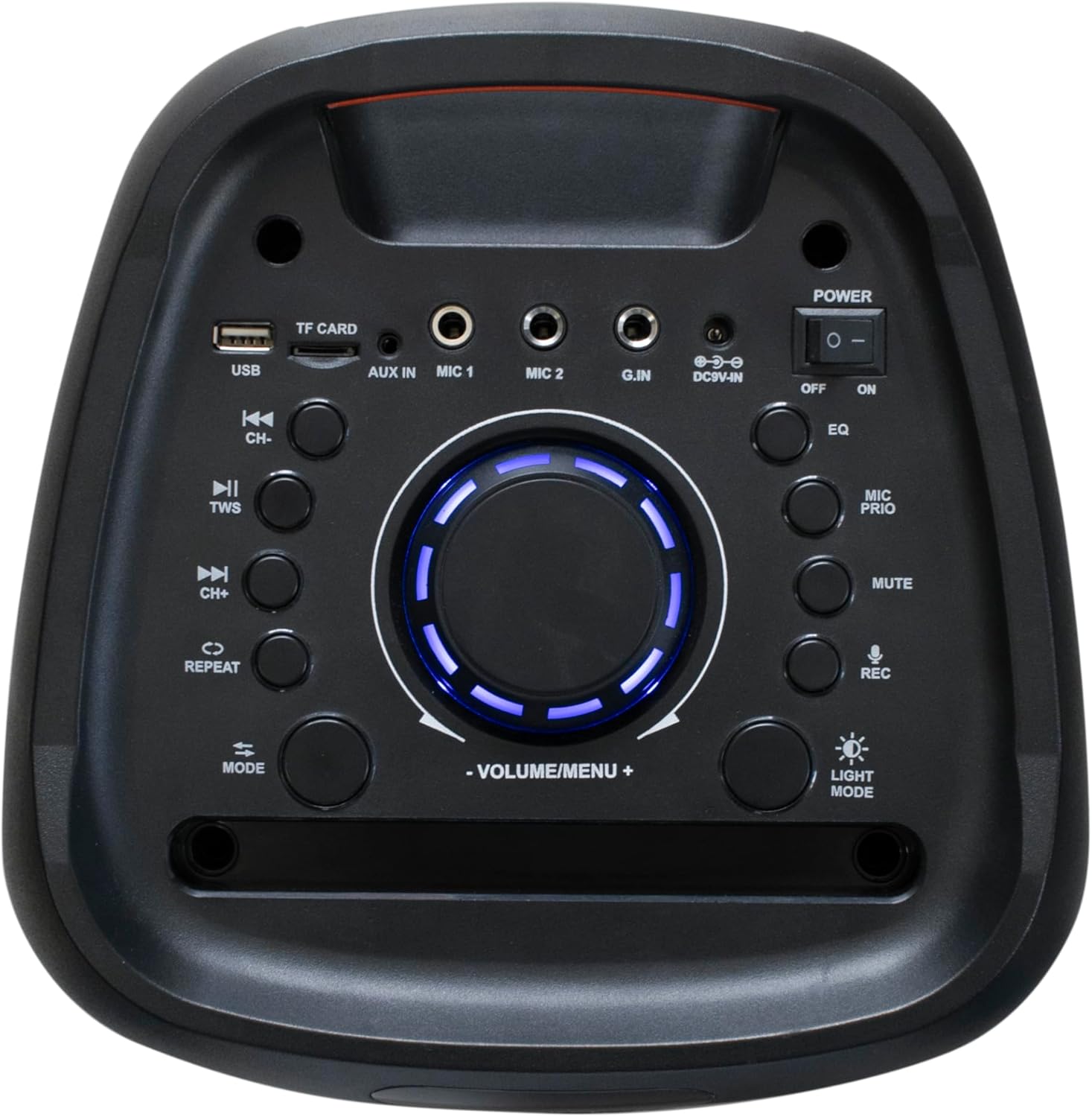
Figure 3.1: Detailed view of the top control panel, showing various input ports and control buttons.
The top panel of the PRT-14 features a comprehensive set of controls and input ports:
- USB Port: For USB drive playback.
- TF CARD Slot: For SD/TF card playback.
- AUX IN: 3.5mm audio input for external devices.
- MIC 1 / MIC 2: 6.35mm microphone inputs.
- G.IN (Guitar Input): 6.35mm guitar input.
- DC 9V-IN: Power input for charging.
- Power Switch: ON/OFF toggle.
- Volume/Menu Knob: Rotary knob for volume control and menu navigation.
- EQ Button: Cycles through equalizer presets (Normal, Rock, Jazz, etc.).
- MIC PRIO Button: Microphone priority function.
- MUTE Button: Mutes audio output.
- REC Button: Records microphone input to USB/SD.
- Light Mode Button: Changes LED lighting effects.
- TWS Button: Initiates True Wireless Stereo pairing.
- Mode Button: Switches between input modes (Bluetooth, FM, USB, SD, AUX).
- Playback Controls: Previous Track (CH-), Play/Pause (TWS), Next Track (CH+), Repeat.

Figure 3.2: Angled top view highlighting the integrated handle and the control panel with its illuminated display.
4. Setup
4.1. Charging the Speaker
Before first use, fully charge the speaker. Connect the provided power adapter to the DC 9V-IN port on the top panel and plug it into a power outlet. The charging indicator will illuminate. A full charge takes approximately 4 to 6 hours. The built-in battery provides up to 6 hours of playback, depending on volume level and usage.
4.2. Powering On/Off
Locate the Power switch on the top panel. Slide it to the "ON" position to power on the speaker. Slide it to the "OFF" position to power off the speaker.
5. Operating Instructions
5.1. Bluetooth Pairing
- Power on the PRT-14 speaker. It will automatically enter Bluetooth pairing mode, indicated by a flashing "BLUE" on the LCD screen.
- On your smartphone or tablet, enable Bluetooth and search for available devices.
- Select "Crystal Audio PRT-14" from the list.
- Once paired, the speaker will emit a confirmation sound, and "BLUE" on the LCD screen will stop flashing.
- You can now play audio from your device through the speaker.
5.2. True Wireless Stereo (TWS) Function
The TWS function allows you to connect two PRT-14 speakers wirelessly for a true stereo sound experience.
- Ensure both PRT-14 speakers are powered on and not connected to any Bluetooth device.
- On one of the speakers (this will be the primary speaker), press and hold the TWS button for a few seconds. You will hear a prompt indicating TWS pairing mode.
- The two speakers will automatically search for and connect to each other. Once connected, you will hear a confirmation sound.
- Now, connect your smartphone or tablet to the primary speaker via Bluetooth as described in section 5.1.
- Audio will now play in stereo through both speakers.
5.3. FM Radio Operation
- Press the MODE button repeatedly until "FM" appears on the LCD screen.
- Press the Play/Pause button (often labeled with a play/pause icon) to automatically scan and save available FM stations.
- Use the CH- and CH+ buttons to navigate through the saved stations.
5.4. USB/SD Card Playback
Insert a USB drive or TF (SD) card into the respective port. The speaker will automatically switch to USB/SD mode and begin playing compatible audio files. Use the playback controls (Previous/Next Track, Play/Pause, Repeat) to manage playback.
5.5. Microphone and Guitar Inputs
Connect a wired microphone to MIC 1 or MIC 2 input, or a guitar to the G.IN input. Adjust the volume for the microphone/guitar using the dedicated controls on the top panel or remote control. The speaker includes a wireless microphone for immediate use.
- MIC PRIO: Press this button to enable microphone priority, which lowers the music volume when you speak into the microphone.
- REC: Press the REC button to record audio from the microphone directly to a connected USB drive or SD card.
5.6. Equalizer and Light Modes
- EQ: Press the EQ button to cycle through various equalizer presets (e.g., Normal, Rock, Jazz, Classical, Pop).
- Light Mode: Press the Light Mode button to change the LED lighting effects on the speaker.

Figure 5.1: The PRT-14 speaker displaying dynamic red and orange LED lighting, illustrating its party flame light feature.
6. Maintenance
To ensure the longevity and optimal performance of your Crystal Audio PRT-14 speaker, follow these maintenance guidelines:
- Cleaning: Use a soft, dry cloth to wipe the speaker's surface. Do not use abrasive cleaners, waxes, or solvents.
- Storage: When not in use for extended periods, store the speaker in a cool, dry place away from direct sunlight and extreme temperatures.
- Battery Care: To prolong battery life, avoid fully discharging the battery frequently. Charge the speaker regularly, even if not in use, to maintain battery health.
- Water Exposure: This speaker is not waterproof. Avoid exposing it to water, rain, or excessive humidity.
7. Troubleshooting
| Problem | Possible Cause | Solution |
|---|---|---|
| No power | Battery is depleted; Power switch is OFF. | Charge the speaker; Ensure power switch is ON. |
| No sound | Volume too low; Mute function active; Incorrect input mode; Device not paired. | Increase volume; Press MUTE button; Press MODE button to select correct input; Re-pair Bluetooth device. |
| Bluetooth connection unstable | Device too far from speaker; Obstructions between devices; Interference. | Move device closer to speaker (within 10m); Remove obstructions; Avoid strong electromagnetic interference. |
| TWS pairing fails | One or both speakers already paired; Speakers too far apart. | Ensure both speakers are unpaired from other devices; Place speakers close to each other during TWS pairing. |
| Microphone not working | Microphone not connected properly; Microphone volume too low; Microphone battery low (for wireless mic). | Check microphone connection; Increase microphone volume; Replace batteries in wireless microphone. |
8. Specifications
- Model: PRT-14
- Brand: Crystal Audio
- Output Power: 80W RMS
- Tweeter: 1x 1.5''
- Woofer: 2x 6.5''
- Bluetooth Version: 5.0
- Frequency Response: 80Hz-18kHz
- Battery Life: Up to 6 hours (depending on volume)
- Charging Time: 4 to 6 hours
- Inputs: USB, SD Card, Mic (x2), Guitar, AUX in
- Features: TWS, FM Radio, Equalizer, LED Lighting (Party Flame Light), LCD Screen, Recording Function
- Dimensions (LxWxH): Approximately 28 x 27 x 62.5 cm (based on product description)
- Weight: 6kg
- Country of Origin: Greece
