
1. Introduction
This manual provides detailed instructions for the safe and effective operation of your TESMEN TCM-300D Smart Digital Clamp Meter and TSM-192 Digital Multimeter Bundle. Please read this manual thoroughly before use and retain it for future reference.
1.1 Safety Information
- Ensure tools are certified CAT III 600V and CAT II 600V for safety.
- Do not exceed the maximum input values for any function.
- Always inspect test leads for damage before use.
- Use caution when working with live circuits.
- Refer to local electrical safety codes and regulations.
For more detailed safety guidelines, please consult the full user manuals provided with each device.
2. Product Overview
The TESMEN TCM-300D Smart Digital Clamp Meter and TSM-192 Digital Multimeter are designed for comprehensive electrical measurements.
2.1 Key Features
- Safe and Reliable: CAT III 600V and CAT II 600V certifications, non-contact voltage measurement (TCM-300D), internal overload protection (TSM-192).
- Versatile Application: AC/DC current, inrush current (TCM-300D), smart automatic mode, voltage, resistance, capacitance, temperature (TCM-300D), essential measurement features (TSM-192).
- Fast and Accurate Measurement: Smart and manual modes for quick and precise readings, automatic range selection (TSM-192).
- User-Friendly: Data hold, auto power-off, low battery indicators, backlit displays.
2.2 Package Contents
- 1x TESMEN TSM-192 Smart Digital Multimeter
- 1x TESMEN TCM-300D Smart Digital Clamp Meter
- 2x Test Leads
- 2x Storage Bags
- 5x AAA Batteries
- User Manuals (for each device)

Image: The TESMEN TCM-300D Smart Digital Clamp Meter and TSM-192 Digital Multimeter, showing both devices included in the bundle.
3. Setup
3.1 Battery Installation
Both the TCM-300D and TSM-192 require AAA batteries for operation.
- Locate the battery compartment on the back of the device.
- Use a screwdriver (if necessary) to open the battery cover.
- Insert the AAA batteries, ensuring correct polarity (+/-).
- Securely close the battery cover.
Note: Ensure batteries are installed correctly to prevent damage to the device.
4. Operating Instructions: TESMEN TCM-300D Clamp Meter
4.1 General Operation
The TCM-300D features an intelligent auto mode that automatically detects the measurement type (voltage, resistance, continuity) when test leads are connected. For specific functions, use the FUNC/AUTO button.

Image: The TCM-300D clamp meter displaying "Auto" mode on its screen, indicating automatic function detection.
4.2 AC/DC Current Measurement (Clamp Function)
- Power on the TCM-300D.
- Ensure the device is in AC/DC current mode (or Auto mode will detect it).
- Open the clamp jaws by pressing the trigger.
- Enclose a single conductor (not a power cord with multiple wires) within the clamp jaws.
- Read the current value on the display.

Image: The TCM-300D clamp meter measuring AC current on a multi-wire cable, demonstrating its non-contact current measurement capability.

Image: The TCM-300D clamp meter measuring DC current on a car battery cable, showing its application for direct current measurements.
4.3 Inrush Current Measurement
- Select the Inrush function using the
SEL/INRUSHbutton. - Clamp the meter around the conductor of the device to be tested.
- Activate the device. The meter will capture the peak inrush current.
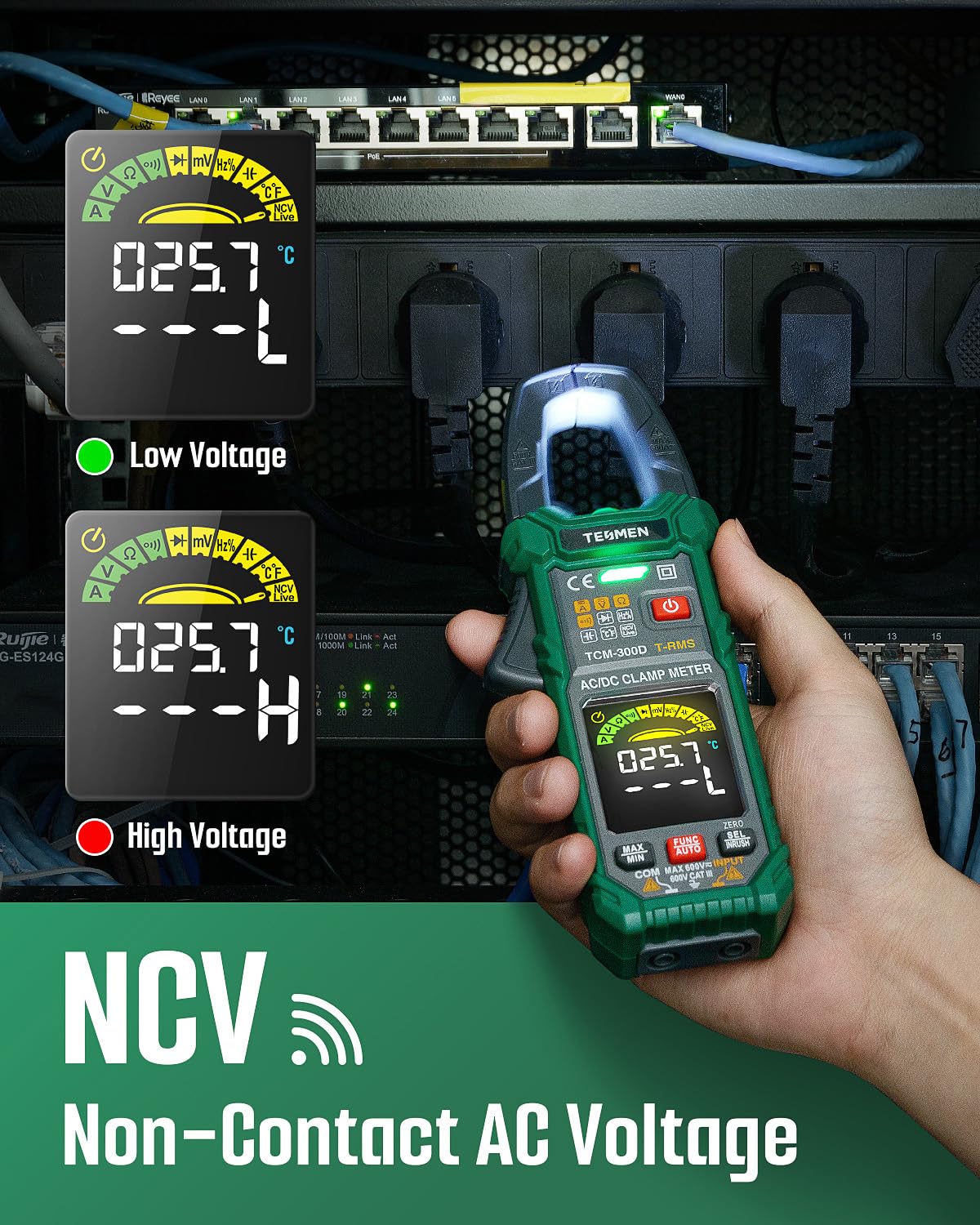
Image: The TCM-300D clamp meter performing an inrush current test, illustrating the measurement of initial current draw.
4.4 Voltage, Resistance, Continuity, Diode, Capacitance, Frequency, Temperature (using Test Leads)
- Insert the red test lead into the
VΩHzinput jack and the black test lead into theCOMinput jack. - Power on the TCM-300D.
- Use the
FUNC/AUTObutton to cycle through the desired measurement mode (Voltage, Resistance, Continuity, Diode, Capacitance, Frequency, Temperature). - Connect the test leads to the circuit or component under test.
- Read the measurement on the display.

Image: The TCM-300D clamp meter displaying various measurement icons, including AC/DC Current, Voltage, Resistance, Continuity, Diodes, Frequency, Capacitance, Temperature, NCV, Live, Data Hold, and Inrush.
4.5 Non-Contact Voltage (NCV)
- Select NCV mode.
- Bring the NCV sensor (top of the clamp meter) close to the conductor.
- The meter will indicate the presence of AC voltage with an audible beep and visual indicator.

Image: The TCM-300D clamp meter detecting non-contact AC voltage, showing the NCV indicator on the display.
5. Operating Instructions: TESMEN TSM-192 Digital Multimeter
5.1 General Operation (Smart Auto Mode)
The TSM-192 features a smart automatic mode that simplifies measurements by automatically identifying the input signal (AC/DC voltage, resistance, continuity).
- Insert the red test lead into the
INPUTjack and the black test lead into theCOMjack. - Power on the TSM-192. The device will enter smart auto mode.
- Connect the test leads to the circuit or component. The meter will automatically display the relevant measurement.

Image: The TSM-192 smart multimeter displaying "Auto" mode, highlighting its fast, simple, and effective automatic measurement capability.
5.2 Multi-Functional Measurement
In addition to auto mode, the TSM-192 can measure AC/DC Voltage, Resistance, Continuity, Live Wire, Phase, and NCV. Use the FUNC button to cycle through these specific modes if needed.

Image: The TSM-192 smart multimeter performing multi-functional measurements, including AC/DC Voltage, Resistance, Continuity, Live Wire, Phase, and NCV, with test leads inserted into a power outlet.
6. Maintenance
6.1 Cleaning
- Disconnect the devices from all circuits and power sources before cleaning.
- Wipe the casing with a damp cloth and mild detergent. Do not use abrasives or solvents.
- Ensure the devices are completely dry before storage or next use.
6.2 Storage
- If the devices will not be used for an extended period, remove the batteries to prevent leakage.
- Store the devices and accessories in their provided storage bags in a cool, dry place, away from direct sunlight and extreme temperatures.
Image: The TSM-192 smart multimeter shown in a compact storage compartment, highlighting its portable and lightweight design.
7. Troubleshooting
7.1 Common Issues and Solutions
- No Display/Power On: Check battery installation and ensure batteries are not depleted. Replace if necessary.
- Inaccurate Readings: Ensure test leads are properly connected and not damaged. Verify the correct measurement function is selected. Clean contact points.
- "OL" or "OVERLOAD" on Display: The measured value exceeds the device's range for the selected function. Select a higher range or a different measurement method if available.
- No NCV Detection: Ensure NCV mode is active and the sensor is close enough to the AC voltage source.
If issues persist, contact TESMEN customer support.
8. Specifications
| Feature | Value |
|---|---|
| Brand | TESMEN |
| Models | TCM-300D, TSM-192 |
| Power Source | Battery Powered (AAA) |
| Safety Rating | CAT III 600V, CAT II 600V |
| Display | Backlit LCD |
| Auto Power Off | Yes |
| Data Hold | Yes |
9. Warranty and Support
For warranty information and customer support, please refer to the specific warranty card included with your product or visit the official TESMEN website.