
1. Introduction
This manual provides detailed instructions for the safe and effective use of the TESMEN TCM-300A Digital Clamp Meter and the TESMEN Hound-200 EMF Detector. These two devices are designed to complement each other, offering a comprehensive solution for electrical measurement and electromagnetic field detection. Please read this manual thoroughly before operation and retain it for future reference.
The TCM-300A Digital Clamp Meter is a smart auto-ranging multimeter capable of measuring AC current, AC/DC voltage, resistance, capacitance, temperature, frequency, and continuity. It also features Non-Contact Voltage (NCV) detection and Inrush current measurement.
The Hound-200 EMF Detector is a 3-in-1 device designed to detect Radio Frequency (RF), Magnetic Fields (MAG), and Electric Fields (ELEC). It is suitable for assessing radiation from various sources, including WiFi, 5G signals (below 3.5GHz), and household appliances.
2. Product Overview

Image 2.1: TESMEN TCM-300A Digital Clamp Meter (right) and Hound-200 EMF Detector (left).
2.1 TESMEN TCM-300A Digital Clamp Meter
The TCM-300A is a versatile electrical testing tool. Its key features include:
- 6000 Counts Display: Provides high-resolution measurements.
- True RMS (T-RMS): Ensures accurate readings for non-sinusoidal waveforms.
- Auto-Ranging: Automatically selects the correct measurement range.
- Measurement Functions: AC Current, AC/DC Voltage, Resistance, Capacitance, Temperature, Frequency, Continuity, Diode Test.
- Special Functions: Non-Contact Voltage (NCV) detection, Inrush Current measurement, Live Wire detection.
- User-Friendly Features: Data Hold, Backlight, Flashlight, Auto Power-Off, Low Battery Indicator.

Image 2.2: TCM-300A display indicating 6000 counts and available functions.

Image 2.3: TCM-300A demonstrating its smart auto mode for fast measurements.
2.2 TESMEN Hound-200 EMF Detector
The Hound-200 is designed for comprehensive electromagnetic field detection. Its capabilities include:
- 3-in-1 Detection: Measures Radio Frequency (RF), Magnetic Fields (MAG), and Electric Fields (ELEC).
- Wide Application: Detects radiation from WiFi, 5G signals (below 3.5GHz), cell phones, routers, refrigerators, washing machines, air conditioners, TVs, laptops, and microwaves.
- Visual and Auditory Alerts: Features a three-color backlight (green, yellow, red) to indicate field strength, audible alarms, and trend graphs for clear data interpretation.
- Measurement Ranges: RF (0.001-200mW/m²), MF (0.01-200µT / 0.1-2000mG), EF (1-2000V/m).
- User-Friendly Features: Maximum/Peak measurement, Data Hold, Low Battery Indicator.

Image 2.4: Hound-200 display with RF, MF, and EF measurement ranges.

Image 2.5: Examples of common sources for RF, MF, and EF detection.
3. Setup
3.1 Battery Installation
Both the TCM-300A and Hound-200 require AAA batteries for operation. To install or replace batteries:
- Locate the battery compartment cover on the back of the device.
- Use a screwdriver (if necessary) to open the cover.
- Insert the AAA batteries, ensuring correct polarity (+ and -).
- Replace the battery compartment cover and secure it.
Note: Always use fresh batteries and dispose of old batteries responsibly.
3.2 Connecting Test Leads (TCM-300A Only)
For voltage, resistance, capacitance, temperature, continuity, and diode measurements, connect the test leads to the TCM-300A:
- Insert the red test lead into the VΩHzCAP°C input jack.
- Insert the black test lead into the COM input jack.
Ensure test leads are fully inserted before use.
4. Operating Instructions
4.1 TESMEN TCM-300A Digital Clamp Meter
Power On/Off: Press the power button to turn the device on or off.
Function Selection: The TCM-300A features a smart auto mode. In this mode, the meter automatically identifies and measures AC/DC voltage, resistance, and continuity. For other functions, press the FUNC or SEL button to cycle through available modes.
- AC Current Measurement:
- Select the AC Current mode.
- Open the clamp jaws by pressing the trigger.
- Enclose a single conductor (not a bundle of wires) within the clamp jaws.
- Read the AC current value on the display.
- AC/DC Voltage Measurement:
- Connect the test leads as described in Section 3.2.
- Select the Voltage mode (AC or DC).
- Touch the test probes to the circuit points where voltage is to be measured.
- Read the voltage value on the display.
- Non-Contact Voltage (NCV) Detection:
- Select the NCV mode.
- Bring the NCV sensor at the top of the meter close to the conductor.
- The meter will emit an audible beep and the NCV indicator will light up when AC voltage is detected. The intensity of the beeps and lights indicates voltage strength.

Image 4.1: TCM-300A demonstrating Non-Contact AC Voltage detection.
- Inrush Current Test:
- Select the Inrush current mode.
- Open the clamp jaws and enclose the conductor of the device you wish to test.
- Turn on the device under test. The meter will capture the peak starting current.

Image 4.2: Illustration of Inrush Current Test with the TCM-300A.
- Other Measurements (Resistance, Capacitance, Temperature, Frequency, Continuity, Diode):
- Connect test leads.
- Select the desired function using the FUNC or SEL button.
- Apply probes to the circuit or component.
- Read the measurement on the display.
Additional Functions:
- Data Hold: Press the HOLD button to freeze the current reading on the display. Press again to release.
- Backlight/Flashlight: Long press the backlight button to turn on/off the display backlight. A short press may activate the flashlight.
4.2 TESMEN Hound-200 EMF Detector
Power On/Off: Press the power button to turn the device on or off.
Function Selection (Detection Modes): The Hound-200 automatically detects and displays RF, Magnetic (MAG), and Electric (ELEC) fields. The display will show readings for all three simultaneously.
- RF Detection:
- Hold the device in the area you wish to test.
- The RF reading (e.g., in mW/m²) will be displayed.
- The three-color backlight and audible alarm will indicate the strength of the RF field.
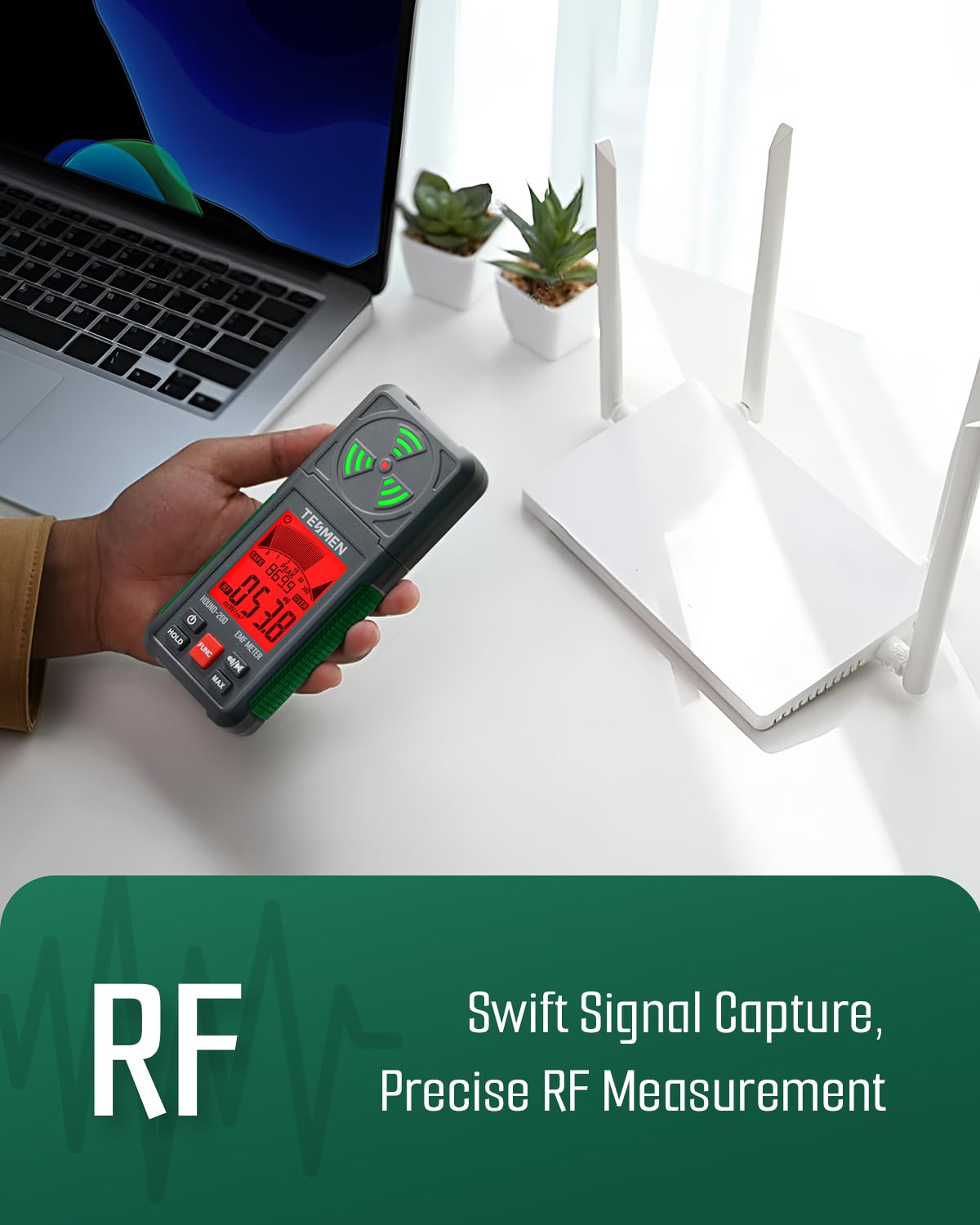
Image 4.3: Hound-200 detecting RF signals from a WiFi router.
- Magnetic Field (MAG) and Electric Field (ELEC) Detection:
- As with RF, simply hold the device in the environment.
- The MAG (in µT or mG) and ELEC (in V/m) readings will be displayed simultaneously.
- Observe the backlight color and listen for alarms to interpret field strength.
- Interpreting Readings:
- Green Backlight: Indicates a safe or low field strength.
- Yellow Backlight: Indicates a moderate field strength, suggesting caution.
- Red Backlight: Indicates a high or severe field strength, requiring immediate attention or mitigation.
- Audible alarms will increase in frequency with higher field strengths.

Image 4.4: Hound-200 intuitive guide for interpreting field strength levels.
Additional Functions:
- HOLD: Press to freeze the current readings on the display. Press again to release.
- MAX: Press to display the maximum detected value since the device was powered on or the MAX function was reset.
- FUNC: Press to cycle through different display modes or settings if available.
- Sound On/Off: Press the speaker button to toggle the audible alarm on or off.
5. Maintenance
5.1 Cleaning
To clean the devices, use a soft, dry cloth. Do not use abrasive cleaners, solvents, or immerse the devices in water. Ensure the devices are powered off before cleaning.
5.2 Battery Replacement
Replace batteries when the low battery indicator appears on the display. Refer to Section 3.1 for battery installation instructions.
5.3 Storage
When not in use for extended periods, remove the batteries to prevent leakage. Store the devices in a cool, dry place, away from direct sunlight and extreme temperatures. Use the provided storage cases/bags to protect the devices from dust and physical damage.
6. Troubleshooting
If you encounter issues with your TESMEN devices, refer to the following common problems and solutions:
- Device does not power on:
- Check if batteries are installed correctly with the right polarity.
- Replace with fresh AAA batteries.
- Inaccurate readings:
- Ensure test leads are properly connected (TCM-300A).
- Verify the correct measurement function is selected.
- For clamp meter, ensure only a single conductor is within the jaws for current measurement.
- For EMF detector, ensure no other strong interference sources are nearby that could skew readings.
- Display is blank or flickering:
- Check battery level and replace if low.
- Ensure the device is not exposed to extreme temperatures.
- No NCV detection (TCM-300A):
- Ensure NCV mode is selected.
- Confirm the presence of AC voltage with another known method if possible.
- No EMF detection (Hound-200):
- Ensure the device is powered on.
- Verify that there are actual electromagnetic fields present in the area.
If problems persist, contact TESMEN customer support for assistance.
7. Specifications
7.1 TESMEN TCM-300A Digital Clamp Meter
| Parameter | Value |
|---|---|
| Display | 6000 Counts |
| AC Current Range | 5A - 600A (Inrush) |
| AC/DC Voltage | Yes |
| Resistance | Yes |
| Capacitance | Yes |
| Temperature | Yes |
| Frequency | Yes |
| Continuity Test | Yes |
| Diode Test | Yes |
| NCV (Non-Contact Voltage) | Yes |
| Inrush Function | Yes |
| Power Source | AAA Batteries |
| Safety Rating | CAT III 600V |
7.2 TESMEN Hound-200 EMF Detector
| Parameter | Value |
|---|---|
| Detection Modes | RF, Magnetic Field (MAG), Electric Field (ELEC) |
| RF Measurement Range | 0.001 - 200 mW/m² |
| Magnetic Field Range | 0.01 - 200 µT / 0.1 - 2000 mG |
| Electric Field Range | 1 - 2000 V/m |
| Frequency Range | 5G signals below 3.5GHz |
| Display | Digital with 3-color backlight |
| Alarms | Audible and Visual |
| Power Source | AAA Batteries |
8. Warranty and Support
TESMEN products are designed for reliability and performance. For warranty information, technical support, or service inquiries, please refer to the warranty card included with your product or visit the official TESMEN website. Please have your model number and purchase date available when contacting support.