1. Introduction
This manual provides detailed instructions for the assembly, operation, and maintenance of your Doredo 29.2" W Small Vanity Desk with Mirror and Lights, Standard Model White. Please read this manual thoroughly before assembly and use to ensure safe and correct operation. Keep this manual for future reference.
2. Safety Information
Please observe the following safety precautions to prevent injury or damage to the product:
- Always assemble the product on a soft, clean surface to prevent scratches.
- Ensure all parts and fasteners are securely tightened before use. Periodically check and re-tighten as necessary.
- Do not overload drawers or shelves. Distribute weight evenly.
- Keep electrical components (lights, charging station) away from water and moisture.
- Use only the provided power adapter for the LED mirror and charging station.
- Keep small parts and packaging materials away from children to prevent choking hazards.
- This product is made from Engineered Wood (MDF). Avoid prolonged exposure to direct sunlight or extreme temperatures.
3. Package Contents
Verify that all components and hardware are present before beginning assembly. Refer to the numbered parts in the assembly instructions for identification.
Parts List:
- Main Desk Panels (various sizes)
- Drawer Panels (4 sets)
- Shelving Units (2 units)
- Sliding LED Mirror
- Cushioned Stool Panels
- Hair Dryer Holder
- Charging Station
Hardware List:
- Screws (various types and sizes)
- Cam Locks and Pins
- Wooden Dowels
- Drawer Slides
- Door Hinges
- Knobs
- Anti-tip kit
- Felt pads
4. Assembly Instructions
Follow these step-by-step instructions carefully. It is recommended to have two people for assembly.
4.1. General Assembly Overview
Watch this video for a comprehensive guide on assembling the vanity desk components.
Video: Makeup Vanity Desk Install Guide (Duration: 7:08). This video provides a full assembly walkthrough for the vanity desk.
4.2. Installing Drawer Slides and Mirror Mechanism
This video demonstrates the correct method for installing the drawer slides and the sliding mirror mechanism.
Video: How to install rail and mirror (Duration: 2:05). Detailed steps for attaching drawer rails and the mirror's sliding components.
4.3. Connecting the LED Mirror Lights
Learn how to properly connect the wiring for the LED mirror lights.
Video: How to connect the light (Duration: 0:21). A quick guide to wiring the LED mirror for functionality.
4.4. Detailed Assembly Steps with Images
Step 1: Assemble the Base Panels
Attach the vertical support panels to the base panel using the provided screws and cam locks. Ensure they are securely fastened.

Image: Shows the initial assembly of the base and side panels, securing them with screws.
Step 2: Construct the Drawer Boxes
Assemble the individual drawer boxes using the smaller panels and screws. Attach the decorative knobs to the drawer fronts.

Image: Displays the assembly of the drawer boxes, including the attachment of the crystal-like knobs.
Step 3: Install Shelving Units
Secure the internal shelves within the side shelving units. Use wooden dowels and screws for stability.
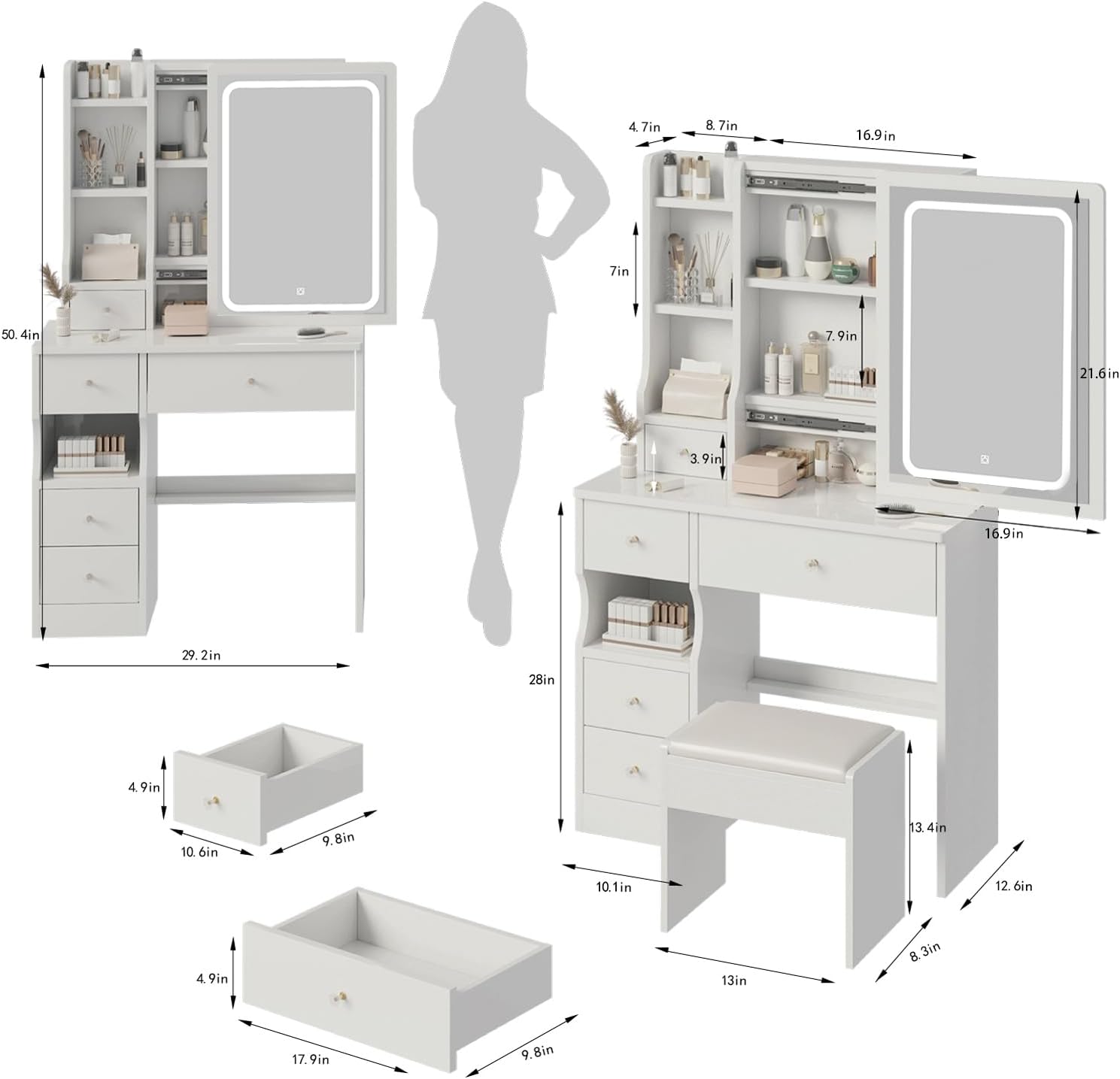
Image: Illustrates the process of inserting and securing the shelves into the vertical storage sections.
Step 4: Attach the Charging Station
Integrate the charging station into its designated slot on the vanity desk. Ensure all wiring is properly routed and secured.

Image: Shows the charging station being installed into the vanity desk, with cables managed.
Step 5: Final Desk Assembly
Connect all major sections of the desk, including the main tabletop, side storage, and mirror unit. Secure with all remaining hardware.

Image: Displays the complete vanity desk assembly, showing the integration of all parts.
Step 6: Stool Assembly
Assemble the cushioned stool following the provided instructions, ensuring all parts are firmly attached for stability.

Image: Shows the assembly of the matching cushioned stool.
5. Operating Instructions
5.1. LED Mirror Operation
The LED mirror features a touch-sensitive switch for controlling lighting modes and brightness.
- Power On/Off: Lightly touch the power icon on the mirror to turn the lights on or off.
- Change Color Mode: With the lights on, short press the touch switch to cycle through 3 color modes: White Light, Natural Light, and Warm Light.
- Adjust Brightness: Long press the touch switch to adjust the brightness level within the selected color mode. Release when desired brightness is achieved.

Image: The LED mirror displaying its three adjustable lighting modes: Cool White, Warm White, and Warm Yellow, controlled by a tactile switch.
5.2. Charging Station Usage
The integrated charging station provides convenient power access for your electronic devices.
- Plug the charging station's power cord into a standard wall outlet.
- Use the available outlets and USB ports to charge your phone, tablet, or other devices.
- Do not exceed the maximum power rating of the charging station.
6. Maintenance
Proper care will extend the life and appearance of your vanity desk.
- Cleaning: Wipe the surfaces with a damp cloth. Avoid harsh chemicals or abrasive cleaners that may damage the finish.
- Mirror Care: Clean the mirror with a soft, lint-free cloth and a glass cleaner. Do not spray cleaner directly onto the mirror; apply it to the cloth first.
- Hardware: Periodically check all screws and fasteners to ensure they are tight. Re-tighten if necessary.
- Electrical Components: Ensure the charging station and mirror wiring are free from damage. Unplug the unit before cleaning or if any damage is suspected.
7. Troubleshooting
If you encounter any issues, refer to the following common problems and solutions:
- LED Mirror Lights Not Working:
- Check if the power cord is securely plugged into the wall outlet and the vanity desk.
- Ensure the power switch on the charging station (if applicable) is turned on.
- Verify that the touch switch on the mirror is being pressed correctly (short press for mode, long press for brightness).
- Drawers Not Sliding Smoothly:
- Check if the drawer slides are correctly installed and aligned. Refer to the assembly video for rail installation.
- Ensure no objects are obstructing the drawer's movement within the slides.
- Verify that all screws securing the drawer slides are tight.
- Desk Feels Unstable:
- Ensure all assembly screws and cam locks are fully tightened.
- Place the desk on a flat, level surface.
- Consider using the anti-tip kit if included, especially if the desk is placed against a wall.
8. Specifications
| Feature | Detail |
|---|---|
| Brand | Doredo |
| Model | Standard Model |
| Color | White |
| Frame Material | Engineered Wood |
| Product Dimensions | 12.6"D x 29.2"W x 50.4"H |
| Item Weight | 48 pounds |
| Assembly Required | Yes |
| Product Care Instructions | Wipe with Damp Cloth |
9. Warranty and Support
Doredo is committed to the quality of its products. This vanity desk comes with:
- A 30-day return policy.
- A 1-year warranty for any quality concerns.
- Lifetime technical support.
For any questions, troubleshooting assistance, or warranty claims, please contact Doredo customer service.


