Introduction
Thank you for choosing the TALOYA 46 inch Low Profile Ceiling Fan. This manual provides detailed instructions for the safe installation, operation, and maintenance of your new ceiling fan. Please read this manual thoroughly before beginning installation and keep it for future reference. Proper installation and adherence to safety guidelines will ensure optimal performance and longevity of your fan.
Safety Information
To reduce the risk of fire, electric shock, or personal injury, please observe the following safety precautions:
- Ensure the power is turned off at the circuit breaker or fuse box before installation or servicing.
- All wiring must be in accordance with national and local electrical codes. If you are unfamiliar with wiring, consult a qualified electrician.
- The fan must be mounted to a structurally sound outlet box or support system capable of supporting a minimum of 35 lbs (15.9 kg).
- Do not bend the blade brackets when installing the blades, balancing the blades, or cleaning the fan.
- Keep hands, feet, and other objects away from the rotating fan blades.
- Do not operate the fan if any part is damaged or missing.
- This fan is designed for indoor use only.
Package Contents
Carefully unpack your fan and check to ensure all contents are present and undamaged. If any parts are missing or damaged, contact TALOYA customer service.
- Motor Housing Assembly
- Fan Blades (5)
- Blade Brackets (5)
- Light Kit Assembly
- Remote Control with Wall Mount
- Mounting Bracket
- Hardware Pack (screws, wire nuts, washers)
- User Manual
Setup and Installation
Tools Required
- Phillips Screwdriver
- Flathead Screwdriver
- Adjustable Wrench
- Wire Strippers
- Electrical Tape
- Ladder
Installation Steps
- Turn Off Power: Before starting, ensure the power supply to the ceiling fan location is turned off at the circuit breaker or fuse box.
- Install Mounting Bracket: Secure the mounting bracket to the ceiling outlet box. Ensure the outlet box is securely fastened to the building structure and can support the fan's weight.
- Wire Connections: Carefully connect the fan's electrical wires to the household wiring according to the wiring diagram provided in the manual. Typically, this involves connecting the live, neutral, and ground wires. Use wire nuts to secure connections and electrical tape for added insulation.
- Attach Motor Housing: Lift the fan motor housing and carefully attach it to the mounting bracket. Ensure all screws are tightened securely.
- Assemble Fan Blades: Attach each fan blade to its respective blade bracket using the provided screws. Then, attach the assembled blade and bracket to the motor housing. Ensure all blade screws are firmly tightened.
- Install Light Kit (if applicable): Connect the light kit wires to the fan motor housing wires. Secure the light kit assembly to the bottom of the fan motor housing.
- Pair Remote Control: Once installation is complete and power is restored, follow the instructions in the remote control section to pair the remote with your fan.
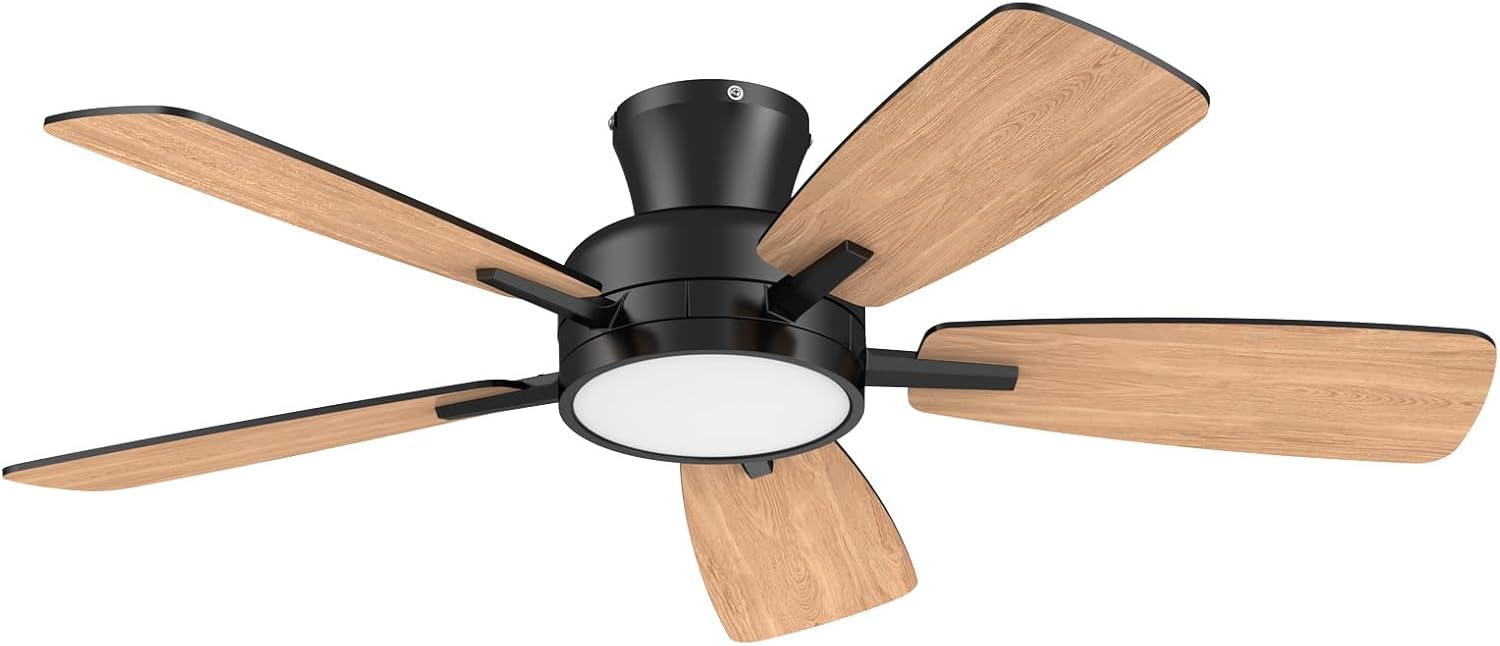
Image: The TALOYA 46 inch Low Profile Ceiling Fan, featuring a sleek black motor housing, five light wood-grain blades, and a circular integrated LED light kit at its center. The fan is designed for modern interiors, providing both air circulation and illumination.
Operating Instructions
Your TALOYA ceiling fan comes with a remote control for convenient operation of all its functions.
Remote Control Functions
- Fan ON/OFF: Press the fan button to turn the fan on or off.
- Fan Speed Control: Use the speed buttons (e.g., 1-6 or low/medium/high) to adjust the fan's rotation speed.
- Light ON/OFF/Dimming: Press the light button to turn the light on or off. Hold the light button to dim or brighten the light.
- Timer Function: Select desired operating time (e.g., 1H, 2H, 4H) to automatically turn off the fan after a set period.
- Reverse Function: (If applicable) Press the reverse button to change the direction of blade rotation for summer (downward airflow) or winter (upward airflow) modes.
Maintenance
Regular maintenance will help prolong the life and maintain the appearance of your ceiling fan.
- Cleaning: Use a soft, damp cloth to clean the fan. Do not use abrasive cleaners or solvents as they may damage the finish.
- Blade Cleaning: Wipe the blades periodically to remove dust buildup.
- Tighten Screws: Periodically check all screws on the fan, especially those on the blade attachments and mounting bracket, to ensure they are tight. Loose screws can cause wobbling or noise.
- No Lubrication Needed: The fan motor is permanently lubricated and does not require oiling.
Troubleshooting
If you experience issues with your fan, refer to the following common problems and solutions:
| Problem | Solution |
|---|---|
| Fan does not start. | Check power supply at the circuit breaker. Ensure all wire connections are secure. Verify remote control batteries are fresh and correctly inserted. |
| Fan wobbles. | Ensure all blade screws are tight. Check that the mounting bracket is securely fastened to the ceiling. Verify blades are not bent or damaged. |
| Light does not work. | Check wire connections to the light kit. Ensure the light kit is properly installed. If LED, check for proper connection. |
| Noisy operation. | Ensure all screws are tight. Check for any loose parts. Verify the fan is mounted securely. |
Specifications
Key technical specifications for your TALOYA 46 inch Low Profile Ceiling Fan:
| Feature | Value |
|---|---|
| Brand | TALOYA |
| Model Name | TLY46-BK-5X-T5 |
| Color | Black |
| Size | 46 inch |
| Electric Fan Design | Ceiling Fan |
| Power Source | AC |
| Style | Modern |
| Product Dimensions | 46"D x 46"W x 10"H |
| Room Type | Bathroom, Dining Room, Home Office, Living Room, Study Room |
| Special Features | LED Light, Remote Controlled, Timer, Waterproof |
| Recommended Uses | Air Circulation, Cooling |
| Wattage | 35 watts |
| Item Weight | 13.89 pounds |
Warranty and Support
TALOYA products are manufactured to the highest quality standards. For warranty information or technical support, please refer to the warranty card included with your product or visit the official TALOYA website. Please retain your proof of purchase for warranty claims.
For further assistance, you may contact TALOYA customer service through the contact information provided on their official website or through your retailer.


