
1. Introduction
Thank you for choosing the Wurkkos HD01 UV Flashlight. This compact and versatile EDC (Everyday Carry) flashlight combines a powerful white LED, a 365nm UV light, and RGB side lights, offering multiple functionalities for various scenarios. Please read this manual carefully to understand its features and ensure safe and optimal use.

The Wurkkos HD01 UV Flashlight, a compact and versatile lighting tool.
2. Package Contents
- Wurkkos HD01 UV Flashlight
- USB-C Charging Cable
- User Manual
- Lanyard (if included)

The Wurkkos HD01 UV Flashlight, charging cable, and user manual.
Unboxing Video
Video demonstrating the unboxing and initial look at the Wurkkos HD01 UV Flashlight.
3. Setup
3.1 Initial Unlock
For safe transportation, the flashlight is shipped in a locked mode. When you first receive it, clicking any button will only cause it to flash twice. To unlock the flashlight and enable full functionality:
- Quickly click the rear button 4 times.
- The flashlight will flash twice to indicate successful unlocking.

Visual guide for unlocking the Wurkkos HD01 UV Flashlight from lockout mode.
3.2 Charging
The HD01 features a USB-C charging port. Connect the provided USB-C cable to the flashlight and a power source (e.g., USB wall adapter, computer USB port). The battery indicator light will show charging status.

The Wurkkos HD01 UV Flashlight connected to a USB-C charging cable.
4. Operating Instructions
The HD01 features a dual-button design for intuitive control of its various light functions.
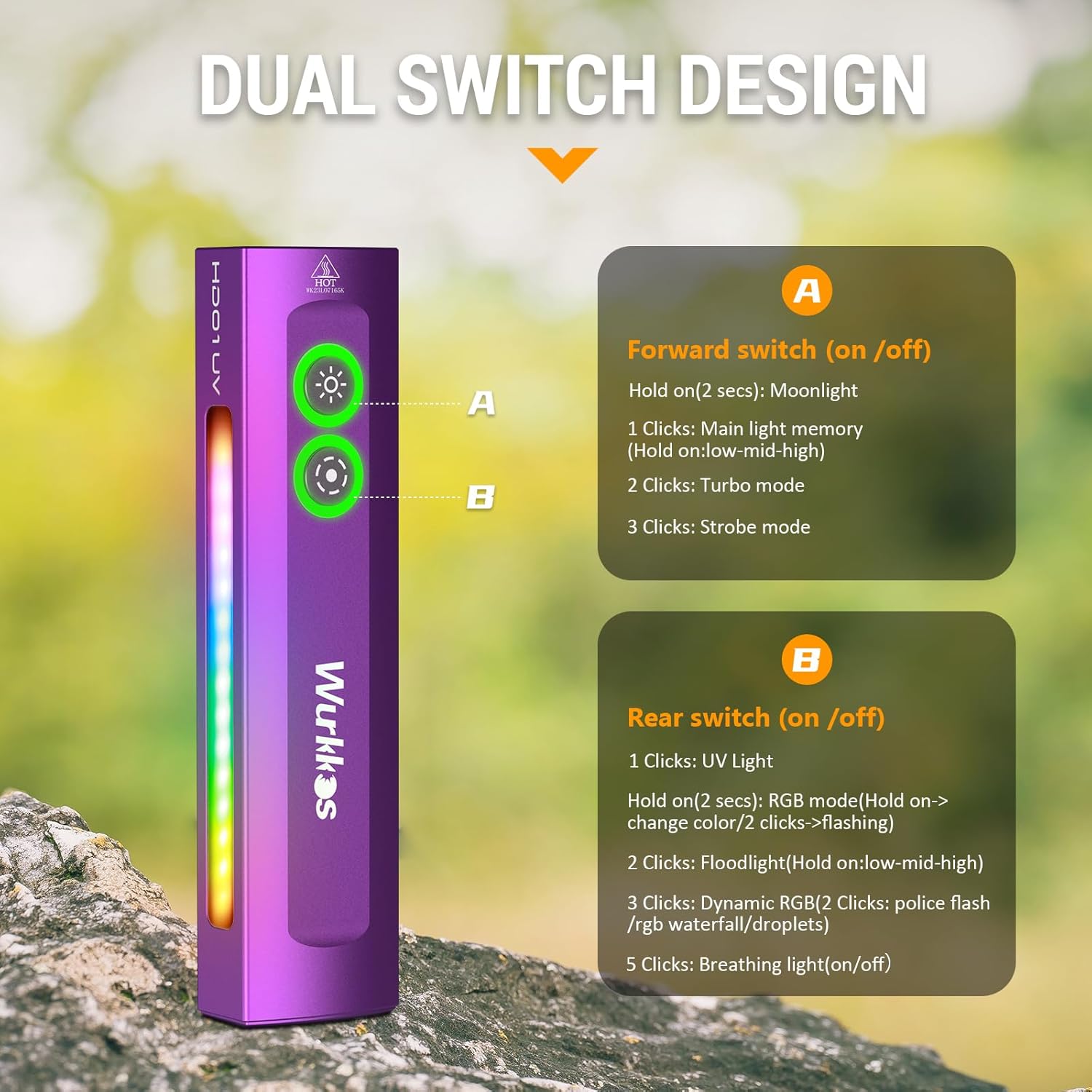
Diagram illustrating the dual switch design and their primary functions.
4.1 Front Button (Main White Light Control)
- Hold (2 seconds): Activates Moonlight mode.
- 1 Click: Turns on the main white light to the last used brightness level (memory function).
- 2 Clicks: Activates Turbo mode.
- 3 Clicks: Activates Strobe mode.

Illustration of the main white light beam and available modes.
4.2 Rear Button (UV Light, RGB Light, Floodlight Control)
- 1 Click: Activates the UV light.
- Hold: Activates RGB mode. Hold again to change colors.
- 2 Clicks: Activates the Side Floodlight (cycles through Low, Medium, High).
- 3 Clicks: Activates Dynamic RGB modes (Police Flash, RGB Waterfall, Droplets).
- 5 Clicks: Toggles the Breathing Light on/off.

Examples of the RGB light modes in use.
4.3 Battery Indicator
The flashlight is equipped with a battery indicator light to monitor the battery status, ensuring you know when to recharge.

Close-up of the battery indicator lights on the Wurkkos HD01.
4.4 Usage Scenarios
The HD01's multiple light types make it suitable for various applications:
- White Light: General illumination, outdoor activities, emergency lighting.
- UV Light (365nm): Pet urine detection, counterfeit currency verification, scorpion hunting, fluorescent agent detection.
- RGB Light: Signaling, mood lighting, creative photography.

Demonstration of the UV light for pet urine detection.

Various applications of the UV light, including banknote detection and scorpion hunting.
Video: How to adjust white light, UV, RGB, Breathing light
Detailed video guide on adjusting the various light modes of the HD01 UV Flashlight.
Video: Using UV light to find scorpions
Short video demonstrating the effectiveness of the UV light for scorpion detection.
5. Features and Design
5.1 Magnetic Base
The strong magnetic base allows the flashlight to be attached to metal surfaces, providing hands-free illumination for tasks like car repair or working in dark spaces.
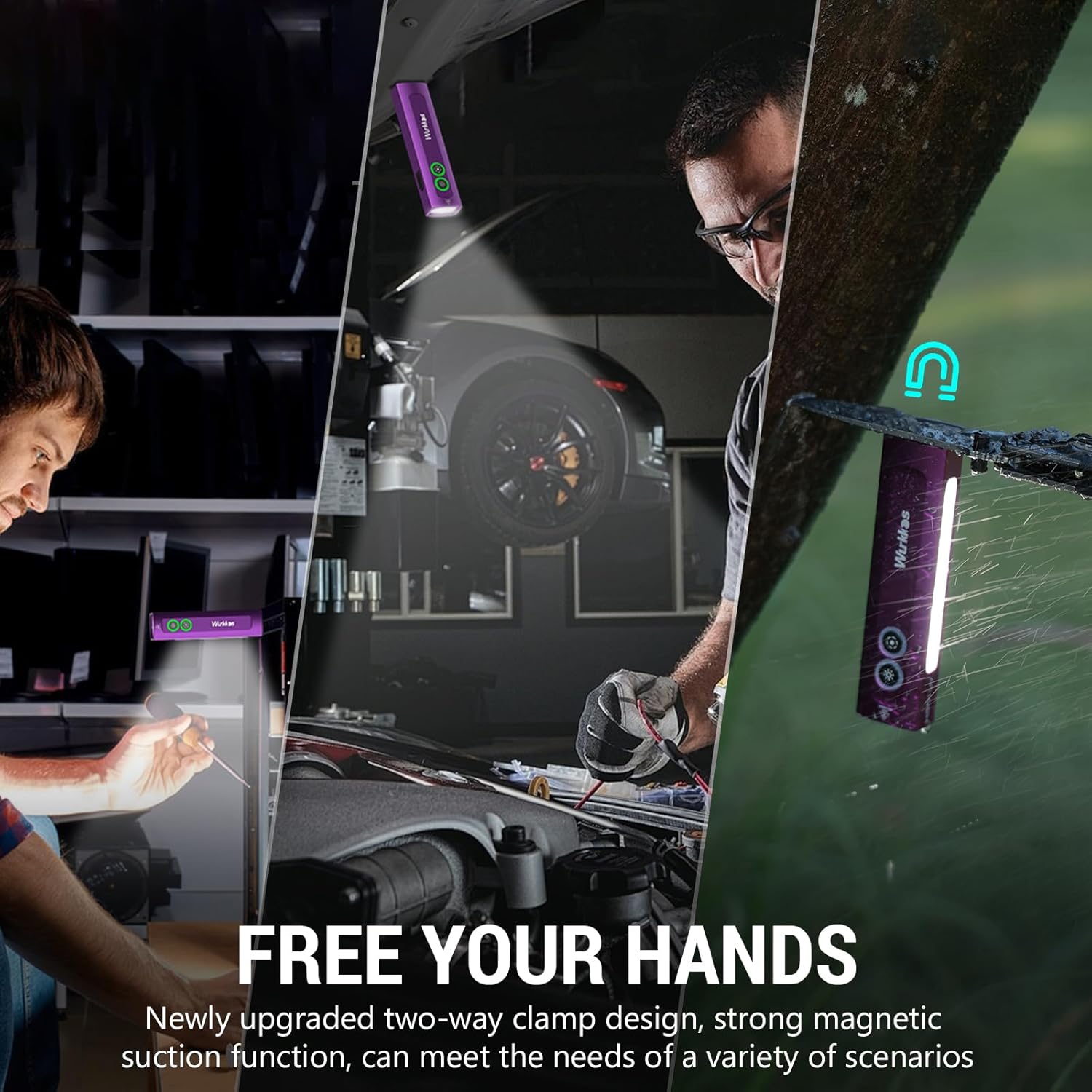
The HD01 attached to a metal surface using its magnetic base.
5.2 Two-Way Clip
The newly upgraded two-way clip allows for secure attachment to pockets, hats, or backpack straps, offering flexible carrying options and directional lighting.

The two-way clip securely attached to a pocket.
5.3 Waterproof Design
The HD01 is designed with a waterproof rating, making it suitable for use in various weather conditions.

The flashlight being used in various outdoor and indoor scenarios, highlighting its versatility and durability.
6. Maintenance
- Keep the flashlight clean, especially the lens and charging port, to ensure optimal performance.
- Avoid dropping the flashlight or subjecting it to strong impacts.
- Store in a cool, dry place when not in use for extended periods.
- Recharge the battery regularly to maintain its lifespan, even if not frequently used.
7. Troubleshooting
7.1 Flashlight only flashes twice and does not turn on.
Issue: The flashlight is in lockout mode to prevent accidental activation during transport or storage.
Solution: Quickly click the rear button 4 times to unlock the flashlight. It will flash twice to confirm it is unlocked.
Video: Flashes twice and does not work - Need to exit lock mode
Video demonstrating how to exit the lockout mode when the flashlight only flashes twice.
7.2 Flashlight turns off by itself or has inconsistent operation.
Issue: This could indicate a low battery, a loose connection, or internal damage.
- Solution 1: Ensure the flashlight is fully charged.
- Solution 2: Check for any visible damage or loose parts.
- Solution 3: If the issue persists after charging and inspection, contact customer support.
8. Specifications
| Feature | Detail |
|---|---|
| Model | HD01 UV |
| White Brightness | Up to 1200 lumens |
| UV Light Wavelength | 365nm |
| UV Light Optical Power | 975mW |
| Light Source Type | LED (White, UV, RGB) |
| Material | Aluminum |
| Power Source | Battery Powered (1 Lithium Ion battery included) |
| Water Resistance Level | Waterproof (IP65) |
| Mounting Type | Clip-on, Magnetic |
| Item Dimensions (L x W x H) | 3.11" x 1.65" x 5.08" |
| Item Weight | 3.36 ounces |
| Included Components | Charging Cable |

Detailed specifications for the main white light modes.

Detailed specifications for the side floodlight modes.
9. Warranty
The Wurkkos HD01 UV Flashlight comes with a 1-year manufacturer's warranty from the date of purchase. This warranty covers defects in materials and workmanship under normal use. It does not cover damage caused by misuse, accidents, unauthorized modifications, or normal wear and tear.
Please retain your proof of purchase for warranty claims.
10. Support
For further assistance, technical support, or warranty inquiries, please contact Wurkkos customer service through the retailer where you purchased the product or visit the official Wurkkos website.
Online Resources:
- Wurkkos Official Store: Visit Store


