
1. Product Overview
The Mova S20 Ultra is an advanced robot vacuum and mop combo designed to provide comprehensive floor cleaning. It features a dual roller brush system and powerful 8300Pa suction for effective debris pickup. The integrated base station offers 140℉ hot water mop self-washing, hot air drying, self-emptying, and self-refilling functionalities, minimizing manual maintenance. Equipped with 360° object recognition, intelligent dirt detection, and app/voice control, it ensures efficient and customized cleaning for various floor types, including carpets.
2. Package Contents
Before setup, ensure all components are present in the package:
- Robot Vacuum x 1
- Base Station x 1
- Base Station Ramp Extension Plate x 1
- Mop Pad x 1 (pre-installed)
- User Manual x 1
- Cleaning Solution x 1
- Power Cord x 1
- Auto-Detergent Compartment x 1 (pre-installed)
- Dust Bag x 2 (1 pre-installed)
- Cleaning Tool x 1
- Washboard x 1
- Side Brush x 1
This image displays all items found within the Mova S20 Ultra packaging, including the robot vacuum, base station, various accessories, and documentation.
3. Setup Guide
3.1 Initial Setup
- Unpack and Place the Base Station: Select a suitable location for the base station against a wall, ensuring clear space around it (at least 0.5m on sides, 1.5m in front). Attach the Base Station Ramp Extension Plate.
- Connect Power: Plug the power cord into the base station and then into a wall outlet.
- Install Mop Pad: Ensure the mop pad is securely attached to the robot vacuum's mop module.
- Place Robot on Base Station: Gently place the robot vacuum onto the base station to begin charging. Ensure the charging contacts align.
3.2 App Connection & Mapping
Download the official Mova app from your device's app store. Follow the in-app instructions to connect your robot vacuum to your home Wi-Fi network. The app will guide you through the initial mapping process, creating a detailed map of your home for efficient cleaning.

The robot vacuum is shown connected to its charging and self-maintenance base station, ready for operation or charging.
4. Operating Instructions
4.1 Cleaning Modes
- Vacuum Mode: Utilizes the dual roller brushes and 8300Pa suction to effectively pick up dust, pet hair, and debris from hard floors and carpets.
- Mop Mode: Engages the mop pad with consistent pressure for thorough floor scrubbing. The 140℉ hot water system helps remove stubborn stains.
- Vacuum & Mop Combo Mode: Performs both vacuuming and mopping simultaneously for a complete clean.

This image highlights the innovative twin rubber brush system and 8300Pa suction power, designed for efficient dust and hair collection.

The image demonstrates the downward pressure and high-speed scrubbing action of the mop pads, designed to remove tough stains.
4.2 Smart Features
- Carpet Cleaning Strategy: The S20 Ultra features ultrasonic carpet recognition, automatically adjusting cleaning modes for optimal carpet care. The 8mm mops auto-lift to protect carpets during mopping.
- Object Recognition & Avoidance: Utilizing a smart camera, 3D structured light, and an LED, the robot detects and circumvents over 70 types of objects, ensuring efficient cleaning even in low light.
- Dirt Detection: The intelligent RGB camera and 5-channel color sensing detect dirt levels, prompting the robot to re-mop as needed for spotless floors.
- Edge Cleaning: Mop extensions ensure the robot reaches deep into corners and edges of walls, providing 100% corner coverage.

This image illustrates how the robot uses ultrasonic recognition to adjust its cleaning behavior when encountering carpets, including automatic mop-lifting.
4.3 App & Voice Control
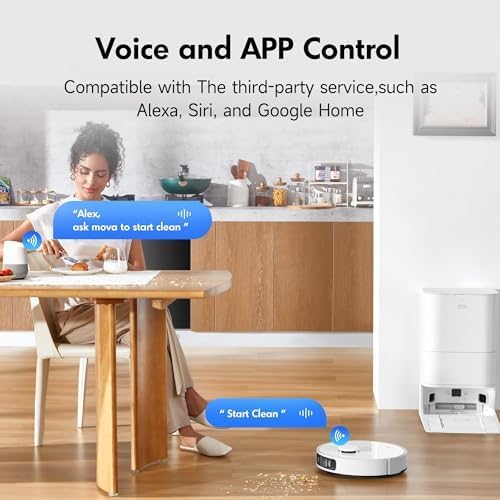
The Mova app provides comprehensive control over your robot vacuum. You can set cleaning frequency, schedule sessions, create virtual walls (no-go zones), and customize cleaning modes. The S20 Ultra also supports voice control with Alexa and Google Home for convenient operation.

The image shows a user interacting with the robot vacuum using voice commands via a smart assistant and managing settings through the mobile application.
Video: Official Mova S20 Ultra product video showcasing its features and operation.
5. Maintenance
5.1 Base Station Maintenance
- Hot Water Mop Self-Washing: The base station uses 140℉ hot water to clean and sanitize the mop pads after each cleaning session, effectively removing stubborn stains.
- Hot Air Mop Drying: After washing, hot air drying reduces odors and prevents mildew growth on the mop pads.
- Self-Emptying: The 3.2L dust bag in the base station allows for up to 75 days of maintenance-free dust collection. Replace the dust bag when full.
- Self-Refilling: The base station automatically refills the robot's water tanks (4.5L for clean water, 4L for dirty water) for continuous mopping.
This image illustrates the various self-maintenance functions of the base station, including self-washing, self-drying, self-emptying, and self-refilling.
5.2 Robot Maintenance
- Dual Roller Brush Cleaning: Regularly check and clean the dual rubber brushes to prevent hair tangling and ensure optimal dust capture.
- Side Brush Cleaning: Inspect and clean the side brush periodically to maintain effective corner and edge cleaning.
- Mop Pad Cleaning: While the base station performs self-washing, it is recommended to occasionally remove and deep clean the mop pads for extended longevity and hygiene.
6. Troubleshooting
If you encounter issues with your Mova S20 Ultra, refer to the following common troubleshooting steps:
- Robot Not Charging: Ensure the robot is correctly aligned with the charging contacts on the base station. Check if the power cord is securely plugged into both the base station and the wall outlet.
- Robot Getting Stuck Frequently: Clear any small objects, cables, or loose rugs from the cleaning path. Use the app to set "no-go zones" for areas where the robot consistently gets stuck.
- Poor Cleaning Performance: Check if the dust bag is full and replace it if necessary. Clean the main brushes and side brush for any tangled hair or debris. Ensure the mop pads are clean and properly attached.
- App Connectivity Issues: Verify your home Wi-Fi network is stable and the robot is within range. Restart the robot and your router if necessary. Re-pair the device through the app if the issue persists.
- Unusual Noises: Inspect the main brushes, side brush, and wheels for any foreign objects that might be causing the noise. Clean them thoroughly.
For more detailed troubleshooting or persistent issues, please consult the full user manual or contact Mova customer support.
7. Specifications
| Feature | Specification |
|---|---|
| Brand | Mova |
| Model Name | S20 Ultra |
| Suction Power | 8300Pa |
| Mop Washing Temperature | 140℉ (60°C) Hot Water |
| Dust Bag Capacity | 3.2 Liters |
| Clean Water Tank Capacity | 4.5 Liters |
| Dirty Water Tank Capacity | 4 Liters |
| Battery Life | Up to 230 minutes |
| Object Recognition | 360° Recognition, detects 70+ objects |
| Product Dimensions | 8"L x 15"W x 13"H |
| Item Weight | 42.3 pounds |
| UPC | 850067619277 |
8. Warranty & Support
MOVA is committed to providing high-quality home appliances and excellent customer service. Your Mova S20 Ultra comes with a comprehensive warranty:
- 30-Day Money Back Service: If you are not completely satisfied, you may return the product within 30 days for a full refund.
- Up to 36-Month Warranty: Enjoy peace of mind with a warranty covering manufacturing defects for up to 36 months from the date of purchase.
- 24/7 Rapid Responding Service Team: Our dedicated support team is available around the clock to assist you with any inquiries or issues.
- Fast Shipping from Local Warehouses: Benefit from quick delivery of products and replacement parts.
For support, please visit the official Mova website or contact our customer service team directly through the contact information provided in the user manual.