
1. Product Overview
The Tapo RV20 Max Plus is an advanced 2-in-1 robot vacuum and mop designed for comprehensive floor cleaning. It features LiDAR smart navigation, powerful suction, and a self-emptying dock for a hands-free cleaning experience.

Figure 1: Tapo RV20 Max Plus Robot Vacuum and Self-Emptying Dock.
2. Setup
2.1 Unboxing and Placement
Carefully remove all components from the packaging. Place the auto-empty dock against a wall in an open area, ensuring there are no obstacles within 1.5 meters (5 feet) in front and 0.5 meters (1.6 feet) to the sides. Connect the power cord to the dock and plug it into a power outlet.
2.2 Initial Charge
Place the robot vacuum onto the charging pins of the auto-empty dock. Ensure the charging contacts on the robot align with those on the dock. The robot will begin charging automatically. For first-time use, fully charge the robot before operation.
2.3 App Connection and Mapping
Download the Tapo app from your mobile app store. Follow the in-app instructions to add your RV20 Max Plus. The app will guide you through the initial mapping process, which uses LiDAR navigation to create a precise map of your home. This map is essential for efficient cleaning routes and advanced features.

Figure 2: Advanced LiDAR Navigation for precise mapping.
3. Operating Instructions
3.1 Cleaning Modes and Suction Levels
The Tapo RV20 Max Plus offers multiple cleaning modes and 5 adjustable suction levels (including Ultra mode for up to 5300Pa max suction) via the Tapo app. Select the appropriate mode based on your cleaning needs and floor type.

Figure 3: Powerful 5300Pa Max Suction for effective debris removal.
3.2 Mopping Function
For mopping, fill the 300ml water tank with clean water (do not add cleaning agents). Attach the washable mop cloth mount. The robot provides 3 water flow options to suit different hard floor types. It automatically avoids carpeted areas when in mopping mode.

Figure 4: Set mopping mode for cleaner hard floors.

Figure 5: Robot automatically avoids carpeted areas when mopping.
3.3 Smart Navigation and Obstacle Avoidance
Utilizing Mesh Grid Technology and advanced sensors, the robot ensures thorough coverage and prevents missed spots. It detects step edges to prevent falls and can effortlessly climb thresholds up to 0.87 inches. The integrated sensor reduces the risk of the robot getting stuck under furniture.

Figure 6: Mesh Grid Technology for comprehensive cleaning.

Figure 7: Obstacle detection and avoidance capabilities.
3.4 App Control and Scheduling
The Tapo app allows for full control over your robot. You can set up cleaning schedules, define virtual walls and no-go zones, and select specific rooms or areas for cleaning. The robot also supports Smart Recharge & Resume, automatically returning to the dock to recharge and resuming cleaning from where it left off.

Figure 8: Set up virtual walls and no-go zones via the Tapo app.
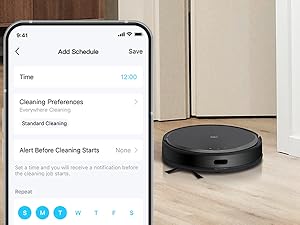
Figure 9: Schedule cleaning times and preferences.
3.5 Voice Control
The Tapo RV20 Max Plus is compatible with Alexa and Google Home. You can use voice commands to start, stop, or send the robot back to its dock.

Figure 10: Control your robot vacuum with voice commands.
4. Maintenance
4.1 Auto-Empty Dock and Dust Bag
The 3L auto-empty dock automatically collects debris from the robot's dustbin after each cleaning, typically lasting for up to 60 days. Replace the disposable dust bag when full.

Figure 11: The 3L auto-empty dock provides up to 60 days of hands-free dust collection.
4.2 Washable HEPA Filter
The robot vacuum's H11 HEPA filter is washable and reusable. Refer to the Quick Installation Guide for detailed instructions on how to clean the filter to maintain optimal performance.
4.3 Main Brush and Side Brushes
Regularly inspect and clean the main brush and side brushes to remove tangled hair or debris. This ensures effective cleaning and prevents damage to the brushes.
4.4 Mopping Cloth
The washable mop cloth should be cleaned after each mopping session to prevent odors and maintain hygiene.
5. Troubleshooting
If you encounter any issues with your Tapo RV20 Max Plus, please refer to the following general troubleshooting tips:
- Robot not charging: Ensure the charging contacts on both the robot and the dock are clean and free of debris. Verify the power cord is securely plugged in.
- Robot getting stuck: Clear any small obstacles, loose cables, or non-furniture items from the cleaning path. Utilize the virtual walls or no-go zones in the app.
- Poor cleaning performance: Check and clean the dustbin, filter, main brush, and side brushes. Ensure the dust bag in the auto-empty dock is not full.
- Mopping issues: Ensure the water tank is filled and the mop cloth is properly attached and clean.
- App connectivity issues: Ensure your robot and smartphone are connected to a stable 2.4 GHz Wi-Fi network. Restart the app or the robot if necessary.
For more detailed troubleshooting or specific error codes, consult the Tapo app or the online support resources.
6. Specifications
| Feature | Detail |
|---|---|
| Brand | Tapo |
| Model Name | Tapo RV20 Max Plus |
| Special Feature | 2-IN-1 Vacuum and Mop with Self Empty Dock, Wet/Dry, Scheduling, Washable Filter, Auto-Docking |
| Color | Black |
| Product Dimensions | 13"L x 13"W x 3.3"H |
| Included Components | Robot Vacuum x 1, Auto Empty Dock, Mop Cloth Mount, Quick Installation Guide, Washable Mop Cloth, 3L Disposable Dust Bag, Main Brush, 2 Side Brushes, HEPA Filter, Cleaning Brush |
| Filter Type | H11 HEPA Filter (Washable) |
| Battery Life | 180 minutes |
| Power Source | Battery Powered |
| Control Method | App |
| Compatible Devices | Smartphones, Amazon Echo, Google Home |
| Max Suction Power | 5300Pa |
| Dust Pickup Rate | Over 97% |
| Climbing Capability | Up to 0.87 inches (22mm) |
| Dust Bag Capacity | 3L (disposable) |
| Wireless Connection | IEEE 802.11 b/g/n, 2.4 GHz band only and Bluetooth 4.2 (onboarding only) |
7. Official Product Video
Video 1: Tapo Robot Vacuum and Mop with Self-Emptying Dock - Official Product Video. This video provides an overview of the product's features and benefits.
8. Warranty and Support
For warranty information, technical support, FAQs, and setup/maintenance videos, please visit the official Tapo support page. You can also scan the QR code below using your smartphone to access these resources directly.

Figure 12: Scan this QR code for quick access to Tapo support resources.
Alternatively, visit: https://www.tapo.com/us/support/tapo-robot-vacuum/


