
Loakdsa Replacement Air Conditioner Remote Control User Manual
For Innovair AC Models: WOE36C2DB2, HO10C2MR13, WO13C2DB2, HO13C2MR13, HOE36C2MR2, WO10C1DB2, HO10C1MR13, WO13C1DB2, HO13C1MR13, WO10C2DB2, WO18C2DB2, HO18C2MR13
1. Introduction
This manual provides instructions for the proper setup, operation, and maintenance of your Loakdsa replacement remote control for Innovair air conditioning units. This remote is designed to function as a direct replacement, offering essential controls for your AC system.
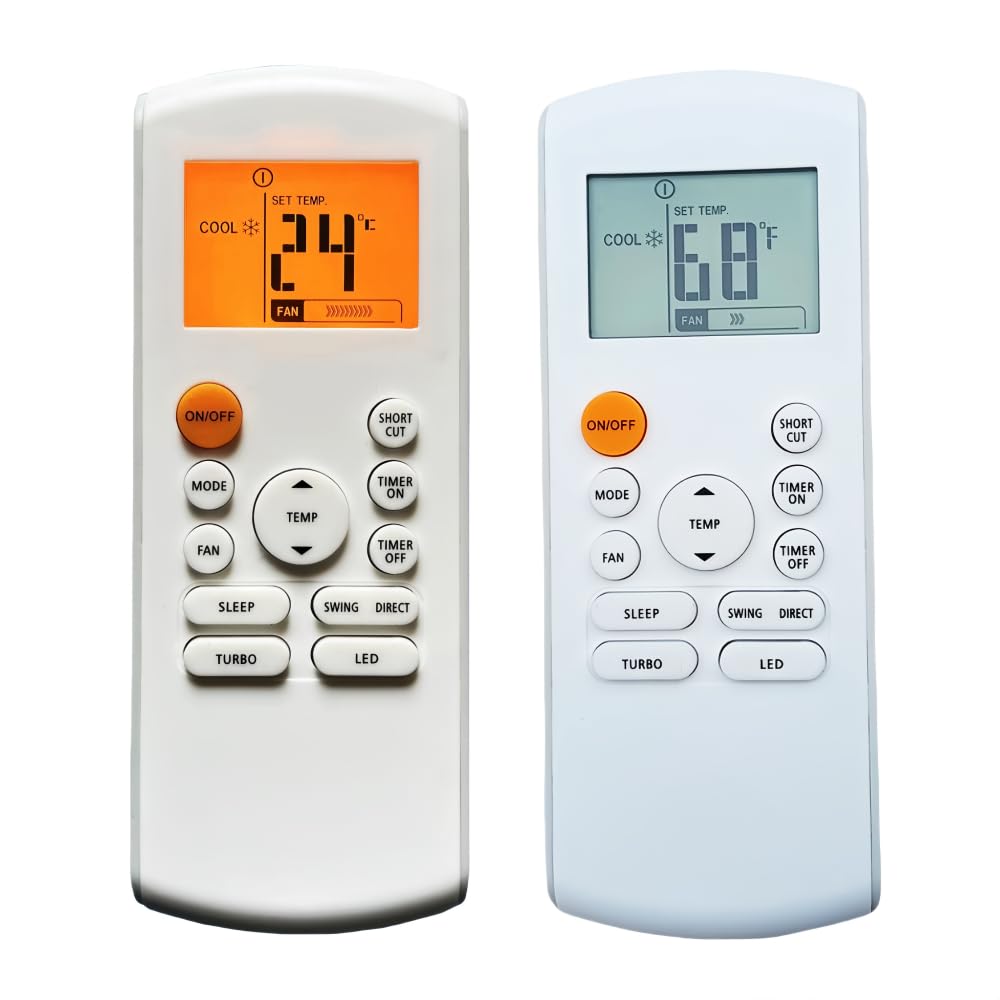
Image 1.1: Front view of the Loakdsa replacement remote control, displaying temperature and mode settings.
2. Setup
2.1 Battery Installation
The remote control requires new batteries for operation. Please follow these steps to install them:
- Locate the battery compartment on the back of the remote control.
- Slide the battery compartment cover downwards or outwards to open it.
- Insert new AAA batteries, ensuring the positive (+) and negative (-) terminals align correctly with the markings inside the compartment.
- Replace the battery compartment cover by sliding it back into position until it clicks securely.
Note: This remote control does not require any programming or setup. It is ready for use immediately after battery installation.

Image 2.1: Rear view of the remote control with the battery cover removed, showing the battery compartment.
3. Operating Instructions
Point the remote control directly towards the infrared receiver on your air conditioning unit. Ensure there are no obstructions between the remote and the AC unit.

Image 3.1: Close-up of the remote control's display and buttons.
3.1 Button Functions
- ON/OFF: Press to turn the air conditioner unit on or off.
- MODE: Cycles through operating modes such as Cool, Heat, Fan, Dry, Auto.
- FAN: Adjusts the fan speed (e.g., Low, Medium, High, Auto).
- TEMP ▲ / ▼: Increases or decreases the set temperature.
- SLEEP: Activates or deactivates the sleep mode, which adjusts temperature for comfort during sleep.
- SWING: Controls the vertical louver swing function.
- DIRECT: Adjusts the horizontal louver direction.
- TURBO: Activates maximum cooling or heating for rapid temperature change.
- LED: Turns the display light on or off on the AC unit.
- SHORT CUT: Recalls a favorite or previously saved setting.
- TIMER ON: Sets a timer for the AC unit to turn on automatically.
- TIMER OFF: Sets a timer for the AC unit to turn off automatically.
4. Maintenance
To ensure the longevity and proper functioning of your remote control, please observe the following maintenance guidelines:
- Battery Replacement: Replace batteries when the remote's response becomes sluggish or the display dims. Always use new batteries of the specified type (AAA).
- Storage: If the remote control will not be used for an extended period, remove the batteries to prevent leakage and potential damage to the device.
- Cleaning: Wipe the remote control with a soft, dry cloth. Do not use liquid cleaners or abrasive materials.
- Avoid Exposure: Keep the remote control away from direct sunlight, high temperatures, and moisture.
5. Troubleshooting
If your remote control is not functioning as expected, please try the following troubleshooting steps:
- No Response from AC Unit:
- Ensure new batteries are correctly installed.
- Check if the remote control is pointed directly at the AC unit's receiver.
- Remove any obstructions between the remote and the AC unit.
- Verify that the AC unit is powered on and receiving electricity.
- Remote Display Not Working:
- Replace the batteries with new ones.
- Check for any physical damage to the remote.
- Incorrect Functionality:
- Ensure the remote control model is compatible with your specific Innovair AC unit model.
- If the issue persists, contact customer support.
6. Specifications
| Feature | Detail |
|---|---|
| Brand | Loakdsa |
| Special Feature | Universal Replacement |
| Compatible Devices | Innovair Air Conditioner |
| Connectivity Technology | Infrared |
| Maximum Number of Supported Devices | 1 |
| Controller Type | Infrared |
| Maximum Range | 10 Feet |
| Batteries Required | AAA batteries (not included) |
| UPC | 764965550429 |
| ASIN | B0DGQTXZ6T |
7. Warranty and Support
7.1 Return Policy
This product is subject to a 30-day return policy for refund or replacement, as per the seller's terms.
7.2 Customer Support
For any questions or concerns regarding your order or the product, please contact the seller directly. Customer inquiries are typically addressed within 24 hours.