
1. Introduction
This manual provides detailed instructions for the safe and effective use of the TESMEN TN-213 Non-Contact Voltage Tester and the TESMEN TCM-300D Digital Clamp Meter. This bundle offers a comprehensive solution for various electrical testing needs, from basic voltage detection to advanced AC/DC current and resistance measurements. Please read this manual thoroughly before operating the devices and retain it for future reference.
1.1 Safety Information
Always observe basic safety precautions when using electrical testing equipment to reduce the risk of fire, electric shock, or personal injury. Pay close attention to all warnings and instructions provided in this manual.
- Do not use the device if it appears damaged or is not operating correctly.
- Ensure proper insulation and connection before taking measurements.
- Always verify the device's functionality on a known live circuit before testing an unknown circuit.
- Wear appropriate personal protective equipment (PPE), such as safety glasses and insulated gloves.
- Do not exceed the maximum input ratings for each function.
- Keep hands and fingers away from the probe tips when testing live circuits.
2. Package Contents
Verify that all items are present and undamaged upon opening the package:
- TESMEN TCM-300D Digital Clamp Meter
- TESMEN TN-213 Non-Contact Voltage Tester
- Test Leads for TCM-300D
- Carrying Case
- AAA Batteries (for TN-213)
- User Manuals (for both devices)
3. Product Features
3.1 TESMEN TCM-300D Digital Clamp Meter
- AC/DC Current and Voltage Measurement: Capable of measuring both alternating and direct currents and voltages.
- Inrush Current Measurement: Measures the initial surge of current when a device is powered on.
- Resistance, Capacitance, Diode, and Continuity Testing: Comprehensive testing for various electronic components.
- Temperature Measurement: Includes functionality for temperature readings.
- Non-Contact Voltage (NCV) Detection: Detects AC voltage without direct contact.
- User-Friendly Design: Features a backlit display and flashlight for low-light conditions.
- T-RMS 6000 Counts: Provides accurate True RMS measurements.

Image: The TCM-300D Clamp Meter's display showing its wide range of measurement capabilities, including AC/DC Current, Voltage, Resistance, Continuity, Diodes, Frequency, Capacitance, Temperature, NCV, Live wire, Data hold, and Inrush current.

Image: The TCM-300D Clamp Meter demonstrating its ability to measure both AC and DC current, highlighting its 'SMART AUTO MODE' for automatic function selection.

Image: The TCM-300D Clamp Meter conducting an Inrush Current Test, showing a graphical representation of current measurement ranging from 5A to 600A.
3.2 TESMEN TN-213 Non-Contact Voltage Tester
- Non-Contact Voltage (NCV) Detection: Provides reliable detection of AC voltage without physical contact.
- Visual and Audible Alerts: Clear indicators for voltage presence.
- Dual-Range AC Voltage: Offers both high sensitivity (12V-1000V) and low sensitivity (70V-1000V) modes.
- Voltage Strength Visualization: Displays voltage strength using a percentage and analog bar.
- IP66 Rated: Shielded from water and dust for enhanced durability.

Image: The TN-213 Voltage Tester in use, showing its non-contact voltage detection capability with a red indicator light when voltage is present in an electrical outlet.

Image: The TN-213 Voltage Tester's display showing voltage strength visualized as a percentage (99%) and an analog bar graph.

Image: The TN-213 Voltage Tester illustrating its Dual-Range AC Voltage capability, offering both High Sensitivity (12V-1000V) and Low Sensitivity (70V-1000V) modes, adjustable via a sensitivity button.
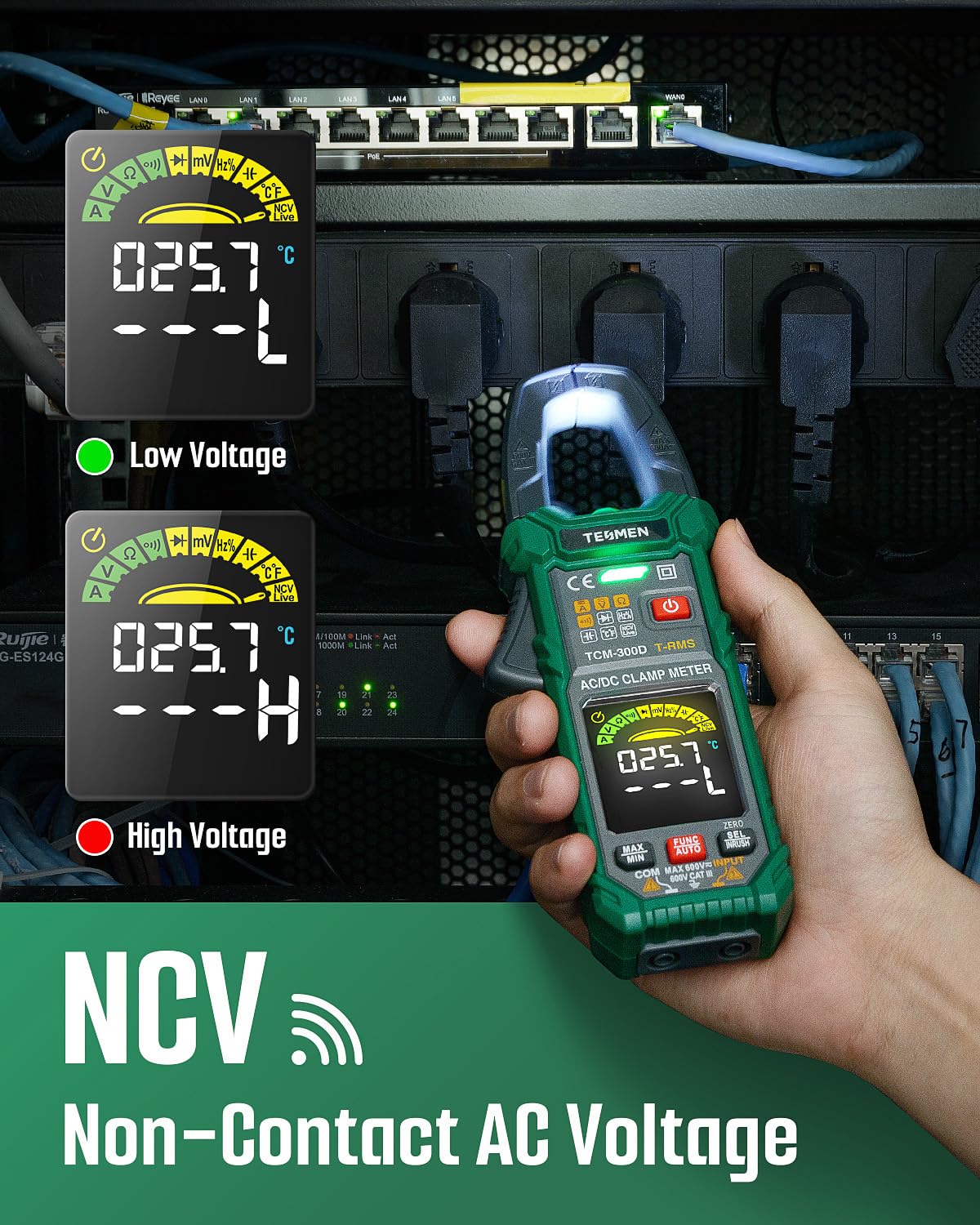
Image: The TN-213 Voltage Tester in a rugged setting, demonstrating its IP66 rating for protection against water and dust, ensuring reliable performance in various conditions.
4. Setup
4.1 Battery Installation (TN-213 and TCM-300D)
Both devices require batteries for operation. The TN-213 typically uses AAA batteries, while the TCM-300D also uses AAA batteries. Refer to the specific battery compartment on each device for correct polarity and type.
- Locate the battery compartment cover on the back of the device.
- Use a screwdriver if necessary to open the cover.
- Insert the required batteries, ensuring correct polarity (+ and -).
- Replace the battery compartment cover and secure it.
4.2 Initial Power-On
Press the power button on each device to turn it on. The TCM-300D will typically start in 'Auto' mode, automatically detecting the measurement type. The TN-213 will power on and be ready for non-contact voltage detection.
5. Operating Instructions
5.1 TESMEN TCM-300D Digital Clamp Meter
The TCM-300D features an intelligent 'Auto' mode that attempts to identify the measurement type. For specific measurements, manual selection is also available.
5.1.1 Auto Mode Operation
Upon powering on, the meter enters 'Auto' mode. It will scan for Amps, Volts, Ohms, and Continuity. Simply connect the test leads or clamp around a conductor, and the meter will attempt to display the relevant reading.
5.1.2 Manual Function Selection
To select a specific function manually, press the FUNC/AUTO button. Each press will cycle through available modes (e.g., AC/DC Current, Voltage, Resistance, Capacitance, Diode, Continuity, Frequency, Temperature). Use the SEL/INRUSH button to switch between AC/DC or other sub-functions within a mode.
5.1.3 AC/DC Current Measurement
- Select AC or DC current mode using the FUNC/AUTO and SEL/INRUSH buttons.
- Open the clamp jaws and enclose a single conductor (not a bundled cable) through the center of the jaws.
- Read the current value on the display.
5.1.4 Voltage Measurement (AC/DC)
- Select AC or DC voltage mode.
- Insert the test leads into the appropriate input jacks (usually COM and VΩmA).
- Connect the test probes to the circuit points where voltage is to be measured.
- Read the voltage value on the display.
5.1.5 Resistance Measurement
- Select resistance (Ω) mode.
- Ensure the circuit or component is de-energized.
- Connect the test probes across the component to be measured.
- Read the resistance value on the display. The meter will auto-range.
5.1.6 Capacitance Measurement
- Select capacitance mode.
- Ensure the capacitor is fully discharged before testing.
- Connect the test probes across the capacitor terminals.
- Read the capacitance value on the display.
5.1.7 Diode Test
- Select diode test mode.
- Connect the red test lead to the anode and the black test lead to the cathode of the diode.
- The display will show the forward voltage drop. Reverse the leads to check for open circuit (OL) in the reverse direction.
5.1.8 Continuity Test
- Select continuity mode.
- Connect the test probes across the circuit or component.
- An audible beep indicates continuity (low resistance).
5.1.9 Frequency and Duty Cycle Measurement
- Select frequency (Hz) mode.
- Connect the test leads to the signal source.
- The display will show the frequency and duty cycle of the signal.
5.1.10 Inrush Current Measurement
- Select Inrush mode (often by pressing SEL/INRUSH in current mode).
- Clamp around the conductor of the device to be tested.
- Power on the device, and the meter will capture the peak inrush current.
5.1.11 Non-Contact Voltage (NCV) Detection
- Select NCV mode.
- Move the top of the clamp meter near the conductor or electrical outlet.
- The meter will indicate the presence of AC voltage with visual and/or audible alerts.
5.2 TESMEN TN-213 Non-Contact Voltage Tester
The TN-213 is designed for quick and safe detection of AC voltage.
5.2.1 NCV Detection
- Press the power button to turn on the device.
- Place the tip of the tester near the conductor, outlet, or wire you wish to test.
- If AC voltage is detected, the tester will emit an audible beep and its LED indicator will light up. The display will show the voltage strength.
5.2.2 Dual-Range Sensitivity Adjustment
The TN-213 offers two sensitivity ranges:
- High Sensitivity: 12V-1000V AC (default mode, suitable for detecting lower voltages or through insulation).
- Low Sensitivity: 70V-1000V AC (for detecting higher voltages or in environments with electrical noise).
To switch between sensitivity modes, short press the S button. The display will indicate the active sensitivity range.
6. Maintenance
- Cleaning: Wipe the devices with a dry, soft cloth. Do not use abrasive cleaners or solvents.
- Battery Replacement: Replace batteries promptly when the low battery indicator appears to ensure accurate readings. Refer to Section 4.1 for battery installation.
- Storage: Store the devices in their carrying case in a cool, dry place away from direct sunlight and extreme temperatures.
- Calibration: For professional use, periodic calibration by a qualified technician is recommended to maintain accuracy.
7. Troubleshooting
| Problem | Possible Cause | Solution |
|---|---|---|
| Device does not power on. | Dead or incorrectly installed batteries. | Replace batteries with new ones, ensuring correct polarity. |
| Inaccurate readings. | Low battery, incorrect mode selection, environmental interference, damaged test leads. | Replace batteries, select correct function, move away from strong electromagnetic fields, inspect/replace test leads. |
| NCV detection not working (TN-213). | No AC voltage present, low battery, incorrect sensitivity setting. | Verify voltage with a known source, replace batteries, try high sensitivity mode. |
| Clamp meter (TCM-300D) shows 'OL' (Overload). | Measurement exceeds the device's range. | Ensure the measurement is within the specified range for the selected function. |
8. Specifications
8.1 TESMEN TCM-300D Digital Clamp Meter
- Item Model Number: TCM-300D
- Brand: TESMEN
- Power Source: Battery Powered
- Measurement Type: AC/DC Current, AC/DC Voltage, Resistance, Capacitance, Diode, Continuity, Frequency, Temperature, Inrush Current, NCV
- Display: Backlit LCD, T-RMS 6000 Counts
- Safety Rating: CAT III 600V
8.2 TESMEN TN-213 Non-Contact Voltage Tester
- Brand: TESMEN
- Power Source: Battery Powered (AAA)
- Voltage Detection Range: Dual-Range AC Voltage (High Sensitivity: 12V-1000V, Low Sensitivity: 70V-1000V)
- Indicators: Visual (LED, display percentage/bar) and Audible
- Environmental Protection: IP66 Rated (Shielded from Water and Dust)
- Safety Rating: CAT III 1000V, CAT IV 600V
9. Warranty and Support
Warranty information for this product bundle is not explicitly provided in the available data. For specific warranty details, technical support, or service inquiries, please refer to the official TESMEN website or contact their customer service directly. Keep your purchase receipt as proof of purchase.