
Konus 7233
KonusPro 550 Ballistic Series Rifle Scope User Manual
Model: 7233 | Brand: Konus
1. Introduction
Thank you for choosing the KonusPro 550 Ballistic Series 4-12x44mm Rifle Scope. This manual provides detailed instructions for the proper setup, operation, and maintenance of your new rifle scope. Please read this manual thoroughly before using the product to ensure safe and optimal performance. Keep this manual for future reference.
2. Product Overview
The KonusPro 550 Ballistic Series Rifle Scope is designed for precision and reliability, featuring a 4-12x magnification range and a 44mm objective lens. It incorporates a Second Focal Plane BDC (Bullet Drop Compensator) reticle, making it suitable for various shooting applications. The scope is constructed with a durable 1-inch tube and includes user-friendly adjustments.
Key Features:
- Fast focus ocular for quick reticle sharpness adjustment.
- Finger adjustable turrets for easy windage and elevation corrections without tools.
- Second Focal Plane BDC Reticle for ballistic compensation.
- Durable Aluminum construction.
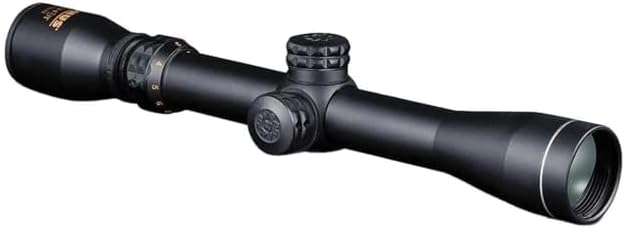
Figure 2.1: The KonusPro 550 Ballistic Series 4-12x44mm Rifle Scope, showcasing its main body, objective lens, ocular lens, and adjustment turrets.
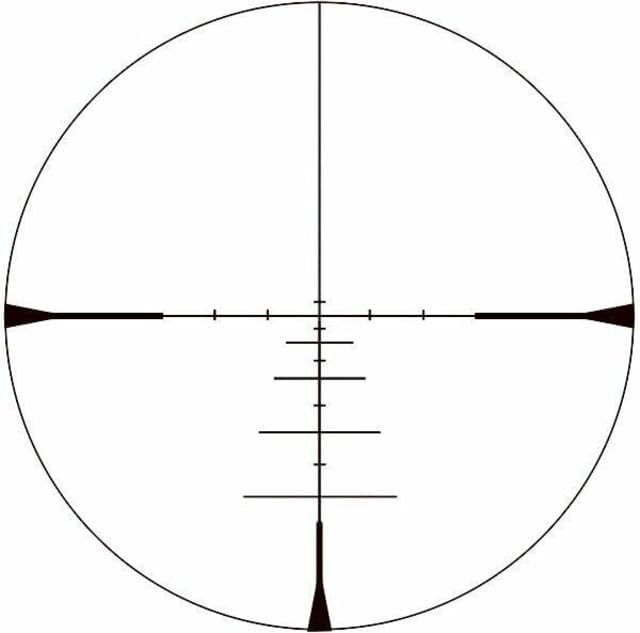
Figure 2.2: Illustration of the BDC (Bullet Drop Compensator) reticle pattern found in the KonusPro 550 scope, showing the main crosshairs and additional holdover points for various distances.
3. Setup
3.1 Mounting the Scope
The KonusPro 550 Rifle Scope is designed for Picatinny Mount systems. Ensure your rifle has a compatible Picatinny rail. Use high-quality scope rings (not included) that match the 1-inch tube diameter of the scope.
- Secure the bottom halves of the scope rings to the Picatinny rail, ensuring proper eye relief.
- Place the scope into the bottom halves of the rings.
- Attach the top halves of the rings and lightly tighten the screws.
- Adjust the scope's position for optimal eye relief and ensure the reticle is level.
- Gradually tighten all ring screws evenly to the manufacturer's recommended torque specifications. Do not overtighten.
3.2 Initial Adjustments
Before zeroing, perform the following initial adjustments:
- Fast Focus Ocular: Look through the scope at a plain, bright background (like the sky or a wall). Rotate the fast focus ocular ring until the reticle appears sharp and clear. This adjustment is critical for preventing eye strain and ensuring accurate aiming.
- Magnification Ring: Rotate the magnification ring to your desired power setting (4x to 12x).
4. Operating Instructions
4.1 Magnification Adjustment
The magnification of your scope can be adjusted by rotating the power ring located near the ocular lens. Turn the ring to select a magnification level between 4x and 12x. Higher magnification provides a closer view of the target but reduces the field of view.
4.2 Windage and Elevation Adjustments
The KonusPro 550 features finger-adjustable turrets for windage (horizontal) and elevation (vertical) adjustments. These turrets are typically located on the top (elevation) and right side (windage) of the scope body.
- To adjust, simply turn the turret in the desired direction. Each click represents a specific change in point of impact (e.g., 1/4 MOA per click).
- Refer to the markings on the turrets for direction (e.g., UP for elevation, R for right windage).
- After zeroing, you may be able to reset the turrets to '0' by lifting and rotating the turret cap, then pushing it back down. Consult the specific turret design for your model.
4.3 Using the BDC Reticle
The BDC (Bullet Drop Compensator) reticle provides multiple aiming points below the main crosshair to compensate for bullet drop at various distances. The specific distances represented by each mark will vary depending on your cartridge, bullet weight, and muzzle velocity. It is crucial to:
- Zero your rifle at a standard distance (e.g., 100 yards).
- Practice and confirm the holdover points at different ranges with your specific ammunition.
- Consult ballistic charts for your ammunition to understand bullet trajectory.
5. Maintenance
5.1 Cleaning the Lenses
Always use a soft, lint-free cloth or a lens brush to remove dust and loose debris from the lenses. For smudges or fingerprints, use a lens cleaning solution specifically designed for optical surfaces and a clean microfiber cloth. Avoid using harsh chemicals or abrasive materials that could damage the lens coatings.
5.2 Cleaning the Scope Body
Wipe the exterior of the scope with a damp cloth to remove dirt or grime. For stubborn marks, a mild soap solution can be used. Ensure the scope is completely dry before storage.
5.3 Storage
Store your rifle scope in a cool, dry place, away from direct sunlight and extreme temperatures. It is recommended to use the provided lens caps to protect the objective and ocular lenses when not in use. If storing for extended periods, consider placing it in a padded case.
6. Troubleshooting
This section addresses common issues you might encounter with your rifle scope.
6.1 Blurry Image or Reticle
- Issue: Reticle appears blurry. Solution: Adjust the fast focus ocular ring until the reticle is sharp.
- Issue: Target image is blurry. Solution: Ensure the magnification is set appropriately for the distance. If the scope has a parallax adjustment (this model does not explicitly state it, but it's a common feature on some scopes), adjust it for the target distance.
6.2 Inconsistent Point of Impact (POI)
- Issue: Shots are not grouping consistently or POI shifts. Solution: Check scope rings and mounts for tightness. Ensure they are properly torqued. Verify that the barrel and action are clean and free of obstructions. Check ammunition consistency.
6.3 Turrets Not Adjusting POI
- Issue: Turning turrets does not change the point of impact. Solution: Ensure the turrets are not stuck or damaged. If they are finger adjustable, ensure they are fully engaged. If the issue persists, contact Konus customer support.
7. Specifications
| Feature | Specification |
|---|---|
| Model Name | 7233 |
| Brand | Konus |
| Magnification | 4-12x |
| Objective Lens Diameter | 44mm |
| Tube Diameter | 1 inch |
| Reticle Type | BDC (Second Focal Plane) |
| Color | Black |
| Material | Aluminum |
| Mounting Type | Picatinny Mount (requires compatible rings) |
| Ocular Type | Fast Focus Ocular |
| Turrets | Finger Adjustable |
8. Warranty and Support
For specific warranty information regarding your KonusPro 550 Ballistic Series Rifle Scope, please refer to the warranty card included with your product or visit the official Konus website. Warranty terms typically cover manufacturing defects.
If you require technical assistance, have questions about operation, or need to inquire about repairs, please contact Konus customer support directly. Contact information can usually be found on the manufacturer's website or product packaging.
Please note that extended protection plans, such as those offered by third-party providers, are separate from the manufacturer's warranty and have their own terms and conditions.
Ask a question about this manual
Ask about setup, troubleshooting, compatibility, parts, safety, or missing instructions. Manuals+ will review the question and use this page’s manual context to help answer it.