
1. Product Overview
The EE Smart 5G Hub 2 (Model HH20C) is a high-performance wireless router designed to provide ultrafast 5G internet connectivity to multiple devices. It leverages the latest WiFi 6E technology to deliver a fast and reliable connection with low latency, suitable for home, gaming, and business use. This device allows you to access the internet without a fixed line, offering flexibility and high-speed data transfer.

Figure 1: Front view of the EE Smart 5G Hub 2 HH20C WiFi Router.
2. What's in the Box
Please ensure all the following components are present in your package:
- Smart 5G Hub (HH20C)
- Power Adaptor
- Ethernet Cable
- User Guide (this document)
3. Setup Guide
Follow these steps for the initial setup of your Smart 5G Hub:
- Insert SIM Card: Locate the SIM card slot, typically found under a small flap on the device. Gently insert your activated 5G data SIM card into the slot until it clicks into place. Ensure the SIM card is correctly oriented as indicated on the device.
- Connect Power: Connect the provided power adaptor to the 'Power' port on the back of the Smart 5G Hub. Plug the other end of the adaptor into a standard electrical outlet.
- Power On: Press the Power button (if available) or wait for the device to automatically power on. The indicator lights on the hub will illuminate as it starts up.
- Wait for Network Connection: Allow a few minutes for the hub to establish a connection to the 5G mobile network. The network indicator light will typically turn solid green or blue once connected.
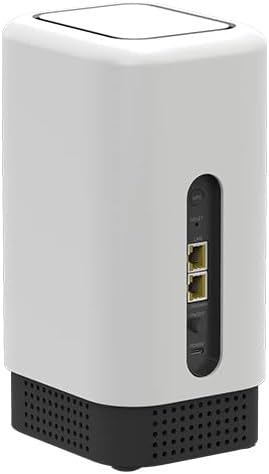
Figure 2: Rear view of the EE Smart 5G Hub 2 HH20C, highlighting ports.
4. Operating Instructions
Once your Smart 5G Hub is set up and connected to the network, you can connect your devices:
- Wi-Fi Connection:
- On your device (laptop, smartphone, tablet), search for available Wi-Fi networks.
- Select the Wi-Fi network name (SSID) printed on the label at the bottom or back of your Smart 5G Hub.
- Enter the Wi-Fi password (also known as the Wi-Fi Key or Network Key) found on the same label.
- Your device should now be connected to the internet.
- Ethernet Connection:
- For wired connections, use the provided Ethernet cable to connect a device (e.g., desktop computer, gaming console) to one of the LAN ports on the back of the Smart 5G Hub.
- The device will automatically obtain an IP address and connect to the network.
The Smart 5G Hub supports Wi-Fi 6E, offering enhanced speed and efficiency for compatible devices. It can support over 100 different devices simultaneously.
5. Maintenance
To ensure optimal performance and longevity of your Smart 5G Hub, consider the following maintenance tips:
- Placement: Place the hub in an open area, away from obstructions, large metal objects, and other electronic devices that may cause interference. Central locations in your home or office are ideal for optimal Wi-Fi coverage.
- Cleaning: Use a soft, dry cloth to clean the exterior of the device. Do not use liquid cleaners or aerosols.
- Restarting: If you experience connectivity issues or slow performance, try restarting the hub by unplugging the power adaptor, waiting 30 seconds, and then plugging it back in.
- Firmware Updates: The device may receive automatic firmware updates to improve performance and security. Ensure the device remains powered on and connected to the internet to receive these updates.
6. Troubleshooting
If you encounter issues with your Smart 5G Hub, refer to the following common problems and solutions:
| Problem | Possible Cause / Solution |
|---|---|
| No Internet Connection |
|
| Slow Internet Speed |
|
| Cannot Connect to Wi-Fi |
|
| Hub Not Powering On |
|
If problems persist after following these steps, please contact customer support.
7. Specifications
| Feature | Detail |
|---|---|
| Brand | EE |
| Model Name | HH20C |
| Connectivity Technology | 5G, Wi-Fi |
| Wireless Communication Standard | 802.11ax (Wi-Fi 6E) |
| Frequency Band Class | Dual-Band |
| Frequency | 3.8 GHz |
| Compatible Devices | Laptop, Personal Computer, Tablet, Smart Television |
| Recommended Uses | Home, Gaming, Business |
| Colour | White |
| Package Dimensions | 25 x 17 x 14 cm |
| Item Weight | 2 kg |
8. Warranty and Support
As this product is a renewed item, specific warranty details may vary. Please refer to the warranty information provided at the time of purchase or contact the seller directly for details regarding your product's warranty coverage.
For further assistance or technical support, please refer to the contact information provided by your retailer or the manufacturer's official support channels. Keep your purchase receipt and product serial number handy when contacting support.
