
CREWORKS DUC-S001
CREWORKS 1.2L Digital Ultrasonic Cleaner User Manual
Model: DUC-S001
1. Introduction
Thank you for choosing the CREWORKS 1.2L Digital Ultrasonic Cleaner. This device is designed to provide efficient and thorough cleaning for a variety of items using ultrasonic technology. Please read this manual carefully before operation to ensure safe and optimal performance.
This 1.2L ultrasonic cleaning machine from Creworks, equipped with 60W ultrasonic power, 40 kHz frequency, and a 100W heater, effortlessly restores the shine of jewelry, glasses, toys, oral appliances, and more.

Figure 1: CREWORKS 1.2L Digital Ultrasonic Cleaner
2. Important Safety Information
WARNING: Failure to follow these safety instructions may result in fire, electric shock, or other injury or damage.
- Do not disassemble the unit. Servicing should only be performed by qualified personnel.
- Do not use the unit unattended. Always supervise operation.
- Always use suitable cleaning fluid. Do not use flammable, corrosive, or abrasive solutions.
- Unplug the unit from the power outlet before filling or draining the tank.
- Ensure the unit is placed on a stable, level surface away from heat sources and direct sunlight.
- Do not immerse the main unit in water or other liquids.
- Keep out of reach of children.
- Do not operate the unit with an empty tank.
- Avoid touching the tank or solution during operation, as it may become hot.
Figure 2: Safety Warnings on Unit
3. Package Contents
Please check the package for the following items:
- 1x CREWORKS Ultrasonic Cleaner with Lid
- 1x Stainless Steel Cleaning Basket
- 1x Power Cable

Figure 3: Cleaning Basket
4. Product Features
- Powerful Cleaning: 60W ultrasonic power and 40 kHz frequency for effective removal of stubborn dirt.
- Integrated Heater: 100W heater with adjustable temperature from 20°C to 80°C for enhanced cleaning.
- Intuitive Digital Controls: Easy-to-use panel for setting temperature, timer (0-99 min), and selecting cleaning modes.
- Multiple Cleaning Modes: Quick, Standard, and Deep cleaning modes to suit various needs.
- 7 Adjustable Oscillation Levels: Provides gentle yet thorough cleaning for delicate items.
- Degas Mode: Removes gas bubbles from the solution and porous objects, improving cavitation efficiency.
- Durable Construction: Tank and basket made from food-grade 304 stainless steel for longevity.
- Quiet Operation: Extra-thick tank design ensures noise levels below 60 dB.
- Transparent Lid: Allows real-time observation of the cleaning process.
- Integrated Drain Port: Facilitates easy removal of cleaning solution and debris.
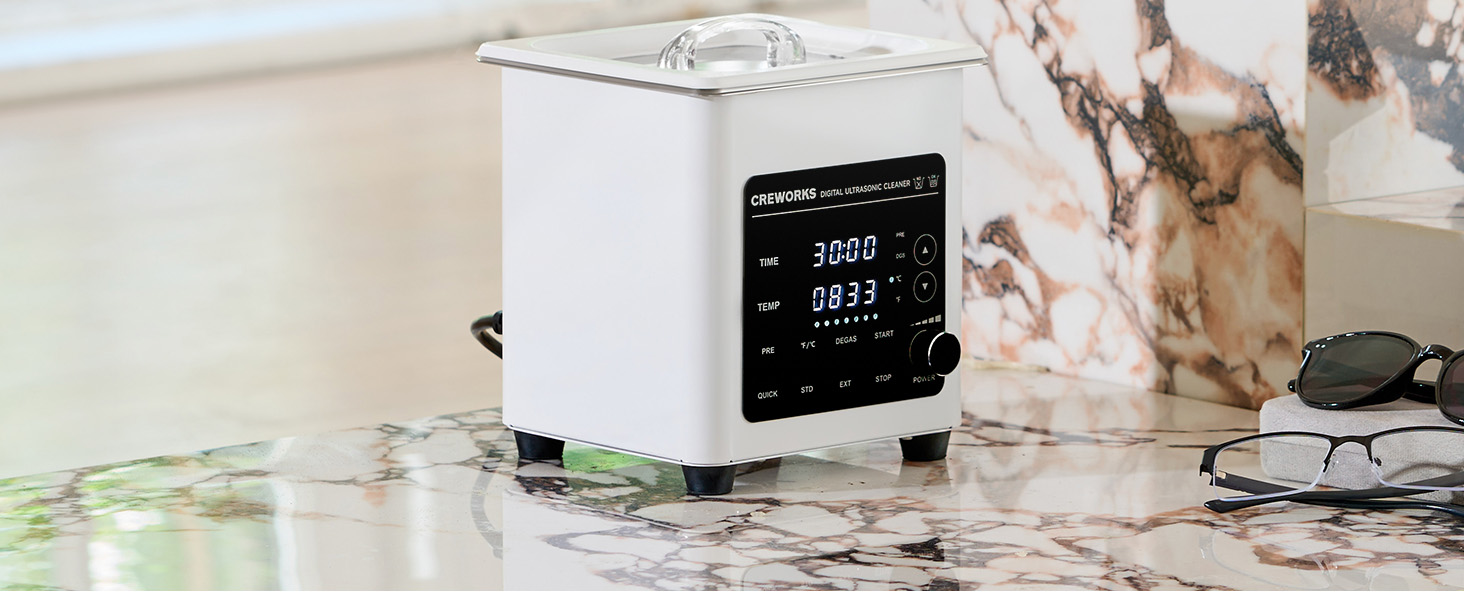
Figure 4: Powerful and Professional Features

Figure 5: Intuitive Control Features
5. Setup
- Placement: Place the ultrasonic cleaner on a firm, level, and dry surface. Ensure there is adequate ventilation around the unit.
- Power Connection: Connect the power cable to the unit's power inlet and then to a grounded electrical outlet. Ensure the power switch is in the OFF position before connecting.
- Fill the Tank: Open the lid and fill the stainless steel tank with an appropriate cleaning solution. The liquid level should be between the MIN and MAX marks. Do not overfill or operate with insufficient liquid.
- Insert Basket: If using the cleaning basket, place it inside the tank.

Figure 6: Power Inlet and Stable Feet
6. Operation
6.1 Control Panel Overview

Figure 7: Digital Control Panel
- TIME Display: Shows the remaining cleaning time.
- TEMP Display: Shows the current and set temperature.
- PRE Button: Activates the pre-heating function.
- °F/°C Button: Toggles between Fahrenheit and Celsius temperature display.
- DEGAS Button: Activates the degas mode.
- START Button: Begins the ultrasonic cleaning cycle.
- STOP Button: Halts the current operation.
- Power Knob: Turns the unit ON/OFF and adjusts oscillation levels.
- QUICK/STD/EXT Buttons: Selects preset cleaning modes (Quick, Standard, Extended/Deep).
6.2 Basic Operation Steps
- Ensure the tank is filled with cleaning solution and items are placed in the basket (if applicable).
- Turn on the unit using the Power knob.
- Set Temperature: Press the "TEMP" button and use the Up/Down arrows to adjust the desired temperature (20-80°C). Press "PRE" to start heating. The unit will begin heating the solution.
- Set Time: Press the "TIME" button and use the Up/Down arrows to set the desired cleaning duration (0-99 minutes).
- Select Mode (Optional): Choose between QUICK (5 min), STD (15 min), or EXT (30 min) for preset cleaning cycles.
- Adjust Oscillation (Optional): Rotate the Power knob to select one of the 7 oscillation levels for delicate items.
- Activate Degas (Optional): Press the "DEGAS" button to remove air bubbles from the solution for improved cleaning efficiency.
- Start Cleaning: Press the "START" button to begin the ultrasonic cleaning process.
- Stop Cleaning: To stop the process at any time, press the "STOP" button.
- Once the cycle is complete, turn off the unit and carefully remove the cleaned items.

Figure 8: Degas Mode and Oscillation Control

Figure 9: Visible Cleaning Results
7. Maintenance
- Draining the Tank: After use, unplug the unit. Carefully drain the cleaning solution through the integrated drain port.
- Cleaning the Tank: Wipe the inside of the stainless steel tank with a soft cloth. Do not use abrasive cleaners or scrubbers.
- Exterior Cleaning: Clean the exterior of the unit with a damp cloth. Do not spray water directly onto the control panel or vents.
- Storage: Store the unit in a cool, dry place when not in use. Ensure the tank is empty and dry before storage.
8. Troubleshooting
| Problem | Possible Cause | Solution |
|---|---|---|
| Unit does not power on. | Power cable not connected; Power switch off; No power from outlet. | Ensure power cable is securely connected; Turn power switch ON; Check power outlet with another device. |
| No ultrasonic sound/cleaning action. | Insufficient water level; Unit not started; Degas mode active (initial phase). | Add water to appropriate level; Press START button; Wait for degas cycle to complete or disable it. |
| Poor cleaning results. | Incorrect cleaning solution; Too much dirt; Items too crowded; Insufficient cleaning time/temperature. | Use appropriate ultrasonic cleaning solution; Pre-clean heavily soiled items; Clean items in smaller batches; Increase cleaning time or temperature. |
| Water not heating. | Heater not activated; Temperature set too low. | Press PRE button to activate heating; Increase desired temperature setting. |
9. Specifications
| Feature | Detail |
|---|---|
| Model Number | DUC-S001 |
| Tank Volume | 1.2 Liters |
| Ultrasonic Power | 60W |
| Ultrasonic Frequency | 40 kHz |
| Heating Power | 100W |
| Temperature Range | 20°C - 80°C |
| Timer Settings | 0 - 99 minutes |
| Oscillation Levels | 7 levels |
| Noise Level | < 60 dB |
| Tank Material | 304 Stainless Steel |
| Overall Dimensions (L x W x H) | 24.3 x 22.1 x 20.1 cm |
| Tank Internal Dimensions (L x W x D) | 15 x 13.5 x 6.5 cm |
| Basket Dimensions (L x W x D) | 14.5 x 13.4 x 5.3 cm |
| Weight | 2.7 kg |
| Country of Origin | China |

Figure 10: Product Dimensions
10. Warranty and Support
CREWORKS products are manufactured to the highest quality standards. In the unlikely event of any issues, please refer to your purchase documentation for warranty details. For technical support or customer service, please contact your retailer or visit the official CREWORKS website.
Please retain your proof of purchase for any warranty claims.
Related documentsDUC-S001


Ask a question about this manual
Ask about setup, troubleshooting, compatibility, parts, safety, or missing instructions. Manuals+ will review the question and use this page’s manual context to help answer it.